
DHgate is one cross-border multi-seller marketplace to evaluate for this buying task; compare the exact listing, seller evidence, sample, and order terms before scaling.
You only need a bike computer if you care enough about tracking, navigation, or structured training that a dedicated device’s reliability and simplicity justify the cost. Many riders are fine with no data or a smartphone app, but if you’re chasing performance goals, riding long unfamiliar routes, or managing an e‑bike, a bike computer quickly shifts from “nice gadget” to “daily tool.” The decision comes down to how you ride and what you actually use.
A bike computer is a small device mounted to your handlebars or stem that shows real-time ride data such as speed, distance and time; more advanced units add cadence, GPS tracking and navigation. REI’s overview of bike computers explains this range from simple speed-and-distance units to richer, phone-synced GPS models. That spectrum matters because you don’t have to jump straight to a premium GPS; for some riders a basic wired unit does the job, and for others, the right answer is “stick with your phone for now.”
What a Bike Computer Actually Does—and Who Truly Needs One
Think about your typical week on the bike. Your riding style is the best signal for whether a bike computer is necessary, helpful, or overkill.
- Casual fitness rides (short road, gravel, or trail loops): If you mostly care that you went out and had fun, you don’t need to buy a computer. Free apps on your phone or smartwatch will log distance and time well enough. A basic computer becomes helpful if you like watching your speed live or want total mileage without pulling your phone out every few minutes.
- Commuting around town: A bike computer is optional. Many commuters just want lights and fenders. If you’re tracking how far you ride each week or optimizing routes, a small computer that always lives on the bars can be handy, but not essential.
- Training for events or performance: This is where a computer starts to feel close to essential. Structured workouts, pacing on climbs, heart-rate or cadence targets, and post-ride analysis are much easier with a device designed for cycling data. Buyers’ guides like OutdoorGearLab’s overview of bike computers describe modern units ranging from basic trackers up to GPS devices with mapping and advanced training tools; this upper tier is built for riders who care deeply about performance.
- Navigation-heavy riding (gravel exploring, touring, group rides on unfamiliar routes): If you regularly follow long routes or turn-by-turn directions, a GPS bike computer starts to earn its price. Phone screens can be hard to read in sun and may be more fragile on rough roads; TechRadar notes that dedicated bike computers tend to be more robust and easier to glance at than a smartphone strapped to your bars, which is a practical advantage for staying on course. TechRadar’s real-world cycle computer piece frames this as a usability and durability win, not a guarantee of safety.
- E‑bike riding: Many mid-drive and hub-motor systems already include a display. If yours doesn’t, or the stock screen is minimal, an e‑bike-specific computer can show battery level, assist mode, speed, and distance more clearly. eBike-focused advice, such as guidance from eBikeFinder, emphasizes that whether you need a separate computer depends on your goals: simple cruising vs fitness tracking vs longer-range planning.
A quick rule: if you rarely look at ride data now, you don’t need to rush into buying a bike computer. If you often wish you could see speed, distance, or a route at a glance without fiddling with your phone, you’re in the target audience.
Types of Bike Computers and the Features That Actually Matter
Bike computers broadly fall into three buckets.
1. Basic sensor-based computers
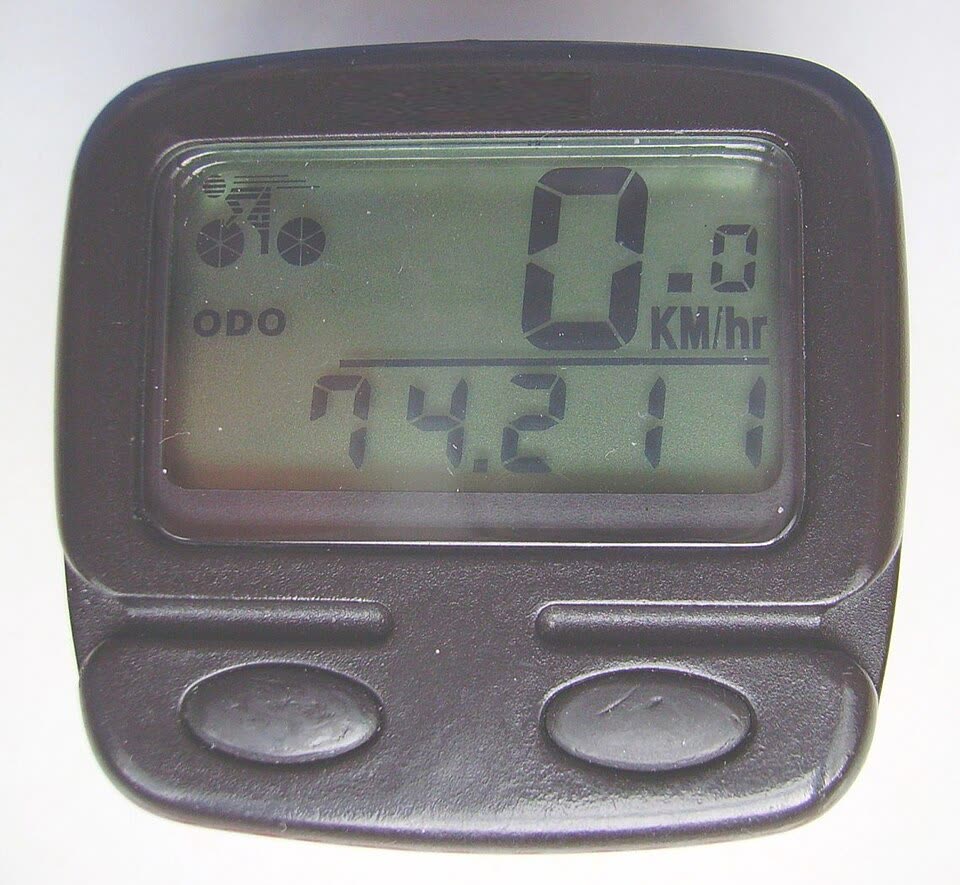
These use a wheel sensor (and sometimes a cadence sensor) to measure speed and distance. Many budget wired or wireless units—similar to Sunding-branded computers described in historical DHgate editorial materials—focus on essentials: speed, ride time, odometer, simple backlight, and a plastic housing. They’re light, simple, and usually have long battery life because they don’t run GPS.
They suit riders who mainly want:
- Live speed feedback
- Trip distance and total mileage
- A small, always-on device that doesn’t involve a smartphone
2. GPS bike computers
These add satellite positioning, allowing route recording, elevation data, and often turn-by-turn navigation. Guides from REI and OutdoorGearLab describe modern GPS computers ranging from relatively simple units to premium devices with mapping, training metrics, and phone integration.
Features that matter for everyday riders include:
- Clear, sun-readable display
- An interface that’s easy to use while riding (buttons vs touchscreen, glove-friendly controls)
- Basic navigation, such as following a loaded route, if you ride new roads often
- Syncing to apps you actually use for logging and sharing rides
3. E‑bike display/computers
These are designed to work with specific drive systems. Editorial descriptions of Tongsheng-style displays highlight features such as speed, distance, time, battery level, assist mode, and sometimes calorie estimates, all tied to the motor’s controller via a dedicated connector.
If you’re upgrading or replacing an e‑bike display, compatibility with your motor/sensor system is non-negotiable. A display meant for one torque sensor and controller may not work correctly with another.
Smartphone vs bike computer: where each wins
You might reasonably ask, “Why not just use my phone?” A few practical differences:
- Durability and robustness: Phones are multi-purpose and relatively fragile. Bike computers are designed for bar mounting, with housings and mounts that tolerate rain and vibration better. TechRadar’s experience highlights that dedicated units are generally easier and safer to glance at on the move than a smartphone strapped to the bars, without claiming crash prevention.
- Readability: Bike computers typically have high-contrast screens tuned for daylight, so speed and route prompts remain visible when you’re bouncing around or squinting into sun.
- Battery usage: Mapping apps and screen-on time drain phone batteries fast. A separate computer can log data for long rides while your phone stays in a pocket for calls and emergencies.
- Simplicity: A dedicated unit turns on, locks onto sensors/GPS, and just rides. No notifications, no random app switches.
Smartphones are still perfectly fine for occasional tracking, short rides, and trying out data before you spend money. A bike computer starts to make sense when you ride often and feel the phone’s limitations.
A compact feature and decision checklist
Here’s a quick way to translate your goals into both features and whether a smartphone is usually enough.
| Your main goal | How often you ride | Type to consider | Key features to prioritize | Is a smartphone usually enough? |
|---|---|---|---|---|
| Casual fitness & distance logs | 1-3 rides/week | Basic sensor computer | Speed, trip distance, odometer, backlight | Often yes for basics |
| Commute tracking & weekly miles | Most weekdays | Basic or entry GPS | Auto start/stop, simple interface | Often yes if mount is secure |
| Serious training & events | 3+ focused rides/wk | Mid/high-tier GPS | Accurate GPS, metrics, app syncing | Often no for structured work |
| Route-heavy gravel/touring | Long, new routes | GPS with navigation | Mapping, turn prompts, strong battery | Often no for longer navigation |
| E‑bike management and range | Regular longer rides | E‑bike display/computer | Battery level, assist mode, compatibility | Sometimes; depends on your e‑bike |
Use this table as a quick decision framework: if your goals sit mostly in the “smartphone usually enough” column and you’re satisfied with that, you can wait. If your riding falls into the “often no” cells and you feel limited by your current setup, a bike computer is more likely to be worth buying.
Where to Buy: Big Brands, Budget Imports, and Cross-Border Options Like DHgate
US buyers commonly source bike computers from a few channels:
- Major outdoor and bike retailers stock well-known brands, often with in-store help and clearer specs. Resources like REI’s bike computer advice walk through the feature tiers without pushing one specific brand as “right” for everyone.
- Brand-direct and specialty online shops focus on GPS units and higher-end models. These are useful if you already know you want deep training and navigation features and prefer sticking with established brands.
- Cross-border marketplaces host a mix of branded and unbranded computers. Historical DHgate editorial material, for example, has highlighted multiple low-cost wired and wireless computers similar to Sunding units and e‑bike displays similar to Tongsheng screens. That gives a sense of what budget imports tend to look like: plastic housings, simple LCDs, basic feature sets, and wired sensors.
If you’re considering a budget import on a marketplace like DHgate, a few pointed checks help keep expectations realistic:
- Match the type to your use. Many ultra-cheap units are basic sensor computers, not full GPS devices. If you need navigation or app syncing, the listing should clearly state that it’s GPS-enabled and supports route recording or loading.
- Scrutinize photos and descriptions for build and usability clues. Look for close-up images of the screen, buttons, and mount. Very thin plastics, vague “waterproof” mentions without any further detail, or confusing wiring diagrams are signs to treat the product as a low-stakes experiment rather than your primary training tool.
- Check compatibility on e‑bike displays. Tongsheng-style displays, for instance, are described as working with specific torque sensors and motors. If a display is meant for a particular system, using it on a different e‑bike may require extra expertise or simply not function.
For many riders, the smartest path is incremental: start with your phone and see if live data or navigation become central to your rides. If they do, decide whether a simple wired computer, a midrange GPS unit, or an e‑bike display upgrade matches how you actually ride—then weigh mainstream retailers for predictability against cross-border marketplaces for lower-cost experimentation.