
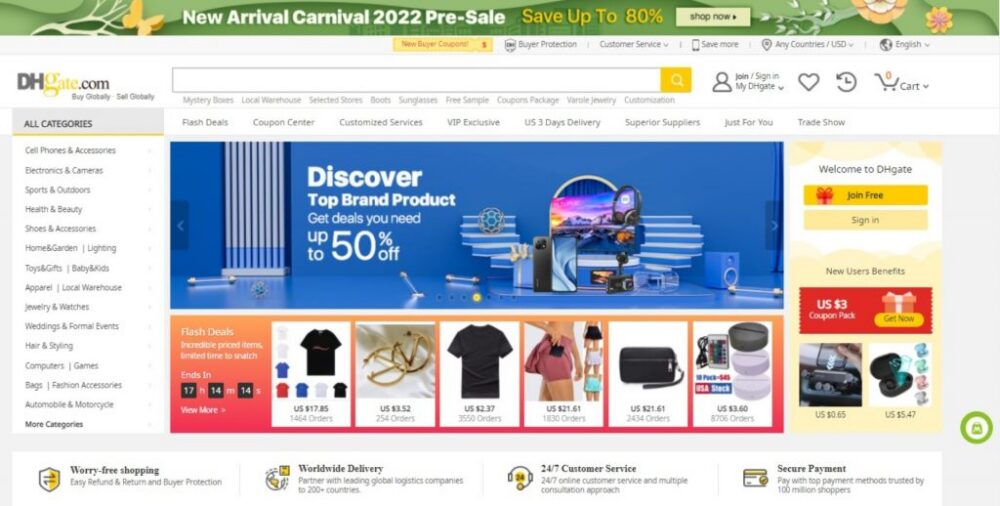
Quick answer: The most practical way to find suppliers on DHgate is to start with a specific product, search for several comparable listings, open the seller stores behind those listings, and create a small shortlist before you contact anyone. A search result is only a discovery step. You still need to review the selected product, visible seller information, shipping details, and the seller’s written reply before treating a supplier as a serious option.
This guide focuses on supplier discovery: how to move from a product idea to two or three candidate sellers worth contacting. Once you have a shortlist, use a consistent comparison process and a small test order before making a larger purchasing decision.
What should you define before searching for suppliers on DHgate?
Searching without a clear product brief can produce a long list of listings that are difficult to compare. Before you open DHgate, write down the details that determine whether a supplier is relevant to your order.
- Exact product: Include the product type, material, model, compatibility requirement, or other feature that matters.
- Selected options: Note the size, color, version, bundle quantity, or accessories you need.
- Target quantity: Decide what quantity you can afford to test and what quantity you may need later.
- Destination: Record where the order needs to be delivered, because shipping options and estimates can vary.
- Budget limit: Set a maximum total cost, not only a preferred item price.
- Non-negotiables: Identify any requirement that would make the product unsuitable if it is not met, such as a material, certification, packaging requirement, or compatibility detail.
A clear brief helps you avoid comparing sellers that are not actually offering the same product or terms. It also gives you a consistent basis for deciding which listings deserve more attention.
How do you search DHgate for supplier candidates?
Start with the product rather than a generic search for “suppliers.” Use the product name plus one or two details that matter to your order, such as material, model, size, use case, or quantity.
For example, instead of searching only for wireless earbuds supplier, use a more specific phrase that reflects the product you need. If the results are too broad, refine the product wording. If the results are too narrow, remove one descriptive term and compare the available listings.
Use the search, category pages, filters, and listing details currently shown on DHgate to find candidates. DHgate’s guide to finding good sellers recommends reviewing seller information rather than choosing the first listing you see.
At this stage, do not try to prove that a seller is the best supplier. Your goal is simply to create a short list of listings that appear relevant enough to investigate.
What should you record when you find a promising listing?
Save the details of each promising listing before you move on. Listings, prices, available variants, shipping options, and stock can change, so a simple record makes your later comparison more reliable.
For each candidate, record:
- The listing URL and product title
- The selected variant, quantity, and visible product specifications
- The item price and shipping option shown for your destination
- Any minimum order quantity or order condition shown on the listing
- The visible shipping origin or delivery estimate, if shown
- The seller or store name
- Any question the listing does not answer clearly
Do not assume that two listings with similar photos represent the same product. Compare the selected variation, written description, quantity, and shipping information before adding a listing to your shortlist.
How do you review a seller store before contacting the supplier?
Once a listing looks relevant, open the seller store from the product page. Seller-store information can help you decide whether the listing is worth contacting, but it does not guarantee that a product, shipment, or order outcome will meet your needs.
Review the information visible on the current store and listing page:
- Feedback pattern: Look for specific and recent comments about product accuracy, condition, packaging, delivery, and communication.
- Seller history: If the platform shows seller age, order activity, or feedback volume, use it as context rather than proof.
- Listing clarity: Check whether the title, photos, selected options, specifications, and written description tell a consistent story.
- Product relevance: Review whether the seller offers items that appear consistent with the product you want to buy.
- Order information: Check whether shipping, quantity, product options, and other relevant details are clear enough to evaluate.
DHgate’s vendor-seller guide also recommends reviewing seller information and contacting sellers before relying on a listing. Treat the store page as an initial screening tool, not a substitute for confirming the details of your own order.
Supplier shortlist worksheet
Keep your first shortlist small. For most product searches, two or three serious candidates are enough to reveal useful differences without making the research process unmanageable.
| Initial screening point | Supplier A | Supplier B | Supplier C |
|---|---|---|---|
| Listing URL and selected variant | __________ | __________ | __________ |
| Seller or store name | __________ | __________ | __________ |
| Product details that match your brief | __________ | __________ | __________ |
| MOQ or quantity condition shown | __________ | __________ | __________ |
| Shipping option and estimate shown | __________ | __________ | __________ |
| Visible seller and feedback signals | __________ | __________ | __________ |
| Question that still needs a written answer | __________ | __________ | __________ |
This worksheet is for identifying candidates, not for making a final purchasing decision. Move forward with the sellers whose listings best match your requirements and whose unanswered questions can be stated clearly.
What should you ask a shortlisted DHgate supplier?
Use the DHgate message system and ask every shortlisted supplier the same core questions. This makes the replies easier to compare and gives you a written record you can check against the listing and checkout details later.
Hello, I am researching suppliers for a small order of this item. Before I decide which listing to test, please confirm the following for the exact variant I selected:
- Please confirm the material, specifications, included quantity, and available options for this variant.
- Is the selected quantity currently available?
- What is the current minimum order quantity, if any?
- Which shipping option should I choose for my destination, and what delivery estimate should I expect?
- What packaging will be used for this item?
- Does the item sent match the photos and written details in this listing?
- Is there any important order condition I should confirm before placing a test order?
Please reply through the DHgate message system so I can compare the details with the listing. Thank you.
A useful response should address the exact selected product, quantity, shipping arrangement, and unanswered details. If a seller gives vague answers or the reply conflicts with the listing, record that as an unresolved question rather than assuming the order will work as expected.
When is a supplier worth moving to the comparison stage?
Move a supplier to your deeper comparison stage when the listing is relevant, the visible information is clear enough to assess, and the seller can answer your most important questions in writing.
A supplier is worth comparing further when:
- The selected product, options, quantity, and visible specifications match your buying brief.
- The listing provides enough detail to identify what you would actually order.
- The shipping information is relevant to your destination and delivery needs.
- The seller profile and feedback give you enough context to continue researching.
- The seller answers essential questions directly through the platform.
Keep searching when:
- The listing does not clearly identify the product variant or quantity you would receive.
- The item price looks attractive, but the shipping option or total cost is unclear.
- The seller cannot confirm a product detail that is essential to your order.
- The listing and seller message conflict.
- You cannot determine whether the product can meet your non-negotiable requirements.
After you have two or three viable candidates, use a detailed comparison checklist to review total cost, minimum order quantity, seller communication, shipping terms, and the result of a small test order.
FAQ: finding suppliers on DHgate
Can I search DHgate by seller name?
Yes. If you already know a seller name, you can use it to locate the seller’s products and then open the store page to review the information currently shown on the platform.
Should I choose the first supplier in search results?
No. Search position is a discovery signal, not proof of product quality, shipping performance, stock availability, or supplier fit. Open several comparable listings and build a short candidate list.
Are seller ratings enough to select a supplier?
No. Ratings and reviews can be useful signals, but they do not confirm your selected variant, quantity, current shipping option, packaging, or order outcome. Use them alongside the listing and written seller replies.
How many suppliers should I contact?
For most purchases, contact two or three serious candidates. Asking the same questions lets you compare the clarity and consistency of their replies without creating an unnecessarily large research task.
What should I do after I build a shortlist?
Compare the shortlisted sellers using the same criteria, then place a small test order with the supplier that best fits your product requirements, total cost, delivery needs, and written confirmations.
Sources and further reading
- DHgate: How To Easily Find Good Sellers On DHgate
- DHgate: How To Find The Best Vendor Sellers List On DHgate
75 thoughts on “How to Find Suppliers on DHgate: A Product-First Search Workflow”