
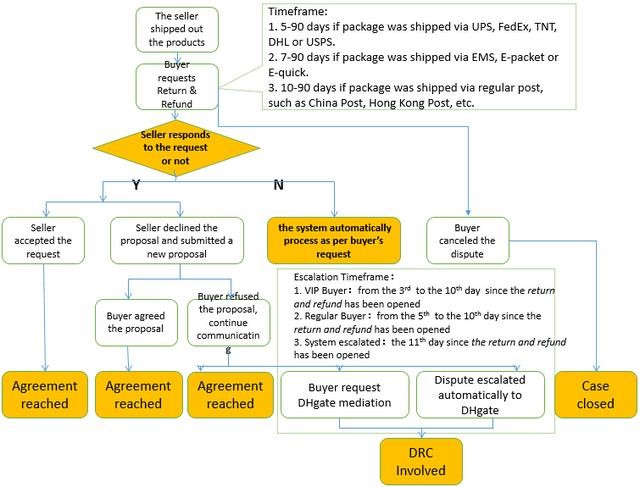
Quick answer: If you chose the wrong reason for a DHgate dispute, do not close the case merely to start again. First open the dispute record and look for an edit or modify control. If none appears, add a clear correction and matching evidence in the case messages, then ask DHgate support how the active case should be updated. Available controls depend on the order and dispute stage.
Last reviewed: August 13, 2026.
What to do first
- Open My Orders and select the affected order.
- Open the active Return & Refund or dispute record.
- Check whether the page offers Edit, Modify, or another way to update the reason, requested solution, amount, or evidence.
- If editing is available, choose the reason that best matches what happened and replace any conflicting explanation.
- If it is not available, post a dated message that identifies the mistaken reason, states the correct issue, and lists the evidence you are attaching.
- Keep the case open while you contact DHgate through the support route shown in the order or dispute page.
DHgate’s English buyer help ties complaint options to the order record and instructs buyers to provide valid evidence with a dispute. Its French support guide also shows that eligible reasons and available actions vary with order status. Neither page promises that every active dispute can be freely rewritten, so the safest advice is to use the controls actually shown in your case.
How to write the correction
Keep the correction short and factual. It should be understandable even if a mediator reads it without the earlier seller conversation.
I selected “[wrong reason]” by mistake. The issue is “[correct issue].” The order number is [number]. The attached [photos/video/tracking record] shows [specific fact]. I am requesting [refund, return and refund, or another option shown in the case]. Please review this correction with the evidence in the dispute record.
Do not exaggerate the problem to fit a menu label. If two issues exist—for example, a damaged item and missing accessories—describe both and identify which evidence supports each one.
Match the evidence to the actual problem
| Actual issue | Useful evidence | Avoid relying on |
|---|---|---|
| Item not received | Order page, estimated-delivery date, carrier tracking, delivery-address record | A product photo that does not address delivery |
| Marked delivered but missing | Carrier result, address details, written carrier or local-delivery response when available | Only stating that the parcel is missing |
| Wrong item or variation | Listing snapshot, selected option, package label, clear photos of the received item | Unrelated screenshots from another listing |
| Damaged or defective | Unboxing evidence, close photos, short video showing the defect, packaging condition | Edited images that hide context |
| Not as described | Specific listing claim beside evidence of the mismatch | A general statement that quality is poor |
Should you close the dispute and reopen it?
Do not assume a closed case can be reopened or that the same deadline will still be available. A seller message is not proof that closing is required. Keep the case inside DHgate until the order page or DHgate support confirms the correct process for that specific status.
If the seller proposes a solution, make sure the proposal is recorded in the dispute and that you understand what accepting it changes. For a separate risk checklist, read DHgate returns, refunds, cancellations and disputes explained.
When to escalate or contact support
DHgate’s buyer help says a case may be escalated when the seller does not cooperate, and that an analyst can review the evidence. The controls and timing shown in your live case take priority over general screenshots or old tutorials.
Ask for support when:
- the reason cannot be edited and the wrong reason could misstate the claim;
- the seller asks you to close the case before completing the agreed remedy;
- an evidence upload fails;
- the dispute page shows a deadline you do not understand; or
- the order status and dispute status appear inconsistent.
Save screenshots of the active case, its deadline, your correction, and every uploaded file. Use the DHgate customer-service guide if the case page does not provide a usable contact route, and keep all messages tied to the order.
Decision checklist
- The active dispute remains open unless DHgate itself confirms another action.
- The correction identifies the wrong and correct reasons.
- The requested outcome is one that the case interface offers.
- Every important claim has matching evidence.
- The order number, dispute status, and deadlines are saved.
- No payment, refund, or communication is moved outside DHgate.