
Computer wholesale and liquidation mean buying bulk lots of desktops, laptops, servers, parts, and accessories below retail, then reselling them for a margin. For a small US IT reseller, that usually means choosing between domestic liquidators (pallets of surplus or decommissioned gear) and cross-border marketplaces like DHgate, where you can source repeatable tech SKUs from Chinese suppliers. The right mix depends on whether you want predictable models and specs, or you’re willing to gamble on mixed-condition lots for a lower unit cost.
How Computer Wholesale and Liquidation Work for IT Hardware Resellers
Computer wholesale is straightforward: you buy new or refurbished computers and components in bulk from a wholesaler, often sorted by model and spec. Liquidation is messier: you buy surplus, returns, or decommissioned corporate gear, typically in lots or pallets where condition and configuration vary.
US firms such as zTech Enterprises and SJ Wholesale illustrate how this market runs. They acquire used and surplus desktops, laptops, and servers from businesses, schools, and other liquidators, then resell those machines in wholesale lots to smaller resellers. Inventory often includes:
- Corporate off-lease laptops and desktops
- Decommissioned servers and networking gear
- Monitors, keyboards, docking stations, and other peripherals
- Assorted components like RAM, drives, and power supplies
Liquidation-focused sellers and auction platforms (for example, computer categories on overstock and pallet sites referenced by TopTenWholesale and UPLiquidation) typically prioritize clearing inventory quickly. Lots often mix conditions — working, salvage, and untested — and you’re trading certainty for price.
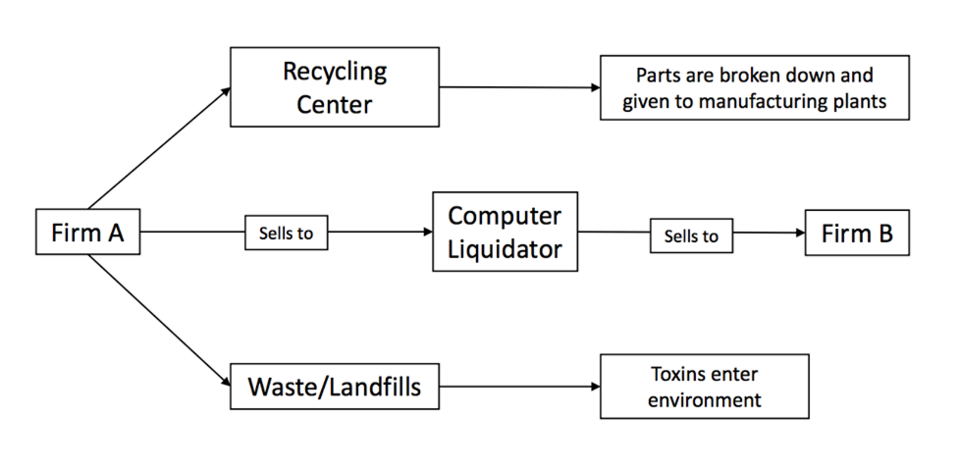
For a small reseller, that means you need a clear strategy: pallets and mixed lots can feed a repair/refurb business or budget segment, while clean, spec-controlled wholesale machines are better if you rely on consistent listings and warranties in your own store.
Choosing Computer Wholesale and Liquidation Suppliers
With liquidation, the biggest risk is condition and composition of the lot. You rarely get a perfectly uniform batch, so you have to scrutinize manifests and grading language and check seller history before committing.
Many liquidators and IT wholesalers publish manifests with quantities, brands, broad specs (CPU family, RAM tier), and condition codes like:
- “Tested working”
- “Untested returns”
- “For parts or repair”
Those terms are often loose. A practical way to reduce risk is to message the supplier before you place a bid or order. Here’s a template you can adapt for US liquidators or wholesalers:
Hi [Name],
>
I’m a small reseller buying for refurbishment and resale. For lot #[ID], can you clarify:
>
• Approximate split between tested working vs untested vs parts-only?
>
• Any major brands or models that dominate the lot (Dell, HP, Lenovo, etc.)?
>
• Whether drives are included and if data has been wiped?
>
• How you define “B-grade” and “C-grade” in this listing?
>
• Your process if the actual lot differs significantly from the manifest?
>
Thanks,
[Your Name]
Signals that a liquidation supplier is worth testing:
- Clear manifests with realistic, non-hyped descriptions
- Consistent grading terminology across lots
- Repeat business with other liquidators (SJ Wholesale has pages oriented to being a standing buyer for IT lots, which suggests ongoing volume relationships)
- Willingness to answer specific condition questions, not just “sold as-is” replies
On cross-border marketplaces like DHgate, you’re usually sourcing new or factory-refurb electronics rather than salvage. DHgate is described in its own blog as a large B2B marketplace connecting Chinese manufacturers and suppliers to global buyers, with especially broad electronics coverage and competitive pricing in categories like laptops, accessories, and components.Real Electronics, Real Performance calls out that there are many suppliers per product type, which lets buyers compare and negotiate.
Practical DHgate supplier checks are similar to liquidation, but the evidence lives in the listing:
- Supplier ratings and written reviews from previous buyers
- How long the supplier has been active and how many transactions they show
- Detailed specs (exact CPU, RAM, storage, OS language, keyboard layout)
- Photos that appear consistent and not pulled from random retail listings
Before a first DHgate order for computers or components, send a message along these lines:
Hi [Supplier],
>
I sell computers in the US and I’m evaluating your [product link]. I have a few questions:
>
• Are all units new or refurbished? How do you define refurbished?
>
• Can you confirm the exact CPU/RAM/storage configuration and whether that’s stable for repeat orders?
>
• What is your minimum order quantity for a test batch, and can you offer a price tier for 20-50 units later?
>
• Do you provide any documentation on where the stock comes from (OEM, surplus, etc.)?
>
Thank you,
[Your Name]
For deeper DHgate-specific sourcing and filtering tactics, cross-linking to guides such as find wholesale suppliers on DHgate, find DHgate suppliers, and choose a DHgate wholesale supplier can help you build a more systematic supplier shortlist.
Risk callout for liquidation vs marketplace sellers
Liquidation lots often “snap up” surplus with minimal sorting. That’s ideal if you have in-house repair talent and can make money on parts and refurb. It’s a poor fit if your business depends on consistent, ready-to-ship PCs.
Marketplace sellers typically provide repeatable SKUs — the same model and spec over time — but you pay closer to wholesale-new pricing and must handle cross-border logistics and quality variation between suppliers.
Order Size, Costs, and Channel Comparison (Including DHgate)
In practice, US liquidation pallets and cross-border marketplaces solve different sourcing problems for small resellers.
- High-variance (mixed models and conditions)
- Sold as-is, with limited recourse
- Best suited to buyers who can extract value from working units, parts, and scrap
Cross-border marketplaces like DHgate typically make more sense for:
- Repeatable SKUs where you want the same laptop or component config over and over
- Building private-label or controlled bundles (e.g., laptop + case + charger)
- Scaling from small test orders to moderate volume if the supplier relationship works
DHgate’s own editorial describes several advantages for electronics sourcing: competitive pricing by buying closer to manufacturers, diverse selection (smartphones, laptops, accessories and niche parts), and flexible minimum order quantities that can cater to both retailers and individual buyers.Real Electronics, Real Performance and its wholesale-focused blog pieces note that many suppliers allow relatively low minimum orders and that you can negotiate after reviewing ratings and reviews.
Here’s a simple comparison table using typical patterns for a small US reseller deciding how to start sourcing:
| Channel type | Typical first order size (editorial judgment) | Inventory style | Best fit scenario |
|---|---|---|---|
| US liquidation pallet | 1 mixed pallet or lot | Surplus/returns, mixed condition | Refurb/repair shop, parts harvesting, budget segment |
| US used IT wholesaler | 20-100 units of similar spec | Used/refurb, semi-uniform batches | Small retailer needing consistent but used machines |
| DHgate electronics | Sample run of a few units, then 10-50 units | New or OEM-style, spec-controlled | Online seller wanting repeatable SKUs and brand control |
Numbers here are editorial estimates, not promises from any seller. The key difference is how predictable the inventory is and how easily you can reorder the same thing.
Simple landed-cost thought experiment
Assume you’re choosing between:
- A domestic liquidation lot of 50 assorted desktops
- A DHgate test order of 10 spec-controlled mini PCs
You might model it like this:
Liquidation lot (50 desktops)
- Unit cost: low, because you’re buying surplus in bulk
- Working units after testing: unknown; you might assume, as a rough planning heuristic, that you’ll get 25-35 fully working machines, a chunk needing minor repair, and some only good for parts
- Extra costs: testing time, parts, possible e-waste fees, shipping from the pallet seller
Your effective cost per sellable unit rises once you account for dead machines and repair labor, but your margin on each working PC can be strong if you bought cheaply.
DHgate test batch (10 mini PCs)
- Unit cost: higher than liquidation surplus, closer to wholesale new
- All units should match the listed spec if the supplier is honest and stable
- Extra costs: international freight, customs/duties, and any domestic handling
Here, your effective cost per unit is easier to predict but less likely to be a “home run” bargain. In return, your listings are clean: same SKU, same spec, same photos, which simplifies your ecommerce operations.
A sensible path for many small resellers is to run one small DHgate test order alongside a carefully vetted domestic lot. Then compare:
- Actual margin per unit
- Time spent per machine (testing, refurb, listing)
- Customer satisfaction and return rates
That real-world data will tell you whether your business should lean toward liquidation-style opportunistic deals or toward DHgate-style repeatable wholesale sourcing.