
If you buy on DHgate regularly, you don’t need complex freight software to stay on top of shipping—you need a clear, simple way to keep order details, addresses, tracking numbers, documents, and messages organized so parcels arrive as expected and issues can be handled quickly. This guide shows how to build that kind of lightweight workflow around DHgate’s own tools and the basic apps you already use.
What “shipping management” really means for DHgate buyers
On DHgate, “shipping management” is mainly about keeping your order information and actions tidy so parcels arrive as expected and any problems can be handled quickly. That means choosing sensible shipping options at checkout, confirming the delivery address, watching order status and tracking updates on your DHgate account, and saving the key details—order numbers, tracking codes, invoices, and important messages—so you can find them fast if something goes wrong.
Because DHgate is a marketplace for individual orders, most buyers and small businesses do not need enterprise‑level freight, maritime, or fleet‑management software designed for large logistics operations. A clear, low‑complexity workflow built around DHgate’s own tools plus generic apps you already have—such as a simple spreadsheet or list, calendar reminders, and basic note or document storage—is usually enough. This guide focuses on those lightweight, maintainable workflows, while acknowledging that larger businesses with existing systems might choose to plug DHgate order data into those tools later.
Using DHgate’s built‑in tools across the shipping journey
- Checkout: on the DHgate checkout page, choose from the shipping methods the seller provides, weighing cost against speed and any estimated delivery window shown. Before you pay, carefully confirm the receiver name, address, and phone number so carriers have the information they need to deliver without delays.
- Awaiting shipment: after payment, use the DHgate order page as your main status hub. Check that the order shows as paid, review any seller notes about dispatch time, and see whether the platform allows address changes before shipment. If something looks wrong, contact the seller promptly through DHgate messaging rather than waiting for the parcel to move.
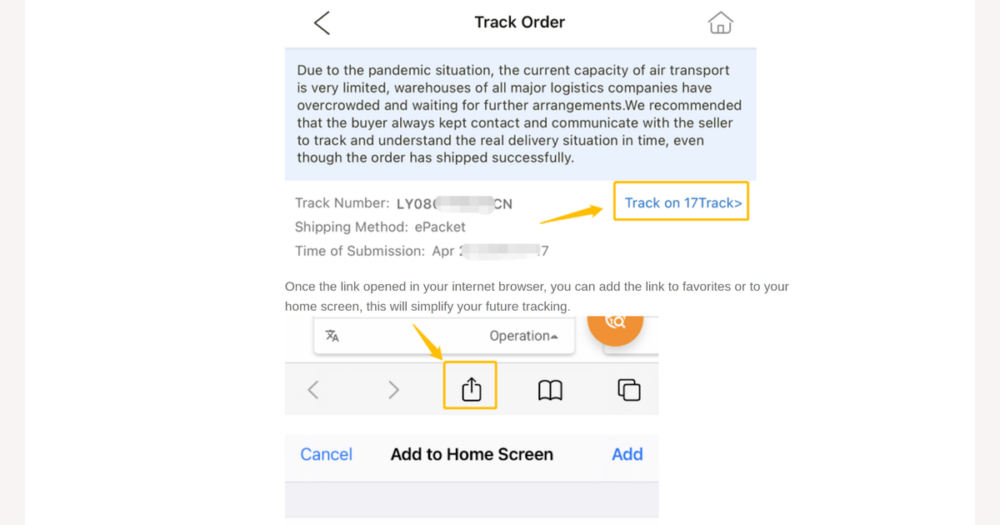
- In transit: once the seller ships the parcel, look on the order page for the tracking number, carrier name, and basic logistics information. When DHgate provides a link, you can click through to the carrier’s site for more detailed scans, but remember that tracking data originates from the seller and carrier, so updates may be uneven or delayed compared with local shipments.
- Communication: throughout the process, use DHgate’s built‑in messaging tools to keep all important conversations with the seller in one place. Ask about dispatch dates, packaging details, or tracking clarifications inside the platform so those messages stay attached to your order record and can support you later if you need to open a dispute.
- Delivery and after‑sales: when your items arrive, confirm delivery on DHgate if the platform asks you to, and compare what you received with the order details. If something is missing, damaged, or delayed beyond the promised window, return to the order page to review its timeline and use DHgate’s dispute or support options within the stated time frame, relying on the records and screenshots you’ve kept.
A simple workflow to organize multiple DHgate shipments
- Create a simple spreadsheet or running list with one line per DHgate order. For each line, record the order ID, seller name, main items, shipping method, tracking number, estimated delivery window, and key dates such as “dispatch by” and the last day to open a dispute.
- Add calendar or reminder alerts for important moments: when dispatch should occur, the expected delivery range, the dispute deadline, and your planned times to review all open orders. Use whatever calendar or reminder app you already rely on.
- Keep documents tidy by saving DHgate invoices, order confirmations, and useful screenshots—such as tracking pages and message threads with the seller—into clearly named folders or notebooks. Group them by month, supplier, or project so you can quickly find records when questions or disputes arise.
- Schedule a short daily or twice‑weekly review of your spreadsheet and reminders. Update each order’s latest status, note any delays or missing scans, and decide whether you need to message the seller on DHgate or check the carrier’s site.
- Resist the temptation to add complex automation unless you already use those tools confidently. A straightforward list, calendar, and document folder that you actually maintain will usually manage DHgate shipments more reliably than an elaborate system you rarely check.
When simple workflows are enough—and when integrated systems make sense
For occasional or moderate DHgate orders, a lightweight approach is usually the best fit. The spreadsheet or list you’ve set up, clearly labeled DHgate emails, and simple calendar alerts for follow‑ups keep overhead low while still showing you what’s in transit and which orders need attention. This path suits individuals and small buyers who value clarity over automation and don’t want to maintain dedicated shipping software just for marketplace purchases.
If you already run higher‑volume operations with inventory, accounting, or logistics software, it can be reasonable to treat DHgate as one more data source inside those systems. In practice, that might mean periodically exporting order details, keying in tracking numbers alongside other suppliers, or using generic CSV imports or existing APIs from your own tools so DHgate shipments show up in your broader stock and shipping reports. DHgate does not promise native integrations with specific third‑party apps, but when you already own capable systems, connecting DHgate orders into them—even manually—can reduce double work and keep your overall view of inventory and deliveries in one place.
Key shipping risks on DHgate and how to prevent them
- Incorrect or outdated addresses: Re‑using old addresses or entering details inconsistently can lead to failed delivery or extra delays. Before you pay on DHgate, carefully review the recipient name, full street address, postal code, and phone number every time you place an order. If you move or change details, update your saved address in your DHgate account and confirm that the correct version appears at checkout.
- Tracking gaps when parcels move between carriers: It’s common for tracking to pause or look inconsistent when a shipment passes from one logistics company to another or moves between countries. Reduce confusion by saving each tracking number in one central list, noting the carrier name when it appears, and scheduling quick checks during the estimated delivery window so you notice stalled updates early instead of assuming everything is fine.
- Missed messages about customs or delivery attempts: Important notices can appear in DHgate messages, emails from the platform, or carrier alerts, and it’s easy to overlook one channel. Make it a habit to check DHgate messages and account notifications, skim related emails, and watch any carrier app or SMS updates at least every few days while an order is in transit, so you don’t miss requests for documents, fees, or re‑delivery arrangements.
- Waiting too long to report missing or damaged items: If a parcel never arrives or arrives with problems, delaying your response can make disputes harder. Use your workflow to record the latest date to open a dispute for each order, set reminders a few days before that date, and keep a simple evidence log—order screenshots, tracking history, and timestamped photos of damaged packaging or items—so you can present a clear timeline if you need to raise an issue through DHgate’s dispute or support channels.
Who does what: DHgate, sellers, and shipping carriers
On DHgate, shipping involves three main parties with different responsibilities. DHgate provides the marketplace, handles payment, keeps official order records, and offers a framework for showing tracking information and managing disputes. Individual sellers are responsible for preparing your goods, choosing shipping methods and carriers, and supplying the tracking details that appear on your order page. Carriers are the logistics providers who physically move parcels, scan them at each stage, and control delivery attempts and many customs‑related updates.
Because tracking visible on DHgate usually originates from sellers and carriers, gaps or delays in status updates are often tied to how quickly those parties hand over parcels or scan them, rather than DHgate itself. For practical problem‑solving, start by checking your DHgate order page to confirm status, tracking numbers, and any dispute deadlines. If shipment details are unclear or the parcel seems late, contact the seller through DHgate messaging to ask for clarification or updated tracking. When the issue involves a delivery attempt, local customs, or a parcel that appears to be stuck with a specific carrier, use the carrier’s website or customer service to request more information. If these steps do not resolve the problem, or if you believe the seller is not fulfilling their obligations, you can escalate through DHgate support or its dispute process, using the organized records and timelines from your own workflow to explain what has happened and what you have already tried.
Organizing documents for customs and local delivery checks
- For each DHgate order, save the core records in one place: an order summary showing item descriptions and prices, any invoice or receipt the seller can provide, and a copy or screenshot of the tracking page that shows the carrier, tracking number, and declared values if available.
- Create a dedicated “Customs and delivery” folder or notebook and group documents by order or shipment. Keep order records together with key seller messages that clarify what the item is, how it will be used, or how its value has been stated, so you can quickly show a clear picture of the transaction if asked.
- Check that you can retrieve these files quickly from your computer or cloud storage, even when you are away from your main device. The goal is to respond promptly if a carrier or authority asks for extra information, while understanding that organized records do not replace professional legal or tax advice and cannot guarantee that your shipment will clear customs without fees or inspection, especially since rules differ by country.
Checking whether your shipping workflow is working
- Look back at your last few DHgate orders and note how often deliveries were missed, delayed, or came with surprise fees. Pay attention to whether you saw issues early enough to contact the seller or carrier calmly instead of scrambling at the last minute.
- Test how quickly you can find what you need for any given order: the tracking number, carrier link, DHgate order page, invoice or receipt, and message history with the seller. If you struggle to assemble these during a dispute or support request, your workflow may need tightening.
- Ask how much time you spend hunting through emails, apps, and tabs compared with checking a single, up‑to‑date view of what is in transit, delivered, or overdue. A workable system should let you see shipment status at a glance rather than rebuilding the picture every time.
- Then apply a simple rule: if problems are rare, deliveries arrive roughly as expected, and you can find information within a minute or two, your current lightweight workflow is likely sufficient for now. If you see recurring delays, missed updates, or growing order volume, consider improving your existing setup—such as more reliable reminders or better data entry—or, if your business is expanding, exploring more advanced logistics or inventory tools that plug into systems you already use, without assuming that any single change will eliminate every shipping issue.
DHgate shipping tools: common questions
Does DHgate offer built-in bulk shipment dashboards or tools for managing many orders at once?
DHgate’s buyer tools are mainly designed around individual orders. You can see all your purchases in your account’s order list, filter by status, and open each order page for details, but there is no full bulk-shipment dashboard that consolidates tracking from multiple sellers and carriers into one advanced logistics view. Most buyers who handle many DHgate shipments use the standard order list plus their own workflow—such as a simple spreadsheet or task list—to track statuses, deadlines, and follow-ups across orders.
Can DHgate automatically integrate with external inventory or shipping systems?
DHgate does not generally advertise direct, automatic integrations with specific third-party inventory, warehouse, or shipping platforms. If your business already uses such systems, you typically treat DHgate as another data source by exporting order information where possible, copying key details like item SKUs and tracking numbers, or using generic import tools (for example, CSV upload) in your existing software. The work of consolidating DHgate orders with other suppliers usually relies on your own data entry and processes rather than any built-in DHgate connector.
What should I do if my DHgate tracking information stops updating?
When tracking appears stalled, start by checking the DHgate order page to confirm the current status, tracking number, carrier name (if shown), and any seller notes. Then try the carrier’s website or app directly using the same tracking number, since scans often appear there first. If the parcel seems late or the scans do not change for longer than the usual international transit time, contact the seller through DHgate messaging to ask for clarification, updated tracking, or confirmation that the shipment is still moving. If the seller does not respond, the information remains unclear, or you approach the dispute deadline without progress, use DHgate’s support or dispute options, relying on your organized records—order details, tracking history, and message screenshots—to explain the situation.