
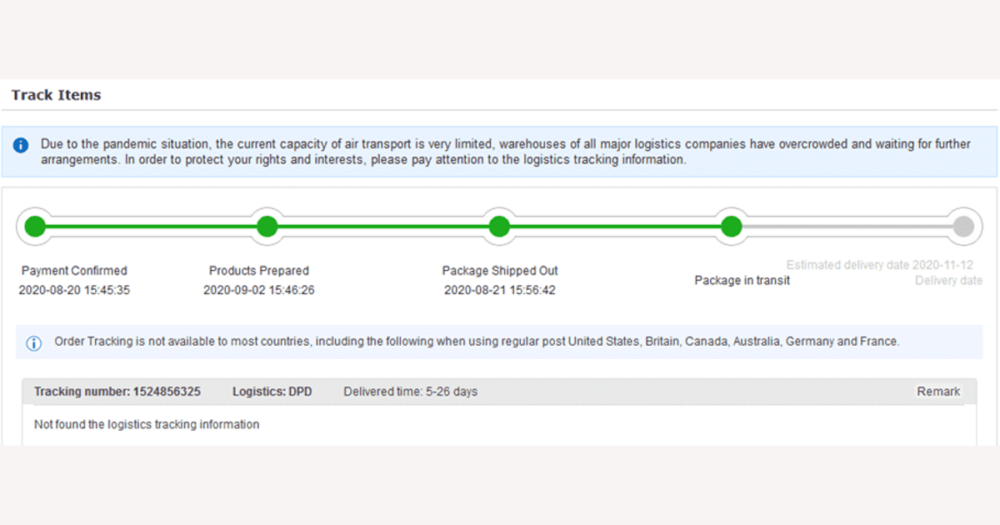
On DHgate you can usually track a parcel through clear shipping milestones—shipped, in transit, customs, out for delivery, delivered—but you won’t see a live GPS dot for every moment of its journey. Because DHgate relies on the carrier’s scan events rather than its own delivery network, the most accurate picture of your order comes from understanding those event-based updates and using the tracking number on both DHgate and the carrier’s site when you need more detail.
What kind of “real-time” tracking does DHgate actually offer?
DHgate is a marketplace, not a delivery company. When a seller ships your order, they choose a carrier, and DHgate’s tracking page simply reflects the status events that carrier reports—things like “shipped”, “in transit”, “arrival at sorting center”, “customs clearance”, “out for delivery”, and “delivered”. Those events are refreshed periodically, not streamed continuously, so DHgate does not show a live GPS dot moving on a map.
Carriers and platforms sometimes market their tracking as “real‑time”, but in practice that means new scan events are posted soon after they’re recorded, not that you can see your parcel’s exact street location at every moment. A typical DHgate journey might look like this: the parcel is scanned when the seller hands it over, at the origin hub, when it leaves the country, when it clears customs and reaches a destination hub, when it goes out for delivery, and when it’s delivered. In the many hours or days of travel between those points, the parcel is still moving even though the online status doesn’t change.
For most DHgate orders, you’ll see these milestone updates with timestamps and sometimes facility locations, but not precise real‑time positioning. Some carriers may offer more detailed views—such as an “out for delivery” map—inside their own site or app, but that level of detail is controlled by the carrier and isn’t guaranteed in DHgate’s interface. It’s more useful to watch for meaningful status changes and the estimated delivery window than to keep refreshing DHgate hoping for tiny, map‑style movements that the platform simply doesn’t provide.
How to find and use your DHgate tracking number
- Sign in to your DHgate account and open your orders list, then select the order you want to track.
- On the order page, look for the shipping or logistics section. Once the seller has marked the order as shipped, this area typically shows the current status, the carrier name, and a tracking number.
- Copy the tracking number shown in DHgate and paste it into the carrier’s official website or app. There you’ll usually see the most detailed tracking history, with facility names, scan timestamps, and sometimes extra events that may not appear in DHgate’s view yet.
- If you prefer, you can also use a reputable universal tracking site that accepts your tracking number, detects the carrier, and combines events from multiple sources. Treat DHgate and the carrier’s own site as your primary references, using any universal tracker as a secondary check rather than a replacement.
- Remember that both DHgate and carrier pages will still show event-based updates rather than continuous movement. Checking DHgate’s order details alongside the carrier’s tracking gives you the clearest snapshot of your parcel’s status at any given time without expecting minute-by-minute location changes.
What “real-time” looks like in practice for parcel tracking
In practice, “real-time” parcel tracking on DHgate means you see carrier scan events shortly after they happen, not a continuous feed of every movement. When a seller ships your order, the carrier scans the parcel at key points—when it is accepted, when it departs and arrives at sorting hubs, during customs checks, and at delivery. Those scans are uploaded to the carrier’s system, and DHgate’s tracking page reflects that data once it’s synced, usually in batches.
Between those scans, your parcel keeps moving even though the online status may look frozen. A typical international journey might show an event like “departed origin facility” and then stay on that message while the package flies overseas, waits in customs for inspection, and is transferred to the next hub. You may only see a new update when customs releases the parcel or it is scanned at the next facility, which can be many hours or even a couple of days later.
There is also a lag between a physical scan and when it appears online. Depending on the carrier’s systems and network connectivity, that delay can range from a few minutes to several hours, and DHgate can only display updates once the carrier has made them available. This pattern is standard for global shipping and not unique to DHgate.
If you expect a constantly updating map or minute‑by‑minute location changes, these normal pauses will feel frustrating. It’s more realistic to watch for new events—such as arrival at a hub, customs clearance, or “out for delivery”—and to pay attention to the estimated delivery window, rather than treating quiet periods between scans as signs that something has gone wrong.
How carrier type affects DHgate tracking detail
How detailed your DHgate tracking looks depends heavily on the type of carrier the seller chooses. Major express couriers used for faster international services typically scan parcels more often and label events with clearer facility or location names. That can produce a long list of updates, sometimes showing each transfer between hubs, which DHgate and the carrier’s own site then display as a richer tracking history.
By contrast, many national postal services and low‑cost economy or consolidator options scan less frequently. They may record an event at the origin, one or two transit hubs, and final delivery, with very little detail in between. In DHgate’s interface those shipments often appear as extended “in transit” periods with only a handful of visible milestones, even though the parcel is still moving through the network.
Because DHgate relies entirely on whatever information each carrier shares, you should not expect the same tracking quality for every order. Two parcels in your DHgate account can look very different: one might show frequent, detailed updates, while another shows only sparse events, simply because the underlying services are different. If timing and visibility matter to you—such as for a gift or deadline—you may prefer faster, higher‑tier shipping options when available, knowing they usually provide more frequent scans and clearer statuses, but still not true continuous live GPS tracking.
Common DHgate tracking limits and frustrations
What to do if your DHgate tracking seems stuck
- Confirm the basics: check your DHgate order details and make sure the tracking number and carrier name you see there are exactly what you’re entering on any external tracking site or app.
- Open the carrier’s official tracking page or app and enter the same number. Carriers often show events sooner and with more location detail than DHgate’s summary view.
- If you want another perspective, you can use a well‑known universal tracking service to see whether it detects additional scan events from partner carriers along the route.
- Compare today’s date with the estimated delivery date or window shown on DHgate. If you’re still within that window, note that long “in transit” gaps are common for international and economy shipping and don’t necessarily signal a problem.
- If the parcel is clearly past the expected delivery time or has shown no new events for an unusually long period, contact the seller through DHgate messaging and ask for clarification or updated tracking information.
- When a shipment appears overdue and the seller can’t resolve it, consider using DHgate’s dispute or order protection options as a final escalation, without waiting indefinitely for further scans.
- Use these checks to stay informed without overreacting to normal tracking pauses, while still giving yourself a clear path to act if a DHgate parcel is genuinely delayed or at risk of not arriving.
DHgate tracking FAQ: trackable orders, missing results, and “real-time” labels
Does every DHgate order have a tracking number?
Most DHgate orders that have shipped come with a tracking number, and you’ll see it in your order details once the seller hands the parcel to a carrier. However, some very low‑cost or basic shipping methods may only support limited or no online tracking. In those cases you might see only simple statuses like “shipped” and “delivered” with few or no in‑between scan events, even though the parcel is still moving.
What does it mean if my tracking number shows “no results” on the carrier’s site?
A “no results” message usually means the carrier’s system hasn’t fully registered or published the tracking data yet. This can happen shortly after the seller creates a label or hands over the parcel. Wait a little while and try again, then cross‑check that you’ve chosen the correct carrier and entered the number exactly as it appears in your DHgate order. If the number still shows no results after a reasonable time, contact the seller through DHgate to confirm the tracking details or ask whether a new number is needed.
If the DHgate app or a tracking page says “real-time updates,” does that mean I get a live map of my parcel?
On DHgate and most carriers, “real‑time updates” usually means that new scan events are shown soon after they’re recorded—such as pickup, hub arrivals, customs clearance, or delivery—not that you can see a constant GPS map of the parcel’s exact location. For the most accurate picture, use the tracking number from your DHgate order on both DHgate and the carrier’s own site, and expect milestone‑based updates whose timing and detail depend on the shipping method the seller chose.