
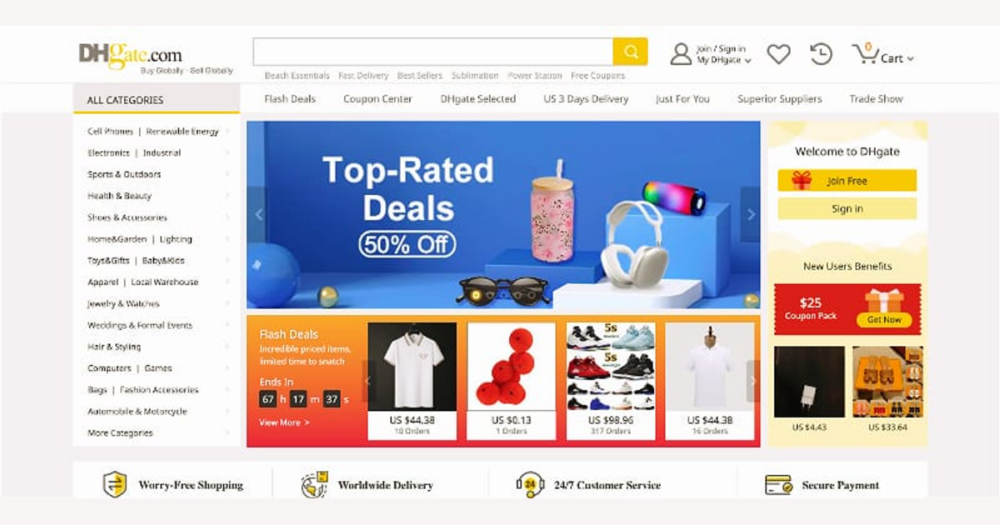
If you land on DHgate with only a vague idea like “stuff and things,” you’re really asking the marketplace to guess what you want—and it can’t. DHgate works best when you translate that fuzzy mood into a few concrete themes, then use its categories, filters, and seller checks to keep browsing fun but low‑risk. This guide shows you how to do that, step by step, without having to know the exact product in advance.
What does a vague search like “stuff and things” actually mean on DHgate?
On DHgate, typing a vague phrase like “stuff and things” doesn’t actually ask the site for anything specific. DHgate is a large marketplace made up of many independent sellers and category areas, so its search tools work best when you give them concrete themes—like “desk gadget,” “phone stand,” or “party favor”—rather than a catch‑all phrase.
When someone says they want “stuff and things,” they usually mean one of a few practical ideas: inexpensive small gadgets for a desk, novelty items for a friend, simple decorations, party favors, or household odds and ends. Each of those ideas would sit in different parts of DHgate’s catalog: office and school supplies, home decor, accessories, gift‑style items, and so on. The marketplace can’t guess which of these you care about from a single fuzzy query.
When I’m in that unfocused mood myself, I get more useful results by pausing to define the context before I search: who the item is for, where it will be used, and roughly how much I’m willing to spend. “Small desk gadgets under a certain amount,” or “cute keychain gifts for friends,” already gives DHgate’s categories and filters something solid to work with, and makes it much easier to check specs, seller records, and refund terms later.
The rest of this guide stays with that DHgate lens: instead of naming specific products, it shows how to turn your clarified context into workable keywords, discover relevant categories, and layer on buyer checks so casual browsing stays fun without feeling random or risky.
Turn your vague idea into concrete DHgate searches and categories
- Start by defining the context of the purchase: who the item is for, where it will be used, and a comfortable maximum budget for one piece or a small set. For example, “fun desk items under a set amount” or “small gifts for coworkers.”
- Brainstorm two or three concrete nouns that fit that context, such as gadget, keychain, sticker, organizer, or decoration. These are the anchors that help DHgate’s search understand what kind of item you’re open to.
- Pair those nouns with simple adjectives that describe the feel or function you want—cute, mini, LED, novelty, durable—and combine them into DHgate‑friendly phrases. If the first results look off‑target, adjust the wording and try again.
- When the results start to cluster around a theme, use any clearly related category page that appears as a more focused starting point. You don’t need to cover every possible category; pick the one that matches your current idea best and stay within it for a while.
- Apply basic filters to make the list manageable: set a price range that matches your budget, check the minimum order quantity so you don’t accidentally pick a bulk‑only listing, and, where available, narrow by shipping region or delivery time to match your expectations.
- Iterate rather than chase a perfect single term. If the mix of items is still too broad, add a more specific noun or adjective; if it becomes too niche or irrelevant, loosen a filter or switch to a nearby keyword. The goal is a small, intentional set of options, not one magic search phrase.
- Err on the side of slightly narrowing your idea—for example, focusing on desk items or small gifts—so DHgate’s filters and categories can genuinely help. I’d rather work within a clear theme and see listings I can evaluate properly than scroll through endless unfocused results that are hard to compare or trust.
Read DHgate listing details so you know exactly what you’re getting
Even when you’re just browsing miscellaneous “stuff and things” on DHgate, the specs tell you what’s actually being sold. I’d rather spend a few extra seconds reading them than end up with something the wrong size, quantity, or quality.
Start with materials and build. Listings often mention whether an item is plastic or metal, the fabric type, or any finishing details. For small gadgets or accessories, this matters: thin, brittle plastic will feel very different from a heavier molded piece or a metal version, and some fabrics wrinkle or fray faster than others. If the material isn’t stated at all, I treat that as a sign to be cautious or move on.
Next, look closely at dimensions and scale. Don’t rely on photos alone; check the measurements in centimeters or inches and compare them to something you know—a notebook, a phone, your hand. That’s how you avoid ordering a mini version when you wanted full-size, or a decoration that turns out much larger than you expected.
Quantity units are another common source of confusion. DHgate listings may price items per piece, per lot, or per set of a specific number. Before you get attached to a price, confirm whether it covers one item or a multi-pack, and whether the minimum order quantity means you have to buy several lots at once.
For accessories or electronics, skim any compatibility or usage notes. Check which models, ports, or sizes the item is designed for, and whether there are limits on voltage, weight, or environment. If those details are vague or missing for something that clearly needs to fit or connect to another device, I’d rather skip the listing than gamble.
Photos help, but they need to match the written description. Distinguish between product-only images and context shots that show the item in use; use both together with the listed dimensions and quantity to build a realistic picture. If the gallery shows multiple color or style variations, the text should clarify which variants are included at the shown price and how you select them.
Common pitfalls come from rushing: misreading quantity units, missing a note that an item is mini rather than full-size, or assuming a listing is for an authentic brand because the imagery hints at it. I treat any well-known brand references cautiously and default to assuming generic products unless branding is explicitly stated, looks plausible for the price, and is consistent across the photos and description.
My own rule is to slow down and double-check dimensions, quantities, and material notes, and to walk away from listings with missing, vague, or contradictory specs—especially when a mis-sized or miscounted order would be annoying to fix. On DHgate there are usually plenty of alternatives, so it rarely feels worth accepting avoidable uncertainty just for one more surprising item.

Example DHgate-style layout where material, size, quantity, and photos are all visible in one place—these are the fields to read closely before you treat a low-priced item as a good deal.
Check DHgate sellers before you treat casual browsing as risk‑free
Once you understand a listing’s specs, you still need to decide whether the seller behind it is worth trusting. On DHgate, overall ratings and order volumes give a rough sense of past activity: a seller with steady, mid‑to‑high scores and many completed orders feels more reassuring to me than a profile with very few sales, even if the numbers look similar at a glance.
Skim recent, detailed reviews rather than relying only on very old or generic feedback. I look for patterns in comments—recurring praise for accurate descriptions and on-time delivery, or repeated complaints about delays or quality—rather than letting one glowing or one angry review define the seller.
Store consistency is another useful signal. Sellers whose listings share similar product types, coherent branding, and reasonably aligned photos and descriptions tend to look more organized. In contrast, a store full of unrelated items, mismatched styles, or obviously copy‑pasted text across very different products makes me question how carefully they manage orders and product information.
Communication cues matter too. If you send a question about specs, quantities, or shipping, pay attention to whether the seller replies and how specific their answer is. Clear, direct responses that address your actual question make me more comfortable; vague replies or silence, especially on basic points, are a reason to be cautious.
Certain patterns are clear red flags: very low order counts combined with unusually high prices, long gaps between reviews, descriptions that are obviously copy‑paste across unrelated items, or photos that don’t match the titles or text. When several of these stack up in one store, I prefer to move on—there are usually plenty of other options, so there’s no need to treat casual browsing as risk‑free.
Personally, I prioritize transparent sellers with a visible track record, even if that means choosing a slightly less novel item or paying a bit more. For me, the peace of mind that comes from clearer ratings, reviews, and communication outweighs the appeal of a listing that looks exciting but offers very little evidence of reliability.
Balance shipping time and cost for low‑priced “stuff and things”
On DHgate, shipping is part of the offer, not an afterthought. Different sellers can use different carriers, service levels, and warehouse locations, so two very similar low‑priced items may have noticeably different shipping costs and timeframes. Instead of assuming shipping will be minor, treat it as a key part of the decision—especially when you’re browsing light, inexpensive “stuff and things.”
For many small items, the shipping charge can be the biggest part of what you pay. A listing that looks extremely cheap at first glance can end up costing more overall once you add the delivery fee. It’s safer to look at the total cost—item price plus shipping—before you decide whether something is still a good casual purchase. If the shipping pushes the total well beyond what you’d pay for a similar item elsewhere, that’s a sign to pause or keep browsing.
Most DHgate listings offer a mix of slower, lower‑cost shipping options and faster, higher‑priced ones. Slower methods can take significantly longer to arrive but keep the total cost down, which often suits fun, low‑stakes items that you don’t need quickly. Faster services are better when timing matters, but the delivery fee can easily outweigh the item price on very cheap products.
A useful way to choose is to ask yourself how you’ll feel if the item arrives much later than expected. If it’s a small impulse gadget or decoration you’re happy to receive whenever it shows up, slower, cheaper shipping is usually fine. If it’s for a specific event or gift date, or you know a late arrival would be frustrating, it’s worth prioritizing clearer, better‑documented shipping options—even if they cost a bit more—so you have a more predictable timeframe to rely on.
Personally, I would rather pay slightly more for shipping that comes with clear terms, realistic delivery estimates, and straightforward conditions than chase the absolute lowest advertised cost when the details look vague or incomplete. For me, that transparency makes casual browsing feel more controlled: I know roughly what to expect and can decide up front whether the total price and timeframe match how important the item really is.
Know how DHgate orders, disputes, and refunds work—even for small items
Every DHgate purchase goes through the same basic structure of order placement, payment, and completion, whether you’re buying a high‑value item or a very cheap piece of “stuff and things.” If something goes wrong, the platform also has formal processes for disputes and refunds, which are designed to handle issues like items not arriving or arriving in a condition that doesn’t match the listing. These mechanisms don’t disappear just because the price is low, but they do come with rules you need to understand.
In broad terms, dispute workflows usually involve time limits and may require evidence. If a package never shows up, or the product is very different from what the listing promised, you may be asked to provide supporting material—such as photos, tracking information, or message history with the seller—to explain the problem. Knowing that you may need to document issues helps you decide early on whether you’re willing to invest that effort for a particular small purchase.
This matters even more when you place several inexpensive orders over time. One low‑cost item might not feel worth the trouble to follow up on, but repeated disappointments can add up in both money and frustration. Understanding the general shape of DHgate’s order and dispute process helps you judge how seriously to treat each listing: you can decide in advance whether you’re comfortable doing the basic checks, keeping records, and possibly opening a dispute if something goes wrong.
Because platform rules, timelines, and documentation requirements can change, it’s wise to read DHgate’s current help or policy pages before relying on any assumption about protection or deadlines. The official guidance will tell you what counts as a valid reason to raise a dispute and how long you have to act. That way, you’re not basing your expectations on outdated information or second‑hand anecdotes.
I personally feel more comfortable experimenting with new or lightly documented listings once I’ve read the latest dispute and refund guidance and understand what DHgate expects from buyers. Knowing my responsibilities—such as checking tracking updates, keeping conversations on‑platform, and saving proof if something seems off—makes casual browsing feel less random and more controlled, even when the items themselves are inexpensive.
At the same time, it’s important not to assume that any particular dispute will automatically be decided in your favor. Outcomes can depend on the evidence available, how clearly the listing described the item, and how the platform applies its rules at that moment. Treat the dispute process as a safety net with conditions, not a guarantee, and use that understanding to decide when a low‑priced “stuff and things” purchase is worth the risk—and when it’s simpler to walk away and keep exploring other listings instead.
A quick checklist for turning “stuff and things” into safe DHgate orders
- Define your use-case and rough budget: who the items are for, how you’ll use them, and how much you want to spend overall.
- Choose a couple of concrete keywords that fit that context and tweak them as you see what DHgate shows you.
- Apply basic filters such as price range, minimum order quantity, and, when available, shipping region or delivery time to keep results realistic.
- Open a few promising listings and double-check materials, dimensions, and quantity units so you understand exactly what’s being offered.
- Review seller ratings, order counts, recent reviews, and overall store consistency to decide whether the seller feels reliable enough for you.
- Look at shipping cost and estimated delivery time together and judge whether the total value makes sense for how soon you want the item.
- Skim the seller’s notes on returns or refunds and keep DHgate’s general dispute structure in mind so you know what follow-up could involve.
- Based on these checks, either add the item to your cart or bookmark it and keep browsing for alternatives.
- Use this sequence each time you explore “stuff and things” on DHgate; it keeps browsing fun but structured, trading a little extra effort for clearer expectations and fewer avoidable surprises.
FAQ: navigating vague “stuff and things” browsing on DHgate
Is there a “stuff and things” section on DHgate?
No. DHgate doesn’t have a catch‑all category called “stuff and things.” To get useful results, you need to translate that vague idea into a few concrete themes—such as desk gadgets, small gifts, or party decorations—and then search and browse within the categories and filters that match those themes.
Is it safe to try new sellers for very cheap items?
Low price doesn’t remove the need for caution. Before you try a new seller, check their overall rating, order volume, and recent reviews, and look for a consistent store layout and product information. If those signals look thin, confusing, or contradictory, it’s usually better to skip that seller and choose one with clearer evidence, even for inexpensive items.
What should I do if the item I receive doesn’t match the description?
First, collect evidence: keep the listing details, take clear photos of what arrived, and save any messages with the seller. Contact the seller through DHgate to explain the difference between the description and what you received. If that doesn’t resolve the issue, follow DHgate’s current dispute and refund instructions in the platform’s help or policy pages, using your documentation to support the case.
Can I rely on product photos alone when browsing for random items on DHgate?
No. Treat photos as helpful context, but always cross‑check them against the written specs—especially size, materials, quantity units, and compatibility notes. That combination is what prevents common problems like ordering the wrong size, getting fewer pieces than expected, or misunderstanding what the item is designed to work with.