
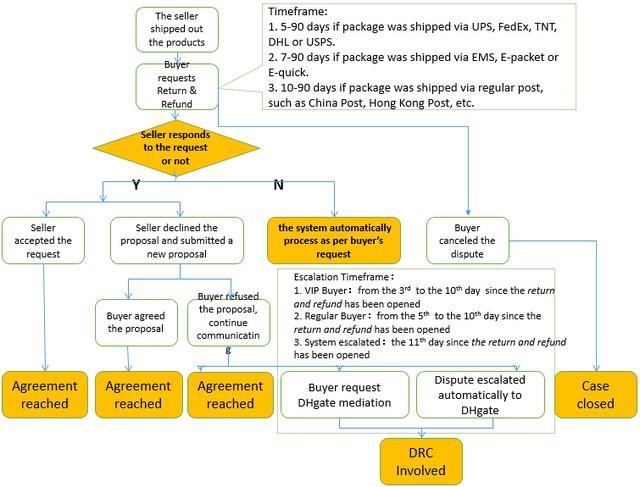
Quick answer: Do not close a DHgate dispute just because the seller asks. Close or accept a resolution only after the agreed remedy is recorded in the official case and you can verify what the action will do. A promise in chat is not the same as a completed refund, replacement, or mediated decision, and closing may remove the active review path.
Last reviewed: August 13, 2026.
Why a seller may ask you to close a dispute
A seller may believe the problem can be solved directly, may want more time to resend an item, or may disagree with the evidence or requested amount. The request is not automatically fraudulent, but it shifts risk to the buyer if the case is closed before the solution is complete.
DHgate’s help materials describe disputes as order-based records in which the seller responds and the buyer may escalate an unresolved case for platform review. That official record is where the evidence, proposal, deadline, and outcome should remain visible.
Check the request against the case status
| Seller request | What to verify | Safer response |
|---|---|---|
| “Close it and I will refund you.” | Is a refund proposal shown inside the dispute? Has DHgate confirmed the action? | Ask the seller to submit the solution through the active case. |
| “Close it and I will resend.” | Is reshipment an available case outcome? Is a deadline and tracking obligation recorded? | Keep the case open until the official workflow records the agreement. |
| “Change the reason first.” | Can the active page be edited without closing? | Correct the record or contact DHgate support; do not assume reopening is possible. |
| “The dispute hurts my store.” | Has the order issue actually been resolved? | Judge the order evidence and remedy, not pressure about store metrics. |
| “Continue on WhatsApp or email.” | Will the conversation remain part of the order record? | Keep communication in DHgate messages and the dispute page. |
When closing may be reasonable
Closing or accepting can be reasonable when the official dispute page clearly shows the resolution, the amount and method match what you agreed, any required return or reshipment terms are understood, and you have verified the action with DHgate’s interface or support. The exact button label may vary, so read the confirmation screen before submitting it.
A seller’s statement that a refund has been “sent” should be checked against the order status and the payment method. Processing time after an approved refund is different from a promise to refund later.
Red flags that mean you should pause
- The seller wants the case closed before submitting any proposal in DHgate.
- The seller asks for an off-platform payment, deposit, or fee.
- The replacement would be sent without an order-linked agreement or tracking obligation.
- The seller says you can always reopen the case but provides no confirmation from DHgate.
- The request arrives close to a visible dispute or evidence deadline.
- The seller asks you to remove truthful evidence or state a different problem.
If the dispute reason is wrong, use the steps in the guide to correcting a DHgate dispute reason rather than closing reflexively.
What to say to the seller
I will keep the dispute open while the issue is unresolved. Please place the proposed refund, return, or replacement in the official DHgate case so the terms and deadlines are recorded. I will review the proposal there.
This response is neutral and keeps the conversation focused on the transaction. Do not threaten the seller or make claims that the evidence cannot support.
How DHgate escalation fits in
DHgate’s English buyer help says that when the seller does not cooperate, an open case may provide an Escalate to DHgate route and an analyst can review it. Another DHgate help page says analysts may request information during an after-sale dispute. Monitor both account messages and the email address associated with the account, and respond within the deadline shown in the live case.
- Save the listing, selected variation, order details, tracking, and messages.
- Upload concise evidence to the dispute record.
- Reject or question a proposal that does not match the agreed remedy.
- Use the escalation option when it becomes available and the seller has not resolved the issue.
- Do not confirm receipt or satisfaction merely to unlock a promised remedy.
For the full sequence from cancellation through refund and return, see DHgate returns, refunds, cancellations and disputes explained. For evidence preparation, the first-order safety checklist explains what records to keep.