
Quick answer
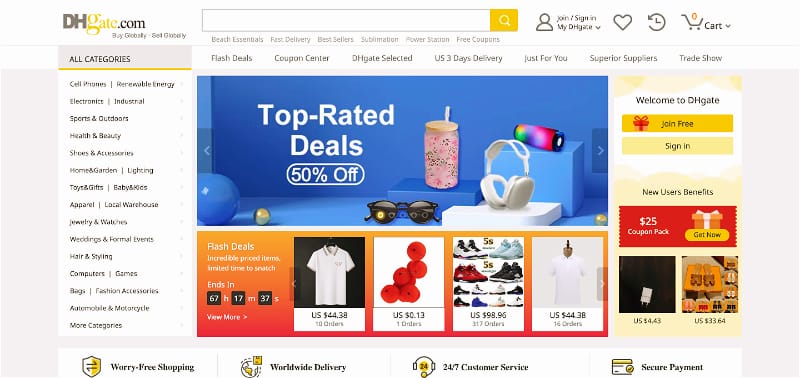
You can search for a store on DHgate, but the results may not always show a separate storefront page first. In many cases, the practical route is to search for the store or seller name, open a relevant product listing, and then use the seller name or store link shown on that page.
DHgate is a marketplace, so store discovery is often connected to product listings rather than a single directory of branded shops. A search result can help you begin the process, but you should still confirm the seller details and the exact product listing before ordering.
Can you search for a store directly on DHgate?
Yes. Start by entering the store name or seller name in the DHgate search bar. Use the most exact spelling you have, including distinctive words, numbers, punctuation, or spacing.
However, marketplace search results may prioritize products instead of showing a clear store page immediately. That does not necessarily mean the store is unavailable. It often means you need to open a relevant product listing and use the seller information shown there.
Why a store search may show products first
DHgate connects sellers, products, and store pages within a marketplace system. Product listings are often the most useful entry point because they show the item, available options, shipping details, and seller information in one place.
When you search for a store name, you may see products that appear to be connected to the seller. This can be useful, but it also means you should verify the seller carefully before assuming a result belongs to the store you intended to find.
- Search results can show products before storefronts. Open a relevant listing to look for seller details.
- Store names can be similar. Check spelling, numbers, punctuation, and word order.
- Page layouts can change. The seller or store entry point may appear in different locations on desktop and mobile pages.
- Product listings can change. Availability, price, variations, and shipping terms may differ from one listing to another.
How to use a product listing to find a store
- Search for the exact store or seller name. If you know a product the seller offers, include a distinctive product term in your search.
- Open a relevant product listing. Choose a listing that appears consistent with the product type or seller you expect.
- Look for the seller or store information. The exact label and placement can vary by device and current page design.
- Open the seller page if an entry point is available. Review the seller’s visible product range and other available information.
- Return to the exact product listing before checkout. Confirm the selected variation, price, quantity, shipping method, and delivery information for your destination.
If the direct name search does not produce a clear result, a distinctive product associated with the seller can be a more useful starting point. Use the product listing to identify the seller, then compare the visible store details before deciding whether it is the right page.
How to tell whether you found the right store
A similar-looking store name or familiar product image is not enough to confirm that you found the intended seller. Before buying, compare the seller page and the product listing with the information you already have.
- Check the store or seller name. Compare spelling, numbers, spaces, punctuation, and word order.
- Review the product range. The visible products should generally be consistent with the seller or category you expected.
- Read the exact listing. Check the item description, photos, variations, quantity conditions, and shipping information.
- Look at visible feedback where available. Recent comments that discuss the actual item or communication may provide useful context.
- Ask a specific question if something is unclear. Use DHgate’s on-platform messaging for important questions about size, material, compatibility, customization, or shipping.
The most useful confirmation comes when the seller name, product range, listing details, and seller response all point to the same item and terms.
What store search can and cannot tell you
| Store search can help you | Store search cannot prove |
|---|---|
| Locate a product listing that may be connected to a seller | That the product will meet your expectations |
| Open a seller or store page when an entry point is available | That the seller is the same as another similarly named store |
| Compare visible seller names and product ranges | That a specific item is currently in stock |
| Review visible product and seller information | That shipping timing will be identical for every destination |
Use store search as a starting point. Your final decision should be based on the exact listing, selected variation, order terms, shipping details, and any clarification you receive before checkout.
What to do if you cannot find a clear store page
If a direct store-name search does not show a clear storefront, try these practical alternatives:
- Search again using the exact spelling or a shorter version of the store name.
- Search for a distinctive product, model, material, style, or category associated with the seller.
- Open relevant product listings and compare the seller information shown on each page.
- Check a saved product link or previous message thread if you have one.
- Use the current support options available through DHgate if you need help with an existing account or order record.
Marketplace layouts, seller pages, and product availability can change over time. Do not assume that a similar store name belongs to the same seller unless the visible seller and product details match.
Helpful DHgate resource
For additional guidance on evaluating sellers, see DHgate’s guide to finding sellers. Page labels, seller-page layouts, and available support options may change over time.
FAQ
Can I type a store name into DHgate search?
Yes. Start with the most exact store or seller name you have. If the results mainly show products, open a relevant listing and look for the seller or store information shown on the page.
Why does a store search sometimes show products instead of a storefront?
DHgate is a marketplace, and product listings are often the main entry point to seller information. A relevant listing can help you find the seller page or store link.
Can I trust a store just because it appears in search results?
No. A search result is only a starting point. Check the seller name, product range, exact listing details, visible feedback, and shipping information before ordering.
What should I check after opening a seller page?
Compare the seller name, product range, item details, selected variation, visible feedback, quantity conditions, and shipping terms for the exact product you want to buy.
What if I cannot find the store I was looking for?
Try a more exact name search, a shorter version of the name, or a distinctive product associated with the seller. Do not assume a similar store name is the same seller without checking the visible details.
Final takeaway
You can search for stores on DHgate, but a product listing may be the most practical route to the seller page. Start with an exact store or seller name, use relevant product results to locate seller information, and verify the store and the exact listing before placing an order.