
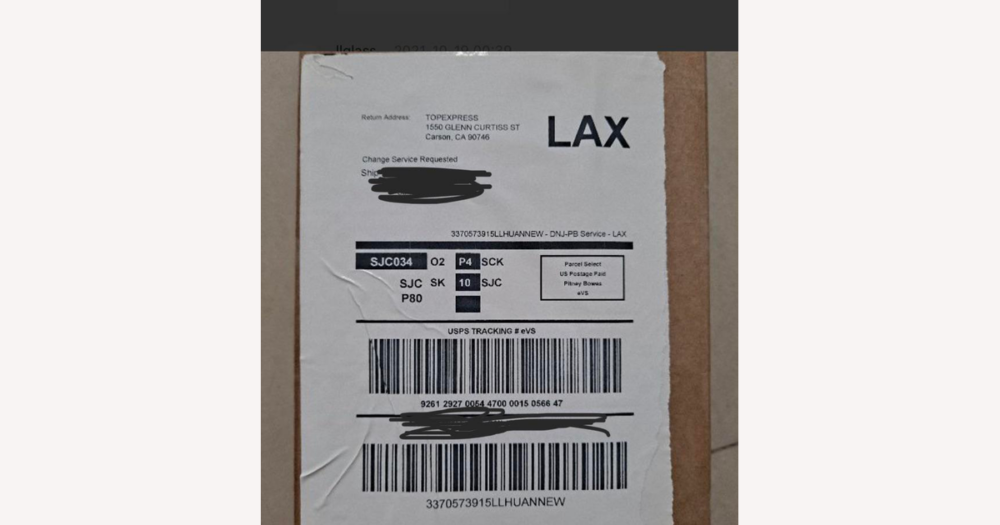
For international DHgate orders, the most important shipping decision is not just how much you pay, but whether the seller uses clear, compliant labels and a trackable carrier that suits your order. This guide shows how to evaluate a seller’s label and shipping setup inside DHgate—focusing on label quality, correct customs and address information, and the level of tracking—so you can ask the right questions before dispatch and understand what to expect if you choose cheaper, less documented services.
What does the label-shipper choice really mean for a DHgate international order?
On DHgate, “label shipper” is about which carrier and service the seller uses to generate and apply the shipping label, not about you printing labels yourself. For an international order, your core decision is to favor sellers and shipping options where the label is clearly printed, includes your full address and customs information, and is tied to a reputable, trackable service that fits how valuable and time‑sensitive your purchase is.
Most DHgate buyers cannot choose the exact label material or printer, but you can select sellers and shipping methods that promise standard carrier labels and tracking, and you can confirm in messages that they will declare the goods accurately. I would personally prioritize compliant labelling and reliable tracking over small savings on shipping, especially for higher‑value or urgent items. Bare‑bones, lightly documented shipping is only worth considering for low‑value, non‑urgent orders where you accept slower transit and weaker visibility if something goes wrong.
How much does label material and print quality matter for overseas delivery?
Label material and print quality matter because international parcels are handled and scanned many times. If the adhesive is weak, the paper tears easily, or the ink smudges, barcodes can become unscannable and addresses hard to read, forcing staff to re‑label or manually sort the package. That increases the chances of delays, routing mistakes, or extra checks at customs when the information on the label is unclear.
Typical DHgate shipments may pass through several warehouses, consolidation centers, and customs offices before reaching you, and some are repackaged along the way. For long routes, higher‑value items, or destinations known for strict customs processing, it is reasonable to ask the seller whether they use standard carrier‑printed, machine‑readable labels and professional packaging, and to avoid improvised or handwritten labels on complex orders. You cannot choose the exact label material, but you can choose sellers who signal that they use proper international labelling rather than the most basic, fragile option.
What information needs to be correct on an international label and customs forms?
For an international DHgate order, the shipping label and any attached customs forms need to carry enough accurate information for every handler and customs office to understand where the parcel is going and what is inside. At a basic level, that means your full recipient details (name, street address in the correct local format, city, state or region if used, postal or ZIP code, country, and a working phone number or email), plus the sender’s name and address so the parcel can be returned or queried if needed.
Customs documentation also relies on a clear description of the contents, their quantity, and a truthful declared value. Depending on the destination country and the carrier, the seller may need to include additional elements such as HS or tariff codes, tax IDs, or other references, but those exact regulatory details vary by route and this guide cannot guarantee full compliance for every case. What is consistent is that obvious errors—misspelled names, wrong postal codes, incomplete streets, or vague or misleading product descriptions—are common causes of delays, misdelivery, or closer customs inspection.
On DHgate, the main way you influence these labels is by controlling the information the seller uses and aligning with them on how they describe the goods. Before you order, review your saved shipping addresses in your DHgate account and make sure they exactly match how mail is normally addressed where you live, including apartment or unit numbers and a phone number that you actively use. After placing an order, check the order details to confirm that DHgate shows your address correctly and that there are no obvious typos.
If an order is high value or going to a country with strict customs checks, message the seller through DHgate to confirm how they will describe the items and what value they will declare. I prefer when sellers slightly over‑communicate here and keep the customs description aligned with the actual invoice instead of trying to avoid duties with very low declared values or vague labels like “gift” or “sample.” Under‑declarations and misleading descriptions can increase the risk of inspection or seizure, even if they seem attractive in the short term. You usually cannot see the final customs form before shipping, but by supplying accurate details and making your expectations clear in messages, you give the seller better inputs for completing those documents correctly.
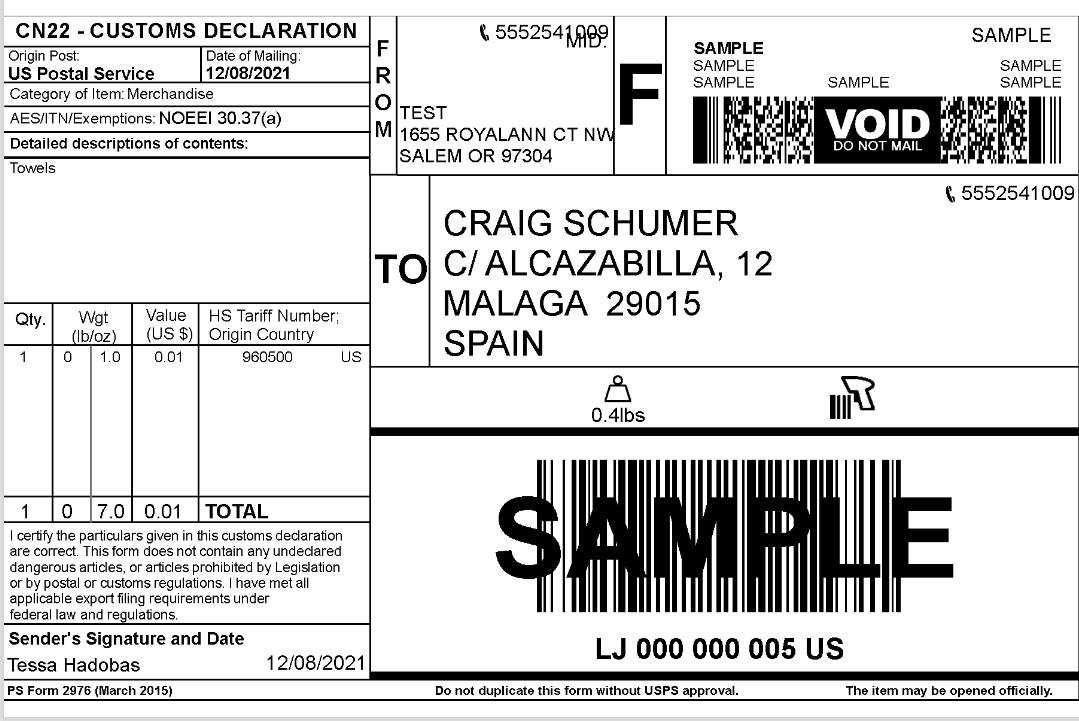
Example of an international shipping label where the recipient and sender addresses sit near the top, a barcode and tracking number sit in the middle, and an attached customs form lists the contents, quantity, and declared value.
How do tracking numbers and carrier choice affect what I can see on DHgate?
Once the label information is set, the next question is how it connects to tracking and what you can see inside DHgate. When a seller books a shipment with a carrier, the carrier issues a tracking number and encodes it on the label as text and a barcode or QR code. The seller then enters that tracking number into the DHgate order, and DHgate uses it to show whatever status updates the carrier supplies—things like pickup, export departure, customs processing, arrival in your country, and final delivery events where those are available.
The level of detail you see depends entirely on the carrier and service level, not on DHgate upgrading or downgrading the feed. Premium, fully tracked international services typically scan parcels more often and mark clear milestones such as export, customs clearance, and “out for delivery,” so your tracking page on DHgate feels more complete and predictable. Low-cost economy or partially tracked routes may only show a few scans—sometimes up to export or handoff to a local postal network—and then go quiet until delivery, or never show every handover between logistics partners. DHgate cannot invent events the carrier does not send, so if reliable visibility matters for a particular order, look for shipping options that explicitly mention tracking, ask the seller which carrier and service level they plan to use, and favor trackable services over the very cheapest “untracked” or “local-post only” methods except for low-value, non-urgent items where you accept that tradeoff.
When should you accept premium tracked shipping versus cheaper economy options?
- Choose premium, fully tracked services when the order is high-value, time-sensitive, or hard to replace; these services usually cost more but offer faster, more predictable delivery and clearer tracking milestones on your DHgate order page.
- Accept cheaper economy services only when the order is low-value or non-urgent and you can tolerate slower delivery and limited tracking; check the product page’s shipping section for estimated delivery windows and any mention of tracking or carrier type before deciding.
What checks can you do on DHgate before and right after placing an order?
- Before purchase, review the product page’s shipping section to see which services the seller offers, their estimated delivery windows, and whether tracking or a specific carrier type is mentioned.
- Check that your DHgate account address and the address shown at checkout are complete, correctly formatted for your country, and include an up-to-date phone number or email.
- For important or higher-value orders, message the seller before buying to ask which carrier and service level they usually use and whether the shipment will include a trackable number.
- After placing the order but before it is marked as shipped, follow up with the seller if needed to confirm that the item description and declared value on customs documents will broadly match what you ordered.
- Once a tracking number appears in the order, open the DHgate tracking page to confirm that the link loads, shows the correct destination country or region, and begins recording events as the parcel moves.
What are the main risks of poor labelling or unsuitable shipping—and how can you prevent them?
- Customs delays or returns from incomplete or misleading declarations: reduce this by checking that your order details (item description, quantity, and value) are correct on DHgate, then messaging the seller to confirm they will use those details—rather than marking the parcel as a gift or lowering the value without your agreement.
- Misdelivery or return due to incorrect or unreadable addresses: prevent this by validating your full name, street address, ZIP or postal code, country, and phone number in your DHgate account and at checkout, and by watching early tracking events to confirm the destination country or city looks right.
- Packages becoming untraceable when sent with untracked or weakly tracked services: lower this risk by preferring options that mention tracking, asking the seller to confirm that a trackable number will be provided, and checking the tracking page regularly so you can raise issues before buyer-protection deadlines pass.
- Extra handling or confusion when labels are damaged or poorly applied: while you cannot control the exact label material, you can flag to the seller that the order is important and ask them to apply a clear, firmly attached label and avoid repackaging the parcel without updating the label and tracking information.
- Unexpected problems with special-regulation items (for example, batteries or liquids): if you are ordering potentially regulated goods, ask the seller whether they are familiar with the relevant shipping rules and choose tracked, more established services, knowing that detailed dangerous-goods compliance is beyond what you can fully verify from DHgate alone.
What can you do if label or tracking problems appear after dispatch?
- Open your DHgate order tracking page and look for recent events, error messages, or status changes, then compare the current status with the original estimated delivery window.
- If something looks odd—such as repeated export scans, long gaps with no updates, or a status you do not understand—take screenshots or note the status text before you contact the seller.
- Message the seller through DHgate, share the relevant tracking details, and ask them to check with the carrier or clarify what is happening with the shipment, including whether there are any label or address issues.
- When tracking appears stalled for a significant period or shows problems such as “returned,” “undeliverable,” or “address issue,” ask the seller what solution they propose, such as correcting the address with the carrier, resending the parcel, or arranging another agreed outcome.
- If the delay extends beyond the original delivery estimate and the seller’s response is not satisfactory, monitor the remaining time under DHgate’s buyer protection and review the platform’s current dispute rules.
- When it seems likely that the parcel is lost, has been returned without a clear plan to resend, or remains stuck after buyer protection would otherwise expire, consider opening a dispute on DHgate, understanding that any refund or replacement depends on DHgate’s policies, your evidence, and case review rather than being guaranteed.
Common questions about label shippers and international shipping on DHgate
Can I choose the exact carrier or shipping company for my DHgate order?
Usually you choose among the shipping options the seller lists on the DHgate product page or checkout, not a specific carrier by name. The seller decides which logistics partners and service tiers they use. If carrier choice matters to you, use DHgate messaging before dispatch to ask which company and service level they plan to use, and request a more trackable tier when available, knowing they may not be able to change their standard setup.
How often should I expect tracking updates for an international DHgate shipment?
DHgate shows the tracking events that the carrier sends; it does not control how often parcels are scanned. Premium, fully tracked services usually show more frequent and detailed milestones, while cheaper economy or local-post routes may only show a few key events or long gaps with no visible movement. If you see sparse updates but the parcel is still within the estimated delivery window, that is often normal for low-cost services rather than a DHgate error.
If a label error causes return or non-delivery, will the seller automatically re-ship my DHgate order?
Re-shipment or refund is not automatic. What happens depends on the seller’s own policies, the carrier’s handling of the returned parcel, and DHgate’s buyer-protection and dispute rules. If tracking shows “returned,” “undeliverable,” or an address issue, contact the seller through DHgate with screenshots and ask what solution they propose. If you cannot reach an acceptable outcome and the problem extends beyond the promised delivery period, you may consider opening a dispute, understanding that DHgate will review the case rather than guaranteeing a particular result.