
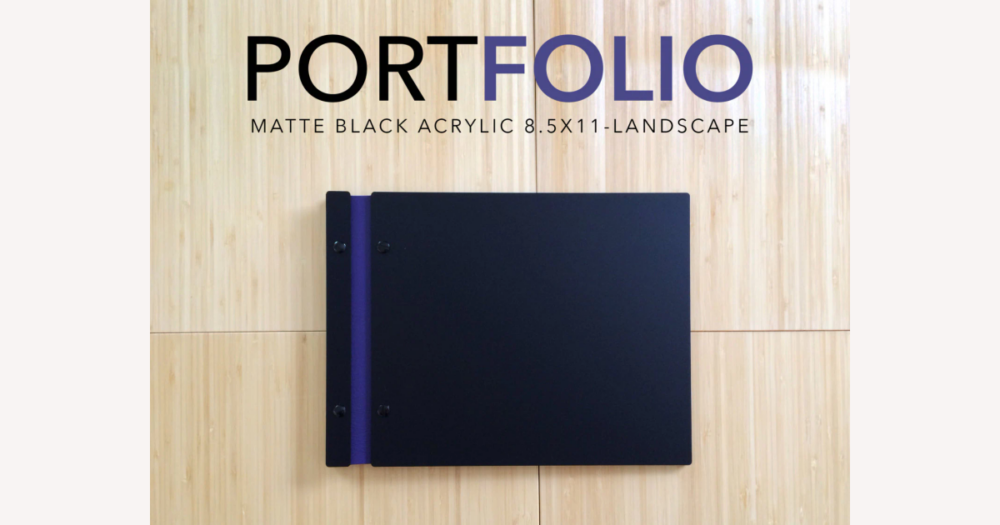
Customizable screw post portfolios on DHgate generally let you pick from set options—such as size, material, color, and simple logo or text printing—rather than ordering a fully bespoke binder. By searching terms like “screw post portfolio” or “custom portfolio” and then reading each listing’s description carefully, you can see which dimensions are actually adjustable and avoid assuming more customization than the seller is really offering.
How customizable screw post portfolios are typically offered—and what that means on DHgate
On DHgate and in the wider market, “customizable” screw post portfolios usually mean you can choose from preset options—such as size, page format, cover material, color, and simple personalization—within an existing design. Makers and manufacturers tend to offer defined formats (like A4 or letter, landscape or portrait) and materials (leather, faux leather, fabric, board), plus the ability to add a logo, name, or artwork, rather than rebuilding the portfolio from scratch to any specification you want.
On DHgate, the practical way to look for these items is to search relevant categories using terms like “screw post portfolio,” “screw post binder,” or “custom portfolio,” then open individual listings to see what “custom” actually covers. Some sellers may only let you pick from listed sizes and colors; others may offer logo printing or basic text personalization. Treat “customizable” as a signal that certain parameters can be chosen, not a promise of fully bespoke craftsmanship or unlimited spec changes, and use the specifications and checklist criteria in this guide to judge whether the options shown match your needs.
Key customization dimensions to check: size, screw posts, materials, and personalization
- Size and page format: Check that the portfolio’s usable area matches your documents—A4, letter, A3, landscape vs portrait, or square formats. DHgate listings should give measurements with units (cm or inches); compare these numbers to your pages, not just the photos.
- Screw post details: Look for information on post length and diameter, how many posts are used, and whether they can be swapped or extended. These hardware specs determine how many sheets the portfolio can hold now and how easily you can expand it later.
- Cover materials and finishes: Listings may mention leather, faux leather, fabric or cloth covers, or rigid board with different finishes. These choices change the weight, feel, and expected durability, so use the material names and any close-up photos to judge whether the construction matches how often you plan to handle the portfolio.
- Personalization options: Many “custom” screw post portfolios offer selectable colors and the option to add printed or embossed logos, names, or artwork. Read the description for phrases like “logo printing,” “name embossing,” or “custom color” so you know exactly which parts of the design you can personalize.
- How to read specs on DHgate: Give priority to listings that spell out exact dimensions, clear units, explicit material names, and basic screw post hardware details, along with a specific explanation of what customization includes. If a listing mainly talks about design or decoration and is vague on size or hardware, treat it cautiously or ask the seller for clarification before you buy.
How materials and construction affect durability and professional look
Cover materials are the first signal of how durable and professional a screw post portfolio will feel. Leather, good-quality faux leather, or covers built from thick boards usually feel heavier and more substantial, which suits formal, client-facing presentations. Lighter cloth or thin covers tend to feel more casual and flexible; they can be fine for personal projects or occasional use, but they may not project the same polished impression or resist wear as well.
Screw post construction also changes the look. Visible posts give an industrial, utilitarian style and make the hardware part of the design; some buyers like this for design portfolios or studio work. Hidden or recessed posts create a cleaner front and spine, which many people prefer when presenting to clients because it keeps attention on the content rather than the hardware.
Hardware quality matters if you plan to add or rearrange pages often. Smooth metal finishes, clean threading, and screw posts that sit securely in the spine help the portfolio open and close reliably without loosening over time. Rough finishes, poorly cut threads, or posts that wobble can make it frustrating to adjust pages and may shorten the life of the binder.
On DHgate, you have to judge these factors from what you can see and read: close-up photos of corners, edges, and hardware, explicit material labels (for example, “faux leather” or “cloth over board”), and buyer reviews that mention build quality. Clear descriptions and solid-looking construction are a strong positive signal, and I would choose those over extra decorative options if the specs or material details seem vague, rather than assuming that any item labeled “custom” is automatically premium.
A practical checklist for defining your needs and reading DHgate listings
- Define your use case. Decide what size documents you need to store (letter, A4, larger formats) and whether they’re landscape or portrait. Estimate how many sheets or page protectors you want to hold, think about how often you’ll carry or handle the portfolio, and note whether it needs to look formal for clients or is mainly for personal archiving.
- Translate that use case into concrete requirements. Set minimum internal dimensions that will comfortably fit your pages, choose a target capacity with some buffer for future additions, pick a material tier that matches your context (for example, leather or sturdy faux leather for formal presentations, cloth or simpler covers for casual use), and decide whether personalization like a logo or name is truly necessary.
- Screen DHgate listings against those requirements. Confirm that stated dimensions include units and align with your page size and orientation. Check screw post details such as length, number of posts, and any mention of expandability or additional extensions. Look for specific material types instead of vague labels like “premium,” and discard listings that do not clearly match your needs.
- Clarify what “customizable” actually includes in each listing. Identify whether customization covers only color choices or also logo printing, artwork, or custom sizing, and check how those options are selected—through dropdowns, order notes, or messaging. Treat listings that explain their options and ordering process clearly as a better fit, even if the personalization choices are limited, because strong, well-documented specs reduce the risk of a poor match.
DHgate-specific seller checks, shipping, and return considerations
Spec verification habits to avoid sizing and hardware surprises
- Measure the width and height of the pages or sleeves you plan to store, note whether they are landscape or portrait, and estimate how many sheets you expect to insert so you know your real size and capacity needs before comparing portfolios.
- Match those measurements to the listing specs, checking which units are used (centimeters vs inches) and focusing on the internal usable area rather than only the outer dimensions shown in photos or titles.
- Review the described screw post length, diameter, and number of posts to judge whether they can handle your expected stack of pages, and make sure you understand any mention of expandable posts, extension pieces, or add-on hardware before you buy.
- Use DHgate’s messaging tools to ask the seller about any unclear or missing specs—especially exact internal dimensions, hardware details, and the precise scope of customization, such as whether custom sizes are possible or only printed logos—so you have written clarification before placing an order.
FAQ: level of customization, price implications, and hardware reusability
Are DHgate screw post portfolios usually fully bespoke or limited to simple personalization?
On DHgate, “customizable” screw post portfolios are more likely to be ready-to-customize designs with fixed formats than fully bespoke builds. Most sellers let you choose from defined sizes, colors, and simple personalization (such as logo or text printing), rather than changing every dimension or redesigning the portfolio from scratch. Treat “customizable” as a prompt to read the listing carefully and see exactly which options—size choices, color variants, printing or embossing—are explicitly offered.
How does customization generally affect the price of screw post portfolios?
In general, customization tends to increase the price compared with basic, non-custom portfolios. Features that commonly add cost include premium cover materials (like leather or heavier faux leather), non-standard sizes, and added personalization such as printed or embossed logos or artwork. Because DHgate listings and sellers vary, it’s safer to compare similar items—one simple, one customized—within the same category and use that relative difference as a guide, rather than relying on platform-wide averages or expecting a specific price band.
Can I replace or reuse the screw posts on a portfolio I buy through DHgate?
Screw posts are typically a replaceable type of binding hardware, and many portfolios are designed so you can remove the posts, add extensions, or swap them out over time. However, post length, diameter, threading, and how they attach to the spine all vary by product. Before assuming you can upgrade or reuse the hardware, ask the seller whether the screw posts are removable, which sizes and thread types are used, and whether they support compatible replacement or extension pieces. That written confirmation reduces the risk of buying a portfolio that can’t be adjusted the way you expect.