
On DHgate, the best template frame isn’t the cutest design—it’s the one whose type, size, and material genuinely match your craft project and the tools you already have. This guide explains the main frame formats you’ll see in DHgate listings and how to use their specs and seller details to avoid ordering a template that’s the wrong size or too flimsy for real use.
What “template frames” for crafts actually are on DHgate
On DHgate, “template frames” are guides or shaped tools that help you create clean borders and frame outlines for cards, scrapbooks, wall decor, photo props, and other craft projects. Instead of being finished decor pieces, they act as patterns you trace, cut, print, or build around so your designs look consistent from project to project.
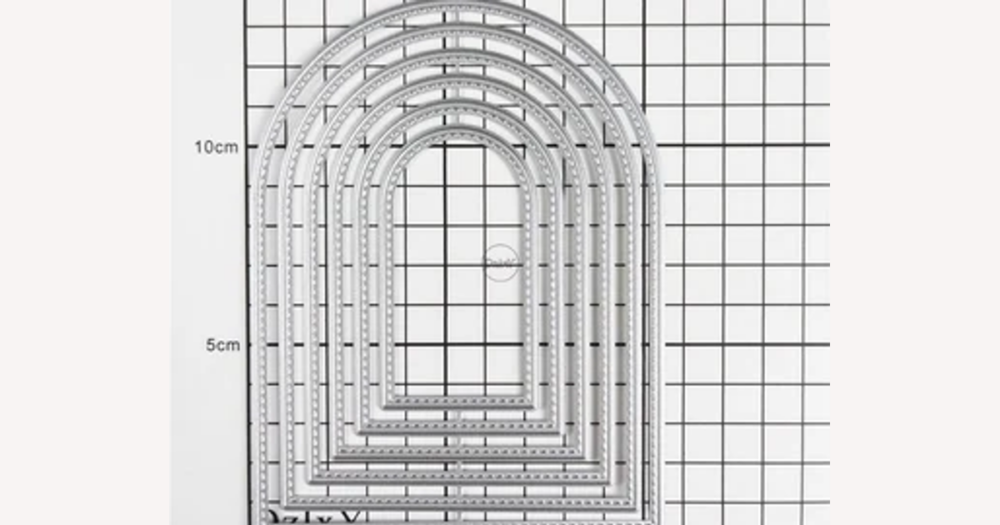
These frames come in several formats. Digital frame designs or printables are files you download and print at home, then cut out or use as layered borders on paper crafts. Metal cutting dies are rigid shapes you run through a compatible die‑cutting machine to cut precise frames out of cardstock, foam, or thin materials. Plastic or mylar stencils are flat templates you place over a surface to trace, ink, paint, or blend around the frame opening. Physical frame blanks made from chipboard, MDF, acrylic, or heavyweight cardstock are actual frame pieces you decorate directly and then mount on a wall, page, or prop.
None of these options is universally “best.” A simple, well‑sized die can be more useful than a trendy digital design if it actually fits your card front and die‑cutting machine, while a large stencil or MDF blank makes more sense for wall decor or photo props. The right choice on DHgate depends on your project’s measured surface, the materials you plan to use, and the tools you already own, so it’s worth prioritizing clear dimensions and material details in listings over purely decorative appeal.
Match your project type to the right frame format and size
| Project type | Typical surface size | Recommended frame formats | Example outer frame size ranges | Listing notes |
|---|---|---|---|---|
| Cards and invitations | Small card fronts such as A6, A5, or US A2/4.25″×5.5″ | Digital printables for layered borders; small metal dies sized for card fronts; compact stencils | Around 3″–5″ (7.5–13 cm) on the longest side for single frames; smaller 2″–3″ (5–7.5 cm) accents | Check that frame dimensions fit your card front with a margin; confirm units (cm vs inches) and whether measurements refer to the outer edge or inner window before ordering on DHgate. |
| Scrapbooks and journals | Larger pages, often 6″×8″ or 12″×12″ scrapbooking sheets, A5/A4 journals | Medium to large dies; full‑page or border stencils; chipboard or cardstock frame blanks | Around 4″–8″ (10–20 cm) frames for photo mats; 10″–12″ (25–30 cm) borders for full pages | Look for listings that specify both overall frame size and the photo window; verify that sizes match your page standard and ask the seller for missing measurements. |
| Wall decor and home signs | Wall areas such as A4/letter‑size prints, 8″×10″ or larger canvases and plaques | Large stencils; MDF, chipboard, or acrylic frame blanks | Around 8″–12″ (20–30 cm) or bigger depending on the wall space | Confirm thickness and material along with width and height; check weight and hanging hardware notes, and make sure measurements match the space you’ve measured. |
| Photo props and party backdrops | Oversized signs or frames held in front of people or hung in photo areas | Large lightweight blanks (foam board, chipboard, acrylic); oversized stencils for painting frames on boards | Around 12″–24″ (30–60 cm) or more on the longest side | Verify outer dimensions and opening size so people fit in the frame; check that the material is sturdy yet light enough to hold and clarify quantity if photos show multiple pieces. |
| Gift tags and small embellishments | Very small surfaces, often under 3″ (7.5 cm) long | Mini dies; small printables; tiny stencils or punch‑style frames | Around 1″–2.5″ (2.5–6.5 cm) | Check the smallest dimension carefully—frames can look bigger in photos than they are; confirm whether the listing size refers to the tag shape or the inner cut‑out. |
| Classroom decor and worksheets | A4/letter‑size worksheets, posters, bulletin‑board elements | Digital printable borders for easy reprinting; large stencils for repeatable frames | Around 8″–11″ (20–28 cm) frames or border sets sized to your paper standard | Look for formats that match your printer paper (A4 vs letter) and note whether you receive a single file or multiple designs; confirm sizes in the listing and message the seller if any measurements are unclear or missing. |
Specs to check in DHgate listings for frame templates
- Outer dimensions: Read the full width and height of the frame, die, or blank and compare them with your card, scrapbook page, photo, or wall space so the frame fits without hanging over the edges.
- Inner window size: Check the opening left for your photo, text block, or main design to make sure it isn’t cropped or squeezed; on DHgate, confirm whether measurements refer to the inner window or the outer edge.
- Border thickness and decorative elements: Note how wide the border is and how much space any flourishes, corners, or cut‑outs remove from the usable design area, especially on small cards or tags.
- Quantity per pack or files per download: Confirm how many physical frames, blanks, or stencil pieces you receive, or how many distinct designs are included in a digital file, so the order matches the number of projects you plan.
- Material and thickness: Check what the frame or tool is made from (metal, plastic, chipboard, acrylic, cardstock) and its thickness to judge whether it suits your project surface and any tools, such as die‑cutting machines or punches.
- Compatibility notes: Look for explicit mentions of supported die‑cutting machines, recommended paper weight, ink or paint types, or surface materials, and avoid assuming a tool works with every machine or paper size by default.
- Measurement clarity over design complexity: When you need predictable results on DHgate, prioritize listings with clear, exact dimensions and compatibility details over unusually intricate designs that don’t spell out their sizing.
Compare common materials for template frames
| Material type | Durability and reusability | Rigidity/flexibility and feel | Typical craft uses |
|---|---|---|---|
| Metal cutting dies | Generally suited to long‑term repeated use; treated as a durable tool you can cut with many times. | Rigid metal with clean, precise edges; smooth surface that presses or cuts sharply into paper and thin materials. | Cutting frame shapes and borders for cards, invitations, scrapbook pages, and tags, often used with compatible die‑cutting machines. |
| Plastic/mylar stencils | Designed for repeated use if cleaned and stored carefully; can last through many projects. | Thin but fairly rigid sheets that flex slightly; smooth surface, with cut‑out areas for paint, ink, or texture medium. | Tracing or inking frame outlines on cards and pages, adding painted borders to signs or wall decor, and creating repeatable classroom or bulletin‑board frames. |
| Chipboard/MDF blanks | More suited to sturdy finished pieces than to constant reshaping; can be reused in decor but not usually recut. | Thick, rigid boards with a matte, sometimes textured surface that takes paint, glue, and embellishments well. | Building framed wall signs, photo displays, door hangers, and plaques where the frame stays in place as part of long‑term home or event decor. |
| Acrylic frames | Durable for display and handling, especially when not dropped or bent; typically reused as a finished frame rather than altered repeatedly. | Rigid, smooth, glossy surface that feels sleek and modern; edges can be clear or colored. | Displaying photos or printed art with a clean, contemporary frame look, often for desks, shelves, and wall areas where clarity and shine are part of the design. |
| Heavyweight cardstock/paper frames | Sturdy enough for cards and scrapbook layouts but more prone to wear over time than board or acrylic; best for decorative rather than permanent heavy‑use pieces. | Firm yet slightly flexible; can be smooth or textured, and folds or layers easily without the bulk of wood or acrylic. | Framing photos and journaling spots on scrapbook pages, layering borders on greeting cards, gift tags, and party stationery where lightweight, decorative frames are preferred. |
Digital vs physical frame templates: key trade-offs
| Template type | Upfront cost and delivery | Tool and material requirements | Reusability | Common mismatch risks | When this format is practical |
|---|---|---|---|---|---|
| Digital templates / printables | Usually low upfront cost per design or bundle; instant delivery after purchase or download, with no shipping wait. | Depend on a home or print-shop printer, ink quality, and suitable paper or cardstock; size and scaling are controlled by your print settings. | Files can be reused indefinitely as long as you keep backups; you can reprint frames on different papers and colors. | Frames may print at the wrong size if scaling, margins, or paper size are misunderstood; colors and detail can look dull on low-quality paper or printers; buyers may assume a cutting machine template when the file is only for printing. | Best when you want affordable variety, are comfortable checking print settings, and can accept some trial-and-error on size—good for trend-driven cards, tags, and classroom decor where perfect precision is less critical. |
| Physical templates (dies, stencils, blanks) | Typically higher upfront cost per tool or frame blank and may include shipping time; once purchased, the physical piece does not require recurring printing costs. | Metal dies need a compatible die-cutting machine and suitable materials (usually thin paper or card); stencils require pens, paints, or inks and a flat surface; blanks must match the thickness limits of your tools and the surface where they will be mounted. | Metal dies and sturdy stencils act as long-term tools you can reuse across many projects; chipboard, MDF, and acrylic blanks are reused mainly as finished frames in decor rather than reshaped repeatedly. | Dies that exceed your machine’s platform size or thickness limits will not run safely; stencils or blanks that are larger or smaller than your measured surface can look awkward or overhang edges; assuming any tool works with any brand of machine can lead to incompatibility. | Best when you need fixed, reliable dimensions and a consistent tactile result—ideal for precision-focused cards, invitations, and long-term decor pieces where you prefer paying more upfront for a tool that matches your measurements and equipment. |
Step-by-step: match your project to a DHgate frame template
- Identify the project type and measure the surface you want to frame—card size, photo dimensions, page size, or wall space—using a ruler or measuring tape.
- Choose a template format—digital file, metal die, stencil, or frame blank—based on tools you already own and how often you plan to reuse the design.
- Select a material that fits how the frame will be handled or displayed, drawing on differences between metal, plastic, board, acrylic, and cardstock for durability and feel.
- Search on DHgate for items that match your chosen format and rough size, then cross-check key listing specs: outer dimensions, window size, border thickness, quantity in the pack or file, material description, and any compatibility notes with machines or surfaces.
- Review DHgate seller information—store ratings, review photos, description clarity, shipping estimates, and policies that support returns or disputes—before deciding whether to place an order.
- When accurate fit matters, prioritize clear measurements and confirmed compatibility over purely decorative appeal, even if that means choosing a simpler frame design.
This video gives a basic overview of metal dies and die-cutting machines, which helps you visualize how a physical frame template tool should match your card size and machine platform when you follow the selection steps.
Avoid common pitfalls when buying frame templates on marketplaces
- Double-check size units before you order. Many DHgate listings use centimeters, but some use inches; compare the numbers with your measured project surface and confirm whether thickness is listed if your frame needs to slide into a slot or work with a machine.
- Treat photos as examples, not the full spec. The main image may show multiple colors, patterns, or a large pile of frames, while the description might specify a single color or a smaller quantity. Read the text for exact quantity, color mix, and pattern details, and rely only on what the description confirms.
- Verify tool and material compatibility instead of assuming everything fits. Metal dies and stencils are often sized for specific cutting machines or types of paper; look for compatibility notes in the description and message the seller if you don’t see platform sizes or recommended materials clearly listed.
- Check whether a listing is for digital files or physical items. Phrases like “download,” “PDF,” or “printable” usually indicate a digital frame template, while mentions of shipping, packaging, or physical materials (metal, plastic, chipboard) indicate a tangible product. Confirm with the seller if you’re unsure.
- Use DHgate features to reduce mismatches: re-read units and specs before paying, compare photos with the written description, ask sellers to confirm unclear measurements or compatibility in chat, and keep screenshots of the listing so you can point to specific claims if you need to open a dispute later.
Check DHgate sellers and policies for craft frame templates
- Look at the store’s overall rating and transaction history to see how established the seller is. A higher rating with a meaningful number of completed orders suggests more experience, though it doesn’t guarantee every item will be perfect.
- Read buyer reviews, paying special attention to photos of actual projects using the frames. These images can reveal whether real-world sizes match the description and how the frames look on cards, scrapbooks, or decor pieces.
- Assess how clearly the listing describes the product. Reliable frame-template sellers typically provide exact outer and inner dimensions, material details, and explicit compatibility notes for cutting machines, papers, or surfaces rather than vague phrases like “fits most cards.”
- Check shipping time estimates and costs to make sure they fit your project schedule. Very optimistic timelines or unclear shipping methods may increase the chance of delays that affect event-based projects like invitations or party decor.
- Review the return, refund, and dispute information, focusing on whether mismatches in size, quantity, or description are covered. Clear policies make it easier to request a resolution if the frames arrive significantly different from what the listing promised.
- Taken together, these checks help you judge whether a seller understands crafters: look for real-example photos, detailed measurements, and specific tools or materials the frames work with.
- Remember that ratings and reviews lower uncertainty but never remove it completely. Treat them as one part of a careful decision alongside reading specs, checking compatibility, and confirming details with the seller when something is unclear.
What ‘best’ really means for template frames on DHgate
For DHgate craft projects, the “best” template frame is the one that actually fits your measured surface, not the one with the most intricate design. It should match your card, photo, page, or wall space in both outer size and inner window, work with the tools and materials you already own—whether that’s a home printer, a specific die-cutting machine, or a preferred paper weight—and use a material sturdy enough for how often and how roughly the finished piece will be handled or displayed. On top of that, the listing itself needs to be clear and specific, with exact dimensions, material details, and realistic photos, and the seller’s shipping, refund, and dispute policies on DHgate should be sensible and transparent so you can resolve problems if the item doesn’t match the description. When you need predictable results, prioritize this fit and spec clarity over trendy designs; if you’re just experimenting or prototyping, it can be reasonable to accept cheaper, less-detailed listings and a bit more uncertainty in exchange for variety or novelty.
Quick answers to common template-frame questions
Is it safe to resize digital frame templates for my craft projects?
Moderate resizing that preserves the proportions is usually fine. If you scale a digital frame template a little larger or smaller while keeping the same aspect ratio, it will generally print cleanly and still look balanced. Very large changes can make lines look blurry or too thick, and the frame may no longer fit your card, photo, or page as intended. Before you commit to a full batch, print a test copy on scrap paper at the size you plan to use and compare it with your measured project surface to confirm both the look and the fit.
What should I do if a DHgate listing doesn’t show the measurements I need for a frame template?
Treat missing measurements as a warning sign. If you can’t see clear outer dimensions, inner window size, or thickness where it matters, use DHgate’s messaging tools to ask the seller for exact numbers in your preferred units (cm or inches). Compare their reply with your project measurements. If the seller can’t provide specific dimensions, or answers vaguely, it’s safer to skip that listing and choose one where critical specs—especially height, width, and any opening size—are clearly stated in the description.
How should I handle it if the frames delivered don’t match the described size or quantity on DHgate?
Start by collecting evidence: take clear photos of the frames next to a ruler to show actual size, count the pieces you received, and save screenshots of the original listing text and images that show the promised measurements or quantity. Contact the seller through DHgate with this information and request a solution, such as a replacement or partial refund. If you can’t reach an agreement, use DHgate’s dispute process within the platform’s deadlines, attaching your photos and listing screenshots so the size or quantity mismatch is documented for support to review.