
On DHgate, the lowest visible price for an Armor X Pro isn’t automatically the smartest buy. Because prices and availability change and we don’t have live cross‑store data, this guide won’t point to a single “best place” to purchase. Instead, it shows you how to treat DHgate as one marketplace where you judge Armor X Pro–branded listings by compatibility with your console, the clarity of the description and photos, seller ratings, shipping, and return options. The goal is to help you find an Armor X Pro attachment that genuinely fits your controller and play style at an acceptable total cost, rather than chasing the absolute cheapest number.
How this guide treats “best price” and where DHgate fits in
If you’re searching for “the best price” on an Armor X Pro, this guide won’t name a single cheapest shop or listing. Prices, availability, shipping offers, and discounts change constantly, and we don’t have live cross‑store data, so claiming that one store is definitively cheapest would be misleading.
Instead, the focus here is DHgate as one marketplace where you can compare Armor X Pro–branded listings and judge whether they’re good value for your setup. On DHgate, the real decision isn’t just the number on the price tag; it’s whether the device clearly matches your Xbox or PC, comes from a seller with solid reviews and clear photos, and has a total cost you can accept once shipping and any potential return or dispute effort are considered.
For this guide, “best price” means “acceptable total cost for a compatible, clearly described Armor X Pro attachment from a trustworthy seller,” not the lowest sticker price on the page. The rest of the article concentrates on understanding what the Armor X Pro actually is, how its specs and compatibility work, and how to apply DHgate‑specific checks to individual listings so you can make a cost‑aware choice without turning the search into a deal‑hunting race.
What the Armor X Pro actually is and what it typically offers
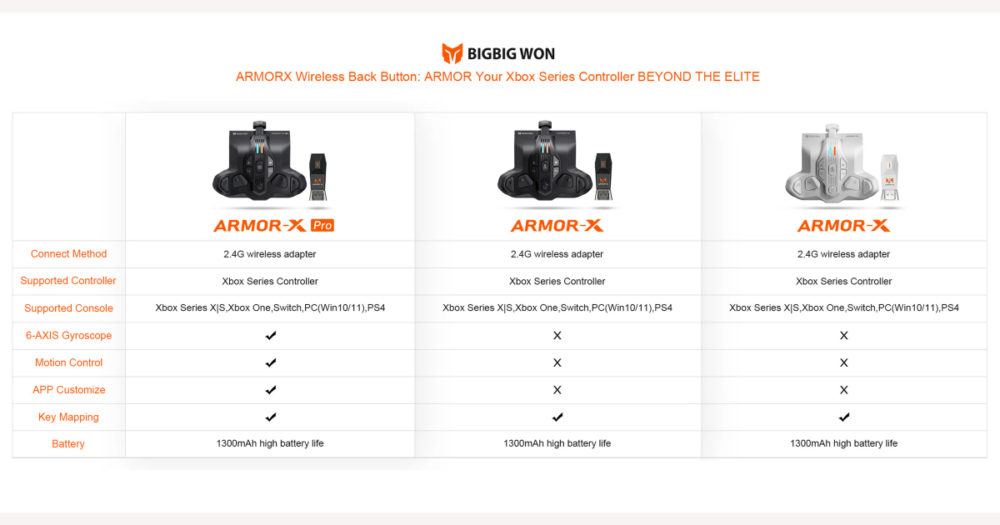
Armor X Pro is best understood as a rear back button or paddle attachment that mounts onto an Xbox Series X|S controller, not as a standalone controller or a new console. It clips onto the back of the pad and turns your existing Xbox Series X|S controller into something closer to a “pro” layout with extra inputs and, in some versions, motion controls.
Typical descriptions highlight four extra rear paddles or back buttons you can map to other functions, a wireless attachment that communicates with your console or PC, and optional gyro or motion control so tilting the controller can be used for aiming or other actions. Many versions also mention a companion configuration app for Android and iOS that lets you remap buttons, adjust gyro sensitivity, and save different profiles, usually supported by an official FAQ and app download links from the brand.
Those are objective patterns in how the Armor X Pro series is presented: a back button module for Xbox Series X|S controllers, extra paddles, motion/gyro capability on certain models, wireless operation, and app‑based configuration. Claims that it “fixes everything wrong with the Xbox controller” or that it is the undisputed “king” of back button adapters are marketing or community hype, not hard specs. DHgate listings may reuse the Armor X Pro name or phrases like “Pro” and “Pro 2” while offering slightly different hardware or feature sets, so you should treat these typical specs as a starting point, not a guarantee. For each listing, check which controller it’s designed for, how many back buttons it actually has, whether motion controls are included, and whether app support is clearly documented before assuming it matches the full feature set described here.
Compatibility patterns: which systems and controllers Armor X Pro is made for
Armor X Pro is advertised first and foremost as an attachment for Xbox Series X|S controllers, and official wording repeatedly stresses “for Xbox Series X|S controller ONLY (NOT for Xbox One Controller).” That means the default assumption is that older Xbox One pads are unsupported, and you should only treat a listing as safe for an Xbox One controller if it clearly and specifically says so in both the title and the description.
Some tutorials and community posts mention using Armor X Pro with “Xbox” in general or even with Switch, PS4, and PC. Those broader claims typically rely on particular hardware or firmware variants in the Armor X Pro series (such as Pro versus Pro 2) and sometimes on extra adapters or modes, not on every device sold under the same name. On DHgate, you can’t assume that every “Armor X Pro” or “ArmorX Pro series” listing includes the same multi‑platform support.
If you already use an Xbox Series X|S controller, you’re in the safest compatibility zone, but you should still double‑check the listing text and photos to be sure the attachment is shown on the correct generation of pad and explicitly mentions Series X|S support. For Xbox One, Switch, PS4, and PC, treat vague labels like “for Xbox,” “universal,” or “multi‑platform” as caution flags; they’re a signal to slow down, plan to use the later checklist and verification steps, and only proceed when the listing spells out controller models and platform modes in enough detail that you’d be comfortable paying a bit more for that clarity.
Key features that drive value: paddles, motion, wireless, and more
| Feature dimension | What it affects | When it justifies a higher price | When a simpler option is acceptable |
|---|---|---|---|
| Back button count and placement | How many extra inputs you get and how naturally your fingers reach them during play. | When you rely on multiple rear inputs for competitive shooters or complex games and want four well‑placed paddles that reduce missed presses. | When two paddles in a clear layout cover your main shortcuts and you don’t need extra macros or layered inputs. |
| Motion/gyro support | Whether you can use tilt or gyro aiming for finer control, especially in shooters or action games. | When motion aiming is central to how you like to play and the listing clearly confirms gyro support with mode descriptions or demos. | When you rarely use motion controls and prefer to save money on a non‑gyro variant that is honest about lacking this feature. |
| Wireless versus wired behavior | How the adapter connects to your console or PC and any impact on convenience or perceived latency. | When you value a clean setup without cables, play at a distance from the screen, and the listing describes stable wireless modes and low‑latency behavior. | When you sit close to your system, don’t mind a cable, or mainly care about reliable input over wireless flexibility. |
| Configuration options (app versus on‑device) | How easily you can remap buttons, adjust sensitivity, and switch profiles across games. | When you frequently tweak layouts, want per‑game profiles, and the listing mentions an Android/iOS companion app with profile management. | When you only map paddles once or twice and simple on‑device programming with a few buttons is enough. |
| Build materials, weight, and noise level | Comfort over long sessions, how heavy the controller feels, and how loud the paddles sound when clicked. | When you play for hours at a time, care about a solid feel, and want quieter, more premium‑feeling buttons even if that costs more. | When you mainly care that it works, can tolerate firmer or noisier clicks, and prefer a lighter, cheaper shell from a clearly described listing. |
| Bundled extras (cases, controller packs, cables) | Total package value and how much setup gear you get out of the box. | When you need a carrying case, extra controller skins, or included cables and see them clearly itemised, making the higher price worthwhile. | When you already own the accessories you need and would rather choose a bare‑bones adapter at a lower price from an equally well‑rated seller. |
Different Armor X Pro listings on DHgate won’t all offer the same mix of paddles, motion controls, wireless modes, apps, and extras. Before you start comparing prices, decide which dimensions actually matter for how you play: if you lean on gyro aiming and custom profiles for competitive shooters, I would prioritise clear motion support and a configuration app over cosmetic bundles. If you mostly want a couple of convenient back buttons for occasional use, a simpler, well‑explained attachment can be perfectly fine.
A higher price makes more sense when a listing lines up closely with your top priorities and explains those features in concrete terms, backed by photos or demos, from a seller with solid reviews. A cheaper option can still be sensible when it is upfront about limited features, still covers your core needs, and comes from a seller whose feedback and policies look just as trustworthy as the pricier alternatives. These feature preferences, together with compatibility needs, will guide a DHgate‑specific checklist for judging individual listings more systematically.
DHgate buyer checklist for Armor X Pro listings
- Search with specific terms such as “Armor X Pro Xbox Series X|S back button adapter” rather than broad “pro controller” queries that mix in unrelated products.
- Read the full title and description for clear platform and controller model information, looking for explicit mentions of Xbox Series X|S support and any exclusion notes like “NOT for Xbox One.”
- Inspect every photo to confirm you’re seeing a rear paddle adapter that clips onto an Xbox Series X|S controller, not a generic gamepad or unrelated accessory, and note any visible version labels such as “Pro 2.”
- Check seller ratings, completed order counts, and buyer reviews, giving priority to listings with customer photos that show the adapter mounted on a real controller.
- Calculate total cost by combining the item price with shipping fees and any taxes or surcharges, then compare this landed cost only across listings that already look solid on compatibility and seller reputation.
- Review DHgate and seller return, dispute, and refund terms so you know how straightforward it would be to get your money back if the adapter turns out to be incompatible or misrepresented.
- If a listing fails several of these checks—unclear compatibility, weak photos, poor reviews, or shaky policies—I would skip it even when it’s cheaper and instead choose a slightly higher‑priced option that passes most or all of the checklist.
Common DHgate pitfalls and red flags for Armor X Pro
- Be wary of listings that use the Armor X Pro name in the title but show what looks like a generic controller or unrelated accessory in the photos, as this can signal a different product altogether.
- Treat descriptions that read like copy‑pasted brand marketing yet omit key compatibility points such as “Series X|S only,” motion limitations, or app requirements as incomplete and risky.
- Don’t rely on broad phrases like “for Xbox” or “multi‑platform” when the text doesn’t spell out which controller generations are supported or how other systems are connected.
- Treat prices that sit far below the general range—especially from new or poorly rated sellers with few buyer photos—as warning signs, not automatic bargains.
- If a listing is vague about bundled extras or contradicts itself about cases, controller packs, or cables, assume you may receive only part of the bundle and consider choosing a clearer, even slightly more expensive, offer instead.
- Overall, I would rather you pay a modest premium for a listing with consistent photos, specific compatibility wording, and a proven seller history than chase a “steal” that ticks multiple red‑flag boxes.
Balancing price with compatibility, extras, and seller trust
On DHgate, the “best price” for an Armor X Pro isn’t just the lowest number on the screen; it’s the lowest total cost among listings that you already know are compatible with your Xbox Series X|S controller, match the features you care about, and come from sellers with credible ratings and policies. Once you’ve used the earlier checklist to filter out vague or risky offers, compare a short list of solid candidates on five points: total landed price (item, shipping, and any taxes), how clearly the listing spells out compatibility and key features, which accessories are included, estimated shipping speed and reliability signals, and the seller’s rating history and review detail.
When you line up several listings that look plausible, treat clarity and trust as at least as important as price. A listing that costs a little more but clearly confirms Series X|S support, shows genuine-looking photos, describes motion and app features in a way that matches what you’ve learned, and comes from a seller with long, detailed review history is usually the safer choice than a cheaper option that leaves questions open. Personally, I would pay a modest premium for that kind of confidence and only favor the cheaper listing when its compatibility wording, feature description, photos, shipping terms, and seller track record truly match what the more expensive competitor offers. If two listings are equally strong on all those non-price factors, then choosing the lower total cost is a reasonable way to decide.
What you can and can’t verify about Armor X Pro listings
Not every claim in a DHgate Armor X Pro listing has to be taken on faith. Platform and controller compatibility language can be compared with the brand’s own product pages and FAQ, especially statements that stress “for Xbox Series X|S controller only” or exclude older pads. Claimed motion or gyro support can be checked against official tutorials and reputable demonstrations that show how the feature works in practice. You can also confirm that a configuration app exists, which platforms it supports (such as Android or iOS), and its core functions by looking at the brand’s app download information and documentation. When a DHgate description lines up with these independent references, that’s a useful sanity check that the seller is at least describing the product in a way that matches known information.
Other aspects are much harder to verify in advance. How the adapter feels in your hand, how loud the paddles click, whether the surface finish feels cheap or premium, and how well the device holds up over months of use can vary from batch to batch and are influenced by personal preference. Even multiple reviews can’t fully guarantee that a particular marketplace listing will deliver the same experience. I treat listings whose key compatibility, motion, and app claims match external information as more trustworthy, but I still assume some uncertainty around comfort and durability and avoid being overly confident based on a few comments or one video. That mindset helps you use verification where it’s possible without forgetting the limits of what any listing can prove ahead of time.
Quick answers to common Armor X Pro and DHgate questions
Should I search for “controller” or “adapter” when looking for Armor X Pro on DHgate?
Treat Armor X Pro as an attachment, not a generic controller. Use focused terms like “Armor X Pro back button attachment” or “Armor X Pro Xbox Series X|S adapter” rather than broad phrases like “pro controller,” which pull in unrelated gamepads and make it harder to spot the correct rear paddle module for your Series X|S pad.
What do names like “ArmorX Pro series” or “Pro 2” usually mean in listings?
Labels such as “ArmorX Pro series,” “Pro,” or “Pro 2” typically signal different generations or variants with their own mix of features, bundles, or platform modes. Treat each one as a distinct product: read the listing carefully to see which controller models it targets, how many paddles it has, whether motion/gyro is included, and what accessories or app support come with that exact version instead of assuming all “Pro” models are identical.
What should I do if a DHgate listing still doesn’t clearly confirm compatibility with my controller or system?
Start by messaging the seller with a specific question that names your exact controller model and platform, and ask them to confirm support in writing. If their answer is vague, contradictory, or slow, I would move on to a different listing that spells out compatibility and features more clearly. If you can’t find any DHgate offer that gives you that clarity, consider buying through official channels or more transparent retailers rather than gambling on a small discount for a device that might not work with your setup.