
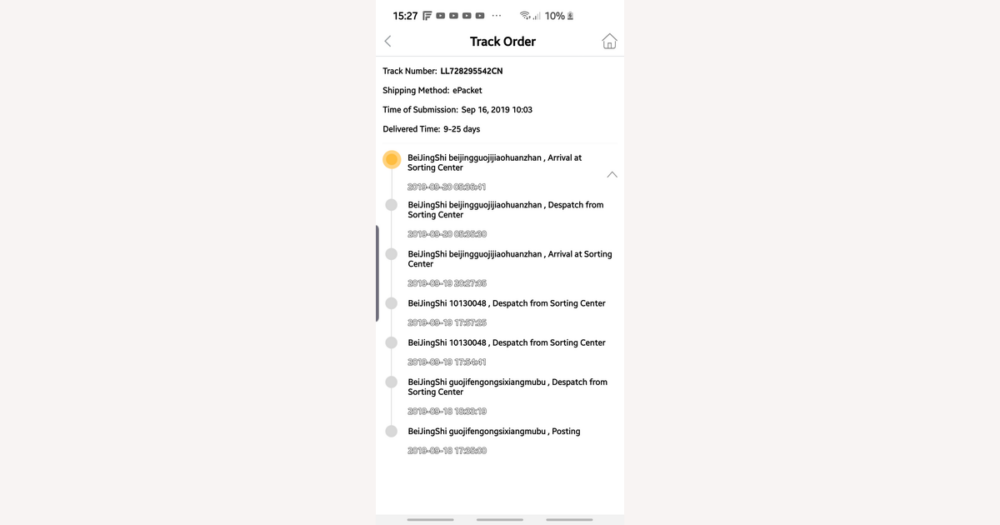
If your DHgate economy shipment seems to pause at the same tracking line for days, it usually reflects how low‑cost international shipping works rather than a package that has vanished. Economy services tend to move in bulk through slower routes and national postal networks, with only a handful of scans along the way, so you’ll often see fewer updates and longer gaps than with express—acceptable if you’re prioritizing price over precision, but a reason to choose a faster option next time if you need close tracking.
How DHgate’s economy shipping typically behaves and why tracking looks sparse
On DHgate, economy shipping usually uses the cheapest international routes, where many small orders are bundled together, moved in bulk across borders, and then handed over to national postal services or low-cost regional carriers. That kind of network keeps prices down but also means your package is scanned less often, spends longer at each hub, and may follow an indirect path before it reaches your country.
Because the parcel might only be scanned when it leaves the seller, when it departs an export facility, when it clears customs, and when your local postal service receives it, tracking for DHgate economy orders often shows only a few milestone updates with multi‑day or even multi‑week gaps in between. Those quiet periods are usually a side effect of consolidation and postal handling, not an automatic sign that the shipment is lost or that DHgate or the seller has done something wrong.
Express couriers, by contrast, run on tighter schedules and maintain their own end‑to‑end networks, so they tend to scan more frequently and give more precise delivery estimates. If you know you need detailed tracking and regular updates on future DHgate purchases, it is more realistic to choose a faster, more traceable shipping option at checkout than to expect economy tracking to behave like express.
Step-by-step: how to track an economy shipment using DHgate and carrier tools
- Sign in to your DHgate account and go to the area that lists your recent orders or purchases.
- Find the order you are worried about and open its order details or a similarly named page that shows more information about that purchase.
- Scroll to the logistics or shipping section and note the tracking number plus any carrier or postal service name shown there.
- Review the tracking panel inside DHgate to see the current status and how it lines up with the seller’s promised handling time and the estimated delivery window.
- Copy the tracking number and paste it into the official tracking page for the named carrier, or for a likely postal service from the shipping country if no carrier is listed.
- Paste the same tracking number into one or more reputable universal parcel‑tracking tools so they can combine events from different carrier systems for you.
- Revisit DHgate, the carrier’s site, and any universal trackers every few days, since each system may update at different times and together they can give a fuller picture of a patchy economy shipment.
This short video walkthrough shows a DHgate buyer opening their account, selecting an order, and scrolling to the logistics section to find the tracking number and current shipping status for an economy shipment.
Typical economy shipping milestones and normal tracking gaps
For most DHgate economy shipments, tracking follows a simple set of milestones even if the exact wording differs by carrier. Early messages often look like “shipment information received,” “order information received,” or “accepted by seller,” which mainly confirm that the seller has created a shipment rather than that the package is moving. It’s common for the status to sit here for a few days while the seller prepares the parcel and hands it to the first carrier.
Once the package is with a logistics partner, you may see events such as “departed origin facility,” “left sorting center,” or a broad “in transit” update. Economy services rarely show every handoff, so there can be multi‑day gaps—and sometimes longer—between these scans, especially while the parcel is travelling within the origin country or waiting to be consolidated with other shipments.
During the international leg, tracking often stays on a generic “in transit” or “departed from export office” message for an extended period. It is common for low‑cost international shipments to show no new events for several days to one or even three weeks while they move between countries and wait for customs processing. That silence alone does not mean the parcel is lost.
After the package reaches your country, you may see “arrived at destination country,” “processed through customs,” or “arrival at inbound office of exchange.” Some economy services only show one or two of these destination scans, and a parcel can clear customs and be handed to a local postal carrier without every step appearing in the tracking history.
In the final phase, the tracking may update to “handed to local carrier,” “out for delivery,” and then “delivered.” On some routes, the last few movements only appear on the local postal site rather than in DHgate’s panel. For DHgate buyers, the key is to see that events progress roughly from seller acceptance to origin departure, international transit, arrival in the destination country, and final delivery over time; long quiet periods between those broad stages are a normal feature of economy shipping, not an automatic sign that something has gone wrong.
Economy tracking limitations and warning signs to watch for
- Start with the normal limitations: economy tracking often shows only a handful of scans, with long gaps between them. It’s common for numbers to update mainly in the origin country or only again when the parcel reaches your country, and for there to be a delay of several days before a new tracking number appears in carrier systems after the seller ships.
- It is also typical for brief “blind spots” when a package is moving between facilities or carriers—such as between the export hub and the airline, or between the destination airport and the local postal service—with no visible events even though the parcel is still in transit.
- Treat the situation more cautiously when a tracking number shows no events at all after many days, especially if the seller’s stated handling time has already passed. A status that stays stuck on “shipment information received” or a similar pre‑shipment message long past the promised ship date is a reason to investigate.
- Be wary if the tracking events clearly reference a different origin or destination than your DHgate order—for example, a route between two countries that does not match your shipping address—or if the number only works on a single obscure tracking site that shows inconsistent or nonsensical data.
- These kinds of patterns are not automatic proof of fraud or non‑shipment, but they are strong signals to review your DHgate order details, compare the timing with the seller’s promises, and contact the seller for clarification instead of either panicking at the first quiet period or ignoring obvious inconsistencies.
What to do on DHgate when economy tracking looks wrong or stalled
- Go back to the original DHgate listing and check the seller’s stated handling or dispatch time and the estimated delivery window for the economy shipping method you chose.
- Open your order details on DHgate and review the current order status, noting whether it still shows as awaiting shipment or already marked as shipped, and check the buyer or order protection countdown so you know how much time is left.
- Compare the seller’s promised handling and delivery timeframe with the tracking history you can see on DHgate and carrier sites to decide whether the apparent delay is still within expectations or clearly beyond them.
- Use DHgate’s messaging system to contact the seller politely, asking for confirmation of the actual shipment date, the carrier or postal service used, and any updated or alternate tracking number if the current one looks inactive.
- Keep an eye on both tracking updates and the seller’s replies; if tracking remains inactive or inconsistent and the seller does not provide helpful clarification as the protection period runs down, prepare to use DHgate’s dispute or refund option before protection expires.
- Check DHgate’s current help center for up-to-date buyer protection rules, dispute steps, and deadline details. Open a dispute only after you have reviewed the listing, watched the protection countdown, and tried reasonable communication with the seller.
Using DHgate’s tracking view versus carrier and universal tools
| Tracking tool | Main strengths | Common limitations | Best use case for DHgate economy shipping |
|---|---|---|---|
| DHgate tracking page | Shows a simple, centralized status tied directly to your order, including whether the seller has marked it as shipped and how much buyer protection time remains. | May show fewer details than carrier logs and can lag slightly behind carrier or postal scans, especially for low-cost economy services. | Use as your baseline view to confirm order status and protection timing, and to see at a glance whether the shipment is progressing within the promised window. |
| Carrier or postal website | Usually provides the most authoritative scan history once the tracking number is recognized in that network, with time-stamped events for each facility and movement. | Some economy numbers only track within certain postal systems or up to borders, and a number may not appear until the carrier has processed it, leaving an initial quiet period. | Use for the most detailed movement information when your DHgate tracking shows the carrier name or format, and to verify that events match your order’s origin and destination route. |
| Universal parcel tracker | Aggregates data from multiple carriers and postal services, which is convenient when a shipment passes through several networks or you are unsure which carrier site to check first. | Coverage can vary by tool and carrier, and universal trackers cannot add scans that carriers never record or overcome the inherent limits of economy services. | Use alongside DHgate and carrier sites to quickly see whether any network has recognized your number yet and to follow complex routes that involve more than one carrier. |
Checklist: is your economy tracking number actually working?
- Check the tracking number’s format. Most postal and courier numbers follow a recognizable pattern of length and mix of letters and digits; a string that looks completely random or far shorter/longer than typical codes can be a warning sign.
- Try the number on the carrier or postal site named in DHgate. If no carrier is listed, start with a major postal site for the order’s origin country and see whether the number is recognized there.
- Enter the number into at least one reputable universal parcel-tracking tool to see whether any carrier system returns events for it, especially if you’re unsure which carrier is handling the shipment.
- Compare any tracking events with your DHgate order details. Origins, destinations, and regions should make sense for your route, and timestamps should fall after the order date and progress in a logical sequence.
- Watch whether the status moves past “shipment information received” or similar initial messages within several days. Some economy services are slow, but a number that never progresses at all over time deserves closer attention.
- Remember that these checks are only heuristics. They cannot guarantee that a tracking number is genuine or that a package will arrive, but they help separate an obviously nonfunctional number from one that is simply slow to update in economy networks.
Economy tracking timing and buyer protection: quick answers to common questions
How long does it usually take for a DHgate economy tracking number to show the first event?
For many DHgate economy shipments, the first real scan appears within a few days after the seller hands the parcel to a carrier, but it can take up to one or even two weeks on slower routes or during busy seasons. That timing depends on the seller’s actual dispatch date, the carrier, and customs, so treat these as typical ranges rather than guarantees and always compare them with the handling time and delivery window shown on your DHgate order page.
What should I do if my DHgate economy tracking number never shows any movement?
Start by checking your DHgate order details to confirm whether the order is marked as shipped and to see the seller’s promised handling time and estimated delivery window. If the tracking still shows only a pre‑shipment message or no events well after the handling time has passed, contact the seller through DHgate to confirm the shipment date, carrier, and whether there is an updated number. If there is still no movement and your buyer protection clock is getting shorter, follow DHgate’s current guidance in the help center and consider opening a dispute before protection expires.
Can DHgate economy tracking stop updating after the border or destination scan but the package still arrive?
Yes. Some economy services only update tracking up to a certain point—such as leaving the origin country, reaching the destination country, or being handed to a local postal service. After that, the parcel can continue moving and be delivered even if no new events appear online. In that situation, keep an eye on your local mail or parcel pickup locations and, where possible, check the same tracking number on the destination country’s postal website to see whether there are extra scans not shown on DHgate.
What should I do if DHgate buyer protection is close to expiring but tracking for my economy shipment is still sparse?
Check the buyer protection deadline and any extension options directly on your DHgate order page, and review the latest tracking on both DHgate and carrier or postal sites. If there are still no reassuring updates and the seller cannot give a clear explanation, do not wait for protection to run out; follow the current instructions in DHgate’s help center on how to request an extension if available or open a dispute or refund request before the countdown ends. Buyer protection rules can change, so rely on the wording and dates shown in your order and in DHgate’s latest policy pages when deciding your next step.