
Shopify apps connect a store to CRMs, marketing platforms, marketplaces, shipping tools, and accounting systems by syncing products, orders, customers, payments, and tracking data through APIs and plugins. For DHgate buyers, it’s important to know that these seller‑configured integrations run in the background, while DHgate itself still governs the official order record, payment status, shipping information, and dispute handling for any order placed on its platform.
How Shopify apps usually connect different e‑commerce tools
On a Shopify store, most connections to other e‑commerce tools happen through apps that the merchant installs and configures. Those apps use Shopify’s APIs in the background, or act as embedded plugins, to talk to external services such as CRMs, email platforms, marketplaces, shipping tools, and accounting systems. Once the merchant grants access, data moves automatically between systems without the buyer needing to trigger anything manually.
The data that typically syncs includes product catalogs and stock levels, order creation and status updates, customer contact details, payment status, and shipping information like labels and tracking numbers. Some integrations also pass refund and cancellation events into external systems so the seller’s records stay aligned across channels.
These flows are designed and controlled by the seller: they decide which apps to install, which fields to sync, and how often updates run. Buyers usually don’t see the integration settings themselves—they experience the results as accurate stock information, timely order processing, and consistent messages across channels.
When a seller also operates on DHgate, their Shopify‑based integrations mainly shape internal business management, such as inventory and customer records, while DHgate continues to provide the official order record, payment status, shipping options, tracking display, and dispute process for any order placed on DHgate.
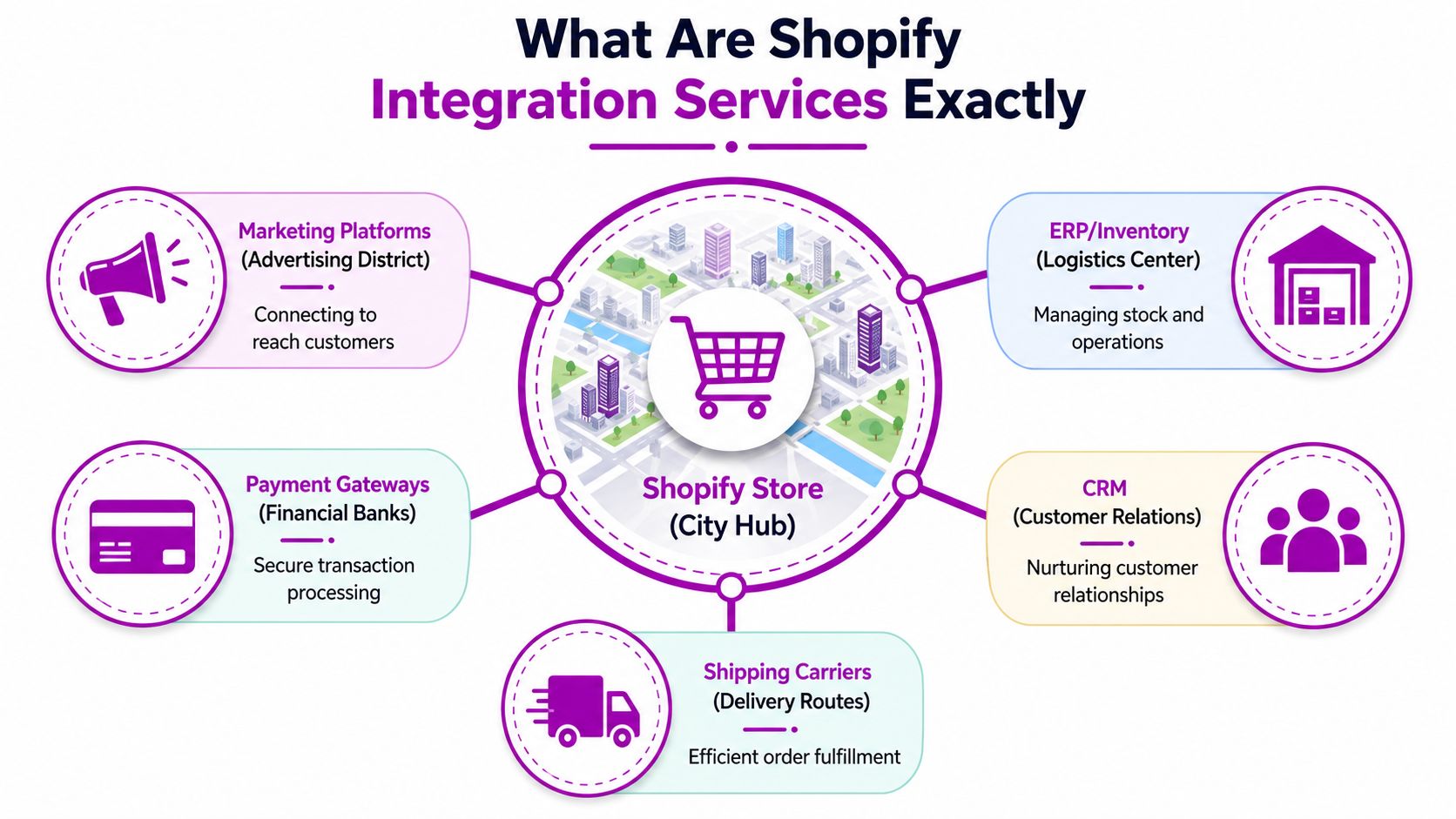
A Shopify store often sits at the center of a network of tools—CRM, marketing, marketplaces, shipping, and accounting—with apps and APIs moving orders, inventory, and tracking data between them.
How Shopify’s flexible integrations differ from DHgate’s centralized processes
On Shopify, each merchant assembles their own stack of apps and integrations. One store might plug in multiple payment gateways, connect shipping carriers through separate apps, and sync inventory or customer data to external ERPs and CRMs. Another store could use a simpler configuration. Because these tools are seller‑selected and seller‑configured, the way orders are routed and processed can vary significantly from one Shopify store to another.
On DHgate, the buyer‑facing flow is standardized by the platform. You place your order through DHgate’s checkout, payments are processed or held according to DHgate’s rules, shipping options and logistics solutions are presented in the DHgate interface, and tracking details appear in your DHgate order page. After‑sales issues and disputes are handled through DHgate’s own ticketing and buyer protection processes.
For DHgate orders, key parts of the journey are therefore anchored on DHgate itself: the official order record, payment status, tracking view, and dispute tickets all live inside your DHgate account. Behind the scenes, a seller may still use their own warehouse system, CRM, or multi‑channel inventory sync (which might involve Shopify apps) to manage stock and communicate with customers across different channels, but those tools do not replace DHgate’s records or policies.
If the same seller runs a Shopify store alongside their DHgate presence, I care most about which system actually governs your order. For any purchase made on DHgate, DHgate should be treated as the authoritative source for what was ordered, how it was paid, how it is shipped, and how problems are resolved, while Shopify integrations remain part of the seller’s back‑office environment and other sales channels.
| Buyer journey step | Shopify (seller-controlled apps) | DHgate (platform-controlled flow) |
|---|---|---|
| Order creation | Each store decides how orders are created and where they go—apps may push orders into ERPs, CRMs, or other channels based on the merchant’s configuration. | Orders are created directly in DHgate’s system when you place them on the platform, and the DHgate order record is the reference for what you purchased. |
| Payment handling | Merchants choose payment gateways and related apps, so payment routing and settlement can differ between stores. | DHgate defines which payment methods you can use and how funds are processed or held under its buyer protection rules. |
| Shipping and logistics | Apps connect the store to chosen carriers or fulfillment providers; shipping workflows depend on how the merchant sets up those integrations. | DHgate presents available shipping options and logistics solutions in the order workflow, and these are tied to the platform’s own logistics arrangements. |
| Tracking display | Stores may send tracking via email, customer portals, or third‑party apps, and formats vary with each setup. | DHgate shows tracking numbers and updates within your order page; this is the official tracking view for DHgate orders, even if the number also appears in other systems. |
| Refunds and returns | Refund and return handling can involve apps, custom policies, or external systems chosen by the merchant. | Refunds, returns, and after‑sales issues for DHgate orders follow DHgate’s processes and buyer protection rules through its dispute and service channels. |
| Disputes and problem resolution | Issue handling may rely on the merchant’s own tools (support desk apps, CRM, or custom workflows) and policies for their Shopify store. | Disputes and order problems for DHgate purchases are managed through DHgate’s dispute system and customer service, which govern timelines and outcomes regardless of the seller’s external integrations. |
Key types of Shopify integrations and what they mean for DHgate buyers
Instead of thinking about individual Shopify apps, it’s more helpful to group them by what they do: managing relationships (CRM), sending marketing messages, syncing listings across marketplaces, handling shipping and fulfillment, keeping the books, or automating workflows between systems. Each category tends to move a specific type of data—like customer records, order events, or shipping statuses—between Shopify and other tools.
When a seller also operates on DHgate, these integrations mostly shape how organized their back office is: how quickly they see your order, whether messages are consistent, and how smoothly stock and tracking updates are managed. For a DHgate buyer, though, DHgate’s own order page, payment records, and dispute tools still define what was bought, how it was paid, and how problems are handled, regardless of how many Shopify-connected systems the seller uses behind the scenes.
- CRM integrations: These tools sync customer profiles, order history, and communication preferences from Shopify into a CRM system, and sometimes pull updates back. If a seller connects DHgate data as well, they may see your DHgate purchases alongside other channels, which can mean more informed support and fewer mistakes about who you are. Even so, the official details of a DHgate order—items, price, timelines, and protections—remain whatever appears in DHgate’s own order record.
- Email and marketing tools: Shopify-connected email and marketing platforms use order and behavior data to send newsletters, promotions, and automated follow-ups. You might receive messages that refer to a brand’s Shopify site or general offers, but for DHgate purchases, the authoritative notifications and all binding messages about your order are the ones delivered through DHgate’s messaging and notification system.
- Marketplace and sales-channel integrations: Sellers often plug Shopify into other marketplaces and social commerce channels so listings, prices, and inventory stay in sync. This can help reduce overselling and keep pricing consistent if the same item appears on DHgate and elsewhere. However, each platform still runs its own order and dispute flow, so a DHgate purchase follows DHgate’s rules even if the product also exists in the seller’s Shopify catalog or other channels.
- Shipping and fulfillment tools: Apps that connect Shopify to carriers, label printers, and third-party warehouses generate tracking numbers and update shipping events automatically. A DHgate tracking number may originate from one of these services, but the version shown inside your DHgate order page is the reference you should rely on; external tracking portals are useful for detail, not for changing the shipping promises DHgate shows for your order.
- Accounting and finance integrations: Bookkeeping, invoicing, and tax tools pull in Shopify order and payout data so the seller can keep accurate financial records. These integrations help the seller stay organized but do not alter how DHgate collects your payment, holds funds under its buyer protection, or issues refunds according to DHgate’s policies.
- Automation tools and middleware: Workflow connectors and middleware platforms pass events between systems—for example, creating a CRM ticket when a new Shopify order arrives, or updating inventory in an ERP. Used well, they reduce manual errors and speed up responses; used poorly, they can create mismatches between systems. For DHgate buyers, these tools explain why a seller may seem very coordinated across channels, but they do not override DHgate’s own order, payment, tracking, or dispute processes.
- Taken together, these categories show why a seller might appear organized and responsive across multiple stores and marketplaces. Still, when you place an order on DHgate, that order is governed by DHgate’s records and rules, with Shopify integrations operating strictly in the seller’s background systems.
From seller setup to buyer checks: how integration workflows translate to your order
- Install or connect the integration: The seller chooses a Shopify app or connects an external service that promises to sync data such as orders, inventory, customers, or shipping information, and adds it to their Shopify store.
- Authorize data access: They grant the app permissions or enter API keys so it can read and, when necessary, write data like order details, stock levels, and customer records across systems.
- Map data fields: The seller decides which fields line up—for example, how Shopify’s order number, customer name, and address map into CRM fields, or how specific shipping statuses should translate between tools.
- Set sync direction and timing: They configure whether data flows one way or both ways (for example, Shopify to CRM only vs. two-way inventory sync) and whether updates happen in real time or on a schedule.
- Test and monitor: Before relying on the setup, the seller runs test orders, checks logs or reports, and confirms that orders, statuses, and inventory updates appear correctly in each connected system, then continues to monitor for errors once the integration is live.
From a DHgate buyer’s perspective, all of this complexity sits in the background. For your protection, the DHgate order page and DHgate order ID should be treated as the official home of any purchase you make on the platform, even if the seller mentions another system or a different order number in messages.
I would always confirm that payment went through DHgate’s own checkout rather than an external link; once you leave DHgate to pay elsewhere, it becomes harder to rely on DHgate’s buyer protection if something goes wrong. If a seller pushes you toward off-platform payment, I would be cautious or walk away.
When tracking is involved, check that the tracking number shown in your DHgate order opens a legitimate carrier site and that its status matches any external link or screenshot the seller shares. If they differ, I would trust DHgate’s order record first and ask the seller to explain the discrepancy rather than silently following an outside link.
If a seller keeps referring to a different store or system—such as a Shopify order number—it’s reasonable to ask which system they consider the system of record for your purchase and to insist that DHgate remains that system for any order placed on DHgate. I personally prefer simpler, clearly documented setups; complex multi-app stacks are acceptable only when the seller can spell out where each step happens and which platform is responsible for payment, shipping, and dispute handling for your DHgate order.
Where cross-platform setups can go wrong (and why DHgate should stay your anchor)
Quick checks to confirm your order is safe and synced
- Match order references: Check that the DHgate order ID and status on your account are the same ones the seller mentions in messages or any screenshots from other systems.
- Confirm payment stayed on DHgate: Verify that you paid through DHgate’s checkout and that the payment appears correctly in your DHgate order or payment history if you want DHgate’s protections.
- Validate tracking details: Test the tracking number shown on DHgate on the carrier’s website and make sure it matches any external tracking link or code the seller sends you.
- Watch shipping progress in DHgate: Keep an eye on the shipping timeline inside DHgate—if scans don’t update for a while or contradict external updates, follow up with the seller through DHgate messages.
- Keep key communication on‑platform: Put important changes—address updates, product adjustments, promised refunds or reshipments—into DHgate’s messaging, even if you also receive emails from other systems.
- For sellers: Periodically run test orders to confirm that DHgate orders flow correctly into your CRM, fulfillment, or accounting tools, and fix any broken mappings so internal integrations never override DHgate’s official records for those transactions.
FAQ: Shopify integrations, DHgate orders, and who’s responsible
Can a seller’s Shopify integration change how I pay for a DHgate order?
No. For DHgate orders, payment should go through DHgate’s own checkout using the methods shown there. If a seller sends you a separate Shopify checkout link, bank details, or any off‑platform payment request, that is a different transaction and may not be covered by DHgate’s buyer protection. If you want DHgate’s protections, pay only inside DHgate for DHgate listings.
Which tracking information should I trust if the seller’s link is different from what I see on DHgate?
Treat the tracking shown on your DHgate order page as the reference, especially for disputes. You can still open the seller’s external link to understand more detail, but if the two differ, rely on the tracking and timelines in DHgate and ask the seller—through DHgate messages—to explain the mismatch. Quote your DHgate order ID so everyone is talking about the same shipment.
If the seller says they refunded me in their own system, do I still need a refund recorded in DHgate?
Yes. For a DHgate order, the refund that matters for buyer protection is the one recorded on DHgate. A seller might also process a refund in their Shopify or accounting system for their own records, but you should check that DHgate shows the refund in your order details or balance. If it doesn’t, open a dispute or contact DHgate support rather than relying only on screenshots from another system.
Who should I contact if there is a problem with my order—Shopify, the seller, or DHgate?
Shopify is a platform for merchants’ own stores and does not manage DHgate orders. If you placed the order on DHgate, contact the seller via DHgate messages first and, if needed, use DHgate’s dispute or support channels. Those DHgate tools govern timelines, refunds, and resolutions for DHgate transactions, even if the seller also runs a Shopify store or uses Shopify‑based apps in the background.
Can Shopify apps change DHgate’s buyer protection terms or order rules?
No. Shopify apps can automate the seller’s internal work—like syncing orders to a CRM or printing labels—but they do not override DHgate’s payment rules, buyer protection terms, or dispute procedures. For any order placed on DHgate, DHgate’s policies, timelines, and evidence requirements apply regardless of what external tools the seller uses.
Why does it matter to know which system governs each part of the order journey?
Because responsibility and protection follow the system that officially records your order, payment, and shipment. When you know that DHgate governs those elements for DHgate orders, you can treat cross‑platform emails, tracking links, or references to other order numbers as additional context—not as replacements for DHgate’s records. That clarity helps you decide where to pay, where to check status, and where to open a dispute so you stay covered by DHgate’s rules.