
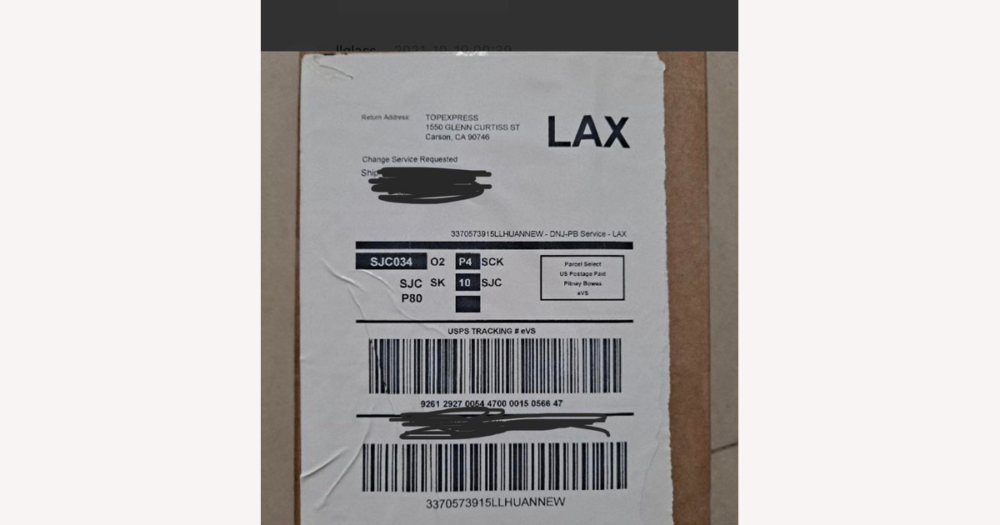
On DHgate, the order and payment happen on the platform, but the shipping label is usually created elsewhere. DHgate records the buyer’s details, the shipping option you promised, and later the tracking number and status; your chosen carrier or logistics tool generates the label and moves the parcel. Understanding that boundary is the first step toward a reliable workflow that keeps your shipments and DHgate’s tracking information in sync.
Understand DHgate’s role in shipping labels
For most DHgate orders, you remain responsible for choosing how to ship the parcel and for creating the shipping label through your own logistics setup—typically by using a postal service, courier, or freight/logistics partner’s website, or a general label-making tool that plugs into those carriers.
In practical terms, DHgate holds the order record—including the buyer’s name, shipping address, agreed shipping option, and later the tracking number and shipment status. Your chosen carrier or tool generates the label and physically transports the package.
Because of this split, do not assume every DHgate order has a hidden or universal label-print button. An advanced workflow, such as automatic label generation through a fulfillment system, would depend on separate integrations or services you set up outside DHgate, not on a standard DHgate feature.
Follow the step‑by‑step flow from order to printed label
- Review the DHgate order details, confirming the item, quantity, buyer name, full shipping address, and the shipping option you promised on the listing or at checkout.
- Choose a carrier and a specific service level—such as standard, express, or tracked—that matches what you offered on DHgate and suits the destination, parcel size, and delivery timeframe.
- Using the carrier’s website or your label tool, enter your sender information and the recipient details exactly as shown in the DHgate order. Then generate the label file, which is often provided as a printable PDF.
- Print the label on appropriate paper or label stock and attach it securely to the parcel so the address and any barcodes are clearly visible and unlikely to be smudged or torn in transit.
- Arrange drop-off or pickup with your chosen carrier according to their procedures so the parcel enters the shipping network and can start moving toward the buyer.
- Copy the tracking number issued by the carrier into the relevant shipping or tracking field in the DHgate order, and update the order’s shipping status so the buyer can see that the item has been dispatched and start tracking it.
- Before you finalize everything, double-check that the address, service level, and tracking number in your carrier or label tool match the information shown in the DHgate order, reducing the risk of delivery issues and later disputes.
Include the right information on every shipping label
- Sender name and full return address, so the carrier can return undeliverable parcels and the buyer can see who shipped the order if something goes wrong.
- Recipient name and complete shipping address exactly as shown in the DHgate order, reducing the risk of delivery failures and “wrong address” complaints during buyer protection reviews.
- Carrier name and service type (for example, standard, express, or tracked), which helps set realistic expectations about delivery speed and whether the shipment will show detailed tracking for the DHgate buyer.
- A clear tracking number and its barcode, which the carrier scans to update their system and which you then use to populate the tracking field in the DHgate order so the buyer can follow shipment progress.
- Accurate customs information for cross‑border shipments, including a truthful description of contents, declared value, and any required HS codes, helping to prevent delays, returns, or unexpected charges that might trigger complaints or refund requests.
- A layout that meets your carrier’s label requirements while faithfully reflecting the DHgate order details, rather than any special DHgate format, so both the carrier and DHgate can rely on the same information if a dispute needs to be assessed.
Connect your labels and tracking to DHgate order statuses
The physical label you create stays on the parcel and is read by the carrier’s systems for routing and delivery, while DHgate acts as the place where you record shipment progress and share key tracking details with the buyer.
Once you have a tracking number from your carrier or label tool, you enter it into the order’s shipping or tracking area on DHgate and move the order to a shipped or equivalent status, so the buyer sees that the item has been dispatched and can access the tracking information from their order detail page.
DHgate typically shows high‑level milestones—such as when the order is marked shipped and the latest tracking update—whereas the more granular events, like individual facility scans or attempted deliveries, live in the carrier’s tracking system and are reached via the tracking number or link you provided.
Keeping DHgate updated with accurate tracking numbers and timely status changes helps buyers follow the parcel within the platform and gives you clearer documentation if the buyer raises a non‑receipt complaint or dispute later on.
Because DHgate’s interface can change over time, the exact menu names or buttons may differ, so you should look within the order page for the shipping or tracking section and follow DHgate’s current guidance on where to input tracking details and update shipment status.
Avoid label mistakes that lead to delivery problems or disputes
Run a quick checklist before dispatching each parcel
- Match the buyer’s name and full shipping address on the label to the DHgate order, including apartment, suite, building, or other secondary address details.
- Confirm that your own sender or return address on the label is correct and current so any undeliverable parcel can be returned to you without confusion.
- Check that the shipping service level shown on the label—such as standard, tracked, or express—matches what you offered in the DHgate listing or at checkout.
- If you use an internal reference, such as an order ID on the package or in your system, make sure it corresponds to the correct DHgate order so you can quickly cross‑reference if an issue arises.
- Enter the tracking number issued by the carrier into the appropriate tracking or shipping field for the correct DHgate order, and double‑check that you have not attached it to a different order.
- Run this checklist before each dispatch so you catch address, service, or tracking mismatches early, reducing the risk of shipping‑related complaints or disputes on DHgate.
Choose a label creation method that fits your workflow
- Use carrier websites (postal services or couriers) to create labels by entering your sender and buyer details, choosing the service level you sold on DHgate, then downloading or printing the label for that specific order.
- Rely on general label‑maker tools if you manage multiple sales channels or want consistent branding, so you can design, save, and reuse label templates while still pulling buyer details from your DHgate orders.
- Set up logistics or fulfillment integrations only if your existing services support them, letting those tools batch orders, generate labels, and sync tracking—but treat this as an optional add‑on rather than a built‑in DHgate feature.
- For every method, meet DHgate’s core requirement by actually dispatching the parcel, using a valid trackable service, and entering the correct tracking number and shipping status into the DHgate order record.
- Choose an approach suited to your business size, volume, and region: simple carrier tools for low volume and more automated solutions for higher volume. Make sure it supports the shipping timeframes and promises you advertise on DHgate while keeping order records accurate.
FAQ: Edge cases and platform‑specific uncertainties
Can DHgate generate shipping labels for me through built-in or integrated shipping tools?
DHgate’s core role is to host the order and payment, not to act as a universal label printer or carrier. In most cases you create labels through your own carrier or logistics tools and then add the tracking number and shipping status to the DHgate order. Some sellers may have access to logistics or fulfillment services that can generate labels using DHgate order data, but any such integration is optional and may not be available to every account or region. Because these features and partnerships can change, you should treat them as a bonus rather than a default and confirm the latest options in DHgate’s seller help center or by contacting DHgate support.
What should I do if a buyer asks to change their shipping address after I already printed the label?
Once a label is printed, the safest approach is usually not to ship with the old address. Before dispatch, you can cancel or adjust the shipment according to your carrier’s rules, create a new label with the updated address, and then update the tracking number and any notes in the DHgate order so they match the new shipment. If the buyer requests an address change after the parcel has already been handed to the carrier, your options depend on the carrier’s terms—some allow rerouting for a fee, others do not. In any case, keep all communication with the buyer inside DHgate messaging, follow DHgate’s current guidance on address changes and buyer protection, and be prepared to cooperate with any dispute or refund process if delivery fails.
How should I handle a DHgate order if the parcel is undeliverable and gets returned by the carrier?
If a parcel comes back as undeliverable, first follow your carrier’s explanation and instructions so you understand why it was returned and whether a new shipment needs a corrected label or additional customs information. Update the tracking or status in the DHgate order to show that the parcel was returned, and inform the buyer through DHgate messaging about what happened. You and the buyer can then agree—within DHgate’s rules—whether you will resend the order (with a new label and tracking) or issue a refund. Because outcomes in these cases depend on DHgate’s current dispute and refund policies, check the latest seller documentation or contact DHgate support if you are unsure which option complies with the platform’s buyer protection framework.
How much do DHgate’s rules and my carrier’s terms affect what happens in these edge cases?
DHgate and your carrier each control part of the process: the carrier decides what is possible with address changes, rerouting, and handling returned parcels, while DHgate sets the order, dispute, and refund rules that apply on the platform. For any unusual situation—integrated label tools, post‑label address changes, or undeliverable returns—you should follow your carrier’s procedures for the shipment itself and keep the DHgate order record accurate with updated tracking and status. At the same time, rely on DHgate’s official help center, seller policies, or customer service for up‑to‑date guidance on how those events are treated under buyer protection, rather than assuming that past cases or other platforms’ rules will apply in the same way.