
Connecting shop management software to DHgate gives your team a way to sync listings, inventory, orders and shipping data across channels, but DHgate itself still controls buyer payments, customs handling and dispute rules. This guide explains how those integrations typically move data between DHgate and external tools, what stays managed directly in DHgate, and which checks you should make before relying on automation so your orders, payments, tracking and after‑sales workflows remain consistent and protected.
What “integration” between DHgate and shop management software actually means
On DHgate, integration with shop management software means creating a structured, usually API‑based connection between your DHgate seller account and an external system. That software can read key DHgate data—such as listings, SKUs and variants, inventory levels, prices, orders, shipping details and some high‑level after‑sales markers—and, within set permissions, push updates like stock changes, price adjustments, and shipment or tracking information back into DHgate.
The shop management tool itself is always an external system: it helps you coordinate data and workflows, but it does not replace DHgate or override DHgate’s rules. DHgate still controls buyer payments, how and when funds are settled to you, the platform’s logistics and shipping frameworks, customs notices and buyer protection conditions, and the formal processes for disputes and refunds. When you connect a tool, you are allowing it to work with DHgate’s data under those existing rules, not to rewrite them.
Most marketplace integrations follow familiar patterns—API calls that pull new orders on a schedule, sync jobs that update inventory across channels, or webhooks that notify the external system when something changes. Those general mechanisms are likely to apply to DHgate connectors too, but the exact behavior is tool‑ and DHgate‑specific. Which fields are supported, how often data syncs, and how much detail you see for after‑sales events (for example, whether you only see a dispute flag or more context) should be confirmed in DHgate help resources or in the documentation for your chosen software before you rely on automation.
I would personally choose an integration that I can understand and monitor end to end, even if it is simpler, rather than chase maximum automation that is difficult to audit. For many DHgate sellers, especially those without strong in‑house technical support, it is safer to start with a straightforward, well‑documented connector, watch how listings, orders, payments and shipping statuses move, and only add complexity once the basic flows are clearly under control. If your organization has a dedicated technical team and needs to coordinate DHgate with multiple marketplaces at scale, using a more complex integration layer can make sense—but even then, everyone responsible for operations should understand the core DHgate data flows and the boundaries where DHgate’s platform rules always remain in charge.
How orders, logistics and tracking data move between DHgate and your management software
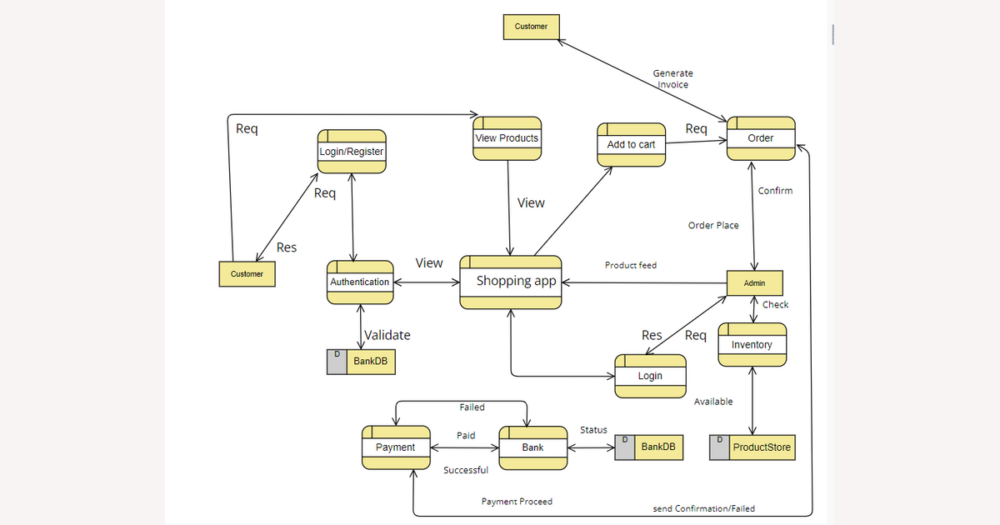
Once your DHgate account is connected to shop management software, the integration usually follows a predictable order and logistics flow. A buyer places an order on DHgate, creating the official DHgate order record with items, quantities, buyer details, the chosen shipping option and the platform’s order status. The connector then imports that order into your management software, where your team can see the products, shipping address, contact details and selected shipping method alongside orders from other marketplaces.
From there, staff typically use the external tool or connected shipping services to manage fulfillment: confirming that the order will be shipped, choosing or confirming the carrier, generating labels and entering or capturing tracking numbers. These fulfillment actions are based on the DHgate order data that was imported, but the key confirmations need to flow back to DHgate so the buyer’s view stays accurate. In a normal setup, the management software or shipping service sends tracking numbers and shipment confirmations back through the integration; DHgate then updates the order’s shipment and, eventually, delivery statuses so the buyer sees progress on their DHgate order page.
Shipping options and addresses are often visible inside the external software, which makes it easier to plan and batch shipments, but the underlying DHgate shipping settings and any core logistics rules—such as which methods you offer, how fees are calculated and how DHgate displays shipping promises—still have to be configured on DHgate itself. Details like how partial shipments are represented, which carriers are supported in a specific connector, and exactly how “shipped” versus “delivered” or other granular statuses map between the systems can vary by tool and by DHgate’s own interfaces, so those points should be checked directly in DHgate help or in the integration’s documentation before you assume a particular behavior.
If DHgate and your external software ever disagree about an order’s shipping or tracking state—for example, the tool shows an order as shipped but DHgate still shows it as unshipped or missing a tracking number—you should treat DHgate’s order and logistics screens as the source of truth and investigate the mismatch. That approach keeps you aligned with the platform’s buyer protection rules and avoids promising a shipment or delivery status to customers that DHgate does not yet recognize.
The main data streams between DHgate and shop management tools
| Data category | What usually syncs via integration | Who can change it | What still requires DHgate actions |
|---|---|---|---|
| Products (titles, attributes, images) | DHgate listings are typically pulled into the management tool so you can view titles, SKUs, variants and basic attributes; some connectors also push back edits like title tweaks or description updates. | Product content is usually edited either in DHgate or in the management tool and then synced, but DHgate remains the authority on what is accepted or displayed. | Creating new listings, complying with DHgate listing rules, handling category approvals and resolving listing violations all happen in DHgate and must follow DHgate’s policies. |
| Inventory (available and reserved stock) | Available quantities for each SKU are often synced both ways: DHgate stock levels are imported, and when you adjust stock in the management tool it pushes updates back so DHgate shows the new availability. | You can change inventory in either DHgate or the external tool, depending on how you choose to work; the connector applies those changes to the other side. | Preventing overselling still depends on DHgate’s view of stock. For critical SKUs, you should confirm that DHgate’s inventory matches your actual stock and verify the connector’s sync frequency and behavior in documentation. |
| Pricing (base prices and discounts) | Base prices and, where supported, simple promotions are commonly synced from DHgate into the tool; some integrations allow price updates to be pushed back so DHgate shows new prices. | You can usually propose price changes from the management software or directly in DHgate, but DHgate controls whether those prices are accepted and when buyers see them. | Managing currency, platform fees, compliance with DHgate pricing rules and participation in DHgate promotions or campaigns still require actions in DHgate and alignment with its policies. |
| Orders (items, buyer details, order states) | New DHgate orders are pulled into the management tool with line items, quantities, buyer and shipping details, plus DHgate’s order state (for example, awaiting payment, awaiting shipment, completed, cancelled). | Operational updates like marking an order ready to ship or adding internal tags are usually done in the management tool, while core order state changes originate from DHgate events and rules. | Cancelling orders under DHgate’s rules, checking official order status, and following any platform-required steps (such as responding to buyer messages or disputes) still need to be handled in DHgate interfaces according to DHgate policies. |
| Payment statuses | Payment-related flags (such as paid, payment pending, or cancelled) and order totals are typically read from DHgate into the management software so you can prioritize work, but they are not controlled by the external tool. | Only DHgate and its payment partners actually move money and update payment states; the management software can display those states but does not process DHgate payments. | Confirming that an order is officially paid, understanding payout timing and handling any payment verification steps all require checking DHgate’s order and payment screens and, when needed, DHgate help resources. |
| Logistics and tracking | Shipping methods chosen on DHgate, buyer addresses and tracking numbers usually sync in both directions: DHgate order data is imported for fulfillment, and shipment confirmations and tracking numbers are pushed back so DHgate can update shipment and delivery statuses. | You often book shipments and generate labels in the management tool or a linked shipping service, while DHgate consumes the resulting tracking data to update the buyer’s order view. | Configuring which shipping options you offer, understanding DHgate shipping promises, handling carrier limitations and clarifying how customs-related logistics are shown to buyers remain DHgate responsibilities that you manage in DHgate and verify in its help materials. |
| After-sales markers (disputes, returns, refunds) | Some integrations display high-level signals such as “dispute opened”, “refund in progress” or “order closed”, usually pulled from DHgate to help you prioritize problem orders alongside other marketplaces. | You may add internal notes or tags in the management software, but DHgate controls the underlying dispute, return and refund states and moves them through its own processes. | Opening or responding to disputes, arranging returns under DHgate’s terms, issuing or agreeing to refunds and understanding any customs or buyer protection implications all require actions in DHgate’s dispute or order-management areas. Treat any after-sales markers in your tool as indicators, and verify exact behavior and available fields for your connector in DHgate and tool documentation. |
How DHgate payments and settlements appear in external software
Connecting shop management software to DHgate does not change how DHgate collects buyer payments, applies its own buyer protection or escrow-like rules, or settles funds to you. DHgate and its payment partners still handle card charges or other payment methods, hold and release funds under DHgate’s conditions, and pay out according to DHgate’s policies.
What the integration usually adds is visibility: your management software reads DHgate payment-related indicators—such as whether an order is considered paid, still pending, or cancelled—along with order totals and sometimes currency information. Those flags help you prioritize which orders can move to picking and packing, but they mirror DHgate’s view rather than replacing it.
In practical terms, DHgate controls the actual flow of money, while the external tool acts as a dashboard and organizer. You might filter orders by “paid” in the management software, but the underlying decision that an order is paid is still made by DHgate; the integration does not turn your management platform into a payment gateway or wallet for DHgate orders.
Because of that, it is risky to assume that connecting software will route DHgate money through the tool, speed up payouts on its own, or weaken DHgate’s payment security and buyer protections. The exact names and timing of payment statuses—such as when an order moves from pending to paid or from paid to eligible for withdrawal—are specific to DHgate and should be confirmed in official DHgate help resources rather than guessed from a generic integration screen.
To keep financial data reliable, I would routinely compare the payment status and amount shown for a sample of orders in DHgate’s order list with what appears in the management platform. If there is any mismatch, I would treat DHgate as the source of truth, investigate the connector’s settings or documentation, and only adjust workflows once I understand how and when payment statuses sync.
Customs information and after-sales workflows: what stays on DHgate
Typical steps to configure and test a DHgate–shop management integration
- Confirm your DHgate seller account is active and stable: you can log in, your basic listings are live, shipping methods are configured and payment settings work correctly when you manage orders directly in DHgate.
- In your shop management software, locate and enable the DHgate connector or integration module that matches your seller account type, making sure you select the correct region or DHgate environment if there are options.
- Authorize the connection by signing in with your DHgate credentials and granting only the necessary permissions for products, inventory, orders and other required data scopes so the software can read and update DHgate where appropriate.
- Map your DHgate catalog to the software’s product records, checking that SKUs, variants and options line up and confirming how inventory quantities will sync between systems so that stock changes in one place appear correctly in the other.
- Import a small set of recent DHgate orders into the management software and verify that order lines, buyer details, payment status indicators and shipping addresses all match what you see in DHgate’s order list.
- Run one or more controlled test shipments using the external tool or a connected shipping service, then confirm that tracking numbers and shipment statuses flow back and display correctly in DHgate so buyers can see accurate tracking on their order pages.
- Check whether your integration shows any dispute or refund statuses; if it does, compare those indicators with DHgate’s dispute or after-sales center to see how closely they align and where you still need to consult DHgate directly.
- Delay enabling aggressive automation—such as auto-accepting orders, auto-creating shipments or bulk catalog updates—until these basic sync tests are stable and you understand how quickly and reliably data moves between DHgate and your software.
- Document any gaps or edge cases you notice, such as fields that do not sync or scenarios the connector does not cover, and consult DHgate help or your tool’s documentation to clarify those limits before you expand automation or change your day-to-day workflows.
Key integration risks and how to monitor DHgate against your software
- Watch for inventory mismatches between DHgate and your shop management software, because slow or failed stock updates can cause overselling on DHgate or unexpected stockouts elsewhere. For key SKUs, regularly compare available quantities in DHgate’s product list with the figures in your external tool and investigate any differences before you accept more orders.
- Check that every new DHgate order appears promptly in your management software, since delayed or missing imports can leave orders unprocessed, cancelled or late, damaging ratings and buyer trust. A simple habit is to review the most recent orders in DHgate each day and confirm that the same set shows up in the external system’s order view.
- Monitor tracking updates back to DHgate so buyers see accurate shipment progress, because missing or incorrect tracking can lead to more inquiries, disputes or refund requests. After you create shipments in your external tool or shipping service, spot‑check a few recent orders directly on DHgate to ensure tracking numbers and status changes are visible on the buyer’s order page.
- Be cautious when reading dispute or refund information in your management software, as many tools simplify or only partially mirror DHgate’s dispute statuses. Before agreeing to a refund, escalating a case or telling a buyer an issue is resolved, open the order’s dispute or after‑sales details in DHgate itself to confirm the official status and any deadlines.
- Treat DHgate as the source of truth for orders, payments, shipping statuses and disputes; use your shop management software as an operational aid, not the final authority. When in doubt, trust what DHgate shows on its order, logistics and dispute pages rather than what an integration label suggests.
- Create a simple reconciliation routine—daily for busy accounts, weekly for smaller ones—that includes reviewing recent orders, inventory changes, shipments and dispute cases in DHgate and comparing them with your management software. Document any recurring mismatches and adjust settings, workflows or automation rules so issues are caught early instead of during a customer complaint.
DHgate-only management vs. integrated multi-channel workflows
| Approach | How you manage DHgate tasks | Benefits | Tradeoffs and risks | Best suited for |
|---|---|---|---|---|
| DHgate-only management | You handle listings, price and inventory changes, order processing, shipping creation, tracking updates and disputes directly in DHgate’s seller interfaces. Staff log into DHgate to publish products, confirm payments, print or upload shipping details, enter tracking numbers and manage disputes or returns in the DHgate after‑sales center. | Simpler setup with fewer technical dependencies and no extra integration layer to maintain. All official statuses and actions live in one place, so it’s easier to understand what DHgate considers shipped, delivered, disputed or refunded. | Less convenient if you sell on multiple marketplaces, because you manage each channel separately. Manual work can grow as order volume increases, and it’s harder to centralize reporting or apply consistent inventory rules across platforms. | Sellers who mainly or exclusively sell on DHgate, smaller teams without dedicated technical support, or anyone who prefers a straightforward, platform‑centric workflow over complex integrations. |
| Integrated multi-channel workflow | You use shop management software as a central hub: DHgate and other marketplaces feed listings and orders into it, you adjust catalog and inventory there, and the hub pushes changes and shipping details back to DHgate so its order pages show tracking and status updates. | Centralized catalog, inventory and order handling across DHgate and other marketplaces. Staff can work from a single dashboard, and at higher volumes this can improve efficiency and make multi‑channel scaling more manageable. | Adds configuration overhead and another point of failure between DHgate and buyers. If sync breaks, you may see wrong stock levels, missing orders or outdated tracking, and you must monitor both the integration and DHgate carefully. Troubleshooting often requires technical support. | Larger operations or teams selling across several marketplaces that have strong technical support and are willing to accept extra complexity and monitoring in exchange for centralization and multi‑channel efficiency. I would only choose this route for DHgate when that support and scale are in place; otherwise I prefer a simpler, well‑understood setup. |
What to verify in DHgate and your tool’s documentation before changing workflows
- Before changing any workflows, keep a DHgate help page and your tool’s documentation open. Treat what you read here as a general pattern, and only rely on behaviors that both DHgate and the software’s docs explicitly confirm.
- Confirm that DHgate officially supports the connector or shop management software you plan to use, including any requirements on seller status, account region or specific API access.
- Check which data categories the integration actually syncs for DHgate—products and variants, inventory, prices, orders, payment-status flags, logistics and tracking details, customs-related notes, and dispute or refund markers—and whether each category syncs from DHgate to the tool, from the tool to DHgate, or both ways.
- Review how often each type of data syncs (for example, near real-time, every few minutes, hourly or daily), and whether documentation warns about delays or throttling that could leave DHgate and your tool out of sync for short periods.
- Look for any stated limitations around multi-warehouse inventory, partial shipments, manual order edits, cancellations, exchanges or complex returns, so you know which scenarios must still be handled directly in DHgate.
- Understand how the integration represents DHgate-specific states such as buyer protection milestones, payout or settlement conditions, dispute phases and refund outcomes, and note where the external tool simplifies or aggregates these statuses compared with DHgate’s own screens.
- Test changes in small batches before shifting your whole operation: run a limited set of products and orders through the integration, then compare DHgate’s order, payment, shipping and dispute views with your tool’s data to confirm they match before enabling broader automation.
FAQ: Do integrations change DHgate’s buyer protection or dispute rules?
If I connect shop management software to DHgate, could that change buyer protection, payment security or how disputes and refunds work on DHgate?
No. Connecting shop management software to DHgate does not change DHgate’s buyer protection, payment security or the formal rules for disputes and refunds. DHgate and its payment partners still control how payments are collected, held and released, and DHgate’s own policies continue to govern when buyers can open disputes, how returns are handled and when refunds are issued.
What the integration changes is how you see and organize information. Your software can display DHgate order states, payment flags and high-level dispute or refund statuses so you can prioritize work, but those indicators mirror DHgate’s view instead of replacing it. Any action that affects buyer protection or payouts—such as opening or responding to a dispute, approving a refund or confirming a return—should still be done through DHgate’s official order and dispute pages. Use your external tool as a dashboard and workflow aid, and treat DHgate as the authority whenever there is a difference between the two.