
DHgate is a multi‑seller marketplace, not a single show host or store. That means you’re buying from individual sellers inside DHgate’s rules and systems, with the platform providing tools for listing, payment and dispute handling rather than running each sale as a show. Once you see that difference, it becomes much easier to know what to check on DHgate around payment, shipping, customs and after‑sales before you place an order.
Show sales platforms vs. marketplaces: the core structural differences
Show sales platforms are built around shows or events where a host presents a limited set of products in a tightly controlled format, often with time‑bound offers and a single, store‑like point of contact for the buyer.
By contrast, DHgate is a general online marketplace. It hosts persistent listings from many independent sellers that you can search and browse at any time. DHgate provides the infrastructure—accounts, listings, search tools, payment channels, rules and dispute mechanisms—but it is not usually the merchant of record for individual items.
When you buy on DHgate, you are dealing with individual sellers: you read their listings, ask questions, and message them directly about order details. DHgate sets the framework and tools those sellers must use, but it does not script each sale as a show or guarantee that all listings follow one unified presentation style.
In many show sales environments, the platform or host decides which products appear in the show, how they are described, and when you can buy, and payment may feel like it goes to that single host or store. On DHgate, thousands of sellers can independently create listings and set prices within DHgate’s rules, and multiple sellers’ items can sit in the same cart at checkout.
Some show platforms may act as the direct merchant, while others operate more like intermediaries, so their exact setup varies. What stays consistent for DHgate is that it works as a multi‑seller marketplace: understanding that you are buying from individual sellers within DHgate’s system is the key to making sense of later checks around payment, shipping, customs and after‑sales support.
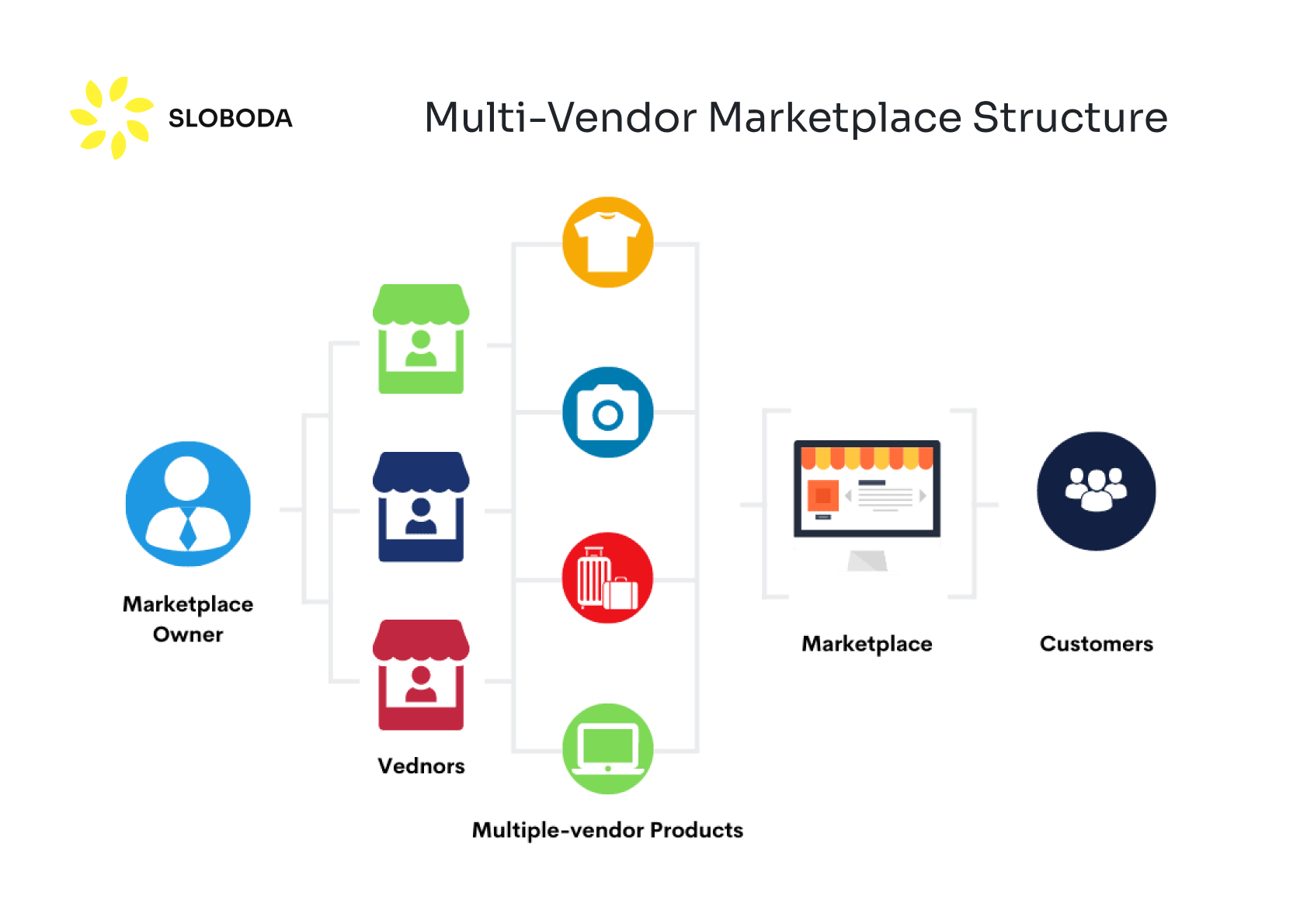
Diagram showing how a buyer connects either to a single show host or store on one side, and to multiple independent sellers through a marketplace framework on the other, illustrating DHgate’s multi‑seller structure.
How payments work on DHgate (and what to check before paying)
At checkout on DHgate, you choose items from one or more independent sellers and pay through DHgate’s supported payment channels in the platform’s own interface. DHgate processes your payment and applies its rules for when funds are released to sellers, often linked to order or delivery milestones, but the underlying transaction is still between you and each seller under DHgate’s marketplace policies.
That feels different from many show sales experiences, where you may click to buy directly during a live presentation and feel like you are paying a single host or store running the show. On DHgate, your cart can include products from several sellers at once, and payment is routed through DHgate’s system rather than through any off‑platform method a seller might mention.
Specific details such as how long DHgate holds funds or exactly when money is released to the seller depend on DHgate’s current payment and buyer protection policies, so you should always rely on the latest information in DHgate’s official help and policy pages rather than assumptions from other platforms.
- Check DHgate’s current payment options in the platform interface or help center so you know which cards, wallets or other methods are officially supported before you order.
- Make sure the checkout and payment pages are on DHgate’s official domain and show a secure connection indicator before entering any card or wallet details.
- Decline any request from a seller to pay off the platform via bank transfer, messaging app or external site, as this usually bypasses DHgate’s payment handling and buyer protections.
- After paying, confirm that your order and payment confirmations appear inside your DHgate account so any later dispute can rely on a recorded transaction in DHgate’s system.
Shipping, logistics and tracking on DHgate
On DHgate, shipping and logistics are part of each seller’s responsibilities. Individual sellers choose which carriers they use, which shipping methods they offer (for example, standard or express), and how long they expect delivery to take. They are also responsible for packaging your order and handing it over to the carrier.
DHgate’s role is to provide the framework: the site shows available shipping options and estimated delivery times on the listing and at checkout, and later surfaces tracking numbers and status updates in your account once the seller has shipped. You see logistics information through DHgate’s interface, but the underlying fulfillment work is done by the seller and the carrier.
That differs from some show sales setups, where a single host, brand or store may manage warehousing and shipping for everything sold during a show. In those cases, shipping rules, carriers and packaging may feel very standardized because they are controlled by one operation rather than many independent sellers.
On DHgate, you should not assume that all sellers share identical shipping speeds, packaging standards or carriers just because they sell on the same site. Conditions can vary significantly from listing to listing, so you need to read each offer carefully and treat logistics as seller‑specific within DHgate’s marketplace framework.
- Before ordering, read the shipping section on each DHgate listing to see which methods are available, what they cost, and the seller’s estimated delivery window.
- Check whether the chosen shipping method includes tracking, and which carrier will handle your parcel, so you know how and where you’ll be able to follow its progress.
- Confirm that the seller ships to your exact destination and note any geographic restrictions, special conditions or longer delivery times for certain regions.
- After purchase, open your DHgate order details, find the tracking number and carrier information provided by the seller, and save these so you can monitor shipment and have them ready if you need shipping support.
Customs, duties and cross‑border rules on DHgate
- For many cross‑border DHgate orders, the seller prepares the export parcel, declares the contents and ships it out; when the package reaches your country, local customs may decide whether duties, VAT or other import fees are due, and you may have to pay those before delivery.
- Some show sales or domestic live‑selling platforms reduce customs complexity by restricting sales to one country or bundling taxes into the price or shipping service. DHgate is a global marketplace with many independent sellers, so tax and customs handling can differ from listing to listing and destination to destination.
- Read the shipping and customs notes on each DHgate listing carefully to see whether duties or taxes are mentioned, excluded, or flagged as the buyer’s responsibility.
- If a seller claims to use tax‑inclusive or prepaid‑duty shipping, treat that as a starting point, not a guarantee: verify any platform‑level program or wording against DHgate’s current help center or policy pages so you understand how it works today.
- Look up your own country’s import rules for the product category you plan to buy so you have a rough idea of possible customs or tax charges and can factor them into your total expected cost before ordering.
- Keep in mind that customs decisions depend on local regulations, how the shipment is declared and any current DHgate policies or programs. No guide can promise that specific duties will or will not apply to a particular order, so always confirm the latest information directly from DHgate and your local authorities if you’re unsure.
After‑sales support and dispute handling on DHgate
When something goes wrong with a DHgate order—arriving damaged, not as described, or failing quickly—the first step is usually to contact the seller through DHgate’s messaging tools. You explain the issue, share photos or videos if needed, and ask for a solution such as a refund, replacement, or partial compensation. The conversation is between you and the individual seller, because they own the inventory and set their own after‑sales terms within DHgate’s rules.
If the seller does not respond, refuses to resolve the problem, or you cannot reach an agreement, you can escalate the case through DHgate’s dispute or resolution channels. Those tools apply DHgate’s platform‑wide policies, review the information from both sides, and may mediate or decide the outcome based on the evidence you provide and the current rules.
This structure differs from many show sales or single‑store environments, where after‑sales support is handled by one unified customer service team, often with a single return and refund policy that applies to all items sold in a show. On DHgate, each seller can have different return windows, conditions and warranty practices, so you cannot assume that every order will be treated the same way.
Because policies can vary between sellers, it is important to treat DHgate as a marketplace rather than a single store: expect seller‑specific after‑sales terms, and rely on DHgate’s dispute tools as a second layer of protection when direct communication with the seller does not resolve the issue.
- Before ordering, read the listing’s return, refund and warranty information carefully, paying attention to conditions like time limits, required product state, and any exclusions.
- Review DHgate’s current buyer protection and dispute policy pages so you understand the platform‑wide statements, including how disputes are handled and any general time limits for opening a case.
- Keep clear records: save order details, listing screenshots that show the original description, and all messages with the seller, along with photos or videos that document any problems with the product.
- Check DHgate’s latest rules for deadlines to open a dispute after delivery and avoid waiting until those windows are close or have already passed; confirm exact timelines in DHgate’s help center or policy documents rather than relying on guesses or third‑party reports.
Avoiding common misunderstandings when using DHgate
Your DHgate pre‑order checklist
- Seller and listing checks: review seller ratings, feedback history and how long they have been active; read the product description carefully, including photos, specifications and sizing; and check answered questions or send a message to gauge responsiveness.
- Payment checks: confirm the chosen payment method is supported by DHgate; ensure the payment page is on DHgate’s official site with a secure connection; refuse any request to pay off‑platform; and verify that order and payment confirmations appear in the DHgate account.
- Shipping and tracking checks: read the listing’s shipping section for methods, costs and delivery estimates; confirm tracking is included and note the carrier; and check for any destination restrictions or special conditions.
- Customs and total cost checks: look for customs or tax notes in the listing; consider your country’s import rules for the product; add an estimated customs amount to the item and shipping cost to judge whether the order still makes sense.
- After‑sales and protection checks: read the listing’s return and warranty terms; skim DHgate’s buyer protection and dispute policies for key time limits; and plan to keep order documentation and evidence in case a dispute is needed later.
FAQ: DHgate, live shows and hybrid formats
Does DHgate have live or show‑style selling?
Many ecommerce marketplaces experiment with live or video‑based selling tools, and DHgate may introduce or update such features over time. Because availability and formats can change, rely on what you see inside DHgate itself—look for live, video or show icons, and any explanations in the platform interface or help center—rather than assuming that specific live features are always present or work in a particular way.
If a seller uses live or show tools on DHgate, does that change my buyer protections?
In general, your protections depend on whether the transaction goes through DHgate’s official checkout and stays inside its policies, not on whether the sale is presented via live video or static listings. As long as you pay through DHgate’s supported payment channels, keep the order and payment records in your DHgate account, and follow platform rules, the usual marketplace protections around payment handling, shipping responsibility and dispute processes still apply.
How do I know who I’m buying from in a live or show context on DHgate?
Treat any live or show presentation as a doorway to a normal marketplace transaction. Before buying, open the linked listing, check the seller’s store name and profile, review ratings and feedback, and read the full product description and terms. Even in a live context, you are dealing with an independent seller operating under DHgate’s rules, so you should confirm their identity and conditions just as you would with a static listing.
What should I focus on if DHgate offers live or hybrid formats?
Regardless of whether you see a live show, video or standard listing, the key is to understand who is responsible for listing accuracy, payment, shipping, customs and after‑sales, and to keep the transaction inside DHgate’s framework. Use DHgate’s current policy pages and in‑platform labels to confirm how payment is processed, how shipping and customs are handled, and how disputes work, and avoid moving payments or key agreements to off‑platform channels where DHgate’s protections may not apply.