
Most distributing firms and small ecommerce businesses don’t run on a single “magic” system. You usually need a core inventory or ERP platform as your record of stock and orders, plus add‑on tools that connect to marketplaces, 3PL warehouses, and shipping carriers. The right mix depends on how big you are, how many channels you sell through, and how complex your product and warehouse setup is.
For a small Canadian distributor or online seller, a realistic stack might be: an inventory app that syncs with your storefronts, a basic accounting system, and shipping/warehouse tools that plug into the inventory app. As you add B2B accounts, multiple warehouses, or custom pricing, you might step up to a distribution‑focused ERP and a separate warehouse management system (WMS).
How Modern Distribution Platforms Manage Inventory and Orders
“Distribution platform” is vague in marketing language, but operationally these tools all touch the same core workflows:
- Purchasing and replenishment. You create purchase orders to your suppliers, receive goods, and update stock. Distribution ERP tools are built to manage these inventory logistics operations across B2B, B2C, and direct‑to‑consumer channels.
- Stock management. Products sit in one or more locations (bins, shelves, third‑party warehouses). Systems track quantities, lot/serial numbers when needed, and costs.
- Order capture. Orders arrive via ecommerce storefronts, EDI, sales reps, or marketplace feeds. Some platforms ingest all orders; others rely on integrations from external sales channels.
- Picking, packing, and shipping. Warehouse staff use paper pick lists or barcode scanners, guided by a WMS or ERP. Shipments then get labels and tracking numbers through carrier or shipping tools.
- Data flow across tools. The key decision for you is which system is the “source of truth” for inventory and orders, and how everything else feeds into it.
Broadly:
- An ERP often owns inventory, purchasing, sales orders, and financials in one place.
- A WMS specializes in what happens inside the warehouse — locations, picks, put‑aways, cycle counts.
- Inventory apps focus on multi‑channel stock and simple purchasing, tying into ecommerce platforms.
Wholesale distribution platforms from vendors such as those highlighted by Ultra Consultants and Infor aim to optimize inventory and pricing, speed fulfillment, and protect margins as you add services like light assembly or kitting. The question isn’t whether those features exist; it’s whether your business is complex enough to need them.
Types of Inventory and Order Tools Distributors Use
For Canadian buyers and small distributors, the main tool categories look like this.
1. Distribution ERP (the big integrated option)
Distribution‑focused ERP suites organize multiple modules in one platform: inventory, purchasing, sales orders, customer pricing, and financials. Pages like NBS’s distribution ERP overview describe cloud solutions built specifically for wholesale trade through B2B, B2C, and DTC channels.
You’d typically use ERP to:
- Maintain a single product and price file per customer group
- Create quotes, sales orders, and invoices for B2B accounts
- Plan purchasing and transfers across warehouses
- Tie inventory directly into your general ledger
Pros: strong control as you scale, fewer spreadsheets, consistent data. Cons: higher cost, more implementation effort, and overkill if you only run one sales channel with simple pricing.
2. Warehouse Management Systems (WMS)
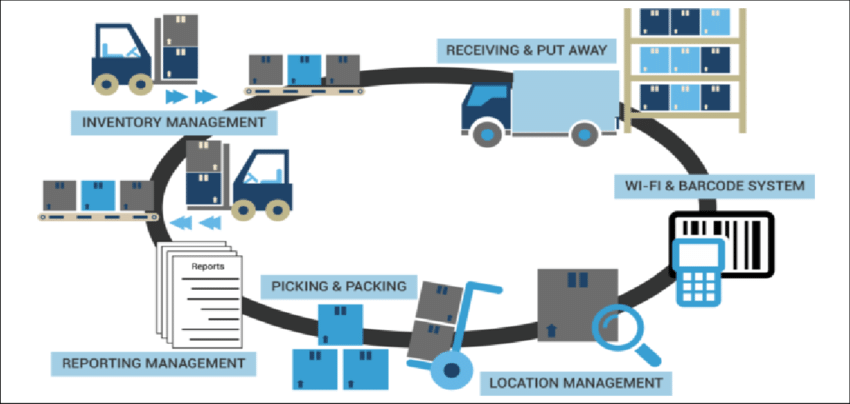
A WMS lives inside the warehouse. It manages:
- Bin locations and storage rules
- Pick paths and wave/ batch picking
- Receiving and put‑away
- Barcode/RFID scanning and cycle counts
Many modern WMS tools integrate with ERPs and inventory apps so orders flow in and pick confirmations flow back. For a Canadian distributor that holds stock domestically but imports from overseas, a WMS becomes useful once you have enough volume that mis‑picks and lost inventory start costing real money.
3. Standalone inventory and order apps
Inventory apps are lighter tools aimed at ecommerce and small wholesale. They typically offer:
- Real‑time stock tracking across multiple sales channels
- Simple purchasing and supplier management
- Basic order routing and status updates
Canadian ecommerce businesses often run an inventory app on top of Shopify, Amazon, or marketplace accounts, plus a separate accounting system. This route saves you from full ERP complexity while still keeping overselling in check.
4. Vendor‑managed inventory (VMI) tools
Vendor‑managed inventory tools are specialized systems that let a supplier monitor stock at your site or your customer’s site and automatically trigger replenishment. As described by Software Connect’s VMI overview, these tools usually integrate with POS or inventory systems to read stock levels and automate reorder rules.
For a small distributor, VMI is most relevant if:
- You manage consigned stock at customer locations
- Large retailers ask you to maintain agreed‑upon stock levels in their stores
VMI can reduce manual replenishment work, but it adds a layer of integration and governance that many small firms don’t need yet.
5. Marketplace and ecommerce integrations
Most modern platforms assume you’ll sell through multiple channels. Integrations commonly include:
- Ecommerce carts (Shopify, WooCommerce, BigCommerce)
- Global marketplaces (Alibaba, AliExpress, Amazon, eBay, DHgate, etc.)
- Shipping platforms and carriers
Some inventory tools mentioned in DHgate’s own editorial blog, such as QuickBooks Commerce or Ordoro, have been able to integrate with online marketplaces including DHgate to sync stock and orders. Support can change, so treat marketplace integration as a feature you verify directly with each software vendor rather than an assumption.
Quick comparison of tool categories
| Tool type | Main job in your stack | Best for | Key trade‑off |
|---|---|---|---|
| Distribution ERP | Central system for inventory, orders, GL | Multi‑warehouse, B2B‑heavy distributors | Higher cost & complexity |
| Warehouse Management (WMS) | Direct control of warehouse operations | Firms with busy or multiple warehouses | Needs integration to see orders |
| Inventory & order apps | Multi‑channel stock + basic purchasing | Small ecommerce + simple wholesale | Limited advanced pricing/accounting |
| VMI tools | Automated replenishment at remote sites | Consignment & retail shelf programs | Extra setup, niche use cases |
| Marketplace connectors | Feed orders/stock between sales channels | Any business selling on marketplaces | Dependent on third‑party APIs |
Comparing Platform Routes and Matching Them to Distributor Profiles
Once you understand the categories, you need a route: lean inventory tooling, ERP‑centric, or marketplace‑centric. Cloud ERP for wholesale distribution, such as the systems profiled by Qdos, emphasizes efficient customer order management and tailored orders tied directly into inventory control. That makes sense for some profiles, not all.
Here’s how the main routes usually fit Canadian businesses:
Route A: Marketplace‑centric with inventory app (tiny cross‑border seller)
Profile: You source products from overseas suppliers, sell primarily via Shopify and a couple of marketplaces, and keep limited stock in one Canadian location.
Stack:
- Inventory app as the source of truth
- Integrations to your ecommerce store and marketplaces (possibly including DHgate, Amazon, eBay)
- Basic accounting software
You care most about avoiding overselling and having simple purchase orders to overseas suppliers. Full ERP and VMI are likely overkill here. Before choosing an inventory app, confirm which marketplaces it currently supports, compare integration stability, and consider your growth plans.
For a neutral view of how DHgate itself works as a marketplace compared with platforms like Alibaba or AliExpress, you can read What DHgate is and how the marketplace works and Compare DHgate with AliExpress, Alibaba and Temu. Those decisions sit outside your internal tooling, but they shape which integrations you actually need.
Route B: Inventory app + WMS (growing distributor with a busy warehouse)
Profile: You stock hundreds or thousands of SKUs in a Canadian warehouse, sell B2B and online, and warehouse errors are starting to hurt customer relationships.
Stack:
- Inventory app or light ERP as the source of truth for stock and orders
- Standalone WMS focused on bin locations, pick paths, and scanning
- Shipping platform integrated with WMS
You’re prioritizing operational accuracy and speed in the warehouse. Advanced ERP modules for pricing or service contracts may still be optional if your customer terms are straightforward.
Route C: Full ERP + WMS (multi‑warehouse, B2B‑heavy distributor)
Profile: You run multiple warehouses, complex customer‑specific pricing, and possibly value‑added services like kitting or light assembly. You might serve Canadian and US customers with different catalogs.
Stack:
- Distribution ERP as the main system for inventory, customer orders, and financials
- WMS integrated with ERP for real‑time picks and receipts
- Optional VMI for key customers or retailer programs
Here, the ERP route makes sense: you benefit from having pricing, inventory, and order data under structured control so you can protect margins and plan stock. Implementation effort and license cost are higher, so this path usually fits businesses that are already feeling pain from fragmented data.
How to avoid overbuying software
A few practical filters for Canadian distributors and ecommerce sellers:
- Start from operational pain, not features. Are you losing money to mis‑picks, overselling, bad pricing, or manual reconciliations? Choose the category that directly addresses that pain.
- Count channels and locations. One warehouse + one or two sales channels usually means inventory app + light integrations. Multiple warehouses or deep B2B catalogs push you toward ERP.
- Think 3-5 years ahead, not forever. Cloud tools make it feasible to start smaller and graduate later. Over‑specifying on day one can lock you into unnecessary complexity.
If you’re evaluating platforms, it also helps to compare the marketplaces themselves — for shipping, dispute, and fee considerations — separately from your internal tools. A neutral overview like Compare online marketplaces and shopping platforms can frame that decision, while your ERP/WMS/inventory choice should focus strictly on how well the software handles your inventory and orders.