
Amazon only guarantees acceptance for gift cards and codes that it issues and recognises under its own terms; a seamless or multi‑retailer card that simply shows Amazon’s logo is not automatically usable there. On DHgate, that makes it crucial to understand which card types Amazon supports and to check each gift‑card‑related listing carefully before you pay.
How does Amazon actually treat seamless and other gift card types?
Amazon only reliably accepts gift cards and codes that fall under its own official programs. An official Amazon gift card is issued directly by Amazon, carries Amazon branding, and is governed by Amazon’s published gift card terms. When you redeem it, Amazon treats the balance as an Amazon.com balance under those rules.
By contrast, prepaid cards from payment networks like Visa or Mastercard are general-purpose payment methods, not Amazon gift cards. Amazon may allow certain prepaid cards as a way to pay, but they are handled under its accepted payment methods and any restrictions the issuer sets, not under Amazon’s gift card program. You have to check both Amazon’s payment help pages and the issuer’s conditions to know how they work there.
Third‑party “seamless” or multi‑retailer gift cards are different again. These products are managed by an intermediary platform that promises you can spend the balance at multiple brands. Amazon may or may not actually participate in that program, and seeing Amazon’s logo in marketing materials does not prove that Amazon recognises the card.
In practice, only cards and codes that Amazon itself names and supports in its official gift card or payment terms are predictable on Amazon. A multi‑retailer or aggregator card that merely lists Amazon among many brands is not equivalent to an official Amazon gift card and may not be honoured. I would not assume a seamless card works at Amazon unless I can match its exact program to Amazon’s own documentation or support response.
Official Amazon gift cards use Amazon’s own branding and sit under Amazon’s published gift card terms, which is what makes their acceptance clear.
How can you verify whether a card type is usable on Amazon?
- Open Amazon’s official gift card and payment help pages and read how they define acceptable gift card types, issuers, and usage limits.
- Look closely at the physical or digital card, or the product description, and note the exact issuer, brand, and program name—not just the logos or vague phrases like “seamless” or “multi‑retailer.”
- Search Amazon’s help content for that specific issuer or program name to see whether it is mentioned as a supported gift card or payment method, or described with restrictions.
- If the documentation still leaves the status unclear, contact Amazon customer support, describe the card program in detail, and ask directly whether it can be redeemed on Amazon.
- Compare any seller, blog, or forum claims with what Amazon’s own terms and support say, and give more weight to Amazon’s documentation whenever there is a conflict.
What DHgate listing and seller checks should you make for gift‑card‑type products?
- Read the DHgate listing carefully for a precise description of the card type and program: who issues it, which brands it claims to cover, the exact denomination, and how redemption is supposed to work. Treat vague phrases like “seamless card” or logo collages without clear text as a warning sign.
- Check whether delivery is described as a digital code (sent through DHgate messages, email, or a file) or a physical card shipped to you, and note any stated processing and delivery timeframes so you know when you should receive it.
- Review the seller’s ratings, number of completed orders, and buyer comments, paying close attention to reviews that mention gift cards or codes being successfully redeemed—or failing. Lack of detail or many complaints about invalid codes should make you walk away.
- Look for references to DHgate buyer protection or escrow on the listing and make sure the payment method you plan to use is covered by those protections, so you have a clearer path to a refund if the card or code does not work.
- Prefer listings where the card program details are consistent across the title, description, and any images. If the listing mainly shows brand logos (including Amazon) and big promises but never names the exact card program or issuer, I would treat that as high risk and avoid buying.
For digital delivery on DHgate—codes sent through messages, email, or attached files—there is usually no shipping tracking. If a code fails, any dispute you open will rely more on what you can show: screenshots of the code exactly as received, timestamps of when the seller sent it, and clear screenshots or copies of the error messages from Amazon when you try to redeem it.
With a physical gift card shipped to you, the dispute focus shifts to delivery rather than code validity. Tracking information, delivery records, and photos of damaged or altered cards become the main evidence if the card never arrives or is obviously tampered with when it does.
In both cases, keep all communication with the seller inside DHgate, along with screenshots and files related to the card or code. DHgate’s detailed rules and enforcement can change, so you should confirm the current buyer protection and dispute procedures in DHgate’s help center, but the general principle is simple: the clearer the listing terms and the better your documentation, the stronger your position if you need to open a case.
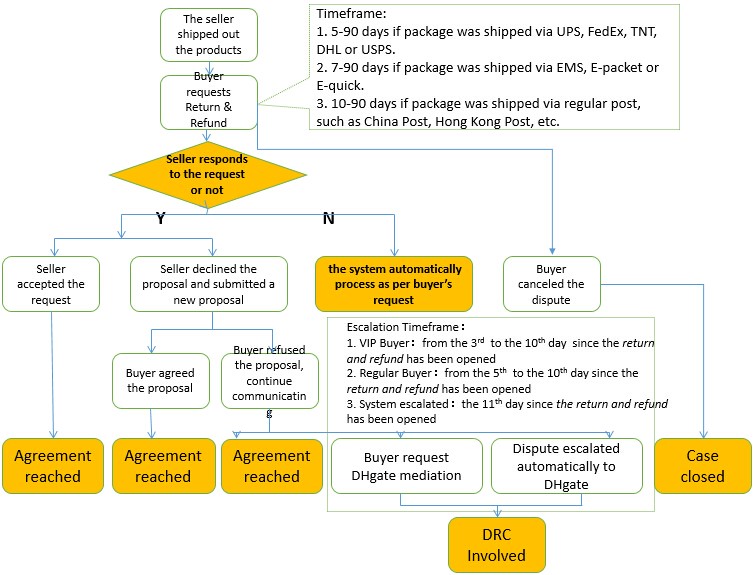
A DHgate dispute page interface reinforces that disputes for digital codes rely on platform communication and records, just as disputes for shipped cards rely on tracking and delivery information.
What are the main risks of seamless cards, and how cautious should you be?
FAQ: Can a seamless card that lists Amazon be treated like an official Amazon gift card?
Can I treat a seamless or multi‑retailer card that lists Amazon as the same as an official Amazon gift card, and what should I do if it won’t redeem on Amazon?
No. A seamless or multi‑retailer card that only shows Amazon’s logo or name is not automatically part of Amazon’s own gift card program and should not be treated as equivalent to an official Amazon gift card. If it does not redeem on Amazon, it usually means Amazon does not support that third‑party program, regardless of the marketing claims.
As a DHgate buyer, your options focus on the marketplace side. First, carefully recheck the redemption instructions in the DHgate listing to confirm you followed them exactly. Then capture screenshots of the code as provided, your redemption attempt, and any error message Amazon shows. Use DHgate’s messaging system to contact the seller with this evidence and ask for clarification or a solution.
If the seller does not resolve the issue, open a dispute or contact DHgate customer support, referencing the listing’s promises versus what actually happened. Amazon support may confirm that the card is not accepted, but it is unlikely to refund value from a program it does not control. Treat multi‑brand marketing as advertising, not proof of official acceptance, and consider avoiding similar cards in future unless you can clearly match the card type to Amazon’s documented gift card or payment programs.