
Bulk upload tools let you push a lot of data or files into a platform at once instead of doing it entry-by-entry. In ecommerce, that usually means sending a spreadsheet (CSV) or a batch of images to create or update many product listings, ads, or social posts in one go. Used well, bulk upload saves hours of repetitive work; used carelessly, it can copy a single mistake to hundreds of listings.
This guide focuses on how bulk upload actually works across different platform types and how to design a workflow that speeds you up without creating a mess.
What Bulk Upload and Uploader Tools Actually Do
Bulk upload is simply transferring multiple files or data entries to a system simultaneously rather than one by one. Image tools like Image2URL describe it as a way to streamline tasks that would otherwise require individual uploads.
Most uploader tools follow a few common patterns:
- CSV or spreadsheet upload. You download a template from the platform, fill rows for each item (product, post, ad), then upload. Ad platforms like impact.com’s bulk asset uploader use CSV files with columns that match their “Ad” object fields.
- Drag‑and‑drop multi-file upload. Document systems such as Folderit let you select multiple files or folders and drop them into a designated upload area. Many ecommerce tools use a similar pattern for images and PDFs.
- Scheduler-based bulk upload. Social tools like Buffer’s bulk upload and HubSpot’s social bulk scheduler let you import a spreadsheet of posts, then automatically schedule them across dates and accounts.
- API-driven upload. For larger operations, developers connect directly to platforms via APIs so software can push and update listings continuously, not just in one-off batches.
For a small ecommerce business, the key is not the technology itself but how you map your data to what each platform expects. Every column in your CSV or field in your uploader corresponds to something visible to shoppers: title, price, SKU, variant, image, or ad copy.
Types of Platforms and How Their Bulk Upload Features Differ
Different platforms handle bulk upload in different ways because they’re solving different problems. Here’s how the main categories usually look for a US ecommerce seller.
Marketplaces and store builders
Retail and wholesale marketplaces (Amazon, eBay, AliExpress, DHgate, etc.) and store builders (Shopify, BigCommerce, WooCommerce) typically:
- Offer CSV templates for product creation and updates.
- Require strict field mapping: column names, allowed values (e.g., sizes, colors), and category IDs must match their schema.
- May let you bulk upload images and attachments alongside products via separate image uploader tools or URLs in the CSV.
Third-party tools like Shop Uploader (for Etsy) illustrate the pattern: you manage listings in a spreadsheet, map columns to marketplace fields, and the tool pushes them into the marketplace in bulk.
Marketing and ad platforms
Marketing tools use bulk upload to keep campaigns consistent across channels:
- Social scheduling tools such as Buffer and HubSpot accept CSV files with fields for account, post text, image URL, and scheduled time, then queue dozens of posts automatically.
- Ad platforms like impact.com or specialized uploaders such as Ads Uploader let you import many creatives at once, mapping columns to campaign, placement, destination URL, and tracking parameters.
For ecommerce, the useful pattern is that your product catalog and your marketing assets can both be driven from structured data: your SKU, product name, image, and price can be reused in ad copy or social posts.
File storage and documentation systems
Cloud storage and documentation tools focus on assets rather than structured product data:
- Bulk upload here is heavily drag‑and‑drop: select dozens of images or PDFs and drop them into a folder.
- Folder names, tags, or metadata fields may become your internal source of truth for which asset belongs to which product.
Systems like Folderit show how multi-file selection and a single upload action can quickly populate a repository. For ecommerce, the same idea applies when you organize product images or spec sheets before feeding them to marketplaces.
Multi-channel and media‑focused tools
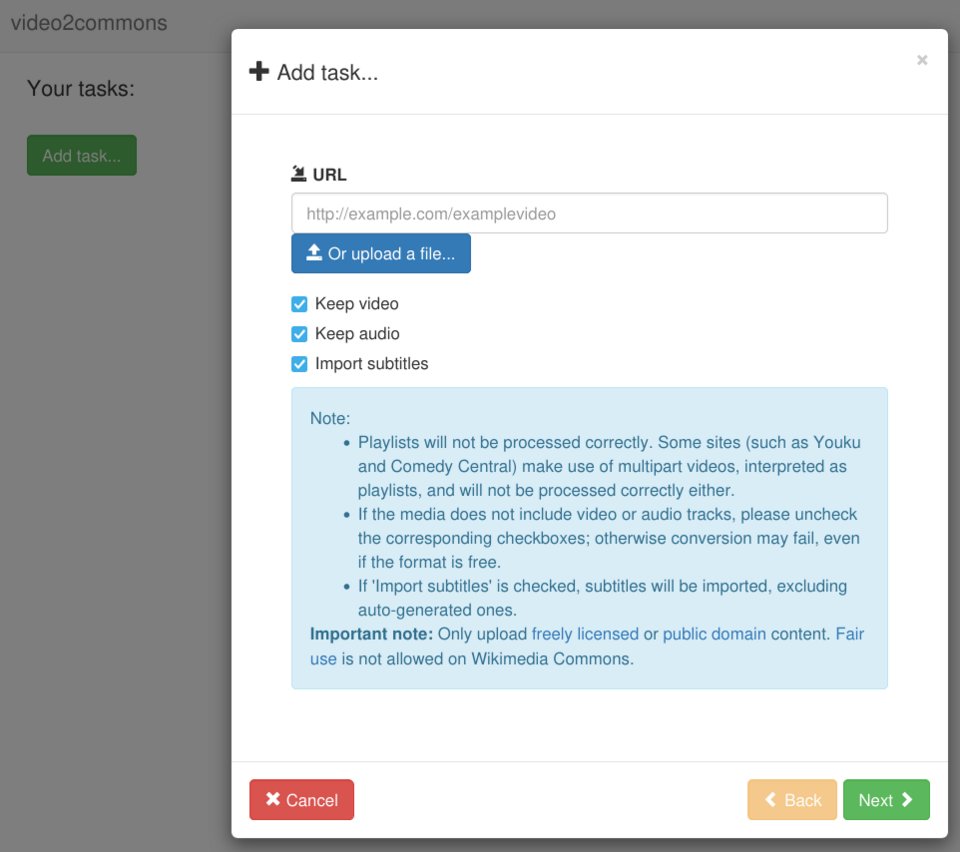
Video and multi-channel tools such as Zeotra or the Video2Commons interface in the image above demonstrate another pattern: upload once, then distribute across channels. While many marketplaces don’t do this natively, the workflow idea is valuable—centralize content, then push tailored versions out to each sales or marketing channel.
Choosing and Using Bulk Upload Tools for Multi‑Channel Selling
Once you sell on more than one marketplace or platform, bulk upload becomes an operations problem, not just a time saver. You’re trying to keep product data, pricing, and inventory consistent everywhere.
Common tool routes for multi-channel sellers
Here’s a compact way to think about your options:
| Tool route | Where it lives | Strengths for ecommerce | Main risks if misused |
|---|---|---|---|
| Native CSV bulk upload | Each marketplace / store builder | Direct control, no extra cost | Inconsistent data across channels |
| Dedicated uploader (e.g., Shop Uploader) | Between your catalog and a specific marketplace | Easier mapping, often friendlier UX | Tool-specific learning curve, partial coverage |
| Social/ad bulk schedulers (Buffer, HubSpot, impact.com, Ads Uploader) | Marketing channels | Quick promotion across many posts/ads | Wrong links or prices amplified in campaigns |
| Automation platforms (Zapier, etc.) | Separate integration layer | Keeps inventory and listings in sync automatically | Harder to test; errors can propagate widely |
No single route is “right” for every seller. A small US brand listing 100 SKUs on one marketplace might be fine with native CSV uploads. Once you’re on three marketplaces plus social and ad platforms, centralizing your data and using automation or dedicated uploaders becomes more attractive.
How a marketplace like DHgate fits into this
If you source or sell through a cross-border marketplace such as DHgate alongside your own store or other marketplaces, it becomes one more channel that needs consistent data. DHgate’s editorial blog has suggested using integration tools and centralized inventory management to keep product information aligned across platforms and avoid overselling.
Practically, that means you would:
- Maintain a master catalog (often in a spreadsheet or database) with clean SKUs, titles, prices, and stock.
- Use bulk upload or integrations to push that catalog into DHgate and other marketplaces, instead of editing each channel separately.
- Keep branding, descriptions, and imagery consistent, then adjust only what truly needs to differ by channel (for example, bundles or local compliance notes).
For more background on how DHgate itself operates as a marketplace before you decide whether to bring it into your multi-channel setup, see What DHgate is and how the marketplace works and the broader overview in Compare online marketplaces and shopping platforms.
A light checklist for CSV‑based bulk uploads
To keep bulk uploads from creating chaos, treat every upload like a release:
- Work from a clean template. Download the latest CSV template from each platform so your columns match exactly.
- Normalize key fields. Make sure SKUs, variant naming (size, color), and category assignments are consistent across your catalog.
- Test on a small batch. Upload 5-10 items first and check them live: prices, images, variants, and SEO fields.
- Version your files. Save each upload file with a date and purpose (e.g., `2026-10-10_price-update-marketplace-A.csv`) so you can roll back if needed.
- Review high‑risk fields. Scan price, inventory, and shipping-related columns before every upload; these are where one typo can hurt most.
Bulk upload doesn’t eliminate errors—it scales whatever you feed it. If you treat uploader tools as part of a deliberate workflow rather than a shortcut, they can help a small ecommerce operation behave like a much larger one without losing control.