
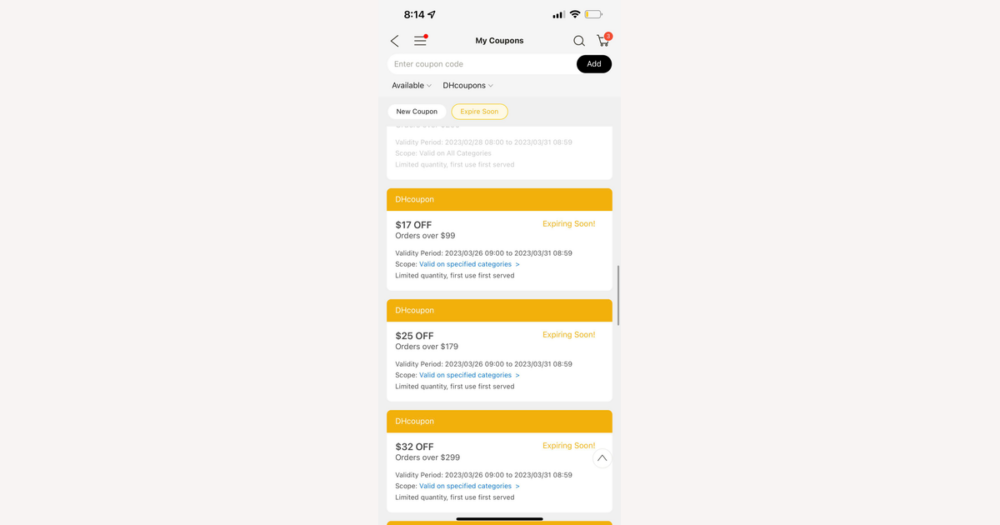
When you buy nature gifts on DHgate, assume that only one coupon or promotion will apply to each order or store, then verify any extra discount directly in checkout before counting it toward your profit. Most multi-level savings come from a single visible coupon applied to prices already reduced by sitewide or seller promotions, so the safest way to protect your margin is to build your cost plan around that one confirmed discount and treat any additional automatic deal as a welcome bonus.
Can you stack multiple coupons on a DHgate nature gift order?
For DHgate nature gift orders, start by assuming that only one coupon or promotion will apply per order or per store. Even if you have several codes, the checkout flow on DHgate and most other online platforms typically lets you choose a single active coupon or promotion rather than stack a handful of codes.
Nature gifts are not a special exception here—the rules are driven by how DHgate structures orders and promotions overall, not by product type. Sometimes it can look like offers are stacking because a sitewide sale, seller markdown, or event price is already built into the item price, and then you add one platform or seller coupon on top. That is still one coupon being applied to a price that has already been discounted, not multiple separate codes stacking.
For budgeting and profit planning, I treat it as a hard rule that only the discounts I can see applied in the DHgate cart and payment summary actually count. I plan landed cost and margin assuming just one confirmed coupon or promotion will work, and if checkout clearly shows an extra automatic discount or special event offer on my nature gifts, I treat that as a bonus—not something I rely on in advance.
How DHgate coupons, promotions, and balances typically interact
A DHgate nature gift order can involve four main price-related elements. Platform coupons come from DHgate and usually apply across many stores or categories when you meet the stated conditions. Seller or store coupons are tied to a specific shop or product range and work only on that seller’s eligible items. Automatic promotions—such as flash sales, event pricing, or quantity discounts—change the listed item price without requiring a code. Stored-value tools, like DHgate balance, credits, or gift-card-style funds, work more like money in your account: they pay part of what you owe instead of directly changing the item price.
The practical difference is that platform coupons, seller coupons, and automatic promo prices all reduce the price of your nature gifts before tax and fees, while stored balances simply cover some or all of the remaining total at payment. In many e‑commerce systems, including DHgate, the interface typically allows only one active coupon or code at a time, even if automatic sale prices are already baked into the item cost. A stored balance may or may not be usable alongside that single coupon, depending on current rules and how the payment page is built.
Because DHgate can change promotions and payment logic, it is safest to treat anything that reduces the item price before fees as a discount that probably will not stack with another coupon, and to treat balances as separate payment tools that might work in addition to one coupon. Each time you place a nature gift order, you need to test the combination directly on the DHgate payment page: see which single coupon you can select, check whether your balance or credits can still be applied, and only then assume those reductions are real for your cost and profit calculations.
How to test coupon combinations during DHgate checkout
- Add the nature gift items you want to buy to your DHgate cart, setting the quantities, variants, and sellers exactly as you plan to order so the prices and eligible coupons are realistic.
- Go to the cart or checkout page and open any area labeled something like “Coupons,” “Store coupons,” or “Use coupon” to see all options available for this order or store.
- If you see several coupons, try selecting more than one. Watch whether DHgate automatically deselects the others or limits you to a single coupon per store or per order—this shows you how much stacking is actually allowed right now.
- Look at the item prices and totals for any automatic promotions, such as crossed‑out original prices, flash‑sale tags, or separate promotion lines. Treat these as built‑in discounts that can sit alongside one chosen coupon, not as extra codes you can control.
- Continue toward the payment step and check whether you can keep your chosen coupon applied while also selecting DHgate balance, credits, or another stored‑value option as part of how you pay the remaining amount.
- Study the order summary or “Total to pay” area just before you confirm payment. Note which discount lines appear, how much each removes, and what final amount will actually be charged to your payment method.
- If you’re only testing combinations, keep adjusting the coupon and payment settings until the summary shows a discount you’re comfortable with, and do not hit the final pay button until you accept that this is the real, effective price—even if some extra codes you tried did not stack.
This short tutorial video visually walks through applying a coupon in a DHgate checkout flow and shows where to confirm the final total and applied discount before you pay.
What limited coupon stacking means for your landed cost and profit
Once the DHgate checkout summary shows which single coupon or promotion actually sticks, use that reduced item price as the starting point for your landed‑cost math. For a nature gift order, think in layers: the item price after the confirmed discount, plus shipping, any optional insurance, payment‑processor fees, DHgate or marketplace fees, and any taxes or customs charges that apply when the goods enter your country.
Imagine you plan to buy $50 worth of nature gifts from one seller. If DHgate lets you apply one 10% coupon, your discounted product cost drops to $45 before shipping and fees. If you mistakenly assume you can stack two separate 10% coupons, you might plan around a $40 cost instead. That $5 difference per order can wipe out a big chunk of your expected margin once you add shipping and other charges on top.
For reselling, I prefer to run my profit scenarios using only the discount shown in the final DHgate order summary and treat any rare extra savings—like an unexpected promotion stacking with my coupon—as bonus upside, not the baseline. Building your pricing and margin on that conservative, one‑coupon reality makes it much less likely that you under‑estimate landed cost or over‑promise profit on your nature gifts.
Common coupon-combination pitfalls on DHgate and how to avoid them
- Do not assume a coupon is sitewide. Many DHgate coupons only work for specific sellers, categories, or products, so always check the terms and confirm that your exact nature gifts and chosen seller are listed as eligible before counting on the discount.
- Watch minimum spend and quantity rules. If you remove items, change quantities, or split your nature gift order between sellers, you may drop below the threshold and the coupon can quietly stop applying, even though the code still looks active.
- Be aware that one promotion can cancel another. Adding a new coupon, switching from a seller coupon to a platform coupon, or joining an event offer can automatically remove an earlier discount, sometimes without a clear message—so rely on the current order summary, not on the list of codes you entered earlier.
- Treat time-limited and event coupons as fragile. Flash sales, festival deals, or countdown offers can expire or change before you finish paying, which can make a previously visible discount line disappear when you reach the final payment step.
- Plan refunds around what you actually paid. If an item is cancelled or refunded, DHgate or the seller will usually base the refund on the discounted amount, not the original listed price, which matters if you were expecting to recover your full pre-coupon cost.
- Before you pay, read the coupon and promotion terms on DHgate and compare them against your live cart: confirm the seller, products, and order value meet the conditions, then double-check the order summary to see exactly which discounts are still listed.
- For larger or business-critical nature gift orders, take screenshots of your cart, applied coupons, and final checkout summary so you have clear records if a discount disappears later and you need to talk to DHgate support or the seller about the difference.
How to confirm which discount actually applied after ordering
- Open your DHgate account and go to your order history, then select the specific nature gift order you want to review.
- On the order detail or invoice-style page, look for an itemized breakdown separating product prices, discount or coupon lines, promotions, shipping, taxes, and any other fees from the final total paid.
- Compare this breakdown with the checkout summary you saw before placing the order to confirm that the same coupon or promotion name and discount amount appear and that no expected discount is missing.
- Check your payment provider statement—such as your card, bank, or digital wallet—to make sure the amount charged matches the DHgate order total after discounts and fees.
- For important or repeat business orders, save or export the order details and payment confirmation so you can refine future landed-cost and profit calculations and have solid documentation if you ever question a discount or billing outcome with DHgate or the seller.
Quick answers to common coupon-stacking questions on DHgate nature gifts
Do DHgate coupon rules change for different nature gift subcategories?
Usually no. DHgate coupon behavior is driven by each promotion’s written terms and the seller’s own settings, not by the fact that an item is a “nature gift.” Some coupons may target specific categories or shops, but that will be spelled out in the conditions. Always read the coupon details on DHgate and check that your exact nature gift items and seller are listed as eligible before assuming the discount will apply.
Are coupon-stacking rules different during big DHgate sale events?
Large events sometimes combine an automatic sale price or event markdown with a single coupon, so it can look like stacking. But whether you can add more than one code still depends on that event’s terms and what the checkout page actually lets you select. Treat any big sale as promotion‑specific: read the event rules, try your codes in checkout, and only rely on the discounts that appear in the live order summary before you pay.
What should I do if a DHgate coupon disappears or turns invalid while I’m ordering nature gifts?
First, re-read the coupon terms to confirm seller limits, eligible items, minimum spend, and validity dates. Check whether you changed quantities, removed items, switched sellers, or waited past the expiry time, as any of these can make a coupon ineligible. Refresh the coupon list and, if possible, undo recent cart changes to see if the discount returns. If the coupon still looks valid but no longer applies, take screenshots of the terms and your cart or checkout summary and then contact DHgate customer support or the seller to ask for clarification.
Is it worth chasing complex coupon stacking on small DHgate nature gift orders?
In most cases it isn’t. For everyday, smaller nature gift orders, it is usually more efficient to pick one clearly valid coupon, confirm that it actually appears in the DHgate checkout total, and base your cost and profit numbers on that. I only invest extra time testing multi-level combinations or special events when I’m placing larger, repeat purchases where a confirmed extra discount can make a meaningful difference to margin.