
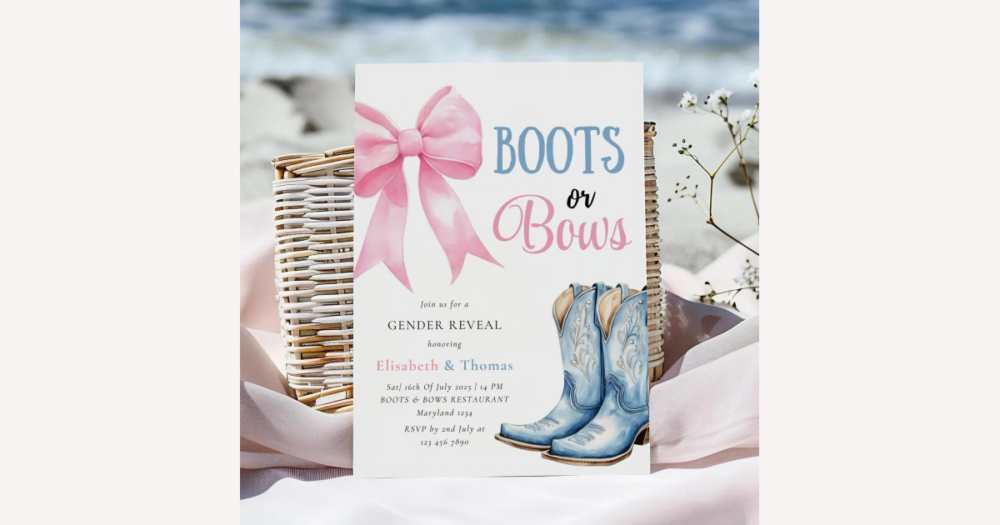
If you love the boots-and-bows gender reveal theme and want customizable invitations from DHgate, the real decision is how much control you need over the design and print quality. This guide explains how invitations are usually offered as printed cards or digital files, what customization options to expect, which paper and file specs matter most, and how to use DHgate’s seller information and buyer protections so you can keep your party on track without gambling on unclear listings.
Understand the main invitation types and customization basics
On DHgate, customizable boots-and-bows gender reveal invitations usually fall into two broad types. Some listings offer printed invitations, where the seller handles printing and ships physical cards to you. Others offer digital templates or finished files you download, edit, and print yourself through a home printer or local print shop.
Printed cards tend to be simpler if you want ready-to-mail invitations and don’t want to worry about paper choice or printer settings, but they require more lead time for production and international shipping. Digital files can arrive quickly and often allow more editing flexibility, yet they put the responsibility for print quality, paper weight, and color accuracy on you or your print service.
For a boots-and-bows design, the most common customizable fields are the names of the parents or baby, event date and time, venue address, RSVP information, and sometimes the headline wording (for example, adjusting phrases like “Boots or Bows?” or adding a short tagline). Some sellers will also let you tweak accent colors—such as the bow color, border, or background—and choose between a few font styles, while major illustration elements like the boots and bows themselves are usually fixed.
DHgate-style listings typically signal the scope of customization in short phrases such as “text only customizable,” “colors fixed,” “editable template,” or “personalized with your details.” If a change you care about—like swapping illustrations, adding extra photos, or re-arranging the layout—is not explicitly mentioned, it’s safest to assume it isn’t included unless the seller confirms otherwise in a message.
Personally, I would favor invitation listings that clearly spell out what can and cannot be customized in the description or sample images, and I’d be cautious about any design where the customization instructions are vague, buried in fine print, or missing altogether, even if the artwork looks perfect for the party.
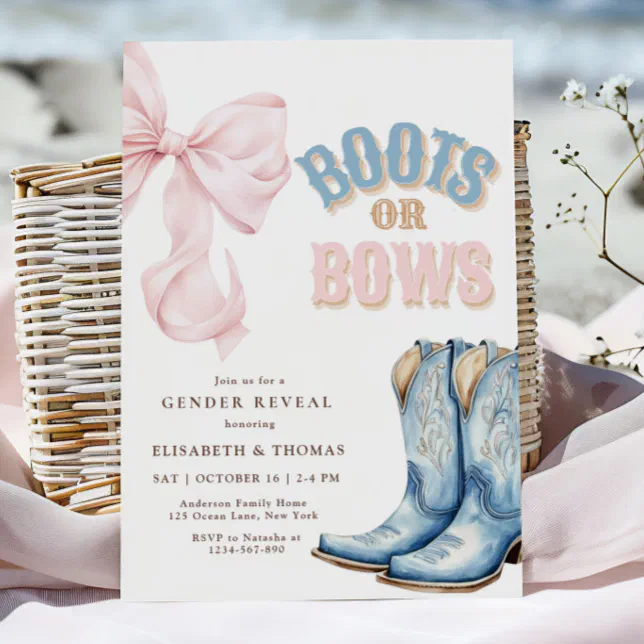
A square boots-and-bows gender reveal invitation with cowboy boots and a bow illustration, a “Boots or Bows?” headline, and neatly organized event details, showing typical layout areas that can be customized on DHgate listings.
Turn listing details into a quality and customization checklist
- Confirm the invitation type. Use the title and description to verify whether the listing offers printed cards or a digital file. If the format is ambiguous or buried in small print, treat that as a red flag and ask the seller to clarify before you place an order.
- Read customization instructions line by line. Note exactly which fields are editable (names, date, time, venue, RSVP, headline), how you’re expected to provide details (order notes, DHgate messages, a form), whether the seller sends a proof for approval, and any limits on revisions or changes.
- Check material or file specs. For printed cards, look for paper weight in gsm, a clear mention of cardstock versus thin paper, the finish (matte, glossy, textured), any printing method notes, and whether envelopes are included. For digital products, check the file format (such as JPEG, PDF, or an editable-template platform), resolution around 300 dpi for sharp printing, and whether the design matches common print sizes used by printers.
- Treat specific specs as quality signals. Numeric or professional-sounding details—like “280 gsm matte cardstock” or “print-ready PDF at 300 dpi”—are positive signs. Vague phrases such as “high quality paper” or “HD image” with no numbers or measurements leave quality uncertain and may justify follow-up questions to the seller.
- Confirm size and quantity. Make sure the dimensions (for example, 4″×6″ or 5″×7″) fit your envelopes or printer, and check whether the price covers a full set of cards or a smaller quantity. If the listing isn’t clear about how many invitations you receive, message the seller to confirm before you rely on the price shown.
- Hesitate when basics aren’t verifiable. I would personally be reluctant to order from a listing that doesn’t let me confirm at least paper weight or print resolution, plus basic size and quantity details, even if the reviews look broadly positive; clear specs make it much easier to trust what will arrive or print.
Evaluate seller reliability and past buyer experience
- Check the overall star rating together with how many transactions and reviews the seller has. A rating based on hundreds of orders over time usually gives a more stable picture than one built on only a handful of ratings.
- Read review comments, not just scores. Look for specific mentions of print sharpness, how the paper feels, whether colors matched expectations, and whether customization details like names, dates, and venue information were applied correctly.
- Pay attention to buyer-uploaded photos. Real-life pictures can show the true color tones, how crisp the text looks, and whether the cards appear thick and sturdy or thin compared with the polished listing images.
- Consider store history and product range. An established store that has been active for a while and offers multiple related party or print items often feels more reliable than a brand-new seller with very few listings or transactions.
- Treat single reviews as snapshots, not proof. One glowing or one negative review reflects only that buyer’s outcome; what matters more is the pattern across many reviews—whether comments about quality and customization are consistently careful or repeatedly mixed.
- Prioritize sellers whose feedback highlights clear communication and good print quality. I would personally lean toward stores with repeated comments about accurate colors, sharp printing, and correctly followed customization notes, and be cautious with sellers who show recurring complaints about blurry prints, color mismatch, or ignored personalization, even if their headline star rating looks acceptable.
Use DHgate’s buyer protections when ordering customized invitations
On DHgate, buyer protections generally revolve around platform-managed payments, order tracking, and built-in ways to report problems. Payments are typically handled by DHgate rather than sent directly to the seller, and are only released once the order is confirmed. Orders can be tracked through the site or app, and if something arrives significantly different from the description—or fails to arrive at all—there are mechanisms for raising an issue and requesting a refund or adjustment.
For customized boots-and-bows invitations, those protections work best when every personalization detail is documented on DHgate itself. Send names, event information, color choices, quantities, and any special layout requests through DHgate messages or order notes, and keep records of proofs or preview images the seller sends. Clear, on-platform documentation makes it easier to show what was agreed if the cards or digital files arrive with errors or don’t match the customization instructions.
Be cautious with any seller who asks you to pay outside DHgate or move important customization conversations to unofficial channels, because that weakens your practical access to DHgate’s protections. I would be wary of confirming design details only via external messaging apps or sending money directly, even if the listing looks appealing.
Watch the production and shipping timelines, respond promptly to order updates, and, if serious issues arise, open a dispute within DHgate’s allowed windows rather than waiting until after your event. Think of this as a general orientation to how DHgate supports buyers, not a complete policy summary, and use the platform’s help pages if you need the latest detailed rules.
Avoid common pitfalls with customizable invitations on marketplaces
- Format confusion (digital vs printed): Never assume the listing is for physical cards just because you see a mock‑up photo. Check whether the description clearly says “digital download,” “DIY template,” or “printed cards shipped” and whether anything is physically mailed to you or simply delivered as a file. If there is any ambiguity, message the DHgate seller and get the format confirmed in writing before you pay.
- Low‑resolution digital files: Digital invitations intended for printing should normally be high resolution, around 300 dpi, so lines and lettering stay crisp. If the listing doesn’t mention resolution or file quality, ask the seller directly. Treat blurry previews, pixelated sample images, or reviews complaining about fuzzy printing as warning signs and consider choosing another invitation instead of risking a poor print.
- Color mismatch between screen and print: Colors on your phone or laptop often appear brighter and more saturated than they will on paper, and different printers or papers can shift tones. Scan reviews for comments about color accuracy and ask the seller how closely printed colors usually match the listing images. Expect small variations, but if the final cards arrive with obviously different colors from what was advertised, that gap may justify raising an issue through DHgate’s dispute tools.
- Timeline miscalculations: Customized printed cards need time for personalization, production, and often international shipping, while digital files still require time for editing and local printing. Work backward from your event date, add a buffer for delays, and avoid placing last‑minute orders that leave no margin for reprints or shipping problems—especially for boots‑and‑bows designs where you want everything to look coordinated on the day.
- Unclear format or timing overall: Attractive designs can be tempting, but if the listing isn’t clear about whether you’re buying printed cards or a digital file, or how long customization and shipping will take, I would personally skip it. Those uncertainties are exactly the kind that can turn into avoidable stress when your gender reveal date is approaching and invitations still aren’t ready.
Prioritize your criteria and handle remaining practical questions
At this point, your decision on DHgate comes down to a handful of axes: how flexible the customization is, whether you want printed cards or a digital file, how clearly the listing describes material or file quality, how reliable the seller appears, and whether the timeline fits your event date with a buffer for delays.
Customization flexibility means knowing exactly which fields you can edit—names, date, time, venue, RSVP, headline wording—and whether colors or fonts can be adjusted. Format is the next filter: printed cards are more convenient if you want ready-to-mail invitations, while digital files give you faster delivery and more control over printing but shift quality responsibility to you or your local print shop.
Material or file quality signals are what protect you from flimsy or blurry results. For printed invitations, look for clear paper weight in gsm, mention of cardstock, a matte or glossy finish, and whether envelopes are included. For digital designs, prioritize print-ready formats and stated resolutions around 300 dpi. Combine this with seller reliability—stable ratings, detailed reviews about print and color accuracy, and buyer photos that match the listing—plus a realistic production and shipping timeline that leaves room before your gender reveal.
A buyer on a tight budget might accept simpler paper or a more basic digital file as long as the customization rules, quantity, and delivery timing are spelled out clearly and the seller has at least a solid track record. Someone treating the invitations as keepsakes might instead prioritize heavy cardstock, specific print specs, and a seller with consistent praise for quality, even if that costs more and rules out the cheapest options.
Personally, I would put clear customization instructions and verifiable print or file quality above chasing the lowest price. If a listing is very cheap but vague about paper weight, printing method, resolution, and the seller’s history, I would likely pass and keep looking for a boots-and-bows invitation where those details are transparent enough to trust.
Is DHgate a good option for last-minute boots-and-bows invitations?
For customized printed cards on DHgate, last-minute orders are generally risky because you need time for personalization, production, and often international shipping. If your event date is close, a digital template can be more realistic, since the file may arrive quickly, but you still need time to edit the design, arrange local printing, and handle any reprints if something goes wrong. Work backward from your party date and only rely on DHgate if the timeline leaves a clear buffer.
What should I do if the customization instructions on a listing are unclear?
Treat unclear instructions as a sign that you need written confirmation before ordering. Use DHgate’s messaging to ask specific questions about exactly what can be changed—text fields, colors, fonts, layout, number of revisions—and how you should send your details. Only place the order if the seller replies with clear, consistent answers on-platform that you can refer to later if there is a dispute about how the invitations were personalized.
How can I get matching boots-and-bows items like thank-you cards or party signs?
Look for sellers who offer coordinated designs within the same store—such as matching thank-you cards, favor tags, or party signs using similar boots-and-bows artwork, colors, and fonts. When you find potential matching items, apply the same checks you used for the invitations: confirm whether each product is printed or digital, review customization rules, inspect paper or file specs, check seller ratings and buyer photos, and make sure all pieces can be produced and delivered in time for your event. Then shortlist only the sets that meet your quality and timing priorities before continuing your search.