
Simplified shipping on DHgate isn’t a magic button or one perfect app; it’s a practical way of cutting down repeated manual steps and confusion across a few key areas. When you understand how DHgate’s own shipping options and delivery estimates work, when to lean on carrier sites for labels and tracking, when higher‑volume work justifies multi‑carrier shipping software, and which basic packing tools prevent mistakes, you can choose a mix that fits your shipment volume instead of hoping for guaranteed faster or cheaper delivery.
What “simplified shipping” really means for DHgate users
On DHgate, simplified shipping means cutting out unnecessary steps and confusion when you move a cross‑border order from “placed” to “delivered.” Instead of re‑entering details and guessing what a shipping option really involves, you use a small set of tools and settings that keep methods, costs, labels, and tracking clear from the start.
In practice, four areas matter most. DHgate’s own shipping settings come first: sellers choose methods, regions, prices, and handling times, and those choices drive the shipping options and delivery estimates buyers see. Carrier websites and apps are useful for creating labels, checking transit times, scheduling pickups, and viewing live tracking. Optional multi‑carrier shipping software works around DHgate to automate repeated tasks—bulk label printing, rules that select a service based on weight or destination, rate comparison across carriers, address validation, and dashboards that show tracking for many parcels at once. Basic physical tools matter too: decent packaging, cushioning materials, a measuring tape, a small shipping scale, and a label printer can reduce errors in size, weight, and addressing.
There is no single best tool for every DHgate user. If you only ship or receive a few parcels and care most about keeping costs low, it can be perfectly reasonable to rely on DHgate’s built‑in shipping options and order tracking plus the carrier’s own site or app. If you handle higher volumes or multiple destinations, I would prioritise tools that cut down repeated manual work—automation rules, bulk labels, and unified tracking—as long as they keep carrier choice, delivery estimates, and fees visible instead of hiding them behind one “simple” option.
The rest of this guide follows that structure: it starts with what DHgate itself already offers for shipping and tracking, then looks at carrier tools and optional shipping software, touches on physical packing equipment, and ends with the key risks, a straightforward step sequence for one order, and a brief note on when more advanced services like third‑party logistics are actually worth considering.
Using DHgate’s own shipping settings and tracking to avoid confusion
On DHgate, sellers configure the shipping experience you see. They pick which carriers or service types they offer (for example, economy, standard, or faster services), set destination regions they are willing to ship to, choose prices or rules for calculating freight, and define handling times before a parcel is handed over to the carrier. Those decisions feed into what appears on product pages and at checkout: the list of available shipping methods, their costs, and the estimated delivery windows for your country or region.
Many sellers can use streamlined or simplified shipping settings on the platform so that their delivery promises are shown as clearer time frames instead of a patchwork of separate rules. The goal is not to change how long a parcel actually takes, but to present more consistent estimates so buyers can compare options without digging through fine print. When a shipment is created, DHgate typically surfaces the tracking number and any known carrier information in the order details view; opening that page, noting the service used, and saving the tracking number (for example by copying it or taking a screenshot) makes it much easier to follow the parcel later instead of hunting through emails or notifications.
- Check the shipping method type: is the seller offering economy, standard, or an expedited service, and does that match how quickly you need the item?
- Confirm the shipping cost for your address, including whether the price changes with quantity, weight, or destination.
- Review the estimated delivery timeframe shown for your country or region, and be sure it seems reasonable for an international shipment.
- Make sure your destination is covered: the seller’s shipping regions should include your country or specific area before you pay.
- Look for any notes about customs, duties, or taxes (for example, whether you might pay fees on arrival) and factor that into your decision.
- If the delivery estimate or carrier information is vague, consider messaging the seller with a clear question or choosing a listing where the shipping method, cost, and timeframe are more transparent.
How shipping software simplifies multi-carrier work around DHgate
Shipping software is designed to remove repeated manual work from shipping, especially when you handle parcels across multiple carriers. Typical tools can import or sync orders from marketplaces like DHgate, let you print labels in bulk for many parcels at once, apply automation rules that choose a service based on weight, destination or required speed, compare rates and delivery estimates across different carriers, validate addresses to catch typos before a parcel is sent, and show a unified tracking dashboard so you can see status updates in one place instead of checking several sites.
Around DHgate, this kind of software usually sits next to the marketplace rather than replacing it. A seller or frequent buyer might export or sync their DHgate orders into the software, generate labels using integrated carriers from that dashboard, arrange pickups or drop‑offs, and then copy or push the tracking numbers back into the DHgate order details so the buyer can see them. The benefit is fewer manual steps and less copying and pasting each time an order is shipped, while DHgate still remains the place where the transaction and order record live.
Because there is a learning curve and often a subscription or usage cost, shipping software mainly makes sense for medium to high shipment volumes or complex destinations. If you ship many parcels each week and find yourself constantly switching between carrier sites, I would lean toward using software that automates service selection and centralizes tracking, as long as it keeps carrier choices visible and any fees transparent. If you only ship a handful of DHgate parcels each month, it is usually reasonable to rely on DHgate’s own tracking view plus the carriers’ websites or apps for occasional label creation and status checks instead of investing time in a more complex tool.
Choosing a simplified shipping approach by volume and control
For DHgate users, the main difference between simplified shipping approaches is how much automation you add on top of DHgate and carrier sites, and how much configuration and lock‑in you are willing to accept. A very simple setup—using DHgate’s shipping options and tracking plus carrier websites for occasional labels and pickup requests—keeps everything manual but transparent: you see each price and service directly, and you spend more time clicking through screens. As you move to expanded carrier tools or full multi‑carrier software, more decisions can be automated and handled in bulk, but you take on more setup work, need to learn new dashboards, and may be tied more closely to specific carriers or fee structures.
I would generally treat increased automation as a response to real pain rather than something to adopt by default. If your current DHgate plus carrier‑site workflow feels manageable for your volume, it is reasonable to stay there and avoid extra complexity. When you start to feel overwhelmed—dozens of parcels each week, frequent international destinations, or too much time spent re‑typing addresses and comparing services—it becomes easier to justify moving up to richer carrier tools or multi‑carrier software, as long as you understand how those tools choose services and what you pay for them.
| Approach | How it works with DHgate | Typical shipment volume fit | Automation level | Control and transparency | Who it suits |
|---|---|---|---|---|---|
| DHgate + carrier sites only | Use DHgate’s seller‑provided shipping options and tracking for each order, then visit the carrier’s own website or app when you need to create a label, schedule a pickup, or check detailed tracking. | Low volume, such as a few parcels per month or occasional DHgate purchases. | Low automation: most choices and data entry are manual, handled order by order. | High day‑to‑day transparency: you see carrier prices and services directly, with minimal extra configuration. | Buyers or small sellers who prioritize simplicity and the lowest visible price, and do not feel burdened by handling each shipment individually. |
| DHgate + expanded carrier tools | Keep using DHgate for orders and tracking, but register with one or two preferred carriers and use their dashboards more deeply—saving addresses, scheduling pickups regularly, and possibly arranging account‑level settings or small incentives. | Medium volume, such as regular monthly shipments or growing side‑business activity. | Moderate automation: carrier tools remember addresses and preferences, and can streamline pickups and label creation. | Strong control over a small set of familiar carriers, with clear visibility into their services and account terms. | Users who ship often enough to value faster workflows, prefer building a direct relationship with one or two carriers, and are comfortable working within that limited carrier set. |
| DHgate + multi‑carrier shipping software | Import or sync DHgate orders into shipping software, apply automation rules to choose services, print labels in bulk, and manage tracking for many carriers from a single dashboard while updating tracking numbers back into DHgate. | Higher volumes, such as frequent weekly shipments, multiple destinations, or more complex fulfillment patterns. | Higher automation: rules, bulk label printing, and centralized tracking reduce manual steps significantly once configured. | Control depends on setup: you gain a unified view of many carriers but must pay attention to how the software selects services and charges fees to avoid opaque decisions. | Sellers or frequent shippers whose parcel volume and complexity make manual workflows unmanageable, and who are willing to invest time in configuration in exchange for substantial time savings. |
Physical tools that make packing and labeling simpler
- Sturdy boxes or mailers sized to your typical products, so items fit snugly without being crushed or rattling around.
- Appropriate dunnage (padding) such as bubble wrap, paper, or foam to protect items and reduce the chance of damage in transit.
- A simple measuring tape to record parcel length, width, and height accurately for shipping quotes and carrier requirements.
- A reliable shipping scale for weighing parcels so you pay the correct postage and avoid underpaid or surcharge situations.
- A thermal label printer for fast, legible shipping labels that stick cleanly to boxes and save time compared with printing on paper and taping.
- If you ship only occasionally, you can often manage with basic packaging, a household scale, and standard printer labels; frequent shippers usually benefit from keeping proper supplies and a thermal printer on hand for smoother workflows.
These physical tools reduce obvious sources of error and rework across any ecommerce setup, including DHgate orders. Accurate weights from a dedicated shipping scale and precise dimensions from a measuring tape help carriers calculate postage correctly, which lowers the risk of underpaid parcels, unexpected surcharges, or returned shipments. Sturdy boxes or mailers combined with suitable dunnage keep items from shifting or breaking, so you spend less time dealing with damage claims and reshipping replacements.
A thermal label printer mainly improves speed and clarity. Instead of printing labels on regular paper, cutting them out, and taping them to boxes, you can print adhesive labels in seconds, with barcodes and addresses that stay readable during transit. For someone shipping only a few parcels, these upgrades are helpful but optional; using a standard printer carefully may be enough. As shipping volume grows, though, these simple tools make packing and labeling more consistent and less stressful, without being tied to any particular brand or platform.
A simple step sequence to streamline one DHgate order
- Before paying, review the product page and checkout shipping options carefully: check the shipping method name, price, estimated delivery window for your country or region, and any notes about carrier choice or destination restrictions.
- Confirm that your shipping address, contact phone number or email, and any required customs details (such as full legal name or tax ID where applicable) are accurate and complete to reduce the risk of delays or returned parcels.
- Decide whether you will rely entirely on the seller’s chosen carrier—which is what most DHgate buyers do—or, if you are arranging shipment yourself as a seller, whether you need to create a label and schedule pickup through a carrier’s own website or app.
- After placing the order, open the DHgate order details, note the tracking number and carrier name, and save them in one place you trust, such as a notes app, spreadsheet, or simple tracking list, so you do not have to hunt for them later.
- Once you have handled a few orders, reflect on how many parcels you manage and where you feel most frustrated; if manual checking and tracking across many shipments starts to feel overwhelming, that is the point where exploring shipping software could make sense, while lower volumes are usually fine with DHgate’s tracking and basic carrier tools.
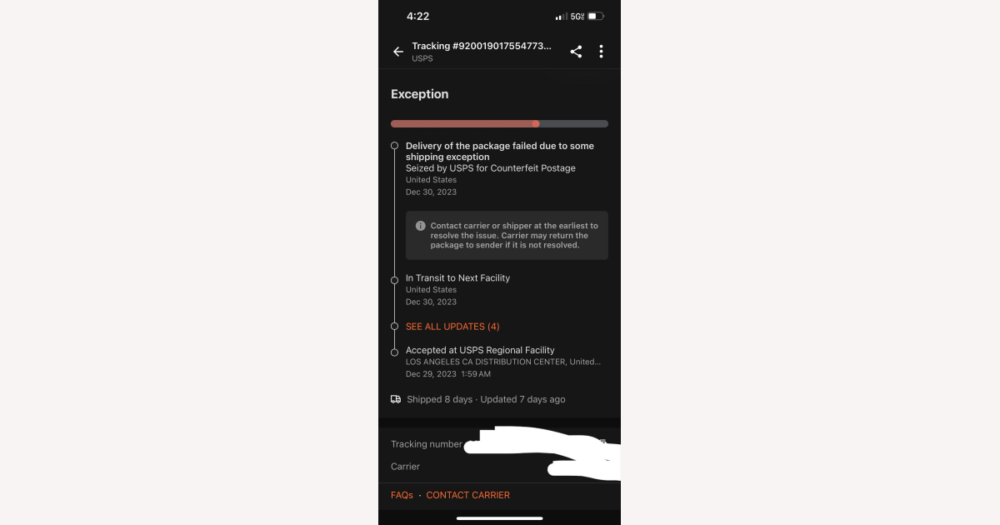
Limits of simplified shipping: responsibility, automation, and disputes
Do DHgate users need a third-party logistics (3PL) provider?
Do I need a third-party logistics (3PL) provider to simplify shipping on DHgate?
Most DHgate buyers and small sellers do not need a third-party logistics (3PL) provider to achieve simplified shipping. A 3PL is an external company that stores your inventory, picks and packs orders, and arranges shipping through carriers on your behalf. This kind of service mainly becomes relevant when your shipment volume and storage needs grow beyond what you can comfortably handle yourself—for example, when you manage many SKUs, ship frequently to multiple regions, or need staff and warehouse space you do not have.
For casual or low-volume DHgate use, simplified shipping usually comes from better use of DHgate’s own shipping settings and delivery estimates, carrier websites or apps for labels and pickups, optional multi-carrier shipping software if your volume justifies it, and basic physical tools like proper packaging, a scale, and a label printer. Those steps reduce manual work and confusion without outsourcing fulfillment.
If your business grows to the point where you are consistently overwhelmed by storage, packing, and daily dispatch, researching 3PL options can be a separate project, with its own costs, contracts, and operational implications. That evaluation sits outside this guide; the key point here is that a 3PL is an optional business decision for higher-volume operations, not a required part of simplified shipping for typical DHgate users.