
Quick answer
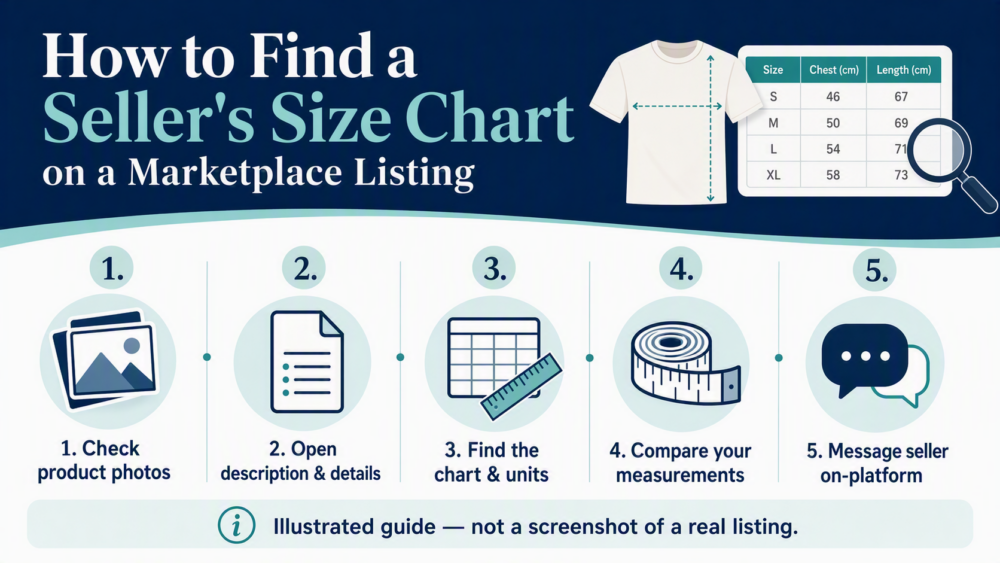
On DHgate, a seller’s size chart is usually in the product photos, the description, or the product-details section. Check the chart’s measurements and units, compare them with your own measurements, and ask the seller through DHgate messages if anything is missing or unclear. Save the chart and the written reply before you order.
Where to look for a seller size chart on DHgate
Start on the product page itself. Scroll through every product image, then open the description and product-details areas. Look for labels such as “Size Chart,” “Sizing,” “Measurements,” or a table that names chest, waist, shoulder, sleeve, inseam, length, or foot length.
Sizing information can be split across a listing. If a chart appears in the photos, check whether the description repeats the same measurements and units. If the listing includes sizing notes elsewhere, save those too. Treat the chart as part of the product record, not as a general promise about every item from the seller.
How to tell whether a size chart is usable
A usable chart is specific, readable, and complete. It gives actual measurements rather than only S, M, L, or XL labels; identifies what is being measured; and states the unit. Do not compare values until you know whether the chart measures the garment or the body.
- Tops and dresses: check chest or bust, shoulder, sleeve, and length.
- Pants and skirts: check waist, hip, inseam, and length.
- Shoes: check foot length, not only the US, EU, or UK size label.
Compare like with like. For example, if a chart lists a 100 cm chest measurement, first confirm whether it is a garment measurement, then compare it with a garment you own or with the measurement basis specified by the listing. Convert centimeters and inches before comparing values.
When to pause before ordering
Pause and ask for clarification—or choose another listing—when the size information is incomplete or inconsistent. Common warning signs include:
- only S/M/L/XL labels with no measurements;
- no stated unit or mixed units;
- a chart that conflicts with the photos or written description;
- a chart that does not identify the measurement points; or
- a seller who will not confirm the measurement you need in writing.
What to do if sizing is unclear
Use the message thread on DHgate to ask for the full chart, the unit, and the exact measurement you need. Keep the conversation on-platform. If an item later does not match the listing, the listing screenshots, seller messages, order confirmation, and your own measurement notes can help document the mismatch through the options available for that order.
Eligibility, deadlines, evidence requirements, and outcomes depend on the current policy and the individual order. For a live order, use the instructions shown in your account and on the order page as the controlling source.
A practical first-order workflow
- Open the product listing and scan the photo gallery for a size chart.
- Open the description and product-details areas for sizing notes.
- Confirm the measurements, units, and whether the chart is for the garment or body.
- Compare the chart with your own relevant measurements using the same unit system.
- Message the seller on DHgate if any measurement is missing, unclear, or contradictory.
- Save screenshots of the chart, listing, and seller reply before checkout.
- Order only after you have a written record of the sizing details you plan to use.
FAQ
What if the listing only shows size labels?
Ask the seller for the full measurement chart before checkout. A general size label alone is not enough to compare fit reliably.
Should I rely on product photos alone?
No. Check the description and product details as well, because sizing information may be split across the listing.
What if the chart uses different units from my measurements?
Convert the units first, then compare like with like. Also confirm whether the chart measures the garment or the body.
Why should I save screenshots?
They keep the chart and seller reply together with the order record if you need to review what was shown before checkout.
Can I ask the seller to confirm the fit?
Ask for the exact measurement in writing rather than a general statement that a size “fits.”
Next step
Open the listing, find the chart, compare the relevant measurements, and message the seller for any missing information before ordering.
Sources and further reading
- DHgate blog: How to Convert Chinese Clothing Size to US/EU Measurements
- DHgate blog: How to Use and Read a Size Chart for Dresses
2 thoughts on “How to Find a Seller’s Size Chart on DHgate”