
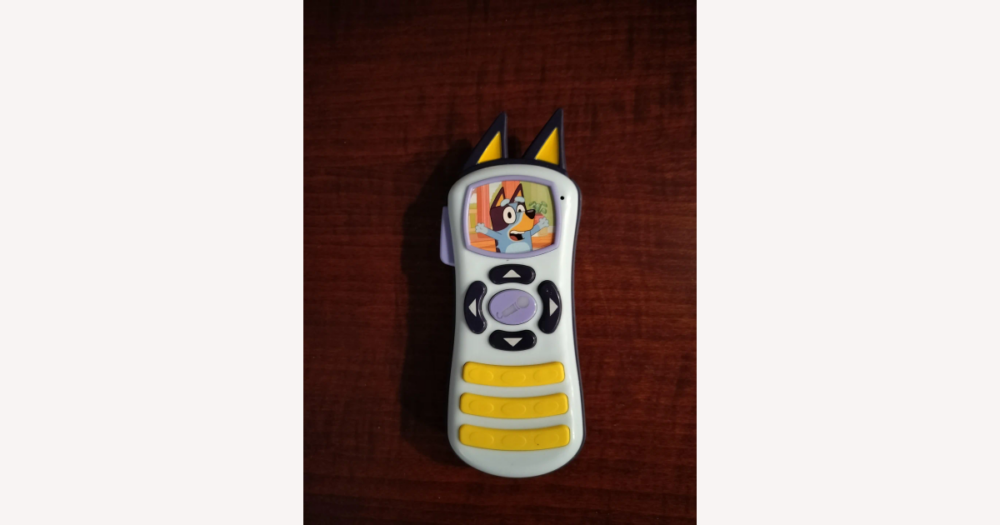
When you search DHgate for a Bluey remote control, you’re really choosing a simple character-branded toy, not a guaranteed TV controller, so the best way to avoid disappointment is to focus on clear, practical details instead of flashy marketing. This guide walks through the core features—buttons, sounds and lights, power source, size, and age fit—and shows how to read specs, photos, and seller information on DHgate so you can quickly decide which Bluey remote feels sturdy and kid-ready enough for your needs.
Core features to check on a Bluey remote control
On DHgate, most Bluey remote controls are character-branded toy remotes for pretend play: they light up, play sounds, and let kids imitate using a “real” remote, but they are not guaranteed to control a TV or other device unless the listing clearly says so. I would only treat them as toys first and see any real remote function as a bonus that must be explicitly described, not assumed from the Bluey branding.
For everyday kid play, a solid Bluey remote covers a few core feature buckets. Button count and layout should match the child’s age: toddlers usually do best with a handful of large, clearly separated buttons, while older kids can enjoy more buttons and labeled functions without getting frustrated. Sounds and lights can include simple beeps, show-style phrases, or short music clips; what matters is that pressing a button consistently produces a sound or light and that the effects aren’t so overwhelming that you want to hide the toy after five minutes.
Power and size are where I pay the most attention on DHgate. A good-enough toy remote states the battery type and quantity, has an obvious battery compartment (ideally with a small screw) and an on/off switch or auto-sleep so it doesn’t drain batteries in a drawer. The overall size should be comfortable for small hands—long enough to grip but not so bulky that a toddler struggles to hold it. Age-appropriate design means rounded edges, no loose or detachable tiny parts, and buttons that don’t feel like they’ll pop off under normal use. For me, sturdy, honest design and clear specs beat flashy features: if a DHgate listing shouts about lights and music but says almost nothing about batteries, size, or age fit, I would usually skip it unless you’re consciously trading those unknowns for a very low price and occasional use.
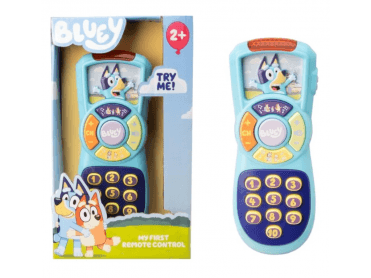
On a typical Bluey toy remote like this, notice the size in relation to a child’s hand, the spacing and shape of the buttons, and where the battery compartment sits on the back—those are the same details worth checking in DHgate listing photos.
How specs like buttons, sounds, and power affect play
On DHgate, focus on the specs that actually change how a Bluey remote feels in daily use. Button count and labeling set the tone: a few big, clearly marked buttons keep things simple for toddlers, while remotes with many small buttons and different modes can be more engaging for older kids who like variety but may overwhelm very young children who just want to press and hear something happen.
Sound options and volume behavior affect both boredom and noise levels at home. Some toys play a single sound or short tune, others offer multiple sound effects, music, or show-style phrases. More modes can keep a child interested longer, but if every press triggers a long, loud clip, parents may get tired of it quickly. Many toy remotes don’t mention any volume control, and that usually means the loudness is fixed; if a DHgate listing is silent about volume or has no close-up of a volume button, treat that as an unknown and assume it could be quite loud.
Battery and power type also come with trade-offs. AA or AAA batteries are easy to find and replace but add ongoing cost. Button cells allow a slim design but can be fiddly to change and should sit behind a screwed compartment so kids can’t access them. Built-in rechargeable batteries avoid buying disposables, yet they need regular charging and, once the battery wears out, the whole toy may be harder to revive. Because of these differences, I strongly prefer DHgate listings that clearly state the battery type, quantity, and whether there’s an on/off switch and charging method. When I’m buying a Bluey remote for frequent play, I would pick the listing with explicit power and basic sound details over a vague description that just promises “fun music and lights” without explaining how it’s powered or how intense the sounds are.
Judging materials and build quality from listings
On DHgate, material wording is one of the few concrete clues you get about how sturdy a Bluey remote might be. Listings that name a specific plastic, such as “ABS plastic,” usually signal a harder, impact‑resistant shell, whereas vague phrases like “plastic material” or “environmentally friendly material” don’t tell you much about toughness. Even with clearer labels, you still can’t confirm how thick the casing is or whether it meets any safety standard from the listing alone, so treat every material claim as an indicator, not a guarantee.
Close-up photos often tell you more than the text. A Bluey remote with a thicker body, buttons that sit flush and evenly in their openings, and seams that look straight and tight is more likely to feel solid in the hand. Visible screws can be a good sign if they’re neat and used to secure key areas like the battery compartment; for toys that use button cells, a screw‑secured cover is generally better for young children than a simple snap‑on lid, because it’s harder for kids to open on their own. In contrast, rough edges, gaps around buttons, or misaligned halves of the shell suggest looser quality control.
Be cautious with listings that rely only on very glossy, heavily edited promo art or show the remote from far away. Low‑resolution images, only one or two angles, or photos where you can’t clearly see seams, screws, or the battery door make it hard to judge build quality at all. Missing details about the plastic type, surface finish, or how the buttons are constructed should be treated as unknowns—not as proof that the toy is either perfectly safe or definitely flimsy. When I’m choosing a Bluey remote on DHgate, I would rather pick a listing that names materials and shows multiple clear, close-up photos (including the back and battery compartment) than a flashier one with bright artwork but vague descriptions, because for a kid’s toy, sturdy and honest beats exciting but unclear every time.
Toy-only Bluey remotes vs. functional controllers
| Remote type | Typical features | Listing clues | Compatibility expectations |
|---|---|---|---|
| Toy-only Bluey remote (pretend-play sound-and-light toy) | Plays built-in sounds, songs, or show phrases; lights up when buttons are pressed; may have simple pretend-play features like a fake “channel” or “volume” button that only changes sounds. | Listings focus on “music,” “sound effects,” “lights,” or “interactive buttons,” sometimes with a button count or mention of Bluey phrases, but do not mention volts, pairing steps, or a specific device it controls. | Intended only as a standalone toy. It almost never controls a TV, set‑top box, or other home electronics unless the listing clearly details supported devices and how to program them. If compatibility with real electronics isn’t spelled out, assume it does not exist and buy it purely as a toy. |
| Functional Bluey controller (for a ride-on car or specific device) | Operates another product, such as a Bluey‑themed ride‑on car or, less commonly, a specific electronic device; may offer steering, start/stop, speed settings, or pairing buttons in addition to lights or sounds. | Listings mention a matching product (“for Bluey bumper car,” “for 12V ride‑on”), give technical details like voltage (for example 6V or 12V), wireless range, pairing or syncing instructions, or use terms like “parental remote control.” | Expected to work only with the exact car or device named in the listing, not with generic TVs or any ride‑on. If the description mixes toy language (“educational,” “music and lights”) with hints of remote‑control use but doesn’t clearly state what it controls, treat compatibility as unresolved. In that situation, I would either message the seller to confirm which model it works with and how it connects, or choose a clearer listing—especially if I’m buying it as a gift where it really matters that the remote does what the child is expecting. |
Listing red flags and unresolved details on DHgate
- Age label uncertainty: Treat listings with missing age ranges, extremely broad labels (such as “1–10 years”), or age suggestions that don’t match the remote’s apparent complexity as unresolved. A very button‑heavy remote marketed for toddlers might feel frustrating or unsafe, while a very simple toy sold for older kids may disappoint. I would either ask the seller to confirm the intended age range or choose a listing where the age guidance clearly fits the child.
- Vague “educational” promises: Phrases like “teaches numbers,” “develops skills,” or “educational remote” without a concrete feature description (numbered buttons, simple quizzes, clear labels) are marketing, not evidence. If you buy based on those claims alone, the toy may turn out to be just a sound‑effect remote with basic lights. Assume learning benefits are unknown unless the listing spells out how the remote actually supports them.
- Missing or unclear battery information: When the description doesn’t state battery type, quantity, and whether batteries are included, you risk surprise extra costs or downtime while you hunt for the right batteries. Some remotes may need small button cells that are trickier to replace. I would treat battery details as unknown until confirmed and factor in both the cost and practicality of replacements before ordering.
- No size or hard‑to‑judge dimensions: Listings that skip measurements or use photos where the remote is shown without a clear size reference can easily lead to a remote that feels too tiny or bulky for the child’s hands. A compact key‑fob‑style remote might look full‑size in close‑up photos. Until dimensions are clear, assume size is unknown and avoid relying on pictures alone if fit and grip really matter.
- Low‑resolution or heavily stylized photos: Blurry images, heavy filters, or pictures that focus more on Bluey artwork than on the actual buttons and casing hide important details such as seam quality, screw placement, and battery compartment design. That doesn’t prove poor quality, but it means you can’t reliably judge build, finish, or even exact graphics. I would treat these aspects as unresolved and prefer listings with sharp, neutral photos for a child’s main toy.
- How to respond to these gaps: None of these issues automatically means a Bluey remote is unsafe or low‑quality, but they do signal that key parts of performance and suitability—age fit, learning value, power needs, and size—are unknown until clarified. For a toy a child will use often or roughly, I would either message the seller to fill in missing details or pick a listing with clearer specs and better photos, even if it costs a bit more. If you mainly care about a low price for occasional play, you might accept more unknowns—but it’s better to do so knowingly, understanding that you’re trading certainty for savings.
Quick pre-purchase checklist for Bluey remotes on DHgate
- Confirm the product type: Read the description carefully to check whether it is a toy‑only sound‑and‑light Bluey remote or a functional controller for a specific device or ride‑on car, and only expect it to do what is explicitly described.
- Check size and dimensions: Look for stated measurements and compare listing photos with your expectations so the remote seems comfortable for the intended child’s hands and not awkwardly tiny or oversized.
- Match buttons and features to play style: Count or estimate the number of buttons and note the main sound and light features described, choosing simpler layouts for younger kids and more varied options for children who enjoy multiple modes.
- Verify battery requirements: Find clear information on battery type, quantity, and whether batteries are included, and factor any extra battery purchase and replacement effort into your decision.
- Scan material and build cues: Look for mentions of materials and close‑up photos of the casing and battery compartment to judge overall sturdiness and how secure the compartment appears when closed.
- Review seller reputation: Check the seller’s overall rating, order history, and proportion of positive feedback on DHgate, giving preference to reputable sellers rather than the absolute cheapest option, especially for frequent kid use.
- Read buyer reviews and view photos: Skim comments and real‑user images for repeated remarks about sound volume, durability, and how closely the Bluey design matches expectations, using these as signals rather than guarantees.
- Confirm shipping and return terms: Note estimated shipping times and the stated return or refund policy so you know in advance how problems would be handled if the remote arrives damaged or different from the listing.
Using DHgate seller ratings and reviews wisely
On DHgate, seller ratings and review metrics are a useful starting filter, not a guarantee. A higher overall rating, a solid history of completed orders, and a high proportion of positive feedback all suggest the seller is generally reliable, especially compared with a new account or one with very mixed feedback.
When you open the reviews for a Bluey remote, focus on patterns rather than any single glowing or angry comment. Repeated mentions of flimsy plastic, buttons that stop working, or very loud, piercing sounds are more important than one isolated complaint; the same goes for multiple buyers saying the toy feels sturdy, the sounds are fun but not overwhelming, or the Bluey design looks just like the pictures.
Buyer-uploaded photos are particularly helpful for character toys. Use them to check whether the Bluey artwork, colors, and button layout match the listing images and to get a rough sense of the remote’s true size and thickness in a hand or next to other objects. If the real photos look noticeably duller, blurrier, or cheaper than the listing, treat that as a warning sign.
Keep the limits in mind: ratings and reviews reflect individual experiences, can be sparse or skewed, and cannot predict exactly how your toy will perform. I would rather see modest but consistent feedback that lines up with detailed specifications and clear photos than rely on a sky-high rating attached to a vague, incomplete listing. Use reviews and photos as one layer of evidence alongside clear specs and honest descriptions, not as a substitute for them.
Turning feature priorities into questions for sellers
Use your priorities—such as sturdiness, clear battery information, and age-appropriate design—to sort DHgate results. Keep listings that name the battery type and quantity, show multiple angles of the Bluey remote, and describe button functions in plain language, and skip options that hide these basics or feel overly generic.
It often pays to favor listings from well-rated sellers that combine detailed descriptions with several real photos, even if the price is slightly higher than the bare-minimum option. That balance of clear information and decent reputation usually tells me more than chasing the absolute lowest price from a seller with thin details.
If a listing is close to what you want but leaves out something important, message the seller before you buy. Helpful questions include: the exact dimensions of the remote, the battery type and whether batteries are included, whether the sounds have adjustable volume or just one level, and whether the remote actually controls a specific device or ride-on car or is purely a sound-and-light toy.
These extra checks matter most when you are buying for younger children or choosing a main gift, where disappointment or safety worries would really sting. In those cases, I would avoid ambiguous listings entirely or wait for clear answers from the seller, and only relax those standards for a low-stakes, occasional-play toy where you are comfortable with a few unknowns.
Common Bluey remote questions that still depend on the listing
Will a Bluey remote control my TV or streaming box?
Usually not. Most Bluey-branded remotes on DHgate are standalone toy remotes that only play sounds and lights. They will not control a TV, streaming box, or other home electronics unless the listing clearly says so and provides details like supported brands or pairing/programming steps. If the description only mentions music, lights, or pretend-play features and says nothing about specific devices, assume it is a toy only. Treat compatibility as unknown until you see explicit information or the seller confirms it in writing; if you need a real controller and can’t get clear details, it’s safer to pick another listing.
What should I do if I’m not sure a Bluey remote is suitable for my child’s age?
Treat unclear age guidance as a warning, especially for toddlers. Combine any stated age range with what you can see about the remote’s complexity (number and size of buttons, small decorative parts) and the battery compartment design—young children are better suited to simple layouts, large buttons, and a screw‑secured battery door. If the listing has a very broad or missing age range, or the photos make it hard to judge size and small-part risks, message the seller and ask directly about the intended age group and safety details. If they won’t clarify, I would err on the side of caution and choose a different listing rather than guess, particularly for children under three or for a main gift.