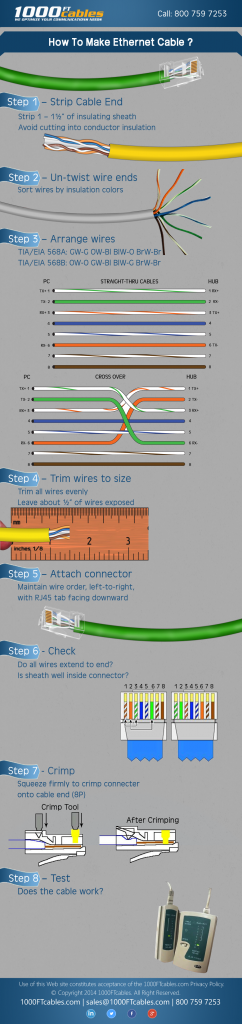
A 60‑foot Ethernet cable is long enough to cross a room or two without pushing networking limits, and DHgate can be a useful place to look if you want value pricing or small‑batch wholesale. You’ll need to search by the right keywords (length plus category), drill into long‑cable and LAN sections, then judge each listing and seller on specs, photos, ratings, and communication. If those signals look thin or confusing, you’re better off buying a branded cable from a domestic retailer.
What a 60‑Foot Ethernet Cable Is and Why Length Matters
For most home and small‑office networks, “60 feet” just means a patch cable in the 50-75 ft range with RJ45 connectors at both ends. Ethernet guidance generally treats runs up to around 100 meters (roughly 328 feet) as safe for standard copper cabling, so 60 feet is comfortably inside typical limits for Cat5e, Cat6, or Cat6a.
At that length, your main decisions are:
- Cable category: Cat5e is fine for basic internet up to gigabit; Cat6 and above are better if you care about higher speeds or future‑proofing.
- Flat vs round: Competitor guidance notes that flat cables slide neatly under rugs and along baseboards but tend to be less durable under rough bends or frequent movement, while round cables usually hold up better in everyday use and tight spaces.
- Shielding: In a typical home, unshielded twisted pair (UTP) is usually enough. If the cable will run near electrical cables or machinery, shielded options (sometimes labeled STP or S/FTP) help reduce interference.
On DHgate you’ll see all of these variants, often mixed together on broad category pages. Knowing which type you want before you start searching makes it much easier to skim listings.
Search and Filter Workflow: Finding 60‑Foot Cables on DHgate
You won’t find a dedicated “60 ft” toggle on DHgate, so your search has to combine cable type and length.
Step 1: Start from the search bar Go to DHgate’s homepage and use the main search bar. DHgate’s own shopping guide and seller‑finding tips describe keyword search as the primary way to reach product categories, so treat it as your main tool rather than hunting menus.
Step 2: Use targeted keywords Type a phrase that includes both the product and length, then adjust if results are too broad. Examples:
- `60ft ethernet cable` or `60 feet ethernet cable`
- `20m cat6 lan cable` (many listings use meters; 20m is about 65.6 ft)
- `super long ethernet cable cat6` for very long options, then narrow by length
- `shielded cat6 20m lan cable` if you know you need shielding
Step 3: Narrow by category and filters From your search results:
- Click into LAN cable / Ethernet cable style categories if they appear. These tend to group long cables more cleanly than generic “computer accessories.”
- Use sidebar filters where available to pick cable category (Cat5e/Cat6/Cat7) or form factor (round vs flat) if the page offers those options.
- Use the search box on a category page to refine with length, for example `20m` or `60ft`.
Step 4: Skim titles for real cables, not adapters Category pages such as “super long ethernet cable” often mix in USB‑to‑Ethernet adapters, hubs, and other gear. Look for titles that clearly mention:
- A length value (m or ft) and
- Words like `LAN cable`, `RJ45`, or `network cable`
Open only those listings in new tabs so you’re evaluating actual 60‑foot‑class cables, not unrelated hardware.
Evaluating DHgate Cable Listings and Sellers Before You Buy
Once you have a handful of candidate listings, your job is to decide whether any of them are trustworthy enough for a home or small‑business network. That means looking at both the cable specs and the seller’s track record.
1. Read the specs carefully
On each product page, focus on details that directly affect performance and fit:
- Length: Confirm the stated length (in meters or feet) in the description, not just the title. Some listings bundle multiple lengths; make sure the option you select matches your run.
- Category and shielding: Look for clear labels like `Cat6`, `UTP` or `S/FTP`. Avoid listings that just say “network cable” without a standard.
- Construction: Note if the cable is flat or round, solid or stranded copper. For a 60‑ft drop that may occasionally move, a round, stranded copper cable is usually more forgiving.
- Use case photos: Images showing the cable connected to routers, PCs, or patch panels can help you verify it’s a standard RJ45 patch cable, not a proprietary lead.
If specs are vague or translated poorly, message the seller with precise questions about category, shielding, and conductor material before you even think about ordering.
2. Use seller ratings and history as a filter
DHgate’s own blog on finding sellers recommends several checks when you’re deciding who to buy from:
- Feedback and review score: Higher review scores reflect better buyer satisfaction with items and service. Treat low scores or very few reviews as a risk sign for something as reliability‑sensitive as network cabling.
- Years active on DHgate: The blog suggests preferring sellers that have been active for a number of years and have built up substantial feedback. A brand‑new account selling ultra‑cheap long cables deserves extra caution.
For a single home cable, you might accept a mid‑range seller with decent reviews. For a small ecommerce business considering repeat bulk orders, be stricler: long history, strong review score, and preferably a badge.
You can see more about these checks in DHgateWiki’s guide on finding trusted sellers on DHgate.
3. Decide if you need samples or a different channel
DHgate’s ecommerce and wholesale blog content encourages buyers sourcing products in bulk to:
- Request or order samples: Buy a single cable or a very small batch first. Use it on your own network, bend it around furniture, and confirm the connectors feel solid.
- Check consistency: If you plan to sell cables, verify that the sample you receive matches the listing’s photos and specs. Inconsistent printing or mislabeled categories are a red flag.
For a small ecommerce business experimenting with network accessories, a structured DHgate workflow makes more sense:
| Scenario | DHgate approach | Retail approach |
|---|---|---|
| Single 60‑ft cable for home | Consider DHgate only if you find a clearly specified cable from a well‑rated seller; otherwise buy domestically. | Walk into a local store or order from a major US site. |
| Test batch of 10-20 cables | Use keyword search, vet sellers (feedback, history, badges), order samples, then place a small order. | Harder to negotiate; usually pay full retail per cable. |
| Ongoing resale of cables online | Build relationships with a few vetted DHgate suppliers, negotiate terms, and keep testing quality. | Look for distributors or branded wholesale programs. |
If you get through the spec checks, seller vetting, and sample testing and still feel uneasy about the listing, don’t force the purchase simply because you’re already on DHgate.
4. Before checkout, run an order‑readiness check
For any cross‑border cable order, confirm:
- The exact length and category option selected on the product page
- Total quantity and color variants, if you care about matching runs
- Any notes about packaging (individual bags vs bulk coil)
DHgateWiki has a separate order‑readiness checklist for DHgate that you can adapt to cables so you don’t miss a simple detail.
If the listing or seller can’t give you clear answers to basic Ethernet questions—category, shielding, conductor material, and length options—that’s a strong signal to walk away and source your 60‑foot cable through a more transparent channel.
For additional DHgate platform context, use What DHgate is and how the marketplace works.