

If you’re buying a battery tester for lithium cells or Li‑ion packs on DHgate, start by focusing on tester types that are explicitly designed for lithium chemistries and clearly state their voltage ranges; that matters more than extra features or generic “all battery” claims. Once you can tell simple household checkers and automotive analyzers apart from lithium‑capable voltage, capacity, and internal‑resistance tools, the DHgate listing specs and seller checks later in this guide become much easier to read and trust.
Tester types that actually make sense for lithium cells and Li‑ion packs
On DHgate, battery testers fall into a few broad categories, and only some of them really make sense for lithium cells and Li‑ion packs. Simple voltage checkers and “good/bad” household testers are usually aimed at alkaline AA/AAA or 9 V batteries. They often just show a rough bar or LED and may not be calibrated for lithium’s higher voltages or specific charge states, so they’re poor tools for judging Li‑ion health beyond a very basic voltage reading.
For lithium cells, slot‑style digital testers and dedicated capacity testers are far more useful. Slot testers are designed for cylindrical or pouch cells and display the actual voltage (and sometimes capacity) of each cell within a safe per‑cell range. Capacity testers add a controlled discharge load and estimate how many mAh a cell can deliver, which is helpful when sorting cells for DIY packs or checking whether tool batteries still have reasonable capacity. These tools matter for lithium because they respect typical Li‑ion voltage limits rather than assuming alkaline behaviour.
Internal‑resistance meters focus on how much a cell or pack resists current flow. In lithium use, this matters for comparing cells, spotting aging, and identifying weak cells in a group: higher internal resistance usually means more voltage sag under load and reduced performance. Some lithium‑oriented testers combine voltage, capacity, and internal resistance in one device, giving hobbyists more insight into how their cells behave without needing lab equipment.
Pack‑focused tools, such as multi‑cell voltage meters, balance checkers, and BMS‑oriented testers, are designed for Li‑ion or Li‑Po packs made of cells in series (2S–8S and beyond). They read total pack voltage and, in better designs, individual cell voltages via a balance connector, so you can see if one cell in an e‑bike, RC, or scooter pack is drifting. These testers are built around lithium chemistries and voltage ranges, unlike automotive analyzers that focus on 12 V lead‑acid starter batteries and cold‑cranking amps.
Automotive battery analyzers and heavy load testers are a different category altogether: they’re made to stress 12 V lead‑acid car batteries and report cranking performance, not to evaluate multi‑cell lithium packs. Using them on lithium packs can be meaningless or even unsafe. The same goes for very generic “all battery” household testers with no explicit Li‑ion, Li‑Po, or LiFePO4 labels. For lithium cells and packs on DHgate, the meaningful functions are accurate voltage measurement, capacity estimation, and, sometimes, internal resistance—delivered within clearly stated lithium‑compatible voltage ranges rather than vague promises of universal support.
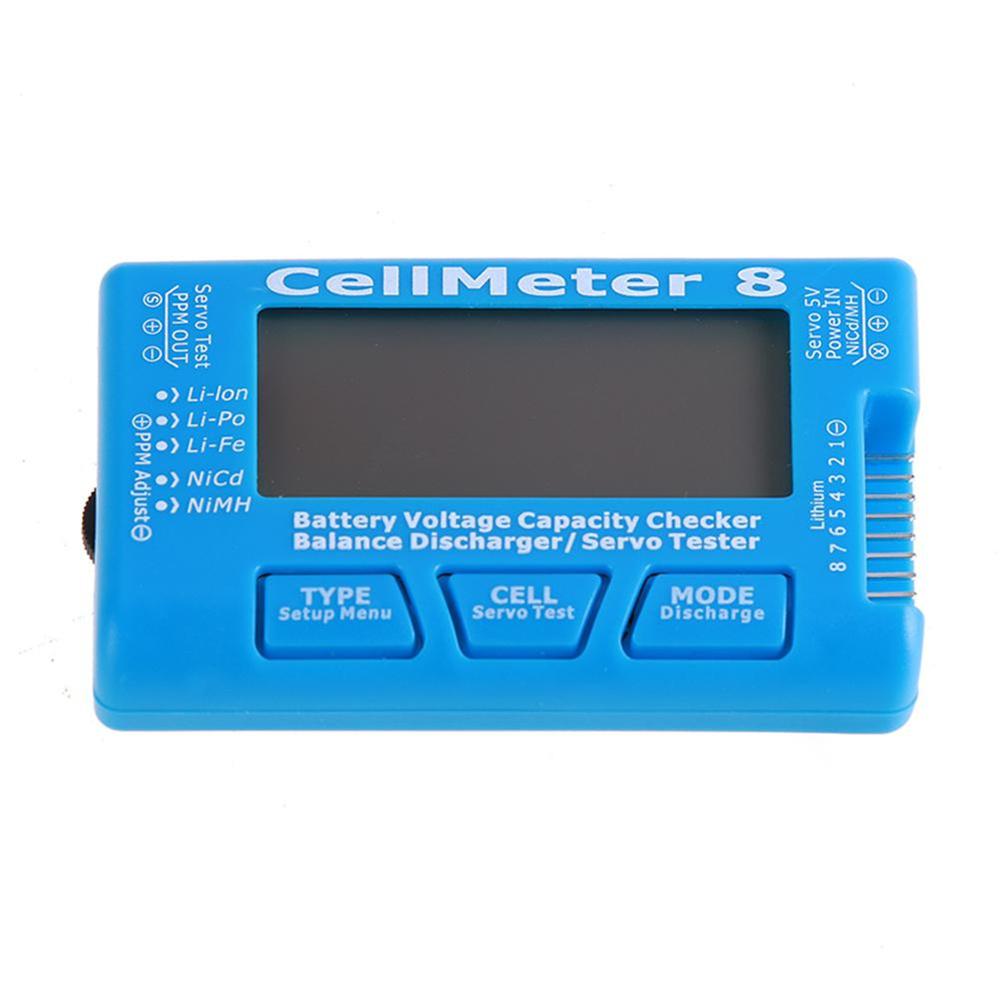
A multi‑cell digital battery checker showing per‑cell voltages for a lithium pack, with a compact handheld layout quite different from simple household good/bad testers.
Specs that matter for lithium batteries and packs—and how to read them
- Supported chemistries: Look for explicit labels such as Li‑ion, Li‑Po, or LiFePO4. A tester that lists specific lithium chemistries is safer and more meaningful than one that only says “all batteries” or mentions alkaline and NiMH without lithium.
- Per‑cell voltage range: Check that the tester’s per‑cell range covers typical lithium values—nominal around 3.6–3.7 V and maximum charge around 4.2 V for standard Li‑ion cells, or the appropriate range for LiFePO4 and other chemistries. The range should include both your usual charged state and your safe lower limit without encouraging over‑discharge.
- Pack voltage range: For assembled packs (e‑bike, scooter, RC), confirm the total pack voltage the tester can handle. Multiply your cell count in series by the per‑cell maximum voltage (for example, 10S × 4.2 V) and make sure that number sits well within the tester’s stated pack voltage range.
- Maximum test current or load: Capacity testers and some advanced meters specify a discharge current or load level. Higher currents stress the battery more and can reveal real‑world capacity, but very aggressive loads aren’t necessary for everyday checks. Choose a tester whose load level matches how hard you actually use your cells or packs, not one that promises extreme stress for no clear benefit.
- Internal resistance measurement: If the tester measures internal resistance, check how it describes this function—often in milliohms. This spec is useful for comparing cells and spotting aging, but for budget tools it should be treated as a relative indicator, not laboratory‑grade data.
- Connector and lead types: Make sure the tester’s physical connectors match your batteries. Slot testers suit loose cylindrical cells; spring contacts or small clamps are useful for button‑top cells; crocodile clips or screw terminals work for bare leads; and balance connectors are essential for reading individual cells in multi‑cell packs. A tester that can’t physically connect to your cells or pack won’t be useful no matter how good its specs look.
- Accuracy and display resolution: Look for a stated accuracy (for example, ±0.05 V) and a display that shows at least two decimal places for voltage on lithium cells. Listings with no accuracy spec or very coarse readouts make it hard to judge small but important differences between cells.
To match a tester’s specs to your own batteries, start with the labels already on your cells or packs. Note the chemistry (such as Li‑ion, Li‑Po, or LiFePO4), the nominal voltage per cell, and the number of cells in series in any pack. Then check that the tester explicitly lists those chemistries and that its per‑cell voltage range comfortably covers your nominal and full‑charge voltages without pushing the battery beyond its recommended limits.
For packs, calculate the total pack voltage at full charge using your series count and per‑cell maximum, and compare that figure to the tester’s stated pack range. A tester that can only handle, say, 4.2 V per cell or a narrow pack voltage window may be fine for small RC packs but unsuitable for higher‑voltage e‑bike systems. Likewise, if you rely on balance connectors to see individual cell voltages, make sure the tester shows it supports the exact connector type and cell counts you use.
When specs are clear and specific—chemistry spelled out, voltage ranges given, test current described—they are much easier to match to your batteries and much more trustworthy. I would pick a tester that plainly supports my lithium chemistry and voltage ranges even if it has fewer bonus features, rather than a flashy device that promises to test “any battery” but never states how it handles Li‑ion. On DHgate, that clarity is often the best signal you have that a tester is technically appropriate for your cells or packs.
Testers for single lithium cells vs. multi-cell Li‑ion packs
| Tester type | Best used on | What it tells you | What it cannot do |
|---|---|---|---|
| Slot-style cell tester | Loose cylindrical or prismatic lithium cells you can insert individually (e.g., 18650, 21700). | Basic per‑cell voltage and sometimes a simple “good/weak” indication, enough to see if a cell is charged and roughly healthy. | Diagnose an entire pack at once, show true usable capacity, or pinpoint subtle degradation under load. Every cell must be tested separately. |
| Cell capacity tester (charge/discharge analyzer) | Individual lithium cells for DIY packs, RC, or replacements where you care about matching capacity. | Measured capacity over a controlled charge/discharge cycle and often internal resistance, so you can compare cells and spot aging or mismatches. | Assess a whole scooter or e‑bike pack without disassembly, reveal wiring or BMS faults, or guarantee lab‑grade accuracy on very cheap units. |
| Dedicated internal-resistance meter | Lithium cells or small groups where you mainly care about IR differences rather than full capacity tests. | Approximate internal resistance values that help you sort cells, identify ones that are weakening, and build more balanced parallel groups. | Provide full capacity numbers, show overall pack voltage or balance, or by itself explain why a device shuts down under load. |
| Pack voltage checker / multimeter-style tester | Assembled Li‑ion packs (tool batteries, e‑bike packs, larger RC packs) you can access at the main terminals. | Total pack voltage and sometimes rough state of charge, enough to see if the pack is within a safe operating or charging window. | Expose which specific cell or parallel group is weak, check individual cell balance without extra connections, or fully explain sudden range loss. |
| Balance tester / BMS-focused pack monitor | Multi‑cell packs with accessible balance leads (common on RC and some DIY packs) or packs whose BMS exposes per‑cell data. | Per‑cell or per‑group voltages within a pack, overall pack voltage, and sometimes basic information about balance and BMS cut‑off behavior. | Measure true capacity of each cell, serve as a replacement for proper diagnostics on a failing pack, or provide full lab‑quality analysis of complex systems in one step. |
For lithium setups, cell‑focused testers are the right choice when your main question is “Are my individual cells still healthy, and do they match each other?” They let you measure capacity and internal resistance per cell, but they only see what is happening at that one cell at a time. To understand a whole pack, you would have to pull it apart and run each cell through the tester, which is not practical for many commercial packs.
Pack‑focused tools flip the perspective: they answer questions like “Is my pack roughly charged, and does it look balanced?” by showing total voltage and, with balance or BMS monitors, the spread between series groups. What they cannot do is tell you which particular cell is failing or guarantee that every cell has the same capacity; they report symptoms at pack level, not a full internal health report.
No inexpensive gadget will fully characterize both complex packs and individual cells with lab‑grade precision. I would pick a pack‑appropriate tester with clearly stated voltage range and connector details if I’m dealing with e‑bike or tool packs, and a detailed capacity tester for DIY or hobby cell work. A generic device that claims to “test any battery” without precise lithium specs is more likely to disappoint than to replace both roles.
Balancing accuracy, features, and budget for lithium testing
Higher accuracy, internal resistance measurement, and logging or PC connectivity usually push a lithium tester into a higher price bracket, and they only earn their keep if you will actually use those capabilities. For someone matching cells for a custom pack or flying RC models where reliability is critical, repeatable capacity and IR data make it much easier to sort out weak cells and build balanced groups. In that context, paying more for a tester with clear accuracy specs and stable measurement modes can be justified.
By contrast, a casual user checking a few Li‑ion tool batteries or occasional e‑bike pack voltage mostly needs trustworthy voltage readings and a rough sense of whether a battery is still serviceable. Advanced logging, programmable test profiles, or computer software add complexity without changing the day‑to‑day decision of “charge it, retire it, or keep using it.” For that buyer, a simpler digital tester with honest lithium compatibility labels and sensible voltage ranges is usually the better value.
I personally prioritise clear lithium chemistry support and specific voltage and accuracy information over fancy extras. On DHgate, I would rather choose a modest tester whose listing spells out its lithium range, connectors, and measurement limits than a feature‑heavy device described in vague marketing language. If a listing advertises “pro” functions but offers almost no technical detail, it’s a sign to avoid over‑paying for features that may not work as claimed.
Checklist: reading a DHgate battery-tester listing for lithium suitability
- Start with the title and first lines of the description. Look for explicit lithium chemistry labels such as “Li-ion,” “Li-Po,” or “LiFePO4.” Treat vague claims like “all batteries” or listings that mention only alkaline or NiMH as a warning sign for lithium use.
- Compare the tester’s stated per-cell and total voltage ranges with your own batteries. Make sure typical lithium values (for example, around 4.2 V full for many Li-ion cells and your pack’s full and empty voltages) sit comfortably inside the specified limits, not right on or beyond the edge.
- Check how the tester connects to the battery. Confirm that its form factor—slots for loose cells, clip leads for bare tabs, balance connectors for hobby packs, or specific plugs—matches a connection method you can safely use with your cells or packs.
- Review the measurement functions listed. Decide whether you need only voltage, or also capacity testing, internal resistance, or balance checking, and make sure the functions promised line up with the decisions you want to make about your batteries.
- Look for accuracy and display details. Prefer listings that give at least a basic accuracy figure (such as ±1% or ±0.01 V) and clear resolution (for example, two or three decimal places). Be cautious when no accuracy is stated or the description uses only marketing phrases like “high precision” without numbers.
- Check how the tester is powered and any usage limits. Note whether it uses its own batteries, USB power, or the pack itself, and read any notes such as “not for high-current automotive testing” or “only for single cells” so you don’t push the tester beyond its design.
- If the listing still fails to state clear lithium compatibility, voltage ranges, or basic accuracy, move on. On DHgate it’s usually safer to skip a feature-heavy tester with vague specs in favour of a simpler device whose listing spells out exactly what it can and cannot do with lithium batteries.
DHgate seller and order checks before you buy a tester
- Check the seller’s overall rating and how long they have been active on DHgate. A higher rating over a longer period usually indicates more consistent fulfilment and fewer serious disputes.
- Read buyer reviews, prioritising those with photos or mentions of lithium use. Look for comments on build quality, measurement consistency, and whether the tester received actually matched the model and features shown in the listing.
- Note sales volume and repeat orders for this tester or closely related items. A steady flow of transactions can be a sign that the seller is delivering what buyers expect.
- Compare the product photos, title, and detailed description carefully. Make sure the tester’s layout, connectors, and stated functions match across all parts of the listing, and avoid pages where images or specs look copied from different models or contradict each other.
- Review shipping options and estimated delivery times. Prefer listings that include tracking and DHgate’s basic order protection, and be realistic about longer transit times if you choose the cheapest shipping.
- Read the refund, return, and dispute terms closely. Check who pays return shipping, under what conditions a refund is available, and how issues such as “item not as described” are handled so you know what support you have if the tester is inaccurate or misrepresented.
- Compare the price with similar battery testers on DHgate. Be wary of listings that are dramatically cheaper yet claim more features than comparable tools, as this can signal corners cut on accuracy, build quality, or honest description.
Clear product descriptions, consistent photos and specs, and solid buyer feedback reduce the risk of ending up with a mislabelled or unreliable tester. When a DHgate seller is transparent about what they are offering and past buyers confirm that the item matches the listing, you have a much stronger basis for trust.
If I were choosing a lithium battery tester on DHgate, I would favour sellers whose ratings, reviews, shipping information, and refund terms are easy to understand, even when their prices are slightly higher. That transparency makes it simpler to use DHgate’s dispute and protection tools if something goes wrong, and is worth more to me than saving a few dollars on a listing that leaves key details unclear.
Common pitfalls and red flags in lithium tester listings
- Vague chemistry claims such as “for all batteries” or only mentioning alkaline/NiMH without clearly listing lithium chemistries (Li‑ion, Li‑Po, LiFePO4). If the listing doesn’t name the lithium types you use, treat it as incompatible and move on.
- Missing, incomplete, or contradictory voltage information—for example, no per‑cell voltage range, unclear maximum pack voltage, or specs that clash between the title, bullets, and detailed description. If you cannot confirm that the tester covers your cell and pack voltages, skip the listing.
- Heavy emphasis on automotive features (12 V car starting current, alternator tests) with no mention of lithium packs, balance functions, or cell‑level measurements. These tools are usually built for lead‑acid systems and add little value for Li‑ion packs.
- Product photos that show a different tester layout, display, or connectors than the text describes, or images that appear to be from several unrelated models. Inconsistent visuals are a strong sign that you may not receive the device you think you’re ordering.
- Buyer reviews that mention receiving a different model, missing advertised features, or obviously inaccurate readings compared with other meters or known batteries. Treat this feedback as evidence that the listing does not match reality.
- Descriptions that omit any accuracy data or measurement resolution, or that use vague phrases like “high precision” or “professional” without numbers (such as ±0.1 V or internal resistance resolution). Without concrete specs, assume the measurements are basic and avoid using the tester for critical decisions.
- Over‑promised capabilities, such as “lab‑grade precision,” “R&D testing,” or extreme current tests, without supporting specifications like controlled charge/discharge profiles, detailed logging, or temperature management. Budget testers rarely offer true laboratory features, so exaggerated marketing is a red flag.
- Any listing that fails your earlier chemistry, voltage, accuracy, or DHgate trust checks—unclear chemistries, incomplete ranges, missing accuracy figures, poor or inconsistent reviews, mismatched photos—is not worth the risk. The safest move is to walk away and choose a clearer, better‑documented alternative.
What budget lithium testers can—and cannot—realistically do
Most affordable battery testers on DHgate are built for practical checks, not full laboratory characterization. When reasonably well made, their basic voltage measurement is usually reliable enough for everyday use: you can see whether a lithium cell or pack is charged, low, or clearly out of range. Capacity estimates and internal resistance readings, however, tend to be approximate. They are most useful for comparing batteries to each other—spotting weak cells or degraded packs—rather than for trusting the absolute numbers as if they were manufacturer specifications.
In contrast, professional lab or R&D battery test systems provide tightly controlled charge and discharge profiles, calibrated measurement chains, temperature control, and detailed data logging. Those tools are designed to characterise batteries with high precision, verify manufacturer claims, and support engineering work. Such capabilities are rare in low‑cost marketplace testers, and even when similar words appear in a listing, the underlying hardware and calibration usually do not match true lab equipment.
For DHgate buyers, it is more realistic to treat budget lithium testers as sorting and diagnostic aids: they help you group cells with similar behaviour, check whether a pack is roughly healthy, and spot obvious issues like a sagging voltage under load. Expecting exact, lab‑grade capacity numbers or full professional diagnostics from these tools will only lead to disappointment. I prefer listings that make modest, honest claims about simple voltage and comparative tests over those that advertise “pro” or “R&D” capabilities without the detailed specifications to back them up.
Simple ways to sanity-check your new tester’s readings
- Start with a known good battery, such as a recently charged tool pack or a lithium cell with an expected voltage, and take a reading with your new tester, noting the value it shows.
- If you have another measuring device like a multimeter, measure the same battery with it and compare the numbers; they don’t need to be identical, but they should be reasonably close and in the same direction.
- Measure the same battery several times in a row with the tester to check that the readings are stable rather than jumping around or changing dramatically without the battery being used in between.
- Repeat the test on a few batteries at different charge levels—full, partly used, and clearly low—to confirm that the tester’s readings move in a sensible way as voltage changes.
- Avoid unsafe experiments: do not deliberately over‑charge or over‑discharge lithium cells, create short circuits, or bypass safety devices just to test the meter. Follow basic handling precautions, keep terminals from touching, and use appropriate leads or holders.
- Treat these checks as a quick sanity test for everyday use, not a full calibration. As long as the readings are consistent and broadly sensible, the tester is likely good enough for routine lithium checks on DHgate‑sourced gear.
FAQ: practical questions about lithium battery testers on DHgate
Can one tester sensibly handle both my lithium packs and household cells?
Many testers can read both lithium and common household cells, but they rarely do every job perfectly. A slot-style tester that fits AA/AAA and 18650 cells is convenient for mixed use, yet its connectors may not reach the main terminals or balance leads on larger Li‑ion packs. Pack-focused tools with clips or balance plugs can read total voltage or per‑cell voltages in packs but are awkward for loose AA/AAA. If you want one device, look for clear chemistry labels that include both lithium and the household types you use and check that it has physical connectors that suit each battery style. Accept that accuracy will be practical rather than lab‑grade for at least one of those roles.
How do display type and interface design affect everyday usability?
Readable displays matter more than marketing claims. An LCD with a backlight is easier to see in dim garages or workshops than a bare reflective screen; simple segment LEDs can be fine for coarse good/low/empty checks but less useful for detailed voltage and resistance values. Clear digit spacing, stable numbers, and obvious units (V, mAh, mΩ) help you avoid misreading results. On DHgate, favour listings whose photos show large, uncluttered digits, straightforward buttons, and menus that look simple enough to use without a manual every time.
Do size, included leads, and noise level really matter for hobby or workshop use?
They do once you start using the tester regularly. A compact handheld unit is easier to bring to where the pack is mounted, while a larger bench-style tester can be more comfortable for repeated cell work but needs a dedicated space. Included leads and clips determine which batteries you can connect safely without improvising wiring; long, flexible leads with decent insulation are a practical advantage. Some testers beep during operations or have fans that run under load—fine in a workshop, but annoying in quiet shared spaces. When a DHgate listing mentions dimensions, cable types, or noise, use those details to match the tester to where and how often you’ll use it.
What should I do if the tester I receive from DHgate doesn’t match the listing?
Start by documenting the mismatch clearly. Take photos of the tester, its display, connectors, and any packaging, and capture screenshots or copies of the original DHgate description and specs you relied on. Compare the features you received with the listing, noting specific differences such as missing functions, different connectors, or obviously inaccurate behaviour. Contact the seller through DHgate, describe the issue politely, and share your evidence. If the seller’s response doesn’t resolve the problem, use DHgate’s dispute or refund process within the platform’s time limits, citing “item not as described” and attaching your photos and comparison notes so support can see why the tester doesn’t meet the promised features.