
Start with the commands your home theater cannot perform reliably. Record the TV, receiver or soundbar, and streaming device model numbers, then distinguish IR control, app control, and power switching. A universal remote may reduce handsets, but it does not automatically replace Bluetooth voice features or make a lamp dimmable.
Match the product to the control problem
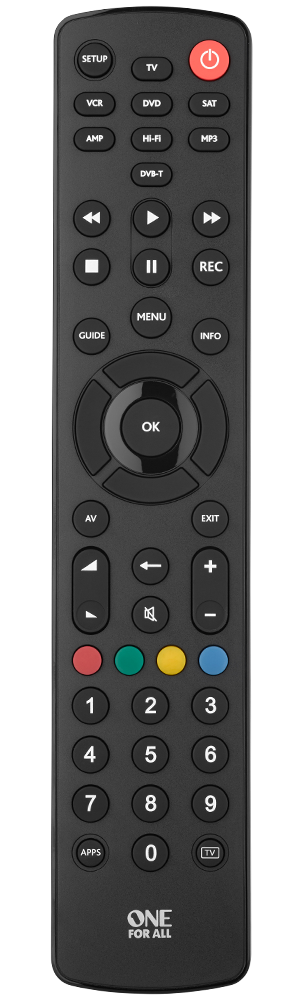
One For All Contour 8, URC1280
The manufacturer’s page lists control for up to eight devices, code-based setup, and learning. It names TVs, set-top boxes, DVD/Blu-ray players, soundbars, audio equipment, and supported IR devices.
Choose for: consolidating supported AV commands into a conventional handset. Check the exact model codes and needed functions before buying. IR learning does not imply that voice search or a Bluetooth-only streaming remote can be copied. Use the URC1280 support page for setup information.
One For All Smart Control 5, URC7955
The URC7955 page describes five-device control, a setup app, and activity modes such as watching TV or a movie. It explains assigning different functions to different equipment, such as volume to an audio receiver.
Choose for: a supported system where activity controls reduce switching between device modes. An app used for setup is not proof that the remote controls every Wi-Fi or Bluetooth device. Confirm current app compatibility, the exact Australian AV models, and the commands needed.
Tapo P110: power switching, not dimming
The Australian Tapo P110 page explicitly describes turning a connected device on or off through its app, plus scheduling and timers. This is a separate power-control role, not an AV remote or a dimmer.
Choose for: switching a suitable lamp or permitted load, within the exact Australian product’s rating and instructions. Do not assume it can vary brightness. Avoid routine hard power cuts to equipment that needs a normal shutdown, and do not interrupt updates or recordings.
Fix hidden equipment without changing its protocol
If your receiver responds when the cabinet is open but not closed, an IR repeater or extender may solve the visibility problem. Check the receiver location, emitter placement, power requirements, and kit compatibility. An IR blaster that sends commands from an app is not necessarily the same device as a wired repeater that receives your existing handset’s signal.
Do not buy a radio-frequency controller merely because it is described as long-range. It must communicate with the intended receiver or appliance. A low-voltage module is not a ready-to-use Australian mains outlet.
Keep Australian electrical and delivery checks separate
For mains-powered accessories, obtain the Australian model and plug version, rated input and load information, and the supplier’s compliance documentation. The EESS explanation of the RCM is a useful regulatory reference; a logo in a listing photograph alone does not establish a genuine compliant supply.
This guide does not recommend adapting low-voltage relay modules to household mains or doing fixed wiring yourself. Use appropriately rated finished equipment and qualified installation where required.
The manufacturer links above establish product functions, not current Australian retail stock or a delivered quote. Ask an Australian retailer for the exact model and regional version, then compare the total price, warranty provider, return address, and support. No order or hands-on compatibility test was performed for this guide.
Test a short command list before adding more gadgets
- TV power and the correct HDMI input.
- Volume and mute on the soundbar or receiver, not accidentally on the TV.
- The streaming commands you actually need, including whether voice features require the original remote.
- The lamp’s separate on/off or genuine dimming control.
Keep the original handsets until the new setup works. A system that uses two clear controls may be easier than a complicated scene that depends on several apps.