
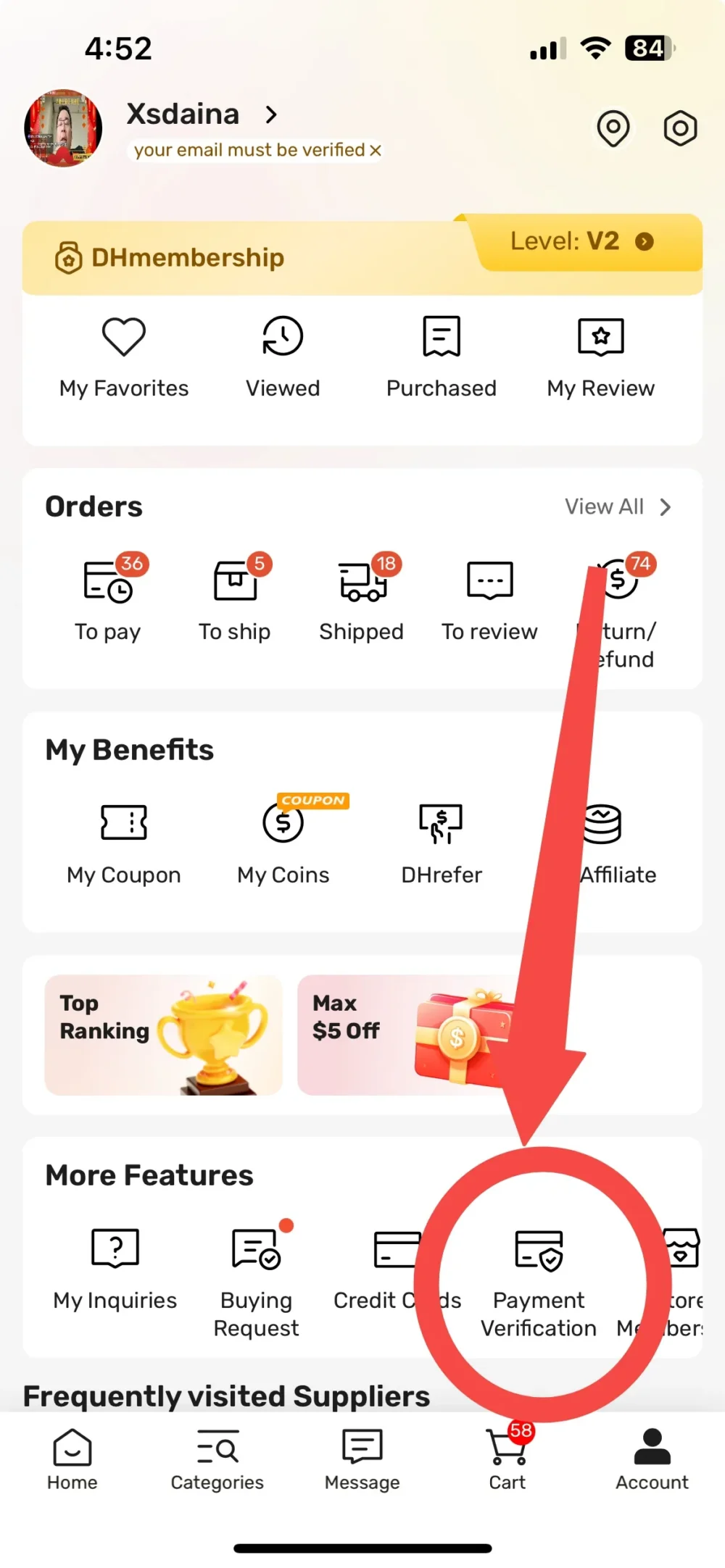
Quick answer: DHgate’s buyer help center provides a path for deleting saved card information: open Account, choose My Credit Cards, and use the Delete option beside the stored card. Menu labels can change, so confirm the current account screen and contact DHgate support if the card or delete control is not visible.
Last reviewed: August 12, 2026. Account labels and app layouts may change.
Where DHgate says saved cards are managed
DHgate’s buyer help center includes an “How to add or delete the card information?” entry. It separates adding a new card during checkout from deleting an existing card in the account area. For deletion, the documented route is Account → My Credit Cards → Delete.
This is more reliable than older screenshots or generic payment articles because it is an account-management instruction published in DHgate’s help system. It applies to saved card information, not every type of payment method. A bank transfer, wallet, coupon or one-time payment option may not create a stored card entry that can be removed from the same screen.
How to delete a saved credit or debit card
- Sign in to the DHgate account where the card was saved.
- Open Account. In the mobile interface, DHgate’s help text describes this at the bottom-right of the home page.
- Choose My Credit Cards or the current menu with an equivalent saved-payment label.
- Find the specific card by checking the final digits and card brand.
- Select Delete beside that card.
- Return to the saved-card screen and confirm that the entry no longer appears.
Do not use a random “sample order” or submit a payment merely to remove a card. The documented deletion path is in the account area.
How to verify that the card was removed
A successful deletion should remove the stored card from the account’s saved-card list. Check the result in the same session, then refresh or reopen the account area. Verify the card by its final digits rather than its color or nickname.
| Check | Expected result | If it does not match |
|---|---|---|
| Saved-card list | The deleted card is no longer listed. | Refresh, reopen the app, and check the correct account. |
| Checkout | The old card is not offered as a saved card. | Do not place an order; return to account settings or contact support. |
| Bank account | No new charge should result from deleting a stored credential. | For an unfamiliar charge, contact the issuer and DHgate separately. |
Deleting a saved credential does not erase completed orders, cancel a pending transaction or remove an authorization already sent to the card issuer. Those are separate records and processes.
What to do when the Delete option is missing
First confirm that you are signed in to the same DHgate account that stored the card. Then check both the app and website account areas if available, because navigation labels can differ. Avoid repeatedly creating new checkout sessions to look for the card.
If the card remains visible but the Delete control is missing:
- take a screenshot that shows the saved-card area without exposing the full card number;
- record the last four digits and card brand;
- open DHgate’s customer-service route from the signed-in account;
- ask for the current path to delete a stored payment card;
- never send the full card number, security code or password in chat.
For broader payment troubleshooting, see the DHgate payment methods and failure guide. If an unrecognized transaction is involved, removing the saved card is not enough—contact the issuer using the number on the card.
Privacy and security checklist
- Use only the official DHgate website or app.
- Confirm the domain before entering account credentials.
- Do not send a full card number or CVV to a seller.
- Keep payments inside the platform checkout.
- Use a unique account password and current contact information.
- Review the issuer’s transaction history after any suspected account problem.
Frequently asked questions
Can DHgate delete every payment method from one screen?
The help entry specifically covers saved card information. Other payment types may not be stored or managed in the same place.
Does deleting a saved card cancel an order?
No. Card storage, order status and card authorizations are separate. Manage an order from the order page and contact the issuer about an existing authorization.
Should I give support my full card number?
No. Identify the card with its brand and final four digits. Never send the full number, security code or account password.
What if the card still appears at checkout?
Return to My Credit Cards and confirm the deletion in the correct account. If it persists, contact DHgate support before placing another order.