
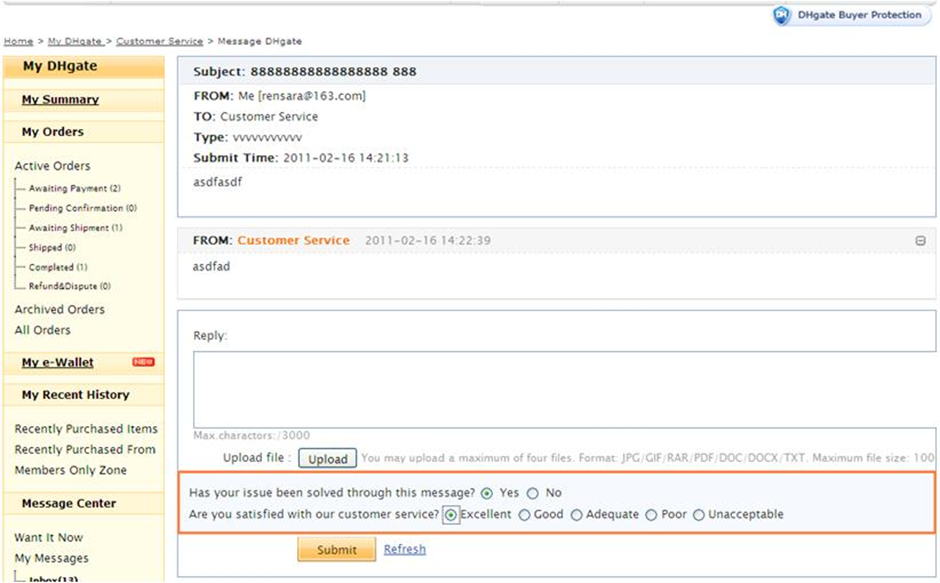
Quick answer: For a product, shipment or item-specific question about an existing DHgate order, start by checking the order record and sending the seller a short message through DHgate. Include the order number, the exact issue, the current order status and the outcome you want. If the seller does not respond, cannot resolve the issue, or the order page offers a support, refund or dispute option, use the relevant in-platform path shown for that order.
Keep every important message inside DHgate. This keeps your communication connected to the order record and makes it easier to show what you asked, what the seller replied and what evidence you provided if you later need platform support.
First, decide who to contact about the order
The right contact depends on the issue. Do not send the same generic message to every channel.
- Contact the seller first for item details, dispatch questions, selected variants, missing accessories, a tracking explanation or a request to resolve a listing mismatch.
- Check the order record first if you are unsure whether payment, shipment or delivery has already moved to a new status.
- Use the order-specific support, refund or dispute option if the seller does not respond, cannot resolve the issue, or the available action in your account directs you to a platform process.
For a broader guide to DHgate customer-service channels and escalation, see How to Contact DHgate Customer Service and Resolve an Order Issue. This page focuses on writing an effective message about one existing order.
What to check before you send a message
Open the relevant order in My Orders before contacting anyone. A clear message is easier to answer when it is based on the information currently shown for that purchase.
- Your order number;
- The item name and selected size, color, model, quantity or variant;
- The current order status;
- The tracking number and latest tracking update, if available;
- The date you placed the order or received the delivery;
- The specific issue you need resolved;
- Relevant screenshots, photos or video evidence.
Do not send unnecessary sensitive information. Never send full card numbers, security codes, passwords or banking credentials in seller messages.
How to write a useful DHgate order message
A useful order message is factual, short and specific. Avoid writing only “Where is my order?” or “Please help.” Explain what you see in the order record and what you need next.
Use this structure:
- Identify the order: include the order number and item or selected variant.
- State the current status: mention what My Orders or tracking currently shows.
- Describe one specific issue: for example, no dispatch update, wrong color, missing accessory or visible damage.
- State the action you want: ask for a tracking update, clarification, replacement discussion, refund guidance or the next available action.
- Attach relevant evidence: include photos, screenshots or tracking details only when they help show the issue.
Message template: the order has not shipped
Use this when the order status has not moved to shipment and you need clarification about dispatch.
Hello, I am contacting you about order [order number] for [item and selected variant].
The order status currently shows [status]. Please confirm whether this item is available and when it is expected to be dispatched.
If there is a problem with the selected item or shipping arrangement, please explain the next available option through the DHgate order record. Thank you.
Do not assume that a seller’s estimated dispatch date is a guaranteed delivery date. Check the order page and shipping information shown for your own purchase.
Message template: tracking has not updated
Before sending this message, check the tracking information and the latest order status in your account. A tracking number may not show movement immediately, depending on the carrier and shipment stage.
Hello, I need an update on order [order number] for [item].
The tracking number is [tracking number], and the latest update I can see is [latest update and date].
Please confirm whether there is any additional shipping information or action I should take through DHgate. Thank you.
For help understanding order status, tracking and separate shipments, see How to Manage DHgate Orders, Carts and Multiple Shipments.
Message template: wrong item, wrong variant or missing item
Use this after delivery when the received item does not match the listing, selected option or stated package contents. Take clear photos before discarding any packaging.
Hello, I received order [order number], but there is a problem with the item.
I ordered [selected variant or quantity], but I received [what arrived].
The specific issue is: [wrong size / wrong color / wrong model / missing quantity / missing accessory].
I have attached photos of the item, package and shipping label. Please review the issue and advise on the next available action through DHgate.
Keep the complaint factual. Explain the difference between the listing and the received item rather than making a general statement that the product is disappointing.
Message template: damaged item
If an item arrived damaged, document the outer parcel, shipping label, packaging and visible damage as soon as possible.
Hello, I received order [order number], but the item arrived damaged.
The damage is: [brief factual description].
I have attached photos of the parcel, shipping label, packaging and damaged item. Please review the evidence and advise on the available next step through the DHgate order record.
Do not send the item back or discard the packaging until you have reviewed the order-specific return, refund or support options shown in your account.
Message template: request a cancellation or refund path
A cancellation, refund, return or dispute may be the appropriate next step depending on the order status. Review the options shown in your own order record before assuming that one route applies to every order.
Hello, I need help with order [order number].
The current status is [status], and my issue is [brief reason].
Please confirm the next available action through the DHgate order system, including any cancellation, refund, return or other resolution option available for this order.
For a fuller explanation of the differences between cancellation, return, refund and dispute paths, see DHgate Returns, Refunds, Cancellations and Disputes Explained.
When to move from the seller to DHgate support
Use the seller message first when the issue can reasonably be clarified by the seller. Move to the platform support route shown in your order record when the seller does not respond, the issue remains unresolved, or the order page gives you a specific support, return, refund or dispute option.
When you contact platform support, include:
- Your order number and the current status;
- The date and summary of your seller contact attempt;
- The seller’s response, if there was one;
- Relevant listing screenshots, order details, tracking updates or delivery evidence;
- A short explanation of the specific outcome you are requesting.
Hello, I need help with order [order number].
I contacted the seller on [date] about [specific issue], but [no response / the issue remains unresolved].
The order status is [status]. I have attached the relevant order details and evidence. Please advise on the next available action for this order.
What evidence is most useful
Evidence should make it easy to compare what the order promised with what happened. Save only the materials that directly support your issue.
- Order confirmation and order number;
- Product listing screenshots, including the selected variant;
- Seller messages about an important item or shipping detail;
- Order-status and tracking screenshots;
- Photos of the parcel, shipping label, packaging and received item;
- Clear photos or video showing damage, missing items or a mismatch.
For guidance on sending visual evidence through DHgate, review DHgate: How To Upload and Send Video Evidence to DHgate.
What not to do
- Do not move payment or important order discussions to an off-platform channel.
- Do not send card details, security codes, passwords or bank-login information in a message.
- Do not open multiple duplicate requests without checking the existing order record.
- Do not mark an order as received while you are still checking a delivery issue.
- Do not discard the parcel, shipping label or original packaging before you document a mismatch or damage.
- Do not rely on a verbal promise alone when the order page shows a different status or available action.
Frequently asked questions
Should I contact the seller before DHgate support?
For a product, shipment or listing-specific question, contact the seller through DHgate first. If the seller does not respond, cannot resolve the issue or the order page directs you to a platform process, use the support, return, refund or dispute option shown for that order.
What is the most important detail to include in a message?
Your order number is the most important starting point. Add the current status, the exact issue and any evidence that shows the difference between what was expected and what happened.
What should I do if tracking has not updated?
Check the tracking number and order status first. Then send the seller a concise message with the order number, latest tracking update and date. If the order record does not resolve the issue, use the available support path for that purchase.
Can I ask the seller for a refund in a message?
You can describe the issue and ask what resolution is available, but follow the cancellation, refund, return or dispute options shown in your own order record. The appropriate path depends on the order status and the issue.
Should I send photos or video?
Send clear evidence when it helps show a delivery problem, damage, missing item or mismatch. Include photos of the item, parcel and shipping label when relevant, and avoid uploading unrelated files or sensitive personal information.
Bottom line
For an existing DHgate order, start with the order record and send a short, specific in-platform message. Identify the order, state the exact issue, attach relevant evidence and ask for the next available action. If the seller cannot resolve the problem, use the support, return, refund or dispute option shown for that order and provide the same clear documentation.
Further reading
- DHgate: Live Chat and Customer Service Support
- DHgate: How To Track Your DHgate Order
- DHgate: Refund Guidance for Buyers
Note: Support routes, order actions, tracking information and available deadlines can vary by order status, destination and account. Follow the information shown in your own DHgate order record.