
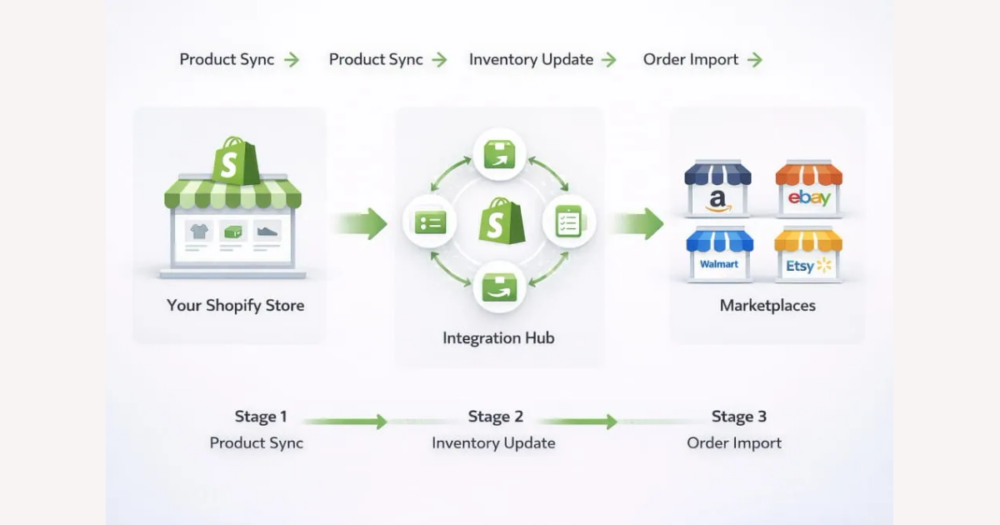
Shopify marketplace apps can centralize your catalog and orders across big retail channels, but DHgate remains a separate trading platform with its own payment, shipping, and dispute rules. Understanding that boundary is essential before you try to build a workflow that uses DHgate for supply while selling through Shopify and external marketplaces.
What Shopify marketplace integration does—and does not do—with DHgate
Shopify marketplace integration apps, including Marketplace Connect and similar tools, sync your store with major sales channels such as Amazon, eBay, Etsy, or Walmart. They typically pull your catalog from Shopify, publish listings to supported marketplaces, and bring orders, prices, and inventory changes back into Shopify so retail sales can be managed from one backend.
These connections are about selling to end customers on external marketplaces, not about sourcing inventory from supplier platforms. They do not turn a sourcing site like DHgate into a native Shopify sales channel, and they do not replace the separate work of finding suppliers, placing wholesale or stock orders, and managing your own supply chain from DHgate.
DHgate’s role: a separate trading platform with separate protections
DHgate is a cross-border trading marketplace where you, as the buyer, select suppliers, place orders, and pay through DHgate’s supported payment methods. DHgate keeps the order record, passes on shipping updates from the seller, and provides its own buyer protection tools and dispute channels if your purchase from that DHgate seller goes wrong.
Those protections and processes apply between you and the DHgate seller, even if you later resell the goods through your Shopify store or connected marketplaces. Your Shopify and marketplace customers pay on their own platforms, under Shopify’s and each marketplace’s rules, and any returns, refunds, or customer service for them follow those separate policies. Connecting Shopify to marketplaces does not merge DHgate’s payment, shipment, or dispute systems into those channels, so you should not rely on DHgate’s buyer protection to automatically cover problems that arise on your Shopify or marketplace orders.
Where data and responsibilities sit across DHgate, Shopify, and marketplaces
| Platform or role | Main product data location | Who collects payment | Who arranges shipping | Where tracking originates | Who handles disputes and buyer protections |
|---|---|---|---|---|---|
| DHgate sourcing (you buying from DHgate suppliers) | DHgate listings and order records hold supplier product details, prices, and your purchase history. | DHgate collects payment from you as the buyer through its supported payment methods. | The DHgate seller typically arranges shipping for your DHgate order according to the listing’s options. | Tracking usually comes from the carrier chosen by the DHgate seller and is reported through DHgate’s order and tracking tools. | DHgate’s buyer protection and dispute system applies to problems with your purchase from the DHgate seller, because DHgate received your payment for that transaction. |
| Shopify store (your own online shop backend) | Your Shopify product catalog holds the retail versions of items you sell, whether created manually or imported from other sources such as DHgate. | Shopify (via Shopify Payments or other gateways connected to your store) collects payment from customers for orders placed on your Shopify storefront. | You or any fulfillment partner you choose arrange shipping for orders sold through your Shopify store, based on your own workflows. | Tracking comes from the carrier or fulfillment service you use and is entered or synced into Shopify for customer updates. | Your store’s policies, plus the rules of your payment processor, govern refunds, chargebacks, and customer disputes for Shopify orders, because those customers paid through Shopify rather than DHgate. |
| External marketplace channel (for example, Amazon, eBay, Etsy) | Marketplace listings hold product data for items sold on that channel, often synced from your Shopify catalog via integration apps. | The marketplace collects payment from end customers on its own checkout and later pays you under its seller payout rules. | Depending on the setup, you arrange shipping yourself or use the marketplace’s fulfillment services; the marketplace expects you to meet its dispatch and delivery standards. | Tracking originates from the carrier or fulfillment program handling the shipment and is reported through the marketplace’s order system. | The marketplace’s buyer protection and dispute processes apply to customer orders placed there, because the marketplace took the customer’s payment; DHgate protections do not cover these retail transactions. |
A possible workflow for sourcing from DHgate and selling through Shopify marketplaces
- Research and vet DHgate sellers and products carefully, focusing on ratings, buyer feedback, available shipping methods, estimated delivery times, and any customs or return notes shown on DHgate listings.
- Place sourcing orders through DHgate, pay using its supported payment methods, and monitor order status, shipment progress, and any issues directly in DHgate’s order and message interface.
- Decide whether goods should be shipped to you first for inspection, re-packaging, or relabeling, or in limited cases shipped directly from DHgate suppliers to customers as dropship supply, recognizing that direct shipping adds complexity around branding, delivery times, and problem handling.
- Create or import product information into Shopify—titles, descriptions, prices, images, and stock levels—via manual entry, CSV import, or simple tools, making sure your Shopify data reflects DHgate-based realities such as longer lead times and potential customs handling.
- Configure Shopify marketplace integration apps to sync your Shopify catalog and orders with supported marketplaces like Amazon or eBay, mapping stock rules and fulfillment workflows so they match how you actually receive and ship goods sourced from DHgate.
- Manage customer orders coming in through Shopify and marketplaces by aligning promised dispatch times, tracking updates, and service messages with what is really happening on DHgate shipments and in your own warehouse or packing process.
- Start with a small, relatively manual workflow to learn timings, stock behavior, and responsibilities across DHgate, Shopify, and marketplaces before adding more complex automation layers or relying on apps to coordinate large volumes of orders.
DHgate payments and escrow compared with Shopify and marketplace payouts
When you pay a supplier through DHgate, the transaction is handled entirely inside DHgate’s own payment system. You place the order, choose from DHgate-supported methods such as cards or online wallets, and DHgate records the payment against that order under its buyer-protection rules. In many cases DHgate will hold funds or delay full release to the seller until milestones such as shipment, delivery, or buyer confirmation are reached, so that disputes or non-delivery can be handled within DHgate’s framework.
By contrast, Shopify Payments, PayPal, and marketplace payout systems like those on Amazon or eBay deal only with money from your end customers. They collect payments on those platforms, apply their own fees, reserve periods, and fraud checks, and then pay you out on schedules defined in their terms. Those retail payouts are not mixed with what DHgate does for your supplier orders, even if you ultimately use DHgate-sourced goods to fulfill the sales.
Marketplace integration apps that sync catalog data and orders between Shopify and external channels do not create shared escrow or a unified payout pool between DHgate and retail platforms. Each transaction type—your DHgate purchase from a supplier, and your customer’s purchase on Shopify or a marketplace—keeps its own payment processor, timelines, and dispute routes. Plan cash flow and refund strategies on the assumption that these money flows remain separate, not on the hope that DHgate, Shopify, or marketplaces will quietly coordinate balances or hold funds together behind the scenes.
Logistics, tracking, and customs for DHgate sourcing
For DHgate orders, suppliers typically choose the carrier and arrange the international shipment themselves, then upload the tracking number and status updates into the DHgate order page. That tracking covers the upstream leg—either from the supplier to you as the merchant, or in some cases directly to a customer if you have agreed to a dropship-style arrangement—so you monitor dispatch and transit inside DHgate and via the carrier’s tracking tools.
If you receive goods first and then ship them on to your own customers through Shopify or marketplace orders, you will usually generate a separate tracking number for that second leg. That means you may have one tracking reference for the DHgate shipment and another for the customer-facing parcel, and it’s your job to keep those straight and communicate the relevant number and status to buyers so they know where their order stands.
Customs treatment sits on its own layer again. Duties and taxes depend on the destination country’s rules, the declared value and contents, and how the carrier handles import charges. Some shipments may be sent with duties prepaid or included in the shipping price, while others arrive with customs or brokerage fees due from the recipient on delivery. You should read DHgate listing pages carefully for shipping and customs notes, confirm carrier practices and estimated delivery times, and then reflect those realities in your Shopify and marketplace listings—both in promised delivery windows and in any notice about possible import charges.
Shopify marketplace integrations do not automatically manage customs paperwork or reconcile multi-leg tracking across DHgate, your warehouse, and the end customer. Those operational details remain your responsibility, supported only by the carriers and whatever information DHgate suppliers provide. Treat DHgate tracking, your own dispatch records, and marketplace expectations as separate pieces you must align, rather than assuming the integration tools will piece them together for you.
Operational risks when DHgate supply meets marketplace SLAs
After-sales responsibilities: DHgate suppliers and your customers
DHgate’s after-sales tools—such as disputes, refund requests, and problem reports—apply only to your own purchase from the DHgate seller. If a shipment from a supplier is late, damaged, incorrect, or never arrives, you raise the issue inside DHgate and any solution is provided under DHgate’s rules, timeframes, and buyer-protection terms.
For Shopify and any connected marketplaces, you are the seller of record. That means you must handle end-customer returns, replacements, refunds, and all customer communication according to each platform’s policies, regardless of what is happening with your DHgate order in the background. Marketplaces will judge your performance on how you treat their buyers, not on whether your supplier cooperates.
DHgate’s resolution outcome may not match what Shopify or marketplaces expect you to offer customers. For example, you might receive only a partial refund or a replacement shipment from a DHgate seller, while your marketplace’s rules or your own promises require you to give the customer a full refund, fast replacement, or extra compensation. In those situations, you need to bridge the gap yourself, potentially absorbing some cost or effort.
Do not assume that DHgate will interact directly with your end customers or that marketplace disputes can simply be pushed back to DHgate for resolution. Each platform deals only with the parties and payments inside its own system, so you should plan your workflow and policies with the understanding that DHgate protects your supplier purchases, while you alone are responsible for protecting and supporting your Shopify and marketplace buyers.
Why payments and protections stay within their platforms
What to verify in official Shopify and DHgate documentation
- Confirm Shopify’s current list of marketplaces supported by its native marketplace integration apps, and note any limits on catalog, price, inventory, or order sync for each channel.
- Review up‑to‑date documentation on how Shopify’s marketplace apps treat inventory reservations, overselling risks, order acknowledgements, cancellations, and refunds so you understand what is automated versus manual.
- Read DHgate’s latest buyer‑protection terms, including dispute windows, required evidence, and conditions for refunds, replacements, or partial compensation on supplier orders.
- Verify DHgate’s accepted payment methods, any escrow‑style confirmation steps, and the rules that govern when funds are released to sellers after shipment or delivery milestones.
- Consult DHgate’s shipping and logistics notices for cross‑border orders, including typical delivery‑time ranges, tracking practices, and any guidance on customs, import taxes, or duties that may apply.
- Plan to recheck both Shopify and DHgate documentation regularly—especially before scaling your workflow or relying on a particular integration pattern—because app capabilities, supported channels, and platform policies can change over time. This article gives you a conceptual framework, not a guarantee of future behavior.
FAQ: DHgate sourcing inside a Shopify–marketplace workflow
Can I dropship directly from DHgate to my marketplace customers through Shopify?
It is technically possible to ask a DHgate seller to ship directly to your end customer, and then manage the order record in Shopify and on marketplaces. However, this adds risk: you lose control over packaging and branding, lead times are usually longer and more variable, and you depend on the supplier’s accuracy and communication. Many merchants either test this approach on a very small scale first or prefer to ship goods to themselves, re‑pack, and then send orders onward so they can control timing, presentation, and problem handling.
When there are multiple shipment legs, which tracking number should I share with customers?
Give customers the tracking number that covers the parcel they are expecting to receive—the leg from you (or your chosen fulfillment service) to them. Keep the DHgate supplier’s upstream tracking for your own monitoring and for evidence in DHgate disputes, but do not rely on that number as the main reference for buyers, because it often describes only the supplier‑to‑merchant leg and may confuse customers or fail to match marketplace tracking expectations.
How should I handle differences between DHgate delivery estimates and marketplace promises?
Base your Shopify and marketplace delivery promises on conservative, real‑world timing, not on the most optimistic DHgate estimate. Look at typical transit ranges from DHgate shipments to your country, allow extra time for customs or carrier delays, and then set marketplace dispatch and delivery windows that you can realistically hit. If DHgate’s listing suggests faster delivery than you usually see, treat it as a best case rather than a guarantee, because marketplaces may penalize you for late delivery even when the delay comes from the upstream supplier.
What if DHgate’s resolution with a supplier does not match what I need to offer my customers?
DHgate’s dispute outcome applies only to your purchase from the supplier. If DHgate offers a partial refund, delayed replacement, or other compromise that is less generous than your marketplace’s rules or your own promises, you may still need to give your customer a full refund, fast replacement, or extra compensation. In practice, you should plan for situations where you absorb the difference between DHgate’s resolution and what you owe buyers under Shopify or marketplace policies.
What general best practices should I follow when using DHgate in a Shopify–marketplace workflow?
Choose workflows that keep responsibilities clear and expectations realistic: separate supplier tracking from customer‑facing tracking, base delivery windows on typical DHgate transit times plus customs slack, and decide in advance how you will handle problems if DHgate and marketplace requirements diverge. Pilot any new pattern—such as direct dropshipping from suppliers or new carriers—on a small number of orders before rolling it out broadly, so you understand timings, packaging quality, and dispute behavior before your marketplace metrics are exposed at scale.