
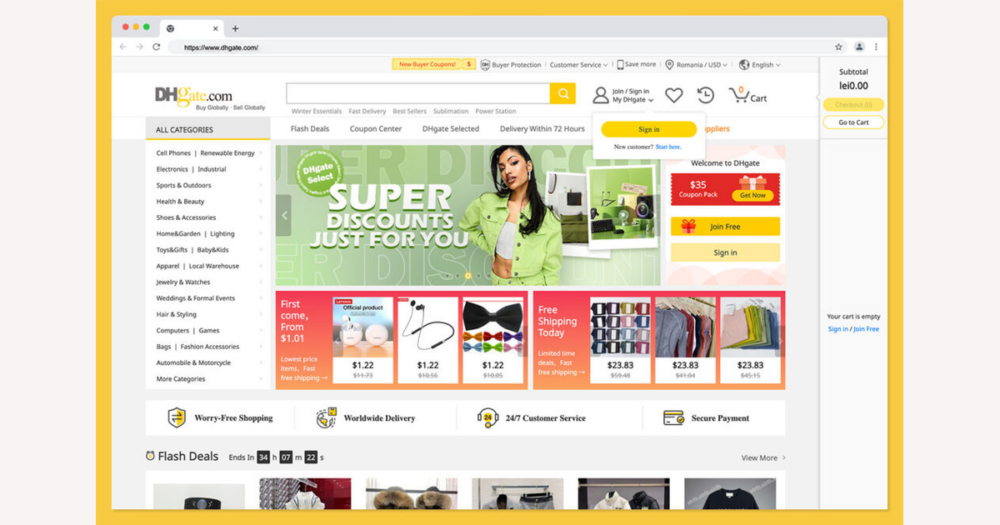
DHgate’s print marketplace doesn’t run its own print factory; instead, independent sellers use DHgate’s platform to offer printed and customizable products to buyers worldwide. Knowing that you’re dealing with individual merchants under DHgate’s payment and dispute rules is the first step to ordering confidently: you use DHgate to structure and protect the transaction, but you rely on each seller for print quality, customization options, and fulfillment details.
DHgate’s print marketplace: what it is and who you’re really buying from
DHgate is a global cross‑border B2B/B2C marketplace where many independent sellers list their own products, including printed goods and customizable items. When you browse print‑related listings, you’re looking at offers created and managed by individual merchants using DHgate’s platform tools.
If you place a print order on DHgate, you are contracting with a specific seller for the actual printing, customization, packing, and shipping, while DHgate provides the transaction framework: hosting the listing, processing payment, and offering basic buyer‑protection and dispute channels. Print quality, available customization options, production timelines, and fulfillment practices are controlled by each seller, so you need to assess those details per listing rather than assuming DHgate operates its own print factory or dedicated in‑house print‑on‑demand service.
The typical buyer journey for print orders on DHgate
- Search for printed or customizable products and shortlist a few promising listings. Focus on clear product descriptions, realistic photos, seller ratings, and reviews that mention print quality, accuracy of customization, and on‑time delivery.
- Open each shortlisted listing to review specifications and options in detail: available sizes, colors, materials, print areas, pricing tiers, and shipping choices. Check that the described base product and printing method match what you need for your design or use case.
- Confirm customization options and constraints before you commit. Use the listing details and DHgate messaging to clarify minimum order quantities, how many colors can be printed, any limits on logo size or placement, and whether the seller can meet your required timeline.
- Agree on design details with the seller inside DHgate. Ask which file formats and resolutions they require, whether they will adjust artwork, and if they provide digital proofs or sample photos before full production. Upload or send your design files only through DHgate’s channels as instructed in the listing or chat.
- When everything is clear, place the order through DHgate, double‑checking that quantities, variants (such as sizes or colors), and the total price including shipping match what you and the seller discussed in messages.
- Complete payment in DHgate’s checkout using the available methods shown for your account and region. Pay only after you’re satisfied with the confirmed design, pricing, production time, and shipping terms visible in the order summary.
- During production or preparation, monitor the order status in DHgate and refer back to any stated lead time in the listing or chat. If progress seems slow or dates change, follow up with the seller via DHgate messages to document new agreements on timing.
- Once the seller marks the order as shipped, use the tracking number and estimated delivery window shown in DHgate’s order interface to follow the parcel. Keep in mind that international transit and any customs handling can introduce delays beyond the original estimate.
- When your items arrive, inspect them carefully against the agreed specifications, proofs, and listing photos. If you notice major issues—such as wrong artwork, color mismatch, or noticeable defects—keep your communication inside DHgate and use its order and dispute tools instead of closing the order immediately.
How payment works and what buyers should confirm
On DHgate, you normally pay through DHgate’s own checkout rather than sending money directly to the print seller. The platform presents the payment methods available for your account and region and processes the transaction under its system, so the seller sees the order as paid inside DHgate rather than receiving funds off‑platform.
For print and customized orders, payment is usually required before the seller starts production or ships anything. That means you should reach full agreement on design files, quantities, colors, print positions, production time, and shipping costs inside DHgate messages and in the order summary before you confirm payment. Once you pay, changes can be harder to negotiate, especially for custom work that the seller may begin quickly.
Before you pay, check the payment section carefully: which methods are currently offered, which currency you’ll be charged in, and whether your bank or card might add conversion or other fees. Make sure the checkout page shows DHgate’s branding, uses a secure connection, and does not ask you to transfer money to a separate account or service at a seller’s request. If a seller suggests paying outside DHgate, treat that as a red flag and keep all payments within the official DHgate checkout and any guidance in DHgate’s help center.
Shipping, production time, and tracking for print orders
After payment and order confirmation, shipping for DHgate print orders is handled by individual sellers. They set the available shipping methods, prices, and carriers in the listing or at checkout, and show estimated delivery windows based on their chosen services. Once they dispatch your items, they normally add a tracking number, which DHgate displays in the order interface so you can follow the parcel’s progress.
Printed and customized products often need a separate production or preparation period before they can be shipped. That lead time can range from quick turnaround on simple prints to longer runs for complex or bulk orders, and it is not always clearly separated from the transit estimate in the listing. The real wait from payment to delivery is production time plus shipping time, so you should look for both pieces of information and confirm them with the seller if anything seems vague.
Because sellers choose carriers and orders travel across borders, actual delivery depends on carrier performance, international transit, and your local delivery services rather than DHgate directly. Delays can occur even when the original estimate looked reasonable. To manage expectations, check the listing for production and transit estimates, ask the seller to clarify dates in DHgate messages, and monitor the tracking updates in DHgate so you can spot slow movement early and document any timing issues if you later need support.
Customs, taxes, and import rules: what’s under buyer control
After‑sales protections and disputes on DHgate
If a DHgate print order arrives late, appears lost, or does not match what was promised, the platform’s buyer protection and dispute system is your main channel for help. Orders typically move through statuses such as placed, shipped, and received, and there is usually a protection window during which you can open a dispute for non-delivery or for items that differ significantly from the listing or agreed specifications.
Disputes are submitted inside DHgate’s order interface, where you choose a reason and upload supporting evidence. For print-related issues this often means screenshots of the approved design or messages with the seller, photos or videos of the actual items received, and any other documents that show how the quantity, size, colors, or print placement differ from what was confirmed.
Because print quality and color can be somewhat subjective, strong cases focus on clear, documented differences—for example, the wrong logo file, missing items in a batch, or a different print method than agreed—rather than minor shifts in shade that are hard to prove. DHgate reviews the information from both sides and may offer a refund, partial refund, or other resolution based on its current rules and the evidence available.
Exact protection time limits, eligible dispute reasons, and options such as refunds, returns, or reprints are defined by DHgate’s latest policies and can change over time. Before relying on any particular outcome, check the buyer protection and dispute terms in DHgate’s help center or policy pages for up-to-date details on how long you have to act and what types of problems are covered.
Pre‑order checklist for print purchases on DHgate
- Check seller ratings and recent buyer feedback, focusing on comments about print quality, communication, and on‑time delivery for similar orders.
- Match the listing’s specifications—materials, sizes, colors, and stated print method—to your actual use case so the product type is appropriate for your needs.
- Confirm customization details, including available print areas, color options, and any design limits, either from the listing or by asking the seller via DHgate messages.
- Verify the seller’s file requirements, such as acceptable formats, minimum resolution, and whether they will send a digital proof for your approval before printing.
- Review minimum order quantities, unit price, and the total cost including shipping, and make sure the amount shown at checkout reflects any price you agreed with the seller in messages.
- Ask the seller to state production lead time and how it fits with their shipping estimates so you understand the full timeline from payment to delivery.
- Read the seller’s return, reprint, or partial refund terms for defective or incorrectly printed items, and clarify any unclear points in writing through DHgate’s messaging system.
- At checkout, confirm which payment methods and currencies are available to you and ensure that all payments and communications stay within DHgate to keep buyer protection in place.
- Look for any notes in the listing or shipping section about customs duties or extra fees, and budget for possible import charges or local taxes on top of the order total.
- Accept that this checklist reduces risk but cannot remove it entirely, and be prepared to stop or adjust the order if the seller cannot give clear, written answers to critical questions.
Platform‑level rules vs. seller‑level practices
| Order aspect | DHgate platform role | Seller-specific practices |
|---|---|---|
| Account and platform access | Provides the website/app, account registration, login security, and overall marketplace rules you must follow. | Decides whether to accept your order, responds to messages, and manages their own storefront within DHgate’s framework. |
| Payments | Processes payments through DHgate’s checkout using the methods available for your region and records the transaction under your order. | Chooses pricing, discounts, and currencies they list in the offer and may negotiate bulk prices or extras with you before you pay. |
| Order status and tracking interface | Shows core order statuses (placed, shipped, received) and aggregates tracking information in your order page when a tracking number is provided. | Selects carriers and services, prepares labels, and updates the order with tracking details once parcels are handed to the logistics provider. |
| Buyer protection and disputes | Defines general buyer protection concepts, dispute reasons, time limits, and the tools you use to submit evidence and request a resolution. | Responds to disputes, proposes solutions such as refunds or reprints, and provides their side of the story within DHgate’s dispute process. |
| Print methods and quality standards | Sets high‑level platform rules (for example, prohibitions on certain content) but does not standardize specific print technologies or quality levels. | Chooses printing equipment and methods, controls color management and finishing, and sets their own internal quality checks for each order. |
| Design support, files, and proofs | Provides messaging and attachment tools so you can exchange files and instructions securely inside the platform. | States file formats, resolution and layout requirements, offers or declines design assistance, and decides whether to send digital proofs or samples before production. |
| Production time | Does not schedule or run production; only the general order protection window and deadlines are defined at platform level. | Sets actual production lead times, batches orders, and may adjust timelines based on workload, inventory, or your specific customization needs. |
| Shipping promises and packaging | Defines general rules about shipment confirmation and tracking display, and may show generic delivery estimates based on carrier data. | Commits to specific shipping options, estimated delivery windows, packaging methods, and any bundled services such as split shipments or consolidated cartons. |
| Returns, reprints, and refunds | Provides the overall framework for returns and refunds, including which problems can be disputed and how outcomes are handled within the system. | Publishes their own return and reprint policies, decides when to accept returns on printed goods, and may offer replacements or partial refunds beyond the minimum required. |
| Where to check details | Hosts official help pages, policy documents, and the order interface, which you should use to confirm platform‑level rules and current features. | Explains seller‑level conditions in the listing description and via DHgate messages, which you should rely on for print capabilities, timelines, and custom arrangements. |
Always confirm key details inside DHgate before ordering
This guide describes how DHgate’s print marketplace usually works, but the platform’s payment options, logistics tools, and protection rules can change. For any real order, treat DHgate’s own interface and help resources as the source of truth.
Before you commit to a print purchase, check which payment methods and currencies are currently available for your account in DHgate’s checkout, and whether any extra processing or conversion fees are shown. Review the shipping choices and estimated transit times on the specific listing and in the order page, including any notes about production time before dispatch.
Confirm the exact buyer protection period for your order, the conditions under which you can open a dispute, and the steps DHgate shows you for submitting evidence if there is a problem. Look for any official guidance inside DHgate about taxes and customs handling for cross‑border shipments to your country, and factor that into your decision.
Be cautious about relying on off‑platform advice, old screenshots, or third‑party blog posts for procedural details. When something matters to the success of your print order—how you pay, how it ships, how long you are protected, and how disputes work—recheck those points directly inside DHgate before you place and pay for the order.
FAQ: DHgate and specialized print orders
Does DHgate run its own print-on-demand service, or is it just a marketplace for print sellers?
DHgate primarily operates as a cross-border marketplace where many independent sellers list printed and customizable products. The sellers themselves handle printing, customization, and fulfillment, while DHgate provides the platform, payment processing, and dispute tools. If you see any DHgate-branded print program or special service, confirm its exact role and conditions in DHgate’s official help center or current platform materials, as offerings can change over time.
Can I return customized print items if I’m unhappy with them?
Customized print items often have stricter return or reprint limits than standard products because they are made specifically to your design and may not be reusable. On DHgate, the detailed return or reprint policy is set by each seller and then handled within DHgate’s general dispute and buyer-protection framework. Before you place an order, read the listing’s terms carefully and ask the seller—through DHgate messages—how they handle misprints, defects, or major design errors. Keep those answers documented in DHgate so you can refer to them if you later need to open a dispute.
What should I do if a seller asks me to pay or communicate outside DHgate?
Requests to pay or move important order discussions outside DHgate are a warning sign. Payments made off-platform are usually not covered by DHgate’s buyer protection, and key agreements made in external channels may be harder to use as evidence in a dispute. To stay within DHgate’s protections, keep all payments in DHgate’s official checkout and conduct essential order communication—design approvals, timelines, problem reports—through DHgate’s messaging system. If a seller insists on off-platform payment or contact that feels unsafe, decline the request and consider reporting it to DHgate via the platform’s support tools.