
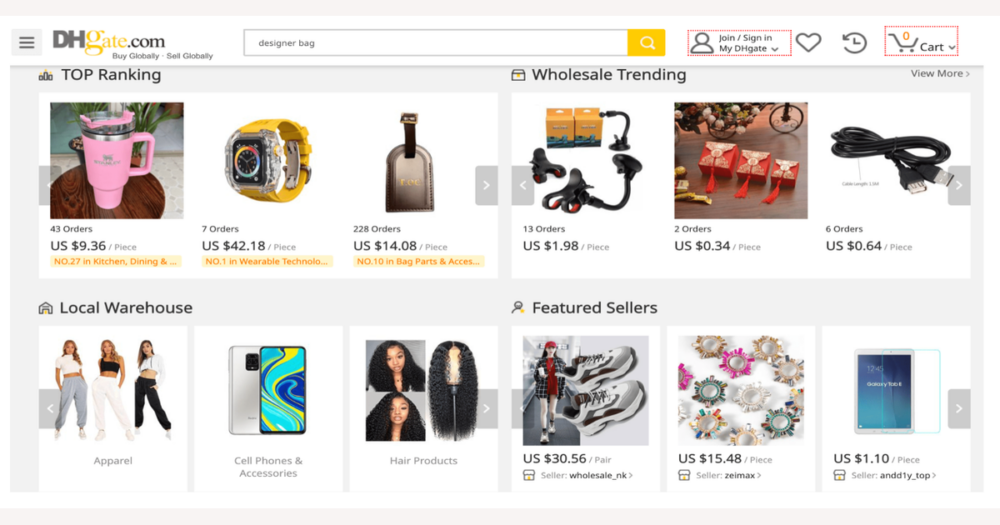
DHgate is a multi-seller online marketplace where Canadian buyers purchase from individual sellers under DHgate’s umbrella of rules, payment processing, and dispute tools. Understanding who does what at each stage—from listing and payment to shipping, customs, and after-sales—is the key to setting realistic expectations, spotting risks early, and deciding how comfortable you are with a particular order before you commit.
What it means that DHgate is a multi-seller marketplace
DHgate is an online marketplace, not a single store. Instead of buying directly from DHgate as a retailer, you shop among many independent sellers who use DHgate’s platform to list their products and accept orders.
When you open a product page on DHgate, you’re really looking at one seller’s offer inside their store. DHgate provides the website, account system, checkout, and dispute tools, but the seller controls the listing details, stock, pricing, shipping options, and most day‑to‑day communication. That’s why reliability, shipping speed, packaging quality, and after‑sales service can differ significantly from one seller to another.
For a Canadian buyer, the basic journey on DHgate usually runs like this: you browse and search listings, choose a specific product and seller, place your order and pay through DHgate’s checkout, the seller prepares and ships the parcel, the package travels internationally and may go through customs, and you either confirm the order or raise an issue if something isn’t right. The rest of the guide unpacks these stages so you can see who is responsible at each point and where to pay closest attention before you spend money.
Step-by-step: your buyer journey on DHgate
- Browse and search listings: You use DHgate’s search and category tools to find items, while the platform provides the interface and shows you multiple sellers’ offers for similar products.
- Open a product page: You click into a specific listing to see photos, descriptions, prices, options, and shipping estimates. The seller is responsible for the information shown; your job is to read it carefully and make sure it matches your expectations.
- Evaluate the seller and listing: You review the seller’s track record, any ratings and reviews, and how clearly the listing explains features, variants, and conditions. These are signals the seller has built over time, but you still need to interpret them and decide whether the risk level feels acceptable.
- Add to cart and place the order: Once you’re comfortable with the offer, you choose quantity and options, confirm your address, and submit the order. DHgate records the order details and gives you an order number you can refer to later.
- Pay through DHgate’s checkout: You complete payment using DHgate’s official payment methods. DHgate processes your money and holds or routes funds based on its rules; you should avoid any request to pay a seller directly outside the platform.
- Seller processes and ships the order: The seller prepares the item, books shipping with their chosen carrier, and marks the order as shipped. They are responsible for dispatching on time and providing a tracking number or status update where applicable.
- Shipment in transit and customs: The package moves through the carrier’s network and may be inspected by customs when crossing borders. Delivery timing now depends on the carrier and customs, while DHgate mainly relays whatever status information it receives.
- Delivery and confirmation: You receive the parcel, check that the contents match the listing, and confirm completion on DHgate if you’re satisfied. This step is where you spot issues quickly and decide whether anything needs to be raised with the seller.
- After-sales and possible disputes: If there’s a problem—missing items, damage, or not as described—you contact the seller through DHgate first. If that doesn’t resolve things, you can usually open a dispute within the platform’s deadlines so DHgate can review the case and apply its buyer protection rules.
Checking sellers and listings before you order
On DHgate, you’re judging individual sellers, not DHgate as a single store, so the first thing I look at is the seller’s overall history. Typical marketplace signals include an aggregate rating, how many orders or transactions the seller has completed, how long the store has been active, and the tone of the most recent feedback. A higher rating built over many orders and months usually suggests the seller has delivered reasonably well for a range of buyers, while a very new store or one with only a handful of sales simply doesn’t give you much data to work with.
Patterns in reviews matter more than any single comment. Positive signs include multiple detailed reviews that mention product quality, packaging, and shipping time in consistent terms, rather than just short “good” or “bad” remarks. I pay attention when buyers describe the item matching the photos and description, and when they confirm that shipping times were close to the estimate. Warning signs include a cluster of recent complaints about items arriving damaged, not as described, or never arriving, especially if those negative reviews mention the same issue over and over.
The listing itself is also a trust signal. Clear, well-lit photos that look like the actual product rather than generic catalogue images, specific specifications (sizes, materials, compatible models), and transparent options for colors, versions, or bundles all suggest the seller has put effort into accurate information. Realistic pricing compared with similar listings is important: a price that is dramatically lower than comparable offers can be legitimate, but it can also signal lower quality, different specifications, or higher risk, so I treat it cautiously and read every detail twice.
When signals are weak or mixed—few reviews, inconsistent feedback, vague photos, or unclear specs—it’s reasonable to add extra caution. That can mean placing a smaller, lower-risk trial order first, choosing a listing from a seller with stronger history, or simply walking away if the risk doesn’t feel worth it. None of these tools are guarantees: ratings and reviews are subjective, even long-established sellers can have occasional problems, and new sellers can be perfectly reliable despite having little track record. On a multi-seller marketplace like DHgate, using these trust signals is one of your most important responsibilities as a buyer, because you’re choosing which individual seller to rely on before you commit your money.
How payments work when you buy on DHgate
Once you decide that a seller and listing feel trustworthy, payment is the moment you commit money, and on DHgate that happens through the platform rather than directly to the seller. You place your order and then pay via DHgate’s checkout using whatever payment methods the platform currently supports for your region; DHgate records the transaction against your account and order number, and manages the flow of funds under its own rules instead of sending your payment straight to the seller’s personal account.
Because the platform sits between you and the seller, DHgate can link your payment to the order, track its status, and apply its buyer protection and dispute tools if something goes wrong. In many marketplace systems, funds are only released to the seller when certain milestones are reached—such as the seller marking the item as shipped or the buyer confirming receipt—rather than instantly at checkout. The exact timing and escrow mechanics are defined in DHgate’s own policies and can change, so they’re best confirmed on DHgate’s official help pages, but the important point is that the platform, not an off-platform transfer, anchors any later refund or dispute.
For that reason, I strongly avoid any request from a seller to pay outside DHgate—through direct bank transfer, external apps, or informal arrangements—because those routes bypass DHgate’s records and make it much harder for the platform to help if there’s a problem. Using only official DHgate payment methods keeps your order visible in your account, with a clear order number, timestamps, and status history. Before you hit “pay”, double-check the seller, listing details, price, shipping estimates, and any notes about customs, and after payment keep your confirmations and order numbers somewhere you can find them quickly. That paper trail is what you rely on later if you need to ask DHgate or the seller for support.
Shipping and delivery on a multi-seller platform
Once DHgate has recorded your payment, the next stage of the journey belongs mainly to the seller: each independent seller decides which shipping methods to offer, provides estimated delivery windows, and is responsible for actually dispatching your parcel. One seller might offer faster, more expensive express services, while another only provides low-cost postal shipping with longer and less detailed tracking.
For Canadian buyers, most DHgate orders are cross‑border shipments, so it’s normal for delivery to be slower and more variable than what you see with domestic e‑commerce. Packages may move through several logistics partners—local couriers, international carriers, and final‑mile postal services—and each handoff can add time and occasional gaps in tracking. Long routes, customs checks, and different working days across countries all make timing less predictable than a simple “two‑day shipping” promise.
DHgate itself doesn’t run trucks, planes, or warehouses; it mainly shows you the shipping options the seller has set and then relays status updates based on information from the seller and the carrier. That platform role is useful for keeping everything in one place, but it also means that shipping quality and speed vary between sellers because they choose the methods and partners they use.
I’m personally willing to accept slower, less predictable delivery from DHgate if the seller is upfront about how long dispatch will take and which shipping methods they’re using. Before I confirm an order, I read the shipping section of the listing carefully, including any notes about processing time before shipment, and I treat the delivery timeframe as an estimate, not a guarantee. Doing the same—checking shipping details on the product page and again at checkout, and assuming some flexibility in the dates—helps set realistic expectations and avoid unnecessary frustration while you wait.
Understanding order tracking updates
Once the seller has prepared your parcel and handed it to a carrier, they mark the order as shipped inside DHgate and add a tracking number. DHgate then shows that number and the associated status updates in your order details or tracking area, usually mirroring whatever the carrier reports. When the shipping method uses a well‑known express service, you’ll often see more frequent scans and clearer milestones; economy or basic postal services tend to provide only a handful of key events.
It’s common for there to be a delay between the seller saying they’ve shipped and the first tracking scan appearing. Carriers may take time to register the parcel, cross‑border shipments can disappear from view while they move between countries or logistics partners, and customs processing can create periods where nothing new is reported even though the package is still moving through the system. Cheaper services sometimes show only “accepted”, “in transit”, and “delivered”, with little or no detail about what happens in between.
Sparse or delayed tracking doesn’t automatically mean a package is lost; it mainly reflects the limits of the shipping method the seller chose and the information their carrier provides. In a multi‑seller marketplace like DHgate, tracking quality and frequency vary with those choices, not just with the platform itself, so two orders placed the same day can look very different in terms of update detail.
Practically, I treat DHgate’s order page as my first tracking stop, then, if the shipping method allows it, I copy the same tracking number into the carrier’s own site for extra detail. When there are gaps, I compare what I see to the estimated delivery window and give the parcel time to move before assuming there’s a problem. If a shipment shows no meaningful change for what feels like an unusually long period relative to the estimate, that’s when I’d consider messaging the seller for clarification and, only later if it truly appears stalled, looking at dispute options described in DHgate’s help and after‑sales tools.
Customs, duties, and common international misunderstandings
For Canadian buyers using DHgate, every overseas order is effectively an import, which means customs authorities—not DHgate or the individual seller—decide what happens once a parcel reaches Canada. Agencies such as the Canada Border Services Agency (CBSA) control inspections, assess any duties or taxes that may apply, and determine how long an item is held and what documentation is required. DHgate and the seller can declare a value and provide shipping information, but they cannot waive Canadian import rules, guarantee that a package will be tax‑free, or force customs to clear a shipment by a particular date.
Customs processing is also one reason tracking can look vague or paused. When a parcel is in a customs facility, carriers may show only broad status messages like “in transit” or “processing,” or nothing new for several days. That doesn’t mean DHgate or the seller has stopped working on your order; it simply reflects that customs operates independently and may not update tracking in a detailed, predictable way. Import duties, sales taxes, and clearance times depend on Canadian regulations and how the parcel is classified, so two similar orders can be treated differently even when placed through the same marketplace.
Misunderstandings often come from assuming cross‑border orders behave like domestic ones. Some buyers expect delivery at local‑courier speed, assume the price they see on DHgate includes all customs fees, or ignore declared value rules when asking a seller to under‑declare an item. Others treat DHgate as the actual seller, expecting uniform service across all stores or assuming the platform can override a slow or unresponsive shipping company. In reality, each DHgate seller chooses shipping methods and service levels, customs authorities control border decisions, and DHgate provides the framework and tools rather than running every step itself.
Practically, I prefer marketplaces that clearly warn about possible customs checks and extra charges; when that information is hard to find or vague, I personally keep individual order values modest and avoid time‑sensitive purchases. As a Canadian buyer, it’s sensible to budget for potential import costs instead of counting on them being zero, read any listing notes about duties or taxes carefully, and treat estimated delivery windows as rough guides that may not fully account for customs delays. Before placing a higher‑value order, checking current Canadian import rules from official sources helps you understand what might be charged and reduces the chance of unpleasant surprises at the door.
After-sales support and disputes on DHgate
Even with careful preparation, some DHgate orders arrive late, differ noticeably from the description, or show damage. On a marketplace like DHgate, the usual first step is to contact the seller directly through the platform’s messaging tools. Sending a clear, polite message that explains the problem, includes photos if relevant, and suggests a reasonable outcome—such as a replacement, partial refund, or clarification on tracking—often resolves issues faster than jumping straight into a formal dispute, because many sellers are motivated to preserve their ratings and avoid escalations.
If messaging the seller doesn’t lead to a solution, DHgate provides a dispute system on the order page that buyers can use within certain time limits. When you open a dispute, you’re typically asked to choose the outcome you’re seeking and upload evidence, such as pictures of the item, screenshots of tracking, and copies of your conversation with the seller. DHgate then acts as an intermediary: staff or automated systems review both sides’ information and apply the platform’s rules to decide whether a refund, resend, or other resolution is appropriate. That framework can be helpful, but it doesn’t guarantee that every case will be decided in the buyer’s favour or that the result will match your expectations exactly.
Because of that, I value platforms that clearly explain dispute deadlines and documentation requirements; if those details are hard to locate or feel confusing, I’m more cautious and keep my orders small. For DHgate, it’s wise not to rely on memory or second‑hand advice: check the current buyer protection and dispute terms on DHgate’s help pages so you know how long you have to act and what evidence they expect. Keep all order records, tracking numbers, delivery confirmations, and screenshots of your messages with the seller in one place. Acting within the stated timeframes and presenting organised, factual evidence gives you the best chance of having a dispute reviewed fairly if something genuinely goes wrong.
Pre-order checklist for Canadian first-time buyers
- Confirm your DHgate account details and Canadian shipping address are accurate before ordering so parcels aren’t delayed or misdelivered.
- Read the full product description, options, and photos carefully so you understand exactly what is being sold and which variant you’re choosing.
- Review the seller’s ratings, recent feedback, and store history to decide whether you’re comfortable with their track record; I only proceed when the pattern looks consistently reasonable.
- Check the listed shipping methods, estimated delivery times, and any stated processing time, and decide whether the timeframe fits your tolerance for international delays.
- Look for any notes about customs, duties, or taxes on the listing and factor possible import charges into your budget as a Canadian buyer.
- Choose a secure payment method within DHgate’s own checkout and avoid paying a seller directly or off-platform, even if they suggest it.
- Save your order confirmation, tracking number, and message history with the seller, and note the current dispute timeframes from DHgate’s help pages so you know when to act if something goes wrong.
Quick answers to common DHgate marketplace questions
Does DHgate itself sell products, or are items mainly from independent sellers?
DHgate primarily operates as a platform for many independent sellers. When you place an order, you are buying from a specific seller’s store that uses DHgate’s systems for listings, payments, and disputes, rather than purchasing directly from DHgate as a retailer.
Can one DHgate account manage orders from multiple sellers at the same time?
Yes. A single DHgate account can place and manage separate orders with different sellers. Each order appears in your account with its own number, seller, shipping method, delivery estimate, and dispute window, so timelines and tracking details can differ from one order to another.
What should I do if my tracking shows no movement for a long time?
Start by checking the tracking status both in your DHgate order details and, if possible, on the carrier’s own site using the same number. Compare what you see with the estimated delivery window and allow for normal international and customs delays. If the parcel seems overdue, send a clear message to the seller through DHgate asking for an update. If there is still no progress or response and you are approaching the platform’s dispute deadline, consider opening a dispute with any tracking information and message history you have as evidence.