
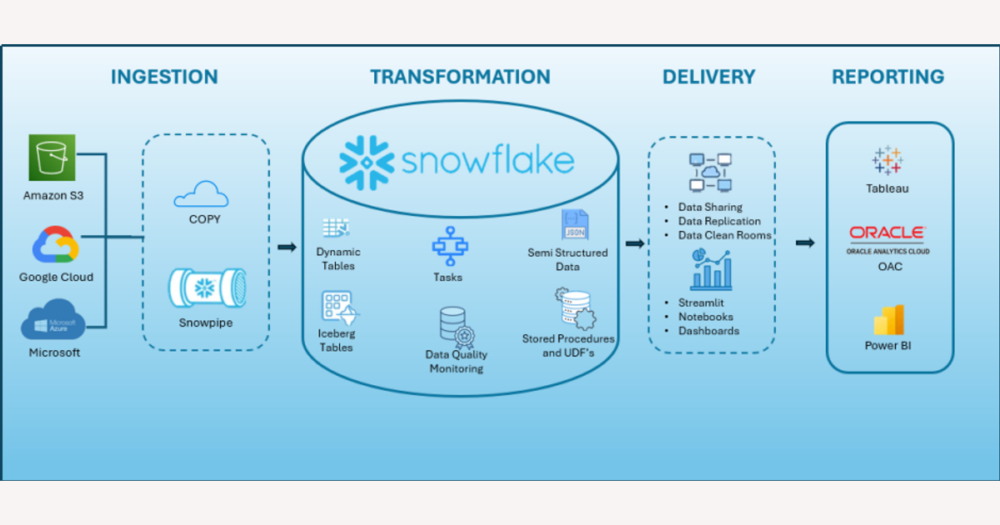
On DHgate, your protections depend on accurate order, payment and shipping records, not on how sophisticated your analytics look. Snowflake can act as a central warehouse that receives data from DHgate, Amazon, Shopify and Etsy through connectors or custom pipelines, but it does not replace DHgate’s dashboards or perform actions like shipping confirmations or refunds. This guide explains how that kind of integration works and what DHgate‑specific details you need to see in Snowflake before trusting it as your main view of multi‑marketplace orders.
How Snowflake actually fits into Etsy, Amazon, Shopify, and DHgate data flows
Snowflake does not work like a DHgate, Shopify, Amazon or Etsy app that you simply install to manage your store. It is a cloud data warehouse: a place where data is stored, combined and analysed after other tools have pushed it in. That means Snowflake never replaces your DHgate order pages or seller dashboard, and it cannot on its own confirm shipments, issue refunds or open disputes.
In practice, integrations sit between each marketplace and Snowflake. Middleware, ETL tools or custom scripts connect to platform APIs and export data on a schedule—orders, items, inventory levels, payments, and shipments. Those feeds are then loaded into Snowflake tables so you can query everything together. For a DHgate seller, one pipeline might pull DHgate orders and tracking updates, another might pull Shopify orders, and another might pull data from Amazon Seller Central.
When this setup is working properly, the result is unified tables: for example, an orders table containing DHgate, Amazon, Etsy and Shopify orders, a line‑items table with all products and quantities, an inventory table with stock levels across channels, a payments or transactions table with what each buyer paid, and a shipments table with carriers and tracking numbers. DHgate orders should appear alongside your other marketplaces, with fields like order ID, buyer, item list, total amount, currency and shipping details visible in Snowflake.
However, the quality of that unified view depends entirely on how the integrations have been designed and maintained. There is no one‑click native Snowflake app on DHgate, Amazon, Shopify or Etsy that guarantees complete data. If an integration misses DHgate‑specific fields—such as dispute status, refund timestamps or shipping method—you may have a very polished Snowflake dashboard that still lacks the details you need to protect buyers or resolve problems. From a DHgate perspective, it is safer to insist on full, auditable DHgate order and payment data in Snowflake than to accept a simplified feed that hides important conditions.
Snowflake shown as a central warehouse that receives order and inventory data from multiple marketplaces via connectors, highlighting that it sits behind DHgate and other platforms rather than replacing their dashboards.
How to check that DHgate and other marketplace orders are correctly captured in Snowflake
- Pick a recent time window (for example, the last 7 days) and note total order counts from each marketplace dashboard: DHgate seller order list, Amazon Seller Central, Shopify admin, and Etsy shop manager.
- Query Snowflake’s orders table for the same time window and marketplace identifiers, then compare the total counts. Look for missing DHgate orders, extra orders that do not exist on DHgate, or obvious gaps for other platforms.
- Select several DHgate order IDs from that window and cross‑check the details: buyer, items, quantities, prices and currency should match between DHgate’s official order detail screen and the corresponding rows in Snowflake’s orders and line‑items tables.
- For those sample DHgate orders, verify payments by comparing total amounts, currencies and any platform fees shown in DHgate’s payment records with the entries in Snowflake’s payments or transactions table.
- Check shipping information for the same DHgate orders. Shipping status, method, carrier and tracking numbers in DHgate should align with the data in Snowflake’s shipments or tracking tables, without missing or generic placeholders.
- Confirm that DHgate‑specific fields—such as dispute or complaint status, refund timestamps, and cancellation flags—are present and correctly populated in Snowflake. If these fields are absent or oversimplified, your integration is not capturing DHgate protections fully.
- Repeat similar checks for Amazon, Etsy and Shopify feeds, then document any discrepancies you find. Share those notes with your developer or integration provider, and treat DHgate’s own order and payment records as the source of truth for decisions about shipping, disputes and refunds until the Snowflake integration has been corrected.
Risks and limits of treating Snowflake as your main view of DHgate orders
When you treat Snowflake as the main view of your DHgate orders, you are relying on data that arrives after the fact. Many integrations only refresh hourly or daily, and sync jobs can fail or complete only partially. A schema change on DHgate or another marketplace can also break a pipeline without anyone noticing immediately, leaving some orders, payments or shipping updates missing from Snowflake even though they appear correctly in DHgate’s own dashboard.
Combining DHgate, Amazon, Shopify and Etsy into one Snowflake schema introduces another risk: important DHgate‑specific fields may be dropped or flattened to fit a generic model. Dispute timestamps, refund statuses, shipment confirmation events, platform fees and commissions can be mis‑mapped or stored as vague flags. In a merged table, you might see a single “status” or “fee” column that no longer reflects DHgate’s exact protection windows or cost structure.
Those gaps have practical consequences. A Snowflake report might show an order as “shipped” or “refunded” while DHgate still shows it as awaiting shipment or has the refund under review. If you rely only on the warehouse view, you could assume a seller has met their shipping obligations or that a refund is final when DHgate would still allow you to open a dispute or escalate a complaint. With my own bias toward clean, auditable records, I would rather reconcile DHgate’s dashboard against Snowflake and keep DHgate‑specific flows separate than act on a simplified, cross‑market table.
Snowflake warehouse vs. marketplace dashboards: how to divide the work
Snowflake is most valuable to a DHgate‑focused business as a central warehouse for insight, not as a control panel. When it is fed correctly, it can consolidate orders and inventory from DHgate, Amazon, Shopify and Etsy into one place, support cross‑channel reporting, show trends in sales, cancellations and returns, and keep a long‑term archive of data beyond what individual dashboards may expose. You can design custom metrics, compare marketplaces side by side, and analyse buyer behaviour without clicking through multiple sites.
Marketplace dashboards, by contrast, remain the engines of day‑to‑day operations. DHgate, Amazon Seller Central, Shopify admin and Etsy shop manager are where you create and edit listings, adjust prices and stock, confirm shipments, manage cancellations, respond to customer messages, and open or respond to disputes. They are also where you actually process refunds and see the exact status changes that matter for buyer protections and seller obligations.
On DHgate specifically, only the platform’s own tools control buyer protection, dispute timelines and shipping confirmations. If you need to start a complaint, upload evidence, agree to a refund or confirm that a parcel has been shipped and received, you must do it in DHgate’s interface, even if the underlying events are later mirrored into Snowflake for reporting. A Snowflake table can show that a dispute exists; it cannot open that dispute or guarantee that every DHgate event has been captured correctly.
Because of that, I treat Snowflake as a reliable central hub only after it has demonstrably captured complete, auditable DHgate data—orders, payments, shipping events, disputes and refunds—without losing any detail. If that proof is missing or the integration looks incomplete, I would rely primarily on DHgate and other marketplace dashboards for operational decisions, using Snowflake as a secondary reference for analytics and history rather than the main source I trust for protections and obligations.
Planning a Snowflake integration that respects DHgate’s order and payment details
- Write down the DHgate details you rely on every day: order ID, buyer name and contact, item and SKU details, payment status, platform fees, shipping method, tracking number, dispute opened/closed timestamps, and refund amounts. Treat this as your “must‑have” field list.
- Sit with your developer or integration provider and ask them, field by field, how each DHgate value will be extracted and loaded into Snowflake: which DHgate API or export it comes from, which Snowflake table it lands in, and how long it will be kept.
- Extend the same conversation to Amazon, Etsy and Shopify: agree which fields are the equivalents of your DHgate list (order IDs, buyer details, item lines, payments, shipping, disputes/refunds) and how they will be mapped into Snowflake so cross‑platform comparisons use consistent meanings.
- Agree on sync frequency in plain terms (for example, near‑real‑time, hourly, or once per day) and define what happens when a sync fails: how you will be alerted, who investigates the issue, and how missing DHgate orders, payments or shipping updates will be backfilled.
- Define a regular reconciliation routine that reuses the validation steps from earlier: how often order counts, payment totals, shipping statuses and dispute flags will be compared between DHgate dashboards and Snowflake, and who is responsible for fixing any gaps or mismatches.
- Decide up front when Snowflake is allowed to act as your central view for DHgate data—only once field coverage, sync reliability and reconciliation results are clearly documented and tested. If a provider cannot explain or prove how DHgate orders, payments, shipping and disputes are handled, keep DHgate as your primary reference and treat Snowflake as a secondary analytics tool instead.
Common questions about Snowflake and DHgate integrations
Do I need Snowflake to sell or buy on DHgate?
No. DHgate works independently of Snowflake, and you can sell or buy using only DHgate’s own website or app. Snowflake is optional and mainly useful if you want advanced analytics or reporting across multiple marketplaces, such as DHgate plus Amazon, Etsy or Shopify.
Does DHgate already provide its own reports and analytics?
Yes. Like most marketplaces, DHgate offers built‑in order, payment and shipping views, along with basic reports that many users find sufficient. If your main need is to track individual DHgate orders, payments, shipping updates and refunds, DHgate’s own dashboards should remain your primary reference even if you add a warehouse like Snowflake for extra analysis.
What should I do if a provider claims they ‘fully integrate DHgate into Snowflake’ but can’t explain the details?
Ask for specifics before you trust the integration. Request a field‑level list showing which DHgate order, payment, shipping, fee, dispute and refund fields are captured; ask for sample schemas or screenshots from Snowflake, and compare them with DHgate’s dashboards using the validation checks described earlier. If the provider cannot clearly show how DHgate orders, payments, shipping and disputes are handled, treat their claim with caution and continue to rely on DHgate’s official records for protections, refunds and dispute decisions.