
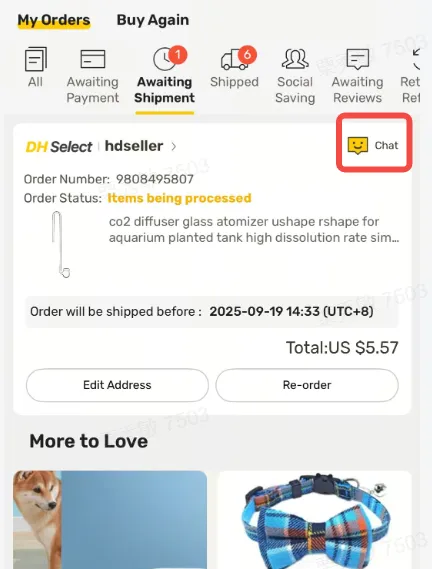
Quick answer: You can contact a DHgate seller through the platform’s chat or message entry when it is available. DHgate’s help page says that an Online Chat entrance may appear on an item list or details page and on an order list or details page. Before you pay, use that conversation to confirm the exact product, selected variant, quantity, shipping option, and any condition that matters to your order.
The goal of contacting a seller is not to collect a vague reassurance. It is to create a written record that you can compare with the current listing and checkout information. If an important detail is unclear, ask a direct follow-up question before placing the order rather than assuming the answer.
Where can you find the DHgate seller chat or message entry?
Start with the current product page for the item you are considering. DHgate’s seller-contact help page says buyers may find an Online Chat or message entrance on item list and details pages, as well as on order list and details pages.
- Before ordering: Open the item page and look for the chat or message control currently shown for that listing.
- After ordering: Open the relevant order in your DHgate account and look for the chat or message entry associated with that order.
- If the control is not visible: Check the current item page, order page, and account area. Interface labels and available controls can change by page, seller, account state, and device.
Do not confuse a seller conversation with DHgate customer support. Seller chat is for questions about a specific listing or order. Platform customer service is the appropriate contact path for account, payment, dispute, or platform-support issues.
What should you review before contacting a seller?
Read the listing first so your message focuses on details that are missing, unclear, or important for your own order. This also makes it easier to compare the seller’s reply with what the listing and checkout page actually show.
- Selected product option: Confirm the color, size, model, material, bundle, quantity, or other variation you intend to buy.
- Product description: Note any specification, accessory, packaging detail, or compatibility requirement that matters to you.
- Quantity and order condition: Check the listed quantity, any minimum-order requirement, and the total you expect to purchase.
- Shipping information: Review the options and delivery estimate currently shown for your destination.
- Seller and review context: Review visible seller information and recent, specific feedback as context, not as a guarantee.
If the listing already answers a question clearly, save that information as your baseline. If it does not, ask the seller to confirm it through DHgate chat so you have a written record.
What should you ask a DHgate seller before ordering?
Ask short, specific questions about the exact item and option you selected. Avoid asking a broad question such as “Is this good quality?” because it is difficult to compare with the listing or verify after delivery.
Copy and send this pre-order message:
Hello, I am considering an order for this item. Before I place the order, please confirm the following for the exact variant and quantity I selected:
- Please confirm the material, specifications, included quantity, and available options.
- Is the selected variant and quantity currently available?
- What is the current minimum order quantity, if any?
- Which shipping option should I choose for my destination, and what delivery estimate should I expect?
- What packaging will be used for this order?
- Does the item sent match the photos and written details shown in this listing?
- Is there any important order condition I should confirm before I pay?
Please reply through the DHgate message system so I can compare the details with the listing before ordering. Thank you.
If you need a sample, customization, neutral packaging, direct-to-customer delivery, or a particular certificate or document, ask that as a separate, direct question. Do not assume a seller can meet a special request unless the current listing or the seller’s written reply confirms it.
How do you compare a seller’s reply with the listing?
After receiving a reply, compare it with the current product page and the checkout details for the exact option you selected. A useful seller response should be specific enough to check.
| What to compare | What should match | When to pause |
|---|---|---|
| Product variant | The color, size, model, material, bundle, or quantity in the message matches the option you selected. | The seller answers about a different option or does not identify the selected variant. |
| Availability | The seller confirms availability for your stated quantity. | The item is unavailable, the answer is vague, or the seller proposes an unreviewed substitute. |
| Shipping | The shipping method and estimate can be compared with the current destination and checkout information. | The message conflicts with checkout details or does not identify a relevant shipping arrangement. |
| Packaging and special conditions | The seller clearly confirms any requirement that matters to your order. | A key condition is ignored, changed, or described only in general terms. |
| Product accuracy | The seller confirms that the shipped item corresponds to the listing and your selected option. | The seller cannot clarify a product detail that is essential to your decision. |
Do not assume a message overrides the product page or checkout terms. If the listing, chat reply, and checkout information conflict, ask for clarification before you pay. If the answer remains unclear, compare another seller or reduce your risk with a small test order.
How should you keep a useful written record?
Keep the conversation inside DHgate whenever possible. A record is useful only if it identifies the product and the condition you asked about clearly enough to compare with the order later.
- Save the product-page URL and note the selected variant and quantity.
- Keep the seller’s written answers in the platform message thread.
- Save the checkout confirmation, shipping option, and total shown before payment.
- Keep tracking updates and delivery records after the order is placed.
- Take photos or notes if the delivered product, quantity, packaging, or condition differs from the documented order.
These records help you make a repeat-order decision and give you a clear reference if an item, shipment, or seller response does not match what was documented.
When should you ask a follow-up question or stop the order?
Ask a follow-up question when:
- The seller answers generally but does not confirm your selected variant, quantity, or destination.
- The reply does not address a required specification, packaging condition, or shipping question.
- The answer introduces a change that is not reflected in the listing or checkout details.
- You cannot tell whether the response applies to the exact product you plan to order.
Pause or choose another seller when:
- The listing and the seller’s written answer conflict on a key detail.
- The seller avoids confirming a requirement that makes or breaks your order.
- The selected item, quantity, shipping option, or total cost remains unclear.
- You would need to make a customer-facing promise that the seller has not confirmed in writing.
A seller response does not need to be perfect to be useful. It should be clear enough for you to compare the promised details with the listing, checkout record, and eventually the delivered order.
FAQ: contacting DHgate sellers
Can I contact a DHgate seller before buying?
Yes, when the current item page shows a chat or message entry. Use it to ask questions about the exact product, selected option, quantity, shipping arrangement, and any other condition that matters before you pay.
Where can I find the seller chat after I have placed an order?
DHgate’s help page says an Online Chat or message entrance may be available on an order list or details page. Open the relevant order in your account and check the controls currently shown there.
What is the first question I should ask?
Start by identifying the exact variant and quantity you plan to buy, then ask the seller to confirm the product details, availability, shipping option, and any condition that could affect your decision.
Should I rely only on seller feedback?
No. Feedback can provide useful context, but it does not confirm the current listing, selected option, stock, shipping option, or the result of your own order. Compare the listing with the seller’s written answer and the checkout information.
What if the seller does not answer every question?
Send a focused follow-up question. If an essential detail remains unclear, do not fill in the gap with an assumption. Compare another seller or keep your first order small enough to test the outcome.
Next step
Open one product page you are considering, identify the exact option and quantity you want, and send the pre-order message above through the available DHgate chat or message entry. Compare the written reply with the listing and checkout details before you pay.
Sources and further reading
- DHgate Help: How to Contact Seller
- DHgate: How To Contact Reliable Suppliers in China
- DHgate: How To Easily Find Good Sellers on DHgate
2 thoughts on “How to Contact a DHgate Seller: Questions to Send Before You Order”