
Quick answer
If a DHgate order is already in dispute, do not assume that closing the dispute is the same as canceling the order or receiving a refund. A dispute is an order-specific after-sales record. Before you close, withdraw, modify, or accept a proposal in that case, review the current order status, the seller’s written proposal, your evidence, and the options displayed in the order record.
If a seller asks you to close a dispute before the issue is clearly resolved, pause first. Keep communication inside the platform and make sure you understand what will happen after the dispute is closed. Available options, evidence requirements, return instructions, deadlines, and outcomes can vary by order status and DHgate’s current terms.
Bottom line: Close a dispute only when the order record clearly supports the result you are accepting. Do not close it simply because a seller asks you to do so in a message.
Canceling an order and closing a dispute are different actions
Buyers often use the word “cancel” for several different actions. Before selecting an option in your account, identify which situation applies to your order.
- Canceling an order before shipment: You may be trying to stop an order that has not yet shipped. The available cancellation option can depend on the current order status.
- Opening or continuing an after-sales request: You may have received an item that is damaged, incomplete, incorrect, or materially different from the listing.
- Closing or withdrawing a dispute: You may already have an open case and be considering whether to end it, modify it, or accept a proposal.
- Returning an item: You may have received instructions connected to a proposed return arrangement. Do not assume that every dispute requires an immediate physical return.
These actions may be connected to the same order, but they are not interchangeable. If your case is already open in a dispute or after-sales workflow, use the options shown in that case rather than assuming the normal order-cancellation path will apply.
When you may be ready to close a dispute
Closing a dispute may make sense when the order record shows a resolution you understand and are prepared to accept. Before taking action, read the current proposal and confirm that it addresses the actual issue you reported.
You may be ready to consider closing a dispute when:
- the seller’s proposal is clearly written in the platform record and addresses the documented problem;
- you understand whether the proposal involves a refund, a return arrangement, a replacement, another shipment, or another available option;
- any required action is recorded inside the order process rather than promised only in a private message;
- you have saved the listing details, messages, photos, tracking information, and other evidence; and
- you are comfortable with the current case status and understand which action you are being asked to take.
If the seller’s message is vague, asks you to close the case before explaining the solution, or proposes moving payment or communication outside the platform, do not treat that request as proof that the issue has been resolved.
When you should keep the dispute open and review your options
It is usually sensible to review the order record carefully before closing a dispute if the problem is still unresolved or the proposed solution is unclear.
Consider keeping the dispute active while you review the available options when:
- the seller asks you to close the case first but has not provided a clear, recorded solution;
- the item has not arrived, arrived damaged, is incomplete, is the wrong variation, or differs materially from the listing;
- the seller’s proposal does not match the evidence or does not address the issue you opened;
- you are being asked to return an item without approved return instructions;
- the seller asks you to communicate or pay outside the platform; or
- the order page shows a support, dispute, refund, return, or escalation option that you have not yet reviewed.
Practical rule: Do not make a case-status decision based only on a seller’s reassurance. Compare the seller’s proposal with the listing, the item received, your saved evidence, and the current options shown in the order record.
What to check before changing a dispute
Before you close, withdraw, modify, or accept a proposal in a dispute, make sure you have a complete record of the transaction.
- Order status: Confirm whether the order is processing, shipped, delivered, or already in an after-sales or dispute workflow.
- Reason for the dispute: Review the reason you selected and make sure it still accurately describes the issue.
- Listing information: Save the product title, photos, description, selected variation, size or material information, price, and shipping details.
- Seller messages: Keep messages exchanged through DHgate, especially any proposal about a refund, return, replacement, or other solution.
- Package and product evidence: Save photos or video of the package, shipping label, contents, received item, and any damage or mismatch.
- Tracking and delivery details: Keep tracking updates, delivery notices, and relevant carrier information where applicable.
- Current case options: Read the buttons, notices, proposals, and instructions displayed in your specific order record.
Save this information before changing the dispute status. Listings, messages, and available actions can change over time, so a complete record helps you explain what happened if you later need to review the case.
How to respond when a seller asks you to cancel a dispute
Keep your response short, factual, and inside the platform message thread. You do not need to accuse the seller or make promises you cannot verify.
You can use this message:
I will review the proposal in the order record before changing the dispute status. Please provide the complete proposed resolution through this case so it is connected to the order.
If the seller has already made a proposal, compare it with the issue documented in your case. Check whether it clearly states what action will occur and whether any return instructions, tracking requirements, or other steps are recorded in the order process.
Do not rely on a promise that requires you to close the dispute first and then wait for an off-platform refund, replacement, or payment arrangement.
If a return is part of the proposed solution
A physical return may be part of an order resolution, but it is not always required and should not be started without clear instructions for the specific order.
Before sending an item back, confirm through the order record:
- whether a return is required for the proposed solution;
- the approved return address and recipient details;
- the shipping method, tracking requirement, and any labeling instructions;
- whether return-shipping responsibility is stated in the process;
- any action deadline displayed for the return; and
- what receipt, tracking number, or proof of shipment you need to upload.
Keep the package, shipping receipt, and tracking information until the order issue is closed. Do not send an item to an address that has not been confirmed through the available order process.
What to do if the seller’s proposal does not resolve the issue
If the seller’s proposal does not address the documented problem, respond with a concise explanation and keep your supporting evidence attached to the order record.
For example:
The proposal does not address the issue in this order. The selected variation was [state the option], while the received item is [state the item received]. I have attached the saved listing detail and photos of the item for review.
Then review the current options shown in the order. Depending on the transaction and platform interface, there may be a further support, dispute, refund, return, or escalation option available. Use the option displayed for your specific case rather than relying on an old screenshot, generic timeline, or advice for another order.
Important: A dispute or support review does not guarantee a refund, return, replacement, or other result. The available outcome can depend on the order status, the issue reported, the evidence, and DHgate’s current terms.
Common mistakes to avoid
- Confusing a dispute closure with an order cancellation. These actions can have different effects depending on the order status.
- Closing the case before you understand the proposal. Read the terms of any proposed resolution before accepting it.
- Relying only on a private promise. Keep important communication and any proposed solution connected to the platform order record.
- Sending an item back without approved instructions. An unapproved return can create problems with address verification, tracking, and proof of delivery.
- Uploading vague evidence. Show the full item, the specific issue, the package where relevant, and the matching listing detail.
- Discarding packaging or messages too early. They may help document shipping damage, missing items, or delivery details.
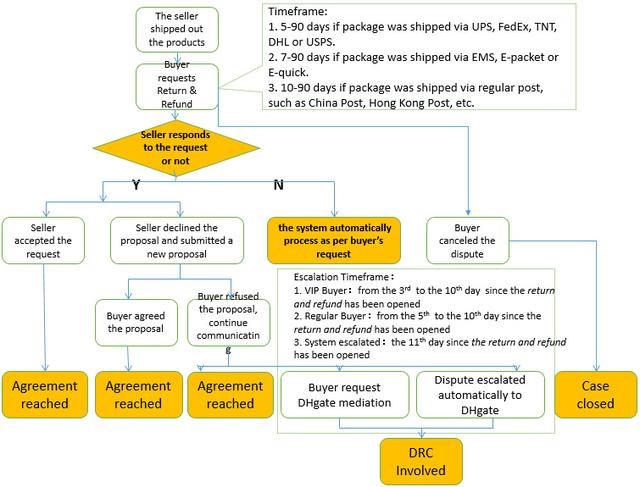
- Assuming a fixed timeline applies to every order. Check the current information displayed in your own order record.
FAQ
Can I cancel a disputed DHgate order like a normal order?
Not necessarily. A normal order cancellation and an open dispute are different workflows. If your case is already in an after-sales or dispute process, review the available options displayed in that specific order record.
Should I close a dispute because the seller asks me to?
Do not close a dispute solely because a seller asks. First review the seller’s recorded proposal, your evidence, the current order status, and the available options in the case. Close a dispute only when you understand and accept the resolution shown in the order record.
Does closing a dispute mean I will receive a refund?
No. Closing a dispute is not automatically the same as receiving a refund. Check the current proposal and order information carefully to understand what outcome, if any, is recorded for your case.
What evidence should I save before changing a dispute?
Save the listing title, photos, description, selected variation, price, shipping information, seller messages, order confirmation, tracking updates, package photos, product photos, and evidence of any damage or difference from the listing.
Should I send an item back before closing a dispute?
Do not send an item back until the order record or approved process gives you clear instructions for that specific transaction. Confirm the return address, shipping method, tracking requirement, and any other details first.
What if the seller’s proposal is unclear or does not solve the problem?
Explain the issue factually in the order record, attach evidence that supports your explanation, and review the current support, dispute, refund, return, or escalation options shown for that order.
Can DHgate guarantee a refund or a specific result?
No. Any outcome can depend on the order status, issue reported, evidence available, return arrangement where applicable, and the platform’s current terms.
Sources and further reading
- How to Cancel a DHgate Order Before Shipping — DHgate Blog.
- How to Cancel a DHgate App Order Before Shipping — DHgate Blog.
- Dispute at DHgate: Solutions to All Your Questions — DHgate Blog.
Editorial note: These sources provide general marketplace guidance. The options, evidence requirements, timelines, return instructions, and possible outcomes shown in an order can change and may vary by transaction. Review your current order record before taking action.