
Quick answer
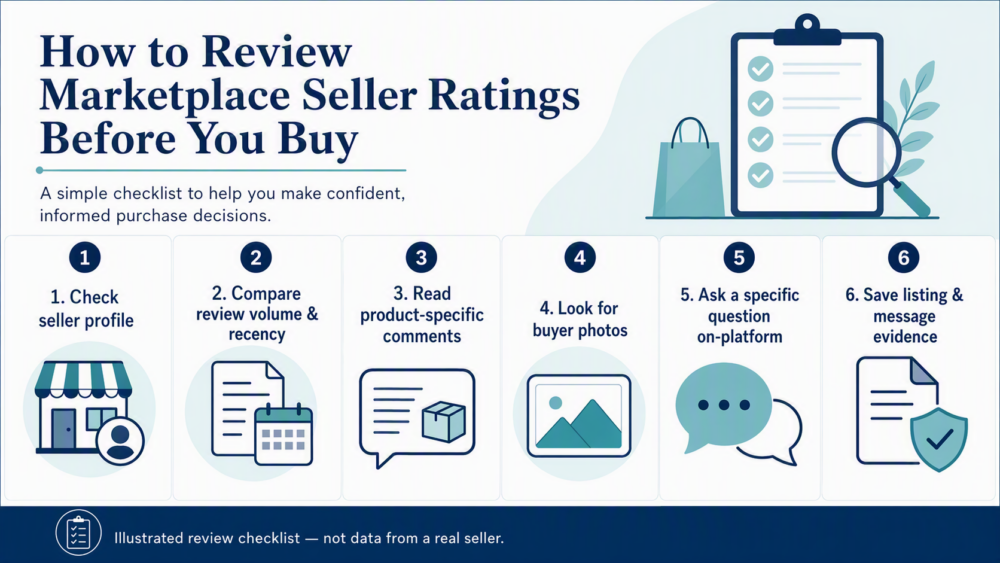
Before buying from a DHgate seller, compare the seller’s recent feedback, review volume, product-specific comments, buyer photos, and visible transaction history. Do not rely on a rating alone. Check whether the evidence matches the exact listing and variant you want, ask one specific question through DHgate messages, and save the reply before paying.
What to check before trusting a DHgate seller
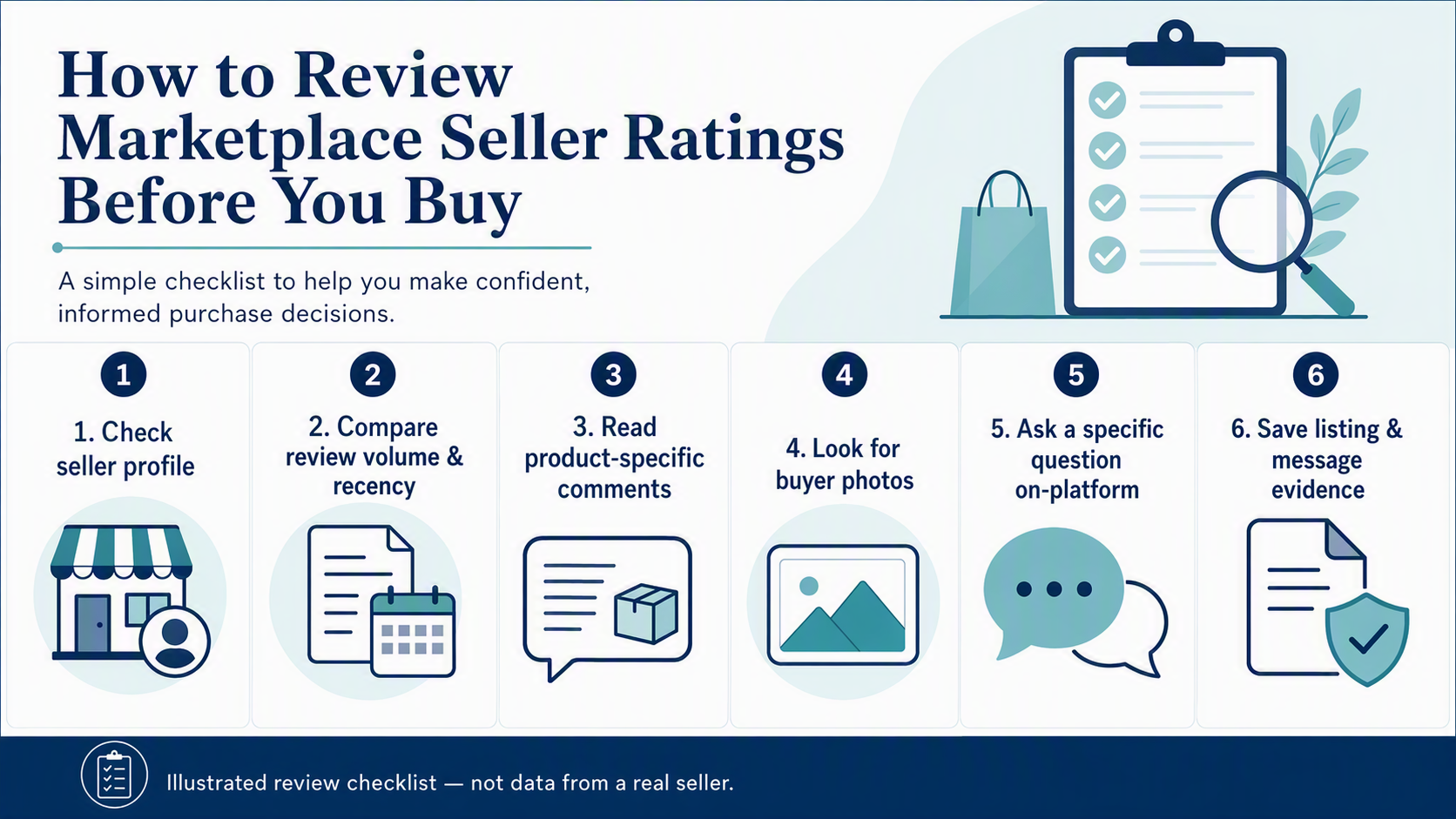
A seller page can help you create a shortlist, but it cannot prove that every item, variant, or shipment will meet your needs. Start by looking for a record that is recent, specific, and consistent across the seller page and the product listing.
- Review pattern: Look beyond one overall score. Recent, detailed reviews are generally more useful than a high rating with little current context.
- Volume and recency: Review volume can add context, but it is not a universal quality threshold. Check whether feedback is recent enough to be relevant to the listing you are considering.
- Product-specific evidence: Read comments and buyer photos for the exact product or a clearly comparable variant—not only for the store as a whole.
- Listing consistency: Compare the title, photos, options, dimensions, materials, price terms, and shipping information. Contradictions are a reason to pause.
- Seller communication: Ask a precise question in the on-platform message thread and assess whether the written answer is clear and consistent with the listing.
Do not rely on a rating alone. A rating is only one signal; it does not guarantee current stock, the quality of a particular variant, delivery performance, or a particular order outcome.
Seller-page signals vs. product-page signals
| Where you look | What it can help you assess | What it cannot prove |
|---|---|---|
| Seller page | Overall feedback pattern, visible store history, and general communication signals. | That the exact item is in stock, matches every photo, or will meet your requirements. |
| Product page | Variant-specific comments, buyer photos, item condition feedback, and whether the listing is complete. | That every other listing from the seller is equally reliable. |
| Message thread | Whether the seller can answer a specific question clearly and in writing. | A guarantee of fulfilment, delivery time, or after-sale outcome. |
Use all three sources together. A strong seller profile with thin, outdated, or mismatched feedback on the exact product is only partial evidence. Likewise, a good-looking product page does not remove the need to check the seller’s broader record.
How to read reviews with more context
Open the newest useful reviews first. Give more weight to comments that mention the actual item, variant, packaging, condition, or delivery experience than to generic praise. Buyer photos can help you compare what arrived with the listing, but they should still be read alongside the written details and selected variant.
Look for patterns rather than trying to find a perfect review section. Repeated comments about unclear sizing, missing parts, damaged packaging, incorrect variants, or unresponsive messages may matter more than one unusually positive or negative review. If the evidence does not clearly relate to the exact item, ask for clarification before ordering.
DHgate’s guides on reading reviews and finding sellers can provide additional marketplace context. Treat platform features and guidance as time-bound: the listing and order page visible for your transaction are the relevant record.
When to pause before buying
Pause, ask for clarification, or choose another listing when you see one or more of the following:
- a high-looking rating but very little recent, product-relevant feedback;
- reviews or buyer photos that do not appear to match the item or variant you want;
- contradictions between the title, photos, options, description, dimensions, or shipping details;
- no useful buyer photos or detailed comments where those details matter to your decision;
- a seller who cannot confirm an important point in the on-platform message thread; or
- a request to move communication or payment off-platform.
Pausing is not an accusation against a seller. It is a way to avoid treating incomplete evidence as a confirmed purchase decision.
A safer first-order workflow
- Open the seller page. Review the visible feedback pattern and recent activity before focusing on price.
- Review the exact listing. Check product comments, buyer photos, variants, specifications, and delivery information separately from the seller profile.
- Ask one or two specific questions. For example, confirm the chosen variant, a material, a measurement, contents, or destination availability through DHgate messages.
- Save the evidence before payment. Keep screenshots of the listing, selected options, seller reply, and checkout details together.
- Check the order promptly after delivery. Compare the received item with the listing and your saved record.
- Use the order record if an issue occurs. Follow the current return, refund, or dispute instructions shown for that order, and submit the records requested there.
For a first purchase, keep the decision tied to the exact listing and order record rather than to a seller score alone. The order page, eligibility, deadlines, evidence requirements, and available options can vary by transaction and current policy. For a broader seller-screening checklist, see How to Tell Whether a DHgate Seller Is Reputable: A Buyer Checklist.
FAQ
How many reviews should I look for?
There is no universal cutoff. Look for enough recent, specific feedback to assess the exact listing you want, then compare it with the seller page and the seller’s written answers.
Should I trust a seller rating alone?
No. Read it together with review recency, product-specific comments, buyer photos, listing consistency, and the seller’s response to a specific question.
Why do buyer photos matter?
They can add context about the item, packaging, condition, or presentation. They are most useful when they clearly relate to the product and variant you are considering.
What should I ask the seller before paying?
Ask about the one or two details that would change your decision, such as the selected variant, a measurement, material, contents, or shipping availability for your destination. Keep the answer in the platform message thread.
What should I do if there is an order problem?
Open the relevant DHgate order and follow the return, refund, or dispute options and instructions currently available there. Keep listing screenshots, messages, delivery records, and clear photos together.
When seller signals conflict
A strong rating is not a reason to ignore conflicting evidence. Use the exact listing and the seller’s written answer to decide whether to proceed.
- High seller rating, but little recent product-specific feedback: pause and look for evidence tied to the exact item or variant instead of assuming the store-level score applies.
- Positive product comments, but buyer photos or listing details conflict: ask the seller to confirm the selected variant, contents, measurement, or material in the on-platform message thread before paying.
- Seller page and product page look consistent, but the seller asks to move payment or key communication off-platform: do not continue on that basis; keep the transaction and important messages within the platform record.
- The seller’s answer is vague or contradicts the listing: do not treat the reply as confirmation. Ask once more for the exact missing detail, or choose another listing.
Decision rule: proceed only when the seller-page signals, the exact listing, and the written answer are consistent enough for the order you plan to place. If a conflict remains unresolved, do not let a rating outweigh it.
One thought on “How to Review DHgate Seller Ratings Before You Buy”