

On DHgate, decal products range from tiny sticker sheets to full vinyl skins and car wraps, but the real difference between a satisfying order and a disappointment is how clearly the listing explains size, material, finish, and adhesive. This guide focuses on those hard specs so you can match decals to your actual surfaces and skip vague, higher-risk listings unless you’re deliberately experimenting with low-stakes decoration.
What “decal products” on DHgate usually include and how their specs affect real‑world use
On DHgate, “decal” products usually cover surface decoration or protection: small sticker sheets, vinyl laptop or phone skins, larger wall decals, and full or partial car wraps. All of these are thin films you apply to a surface, so the most useful part of the listing is how clearly it explains the decal’s size, material, finish, and adhesive behaviour rather than the design alone.
Dimensions are the first hard spec to check. Good listings give a clear width and height (and sometimes pattern repeat for wallpaper‑style decals), so you can compare them with the actual surface using a tape measure. If the decal is smaller than a laptop lid or phone back, you’ll see exposed edges; if it’s larger than the available space, you may have to trim it or it may not fit at all. For cars and walls, multiple panels or a repeating pattern usually work better than one oversized piece you need to stretch into place.
Material type tells you how the decal will feel and how much abuse it can handle. Common options include thin paper stickers (easy to tear and not very water‑resistant), PVC or generic “vinyl” (more flexible and durable), and PET or other plastics that resist heat and moisture better. Thicker vinyl or PVC often survives outdoor use and light scratches but can be harder to smooth over curves; a very thin film may conform nicely to rounded edges but be easier to damage or peel.
Finish labels—matte, glossy, transparent, metallic—affect both appearance and practicality. Matte decals hide fingerprints and reflections, which can be helpful on laptops and walls. Glossy films tend to show light reflections and smudges but can make colours look more vivid. Transparent decals are meant to let the underlying surface show through; they only work as intended if the listing’s photos and finish description match the effect you want on glass, metal, or plastic.
Adhesive details are what determine whether a decal will stay put without damaging the surface. Listings may describe adhesive as permanent, removable, or repositionable; removable and repositionable adhesives are safer for painted walls, electronics, and rental spaces, while more permanent glues are better for long‑term outdoor use where you don’t plan to take the decal off. Some car wraps mention heat‑activated adhesive that needs careful application with a heat gun or hair dryer; that can give a cleaner result but raises the skill level needed. Whenever a listing mentions “easy removal,” look for at least a basic note about residue or recommended surfaces rather than trusting the phrase alone.
Most DHgate sellers can describe size, material, finish, and basic adhesive type in objective terms, and you can cross‑check those against your own measurements and surface. Claims like “super durable,” “waterproof for 10 years,” or “stress‑relief design” are marketing language unless backed by independent evidence. I would only take a decal listing seriously if it spells out clear dimensions, a specific material type, and at least simple adhesion/removal notes. When those details are missing or vague—especially for large wall decals or car wraps—I treat the listing as higher‑risk and usually skip it. The one exception is very small, low‑stakes decorative stickers where I’m deliberately experimenting with style; there, unclear specs are less of a problem because the consequences of a misfit are minor.

Different decal formats—small sticker sheets, laptop skins, wall decals, and car wraps—use similar spec language, but their size, material thickness, and finish make them behave very differently on real surfaces.
What “toner products” usually cover and how to interpret their key specifications
Where decals on DHgate focus on surfaces, toner products almost always mean consumables for laser printers: toner cartridges that slot into the printer, refill kits for those cartridges, separate drum units, and related parts. These are functional items rather than decorative accessories, so a vague or incomplete spec can easily leave you with a cartridge that doesn’t fit, isn’t recognised, or produces fewer pages than you expect.
The most important spec is printer model compatibility. Reliable toner listings list exact model numbers or series codes, often matching the format used in the printer’s label or manual. You can check the sticker on your printer and its documentation, then compare those codes directly with the listing. If your model isn’t named or the listing only says something like “for HP printers” or “fits most printers,” the risk of outright incompatibility is high and not worth a gamble.
Cartridge type and colour come next. Listings usually distinguish black cartridges from colour sets, and may separate cyan, magenta, yellow, and black (CMYK) into individual cartridges or combine colours in a single unit. Some mention standard versus high-yield versions of the same cartridge code. A high-yield cartridge is designed to hold more toner and print more pages than a standard one using the same printer, which can improve cost effectiveness as long as the cartridge code still matches your device. What matters most is that the cartridge identifier and type line up with what your printer manual says it accepts; an incompatible type may physically fit the slot but fail to be recognised or produce errors.
Page-yield numbers—such as “2,000 pages” or “5,000 pages”—are best treated as rough capacity indicators rather than guaranteed outcomes. They are usually based on standardised test conditions with a specific coverage percentage per page. In everyday use, heavy graphics or dense text will reduce actual yield, and we cannot verify any particular DHgate listing’s real-world performance without independent testing. Still, comparing yield figures across similar cartridges can help you estimate cost per use and avoid unusually low-capacity options for the same model.
Toner listings also label whether an item is OEM (original from the printer manufacturer), compatible (third-party but designed to match specific models), or remanufactured (refurbished cartridges cleaned and refilled). OEM supplies tend to be more predictable in compatibility but cost more; compatible and remanufactured cartridges may be cheaper but vary in quality. You can cross-check OEM claims against manufacturer information and use model numbers and cartridge codes to verify that compatible or remanufactured products at least target the right devices, but print quality and defect rates remain uncertain unless you have independent evidence.
Specs you can reasonably verify before ordering are model numbers, cartridge codes, basic colour information, and stated cartridge type. Actual print quality, longevity, and the chance of leaks or defects are unknown from the listing alone. Because toner is a higher-stakes purchase than decorative decals—I need my printer to work reliably—I only shortlist DHgate toner listings that publish explicit printer models and cartridge identifiers I can match to the printer’s documentation. Generic phrases like “fits most printers” or “universal toner” are red flags, even if the price looks attractive.
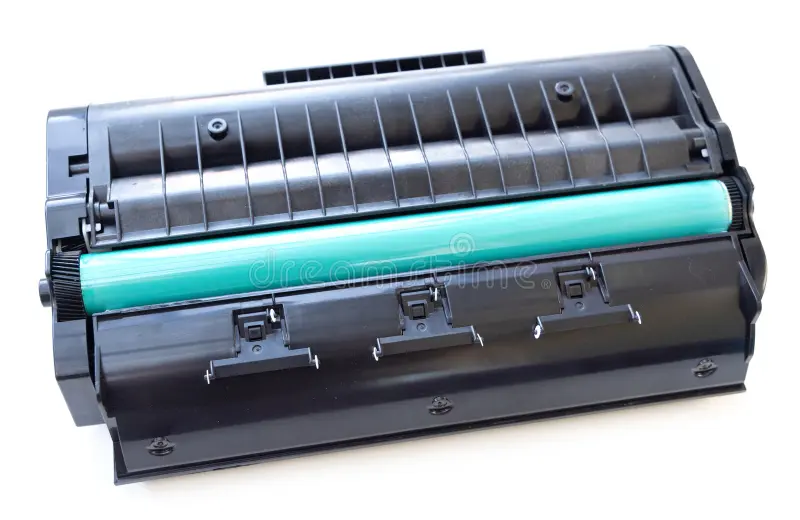
Typical toner consumables include black and colour cartridges plus separate drum units, all of which must match specific printer models and cartridge codes to work correctly.
How decal and toner specs differ in importance and risk
Decal specs mainly decide how well a film sits on a surface, while toner specs decide whether a cartridge can make your printer work at all. For decals on DHgate, the core decisions are about dimensions, material, finish, and adhesive: does the size and shape match the area you want to cover, is the vinyl or other film thick and flexible enough for that surface, does the finish suit how you want it to look, and will the adhesive bond to that material without being impossible to remove later.
Toner listings, by contrast, hinge on precise printer compatibility and cartridge type. If the cartridge code or supported model list doesn’t match your printer’s label or manual, the cartridge may not fit, may not be recognised, or may produce errors or poor operation. Even when a physically similar cartridge can be installed, the wrong type can still fail electronically or give unreliable results, which is a much higher-stakes failure than a decal that looks slightly off or wears out sooner than you hoped.
Because these failure modes are so different, I treat toner as a strict compatibility purchase and decals as a more flexible surface decision. For toner, I insist on exact model numbers and cartridge identifiers and avoid vague claims like “fits most printers” or “universal toner” no matter how attractive the price looks. With small, purely decorative decals—such as sticker sheets or small laptop motifs—I’m more willing to accept some ambiguity if I’m mainly exploring styles and the risk is limited to wasting a few dollars.
That flexibility disappears when decals are large, expensive, or hard to replace. For car wraps, big wall murals, or full laptop skins, clear dimensions, material type, and adhesive information are just as non-negotiable as printer codes are for toner. If a DHgate listing can’t tell me exactly how big the decal is, what film and finish it uses, and how the adhesive behaves on my kind of surface, I treat it with the same caution I would an imprecise toner listing and move on.
Step‑by‑step: how to read a DHgate decal listing
- Measure the surface you want to cover—whether it’s a laptop lid, wall area, car panel, or phone back—and compare those numbers directly with the listing’s dimensions, paying attention to width, height, and any shape or pattern layout that could leave gaps or overhangs.
- Check the material type the listing names, such as PVC or vinyl film, paper, PET, or fabric, and note the finish (matte, glossy, transparent, metallic). Think about how that combination will look and feel on your specific surface and under your lighting: glossy films show reflections and fingerprints more, while matte and textured finishes tend to hide minor flaws.
- Look closely at adhesive and removal details. Listings that specify permanent versus removable adhesive, whether the decal is suitable for indoor or outdoor use, and any notes about residue or repositioning make it easier to judge fit for your surface and how difficult removal will be if you change your mind.
- Only after those objective checks, review the product photos for consistency. Do the images all show the same design and approximate scale, or does the item seem to change between pictures? Then scan buyer feedback for repeated comments about fit, adhesion, and colour accuracy, treating reviews as personal experiences rather than proof that the decal will behave identically for you.
- Shortlist only the listings that clearly state dimensions, material, and at least basic adhesive information. If any of those are missing or vague, I would either message the seller on DHgate for clarification or skip the listing entirely—especially for larger, more visible applications where a misfit or poor adhesive performance is costly to fix.
Step‑by‑step: how to evaluate a DHgate toner listing
- Identify and write down your printer’s full model number and any cartridge code from the printer body, manual, or the manufacturer’s website before you start checking DHgate listings.
- On the DHgate listing, find a compatibility list or spec table and confirm that your exact model number or cartridge code appears; treat vague phrases like “fits many printers” or “universal” as a red flag.
- Verify cartridge type and color—standard vs high-yield, black vs color, single-color cartridges vs combined units—and make sure this matches what your printer documentation specifies.
- Review the stated page yield as a rough capacity indicator, using it mainly to compare options rather than assuming it guarantees a precise number of printed pages.
- Check whether the product is labeled OEM/original, compatible, or remanufactured, and decide how much risk you’re comfortable with: I would be more cautious with compatible or remanufactured cartridges for critical business printing than for occasional home use.
- If compatibility details, cartridge type, or origin (OEM vs compatible) are missing or unclear, send direct questions to the seller via DHgate messaging—and if the answers stay vague or inconsistent, I would skip the listing instead of gambling on a bargain.
Common DHgate spec and compatibility pitfalls to watch for
- For decals, missing or incomplete dimensions can leave you with a product that is too small, too large, or poorly proportioned for the surface you planned to cover.
- Unspecified or ambiguous material and finish make it hard to predict how a decal will look, how flexible it is, or how long it may last on curved, textured, or outdoor surfaces.
- No adhesive or removal information increases the chance of decals that either fail to stick properly or bond too strongly, leaving residue or damage when you try to remove them.
- Product photos that don’t clearly match the described item, design, or scale can signal a gap between what you think you’re ordering and what actually arrives.
- For toner, absent printer model lists or reliance on broad claims like “fits most printers” or “generic cartridge” greatly raise the risk of a unit that won’t fit physically or won’t be recognised by your device.
- Unclear cartridge type or color information can lead to ordering the wrong consumable, such as a black-only unit when you need color, or a high-yield cartridge that your printer isn’t designed to use.
- Page-yield or “high quality” marketing without concrete compatibility specs can distract you from the more serious risk of outright incompatibility or error messages when you install the cartridge.
- When I see these gaps—especially around compatibility and adhesive behaviour—I either ask precise follow-up questions through DHgate messaging or walk away; for toner and long-term or large decals, I prefer listings with clear, verifiable specs over lower prices or flashy designs.
Simple ways to verify fit and compatibility before you order
- Measure the surface you plan to cover with a decal using a ruler or tape, write down width, height, and any curved or cut‑out areas, and compare those numbers directly with the listing’s stated dimensions.
- Roughly sketch or imagine how the decal will sit on that surface, then check listing photos for pattern orientation, margins, and cut‑outs to see whether the design layout matches your plan.
- Before looking at toner listings, find your printer’s full model number and existing cartridge code on the printer body, in the manual, or on the manufacturer’s website, and treat those as the reference for any DHgate search or comparison.
- Use manufacturer documentation or a reliable general printer resource to confirm which cartridge family and types your printer accepts, then reject DHgate listings whose type or code doesn’t clearly match that information.
- Send focused messages through DHgate asking for missing details, such as “Does this cartridge support [exact model and cartridge code]?” or “What is the decal’s material and thickness in millimetres?”, and prefer sellers who answer concretely.
- Ask sellers for additional photos of labels, packaging, or spec sheets when compatibility or material information is vague, and treat delayed, evasive, or non‑responses as a reason to skip that listing rather than take the risk.
Which DHgate listing signals say something about quality—and which don’t
On DHgate you can’t prove decal or toner quality from a listing alone, but you can judge how transparent and consistent the information is. The more specific and self‑consistent the details, the easier it is to understand what you’re really buying.
Stronger signals of reliability include spec tables that clearly match the product type, photos that look coherent and focused on the actual item, and descriptions that admit limitations—such as decals marked for indoor use only or toner that notes it is a compatible cartridge rather than original. Review patterns also matter: several buyers mentioning similar points about fit, adhesion, or printer recognition tell you more than one vague “great product” comment.
Weaker signals are unverified certification logos, generic claims like “premium quality” or “high quality prints,” and single glowing reviews with no detail on how the product was used. A toner listing that lists exact printer models and cartridge codes is more trustworthy than one that just promises sharp output, and a decal listing that spells out material, finish, and adhesive type beats one that leans on big durability claims without specs.
I would rather shortlist DHgate listings with modest but precise specs and honest descriptions than flashier ones that rely on hype. Clear dimensions, material and compatibility information, and grounded buyer feedback are worth more than bold performance promises that you can’t cross‑check before you order.
If your decal or toner order goes wrong: common DHgate next steps
What should I do if a decal from DHgate doesn’t fit or won’t stick as described?
Start by documenting the problem clearly: take photos or a short video showing the decal on the intended surface and how its size or adhesion differs from what the listing described. Re‑read the listing to confirm the dimensions, material, and adhesive claims it made, and note any mismatch. Then contact the seller through DHgate messaging, explain the discrepancy in calm, specific terms, and attach your evidence. Ask whether they can offer a replacement, partial refund, or other solution based on the item not matching the description.
How should I handle a toner cartridge that doesn’t fit or isn’t recognised by my printer after delivery?
Document the issue before you do anything else. Take photos of the cartridge itself, the label or code on the cartridge, your printer’s model label, and any error messages that appear on the printer screen or computer. Compare these details with the listing’s compatibility information to show that your model or cartridge code was listed. Send a message to the seller through DHgate summarising the problem, include the photos, and point to the part of the listing that said the cartridge would work with your printer. Ask for a resolution such as a refund or replacement.
What if the seller doesn’t fix the problem or stops responding?
If you can’t reach an agreement with the seller, check the order page for the time limits that apply to DHgate’s buyer protection and dispute system. Within those time frames, you can open a dispute or refund request, following current guidance on the site for selecting the reason (for example, “item not as described” or “wrong size”). Attach the same photos, videos, and listing screenshots you shared with the seller, and write a short, factual explanation of what was promised versus what you received. DHgate will then review the case according to its policies.
What records should I keep to strengthen my case in a DHgate dispute?
Keep anything that shows you did your homework and that the product doesn’t match the listing: your original measurements for decals, your printer model and cartridge codes for toner, screenshots of the listing’s specs, and the full message history with the seller. When you open a dispute, organise these into a simple set of attachments with a brief explanation. Clear, consistent information makes it easier to show that you relied on the listing’s specs and that the item arrived incompatible or not as described.
Does careful pre‑purchase checking mean I won’t need DHgate’s dispute or refund process?
Careful checks—measuring surfaces, confirming printer model numbers, and messaging sellers for missing specs—reduce the chance of problems but can’t eliminate it. Listings can still be misleading, and individual items can have defects. Part of buying responsibly on DHgate is both doing those checks upfront and knowing how to use the platform’s order, dispute, and refund options if something still goes wrong, so you aren’t left guessing about next steps.