
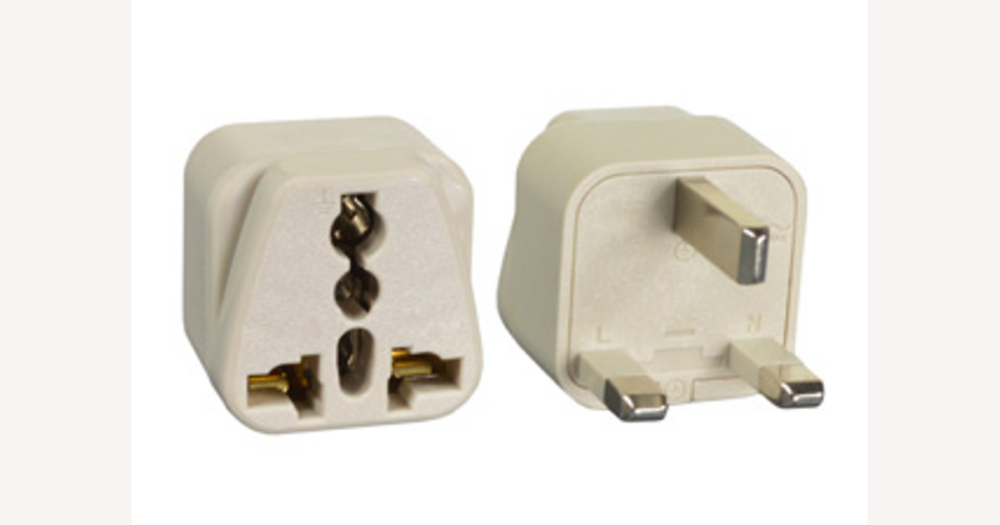
If you’re in Australia planning to use your devices in the UK or Ireland, DHgate can host plenty of compatible power plug adapters—but the real decision is whether a specific listing looks clear, compatible and trustworthy. This guide shows you how to read DHgate titles, specs, photos and seller feedback so you can decide for yourself if an adapter meets UK/Ireland plug and voltage requirements and whether the seller’s history and terms feel solid enough for you to proceed.
How this guide approaches UK & Ireland adapters on DHgate
DHgate is a cross‑border marketplace, not a single retailer. Independent sellers from different countries list UK and Ireland–compatible power plug adapters alongside thousands of other products, while DHgate provides the platform, payment tools and dispute system that support those offers.
This guide stays focused on that DHgate context. Instead of pointing you to a specific shop or a live product link, it shows how to read the information inside a DHgate listing—titles and spec tables, plug and voltage descriptions, photos, seller history, reviews and policies—so you can judge whether one particular adapter really suits sockets and mains power in the UK and Ireland.
If you are in Australia planning to use or travel with devices in the UK or Ireland, DHgate is one option among several for finding an adapter. Personally, I would rather choose a DHgate listing where the seller clearly states the plug type, voltage range and materials and has a steady record of fulfilled orders, even if that means paying a little more or waiting longer for shipping. When a listing is vague about plug type or voltage, or the seller feedback looks patchy, I’d treat that as a reason to skip it unless I was consciously chasing the lowest price and willing to accept more uncertainty.
What makes an adapter compatible with UK & Ireland sockets and voltage?
UK and Ireland wall sockets use the BS 1363 three‑pin rectangular plug, often called Type G. It has two rectangular pins horizontally at the bottom and one rectangular earth pin above them, and the mains supply is around 230–240 V AC at 50 Hz. Many simple plug adapters for this region are rated up to about 250 V and 13 A, while travel adapters often show a wide input range such as 100–240 V for use in multiple countries.
On a DHgate listing, you want those essentials to show up clearly and consistently. In the title, description or spec table, look for explicit language such as “UK plug”, “British plug”, “Type G” or “BS 1363”, plus a voltage and current rating that covers local mains (for example, 100–240 V travel adapter input or 250 V, 13 A for a passive plug adapter). Match this against what your devices need: if a device is not dual‑voltage, an adapter that only changes the plug shape will not by itself make it safe to use on UK/Ireland mains. I’d favour listings where the text and images all point to a BS 1363/Type G plug and a suitable voltage range, and avoid offers that rely only on vague phrases like “international adapter” without stating UK/Ireland or Type G compatibility.
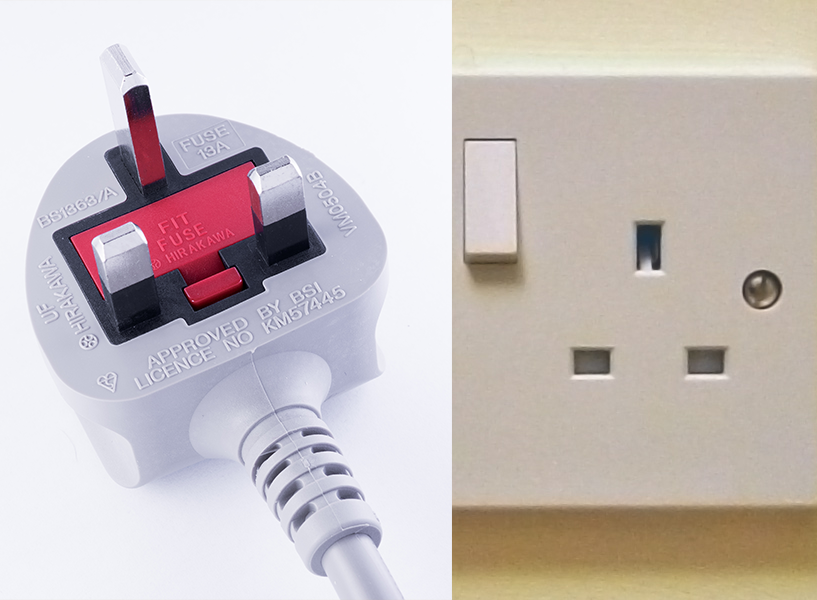
Typical UK BS 1363 (Type G) plug with three rectangular pins and a matching wall socket, showing the geometry you should expect adapter photos to match.
How to read adapter materials and build quality from a DHgate listing
Once you know an adapter is the right plug type and voltage for UK and Ireland, the next question is how solid it looks from a DHgate listing. Most adapters use a hard plastic outer casing, metal pins and internal contacts, and some include an integrated fuse or USB charging module. These are normal features; what matters is whether the listing’s photos and description make that construction look coherent and deliberate rather than improvised or flimsy.
In the photos, look first at the pins and casing. Pins should clearly match the UK Type G layout you already have in mind, with straight, evenly shaped blades that sit squarely in the body rather than at odd angles. The casing should look reasonably thick and uniform, with clean seams, no obvious cracks or warping, and labels that are printed or moulded rather than looking like a random sticker. I pay attention to whether the voltage and current markings on the body are legible and match the written specs, because blurred or missing labels increase uncertainty.
In the text, sellers may use terms like “heat‑resistant” or “flame‑retardant plastic”, “copper” or “brass” pins, “copper alloy contacts”, or “integrated fuse”. These can be positive signals that the seller has thought about materials, but on DHgate they are still claims rather than independently verified facts. I would treat them as mild plus points only when they line up with what the photos show; if an adapter is described as robust but the single image is small, blurry, or looks like a different plug style, I’d assume I’m taking on more risk. Low‑quality or sparse images, missing labels, or visible defects don’t prove an adapter is unsafe, but they do mean you have less reliable information, and for me that’s enough to move on to a listing with clearer, more coherent presentation.
When unclear specs are a reason to walk away from a listing
A practical checklist for judging a DHgate adapter listing before you buy
- Confirm plug compatibility. In the title, description or spec table, look for clear mentions of UK or Ireland, “Type G” or “BS 1363,” and check that the photos show the familiar three rectangular pins and matching socket face.
- Verify electrical specs and adapter style. Make sure the voltage and current ratings cover UK/Ireland mains (around 230–240 V AC at typical currents) and that the adapter type—single‑region, multi‑region or “universal”—matches how and where you plan to use your devices.
- Cross‑check text and images. Read the title, description and any spec table against the photos to confirm they describe the same plug type, voltage range and adapter format, with no obvious mismatches or missing basics.
- Review the seller’s track record. Look at overall rating, number of completed orders and how long the seller has been active, giving more weight to sellers with steady, well‑documented histories than to very new or low‑activity accounts.
- Scan reviews and order history. Read comments about this adapter and other products from the same seller to see whether buyers say the specs, build quality and shipping performance matched what the listing promised.
- Check logistics for an Australian buyer. Confirm estimated shipping times, the stated shipping methods and any notes about duties or import so you have a realistic sense of how long the adapter might take to arrive and whether extra costs are possible.
- Understand payment and dispute basics. Note how DHgate’s buyer protection, refund and dispute processes apply in general, and whether the seller adds any specific conditions on the listing, so you know what support you can expect if something goes wrong.
- Decide whether to proceed. I’d move forward only when most of these checks look solid and any remaining uncertainties feel acceptable for my trip; if several boxes fail—such as vague specs plus a thin seller history—I’d treat that as my cue to skip the listing and look for a clearer, better‑documented offer instead.
How DHgate’s marketplace structure affects adapter quality and support
DHgate works as an online marketplace rather than a single store. Many independent businesses list their own UK/Ireland adapters, set prices and handle packaging and shipping, while DHgate provides the platform, payment tools and an overarching buyer‑protection and dispute framework around those transactions.
Because each seller is responsible for the actual product and service, two adapters that look almost identical in photos can come from different suppliers with very different quality control, packing standards and responsiveness if there is a problem. DHgate does not individually inspect or certify every adapter, so the practical way to manage risk is to treat careful seller selection as part of the purchase. That’s why the checklist you just ran through spends so much time on ratings, order history, policies and delivery expectations: on a marketplace, those signals matter as much as the plug type and voltage specs. I personally treat DHgate as a place where I only buy from sellers with a visible track record of fulfilled orders and consistent feedback, and I’m cautious about newer or poorly documented accounts when the item involves mains power.
Using ratings, reviews and order history as signals—not guarantees
Once you’ve checked plug type, voltage and basic construction, DHgate’s feedback metrics help you judge how closely a seller’s adapters usually match their listings. Overall seller rating, the number of completed orders, and written buyer reviews are all partial signals of reliability, not guarantees. A higher rating paired with many fulfilled transactions over time generally feels more reassuring than a new account with only a handful of sales, especially for something that connects to mains power.
When reading reviews, focus on patterns rather than single comments. Look for repeated mentions that match or contradict the listing: do buyers consistently describe the adapter as solidly built, correctly labelled for UK/Irish sockets and voltage, and arriving roughly on the promised timetable? Are there specific notes about loose pins, misleading specs, overheating or poor customer service? Detailed reviews that broadly confirm what the listing claims about plug type, materials and shipping give me more confidence; sparse, generic praise or conflicting stories make me cautious.
Treat these signals as cross‑checks, not excuses to ignore problems. A good rating or a few positive reviews cannot fix unclear or contradictory specifications elsewhere on the page, and limited feedback means you simply don’t have much evidence to work with. If the plug type, voltage markings or photos raise questions, it’s safer to walk away, even if the seller looks strong on paper, and wait until you find a listing where both the technical details and the feedback line up.
Can a ‘universal’ adapter really cover UK/Ireland and everywhere else?
If a DHgate listing calls an adapter “universal”, “all‑in‑one” or “multi‑country”, does that automatically mean it will work safely in UK and Ireland?
No. Labels like “universal”, “all‑in‑one” or “multi‑country” are marketing claims and do not by themselves guarantee UK/Ireland compatibility. For UK and Ireland you still need an adapter that clearly supports the local plug and mains supply: look for explicit mentions of UK or Britain, Type G or BS 1363, and a voltage rating that covers around 230–240 V AC at 50 Hz. The photos should show a UK‑style three‑pin rectangular plug and matching socket faces, and the voltage and current markings on the body should align with the written specs.
Treat any “universal” adapter the same way you would a single‑region one: apply the checks from earlier sections to plug type, voltage labels, images and reviews. I would only treat a universal adapter as convenient when its UK/Ireland support is clearly documented and the listing looks coherent; if the page never mentions UK, Type G or BS 1363, or the pictures don’t show a UK‑style plug, I’d assume its coverage is incomplete and look for a more transparent listing or a dedicated UK/Ireland adapter instead.