
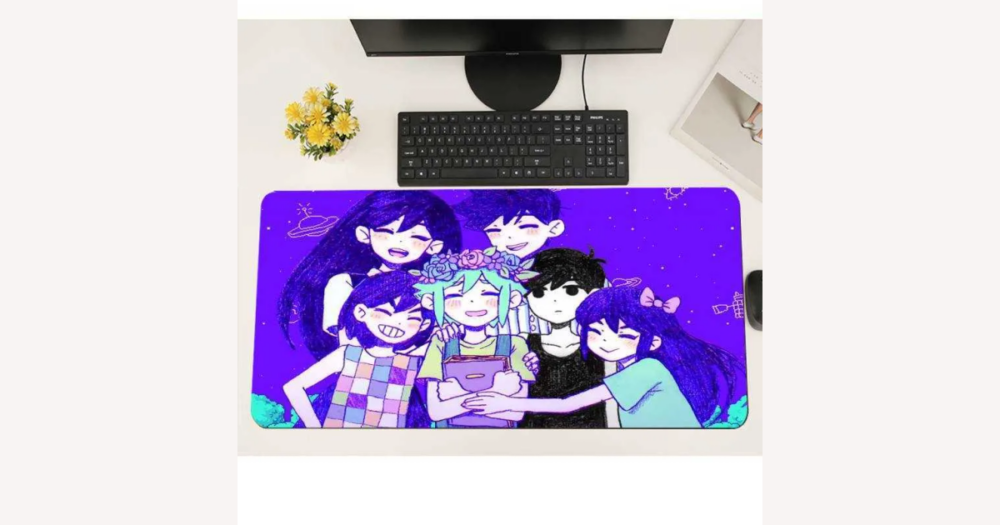
To choose a durable and comfortable Omori mousepad on DHgate, focus less on the artwork and more on build quality: look for a cloth surface, stitched edges, 3–4 mm thickness, and a non-slip rubber base supported by clear photos and specs. Once you use that baseline, it’s easier to decide which designs are worth trusting and where you’re trading longevity for a specific Omori look.
Set a clear quality baseline before you browse Omori mousepads
On DHgate, treat Omori mousepads like any other cloth pad and set a simple quality baseline before you get distracted by artwork. Prioritize listings that clearly state a cloth or fabric surface, stitched or “locked” edges, a non-slip rubber base, and thickness around 3–4 mm, backed by clear photos and at least basic size and material specs.
Each of these details affects day‑to‑day comfort and how long the pad lasts: cloth gives a soft, familiar feel under your wrist; stitched or reinforced edges help prevent fraying; mid‑range thickness provides enough cushioning to smooth out minor desk imperfections and resist curling; and a rubber base grips the desk so the pad doesn’t slide around.
Omori branding and artwork mainly change the look, not the core performance, so it’s the construction that decides whether the pad feels good and holds up. If a listing only shows stylized art, looks very thin, or never mentions edge stitching or the base material, I would usually skip it unless you deliberately accept more wear risk to get that exact design or a lower price.
Choose the right surface material and texture for everyday comfort
Most Omori-themed mousepads you’ll see on DHgate are cloth pads, even when the listing just says “gaming mouse pad,” “cloth,” or “fabric.” A fabric weave gives a gentler glide and softer feel under your wrist, which makes cloth the default choice for everyday work and casual gaming where you want comfort as much as control.
Hard mousepads use a rigid plastic or similar top. They feel faster and more direct, and they’re easy to wipe clean, but they offer less cushioning and can make desk imperfections or a sharp edge more noticeable under your wrist and mouse. Texture labels such as “smooth,” “speed,” or “control” are relative feel descriptions, not strict performance guarantees: smooth or mildly textured cloth surfaces generally give the safest mix of comfort and durability for most people.
If your priority is a comfortable Omori desk mat you can use all day, I would choose a cloth pad with a smooth or slightly textured surface and treat the texture wording as a hint rather than a promise. Hard pads are better reserved for buyers who specifically want very consistent glide and easy cleaning and are willing to give up some softness.
Match pad thickness and base material to comfort and stability
Pad thickness and base material decide how an Omori mousepad feels under your wrist and how well it sits on your desk. Mid‑thickness cloth pads around 3–4 mm usually give a noticeable bit of cushioning, help the pad lie flat, and smooth out small desk imperfections. By contrast, very thin pads around 2 mm or less feel firmer, transmit bumps and grain from the desk more directly, and are more prone to curling at the edges over time.
Extremely thick specialty pads exist, but they raise your wrist higher than a standard mat, which some people find awkward for long typing or gaming sessions. For everyday use, a mid‑range thickness is the balanced choice: it adds comfort without dramatically changing wrist angle or taking up extra vertical space.
The base material matters just as much as thickness. Wording such as “natural rubber” or a clearly textured rubber underside is a good sign for grip and longevity, because dense rubber tends to stay put and resist tearing. Vague descriptions like “foam,” “EVA,” or very light, smooth bases can mean the pad flexes more, slides more easily, and feels less durable, especially on slick desks.
On DHgate, listings may only mention thickness briefly or show it in one photo. Favor pads that give an actual thickness measurement (for example, 3 mm or 4 mm) and include a side‑on photo where you can see both the fabric top and the base, which makes it easier to judge how dense and substantial the pad really is.
My own preference is clear: I would choose a 3–4 mm cloth Omori mousepad with a dense rubber base whenever possible, because it strikes a strong comfort–durability balance. I’d avoid very thin or flimsy‑looking bases unless I had a deliberate reason to accept that trade‑off, such as a specific Omori artwork I can’t find elsewhere or a tight budget where I’m comfortable with shorter lifespan.
Use edge finish and print quality to judge durability
Once thickness and base look solid, edge finish and print quality are the main construction cues for how well an Omori mousepad will hold up. Listings that mention stitched or “locked” edges and show even seams without loose threads are much less likely to fray or separate where the fabric meets the rubber over time. A tight stitch line that runs the full perimeter acts like a reinforcement band, keeping the layers together through daily use.
Pads with raw cut or simply heat‑cut edges, especially when there’s no visible reinforcement, are more vulnerable to wear. The surface fabric can start to lift or fuzz at the border, and the edge may roughen or split sooner, which is a durability compromise even if the artwork looks good at first.
Print quality is just as important for Omori designs. In listing photos, look for sharp lines, solid colors, and artwork that appears well aligned with the pad’s edges. Blurry outlines, visible color banding, or hues that look obviously off compared with known Omori artwork suggest lower‑resolution printing or weaker color control, which can make the pad look cheap and may fade unevenly.
Sellers sometimes describe protective coatings with phrases like “water‑resistant” or “washable.” These coatings can make cleaning easier and help the surface resist light spills, but they don’t turn a thin, poorly stitched pad into a rugged one. Strong edge construction and clean printing are still the core durability factors.
Before you commit, zoom in on every available photo and read the short description carefully. Confirm that you can see stitched edges, consistent seams, and clear print details rather than only distant mockups or heavily edited art previews. I would always prioritize these visible construction cues over generic comfort buzzwords or artwork alone, and I’d skip pads where edge and print detail are hidden or absent, no matter how appealing the Omori design looks.
Pick a size and shape that actually fits your desk setup
Size and shape decide whether an Omori mousepad feels practical or just decorative. A standard pad covers only the mouse area and works best on compact desks, tight keyboard trays, or setups where you like the keyboard sitting directly on the bare desk. It’s easier to place and move, and you’re less likely to run into edges or drawers.
Extended Omori desk mats run under both keyboard and mouse, giving a single cushioned surface and a much larger canvas for the artwork. On a wider, deeper desk this can feel more comfortable and visually satisfying, because your wrists rest on the same material and the design is fully visible. Many extended mats are roughly 800–900 mm wide, sometimes more, so it helps to compare those listed measurements to your actual desk before ordering.
Measure the usable desk area—the flat space not blocked by monitor stands, shelves, or drawers—and compare its width and depth to the mat dimensions shown on the DHgate listing. An extended mat needs enough unobstructed space to lie fully flat without hanging over the front edge, wrapping around corners, or covering drawer gaps; otherwise it can bunch, tilt your keyboard, or feel unstable when you move the mouse.
Choose a pad or mat whose listed width and depth clearly fit inside that usable rectangle with a little breathing room. If the dimensions obviously exceed your available space, I would skip that mat even if the Omori artwork is perfect, because daily comfort and stability matter more than squeezing in a design that will constantly fold, curl, or get in the way.
Run a quick DHgate checklist before you order
- Confirm surface type and thickness in the listing. Look for cloth or fabric wording if you want comfort, or deliberately choose a hard surface if that’s your preference, and check that a thickness value is given or at least suggested by a side-on photo.
- Inspect listing photos for stitched or locked edges, a textured rubber base, and sharp, well-aligned printing that matches the Omori artwork shown rather than blurred or distorted mockups.
- Read multiple buyer reviews and scan real user photos, focusing on comments about build quality, thickness, edge stitching, smell, and print accuracy instead of relying only on the star rating.
- Check seller information on DHgate, including overall ratings, number of completed orders, and any recurring feedback about late shipping, poor packaging, or items not matching the description.
- Review shipping times, costs, and any handling or packaging notes so you understand how long the pad may take to arrive and how it will be shipped before you pay.
- Look at the listing’s refund and dispute information within DHgate, so you know what to do if the mousepad arrives damaged, missing items, or significantly different from the photos or specs.
- If a listing fails several of these checks—missing thickness, no clear edge photos, vague materials, weak or worrying reviews—it’s reasonable to move on and look for a better-documented Omori mousepad, even when the artwork is very appealing.
Watch for risk signs in anime mousepad listings
Know what evidence to trust and treat comfort claims as subjective
On DHgate, the most trustworthy parts of an Omori mousepad listing are the concrete specs and construction details. Stated dimensions, named materials like cloth or rubber, specific thickness values, and clear descriptions of stitched or locked edges and anti-slip bases are verifiable facts, and they should form the backbone of your decision.
Photos that visibly match those specs are your next layer of evidence. Close-ups of the perimeter stitching, the fabric weave or surface texture, and the underside of the pad help you see whether the edges are even and reinforced, the print looks sharp and aligned with the Omori artwork, and the base appears dense enough to stay flat on the desk.
Aggregated ratings and buyer reviews add real-world context. Reviews with user photos and comments about thickness, edge stitching, smell, and print clarity are especially useful because they show how the pad feels and wears after actual use, not just in the seller’s studio images.
By contrast, generic comfort or focus claims—promises of stress relief, better posture, or improved concentration—are subjective impressions or marketing, not guaranteed outcomes or medical benefits. They don’t tell you anything concrete about durability or build quality, and this guide does not treat them as therapeutic claims.
When I’m weighing Omori mousepads on DHgate, I give far more weight to clear specs, matching photos, and consistent review patterns than to hype language. Use those hard pieces of evidence to decide whether the pad’s materials, thickness, and construction meet your standards, and treat comfort descriptors as secondary context that might help but should never override solid information.
Care for your Omori mousepad so it stays comfortable and vibrant
- Dust or lightly wipe the surface regularly with a soft microfiber cloth, dry or slightly damp, to remove crumbs and dust without rough scrubbing.
- For small spots or spills, gently clean the affected area with mild soap and water on a soft cloth, avoiding abrasive brushes or strong chemical cleaners that can damage the print or fabric.
- If you use soap and water, rinse lightly with clean water and then air‑dry the mousepad flat on a clean surface; do not twist, wring, fold sharply, or put it in a dryer, as that can warp the base or distort the artwork.
- Keep drinks and other potential spill sources away from the pad when possible, and if a spill happens, blot the liquid promptly with a soft towel to reduce staining and the chance of the rubber or foam base warping.
- Avoid leaving the pad in strong heat or direct sunlight for long periods, since high temperatures and UV light can fade colors and may harden or weaken the base material over time.
- Treat these habits as simple ways to support the expected comfort and appearance of your Omori mousepad; they help it wear more gracefully but do not guarantee a specific lifespan or performance level.
FAQ: Omori artwork, mixed reviews, and DHgate disputes
Does Omori branding or artwork placement change how a mousepad performs?
On DHgate, Omori branding mostly affects how the mousepad looks and how the design is laid out, not the underlying surface performance. Comfort and durability still depend on core construction details like cloth vs hard surface, thickness, edge stitching, and rubber base. The main exception is when the design adds unusual elements—such as large glossy logos, metallic ink, or visibly raised textured areas—in specific spots. Those can make part of the surface smoother, slicker, or rougher than the rest, so check close-up photos to see whether any decorative elements might affect glide or wrist comfort in the areas where you use the mouse.
How should I interpret mixed reviews on a DHgate Omori mousepad listing?
Treat mixed reviews as a pattern to analyze, not a single verdict. Look first for common themes—if several buyers mention thin material, weak stitching, strong smell, or blurry print, take those issues seriously even if the average star rating looks decent. Check the dates so you can see whether problems are recent or older and whether the seller appears to have improved over time. Prioritize detailed comments that discuss build quality, thickness, edge stitching, smell, and print accuracy, especially when they include real photos, over very short remarks or ratings with no explanation. Isolated complaints or praise can happen on any listing, but consistent, specific feedback about construction and print quality is more informative for durability and comfort.
What should I do if the Omori mousepad I receive is noticeably different from the DHgate listing?
Start by comparing the item carefully against the listing: check dimensions, material, thickness, edge finish, base type, and artwork placement or color. Document every difference with clear photos and, if helpful, screenshots of the original listing description and images. Contact the seller through DHgate’s messaging tools, explain the discrepancies factually (for example, wrong size, missing stitching, different artwork), and share your photos so the issue is clearly recorded. If you can’t reach a reasonable solution, follow DHgate’s dispute or refund process as described in the platform’s policies, submitting your documentation to support your case. Keep your communication focused on evidence rather than emotion, since platform rules and available proof will guide any resolution.
Are dispute or refund outcomes on DHgate guaranteed if my Omori mousepad is misrepresented?
No. Even when you prepare well—save the listing, document differences with photos, and contact the seller promptly—final outcomes for disputes or refunds are governed by DHgate’s platform rules and case review, not by this guide. Strong documentation can improve your position, but it does not guarantee a particular result. Use the quality checks and listing-evidence advice to reduce the chance of misrepresentation, and treat DHgate’s dispute and refund mechanisms as structured options to pursue when something still goes wrong.