
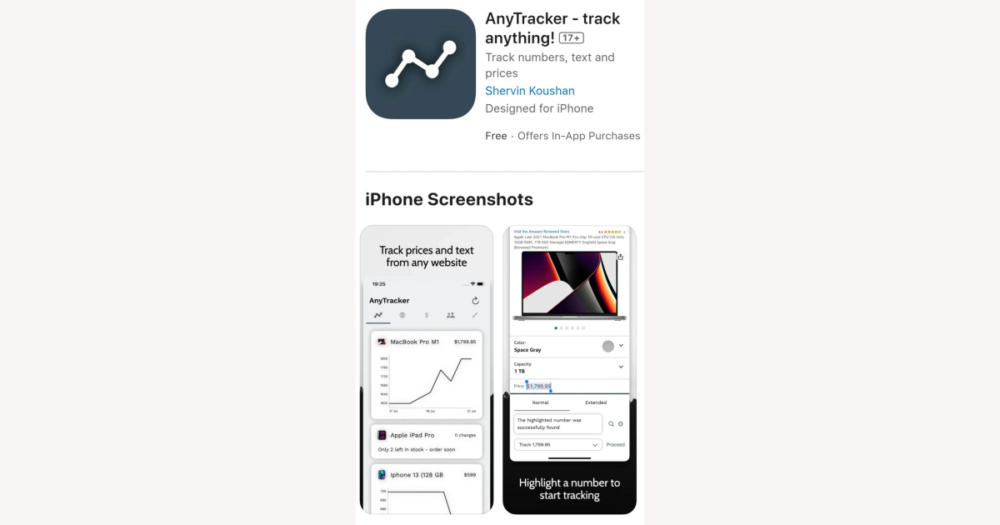
If you buy on DHgate, the most reliable view of any order is always found in DHgate’s own order details, payment records, and logistics tracking. Anytracker is a separate utility that can watch numbers or snippets of text on web pages—like prices, promotion timers, or external courier statuses—but it never replaces DHgate’s official information. This guide explains how Anytracker’s tracking works in practice and how to use it, if you choose to, without losing sight of DHgate as the source of truth.
How Anytracker fits alongside DHgate’s own order tracking
Anytracker is best understood as a general-purpose tracker for what web pages already show, not as a replacement for DHgate’s own order tools. It can watch numbers or short pieces of text on many sites over time—things like prices, stock counts, or status labels—through an app and browser extensions that revisit those values and record changes.
On DHgate, that means Anytracker can sit alongside the platform as an extra layer of monitoring. For example, you might point it at a product price you are watching, a countdown on a promotion page, or a line of text on an external courier site linked from your DHgate order, so you can see at a glance when those values move.
What it cannot do is connect into DHgate’s internal systems: it does not confirm payments, change orders, open disputes, or update shipment status inside DHgate. It only observes whatever the page currently displays. I would treat DHgate’s own order details, shipping timeline, and dispute centre as the single source of truth for any DHgate purchase, and only use Anytracker when it clearly adds value as an optional overlay—such as tracking price changes or external tracking pages—without blurring which information is official.
How Anytracker’s tracking mechanics work in practice
Once you treat Anytracker as an observer rather than a control panel, its mechanics are straightforward. You create a tracked item, open a web page, and tell Anytracker which specific number or piece of text you care about—such as a price, a stock count, or a short status phrase. The tool then reads that value again over time, either when you refresh or according to its own checks, and records when it changes.
Behind the scenes, Anytracker keeps a history of the values it has seen and highlights when something moves, so you can spot trends or one-off changes without manually rechecking the page. It does not edit the page or interact with DHgate’s systems; it only logs what was displayed when it last looked.
For a DHgate buyer, that might mean tracking a product’s price over several days before you commit, watching a coupon or promotion page to see if a discount improves, or monitoring a number on an external courier tracking site that DHgate links you to after shipment. Those are all surface values that can be safely watched from the outside. Exact refresh intervals, limits on how many items you can track, and other technical details can vary by version, so it’s best to treat this as a general description and check Anytracker’s own current documentation if you need specifics.
Platforms and browsers where Anytracker can be used
What stays official on DHgate and what Anytracker can add
For DHgate purchases, the official record always lives on DHgate itself: the order overview, payment and refund status, shipping progress shown in the order details, messages exchanged with the seller, and any dispute or buyer protection tools. Those screens are what DHgate uses to decide whether an item has shipped, whether a refund was issued, and whether you’re covered—no external app can replace that.
Anytracker sits outside these flows. It reads what’s displayed on a web or courier page and keeps a change history for you, but it does not integrate with DHgate’s payment system, shipment triggers, or dispute center. It’s best treated as a convenience layer on top of what you already see, not as a decision-making tool about the order itself.
Safe add-on uses include watching a product’s price over time, tracking a stock or quantity counter, or monitoring an external courier site where you’ve pasted the tracking number provided by DHgate. In all of these cases, Anytracker is just helping you notice changes more easily in values that sit around your DHgate activity.
Personally, I would never treat Anytracker as my primary indicator of whether an order has shipped or a refund has gone through. For any critical decision—opening a dispute, confirming delivery, or relying on buyer protection—I would go back to the DHgate order page and check the status there. Keeping Anytracker in a secondary, convenience role avoids confusion and makes it clear that DHgate’s status is the one that matters when your protections are on the line.
A simple way to track a DHgate-related value in Anytracker
- Install Anytracker on a supported device, such as the Mac app with its Safari, Chrome, or Firefox extension, so it can read values from pages you visit.
- Open DHgate or a related logistics or courier site in that browser and navigate to the exact value you care about—for example a product price, a promotion end date, or a courier tracking result linked from your DHgate order.
- Create a new tracked item in Anytracker and choose the specific number or short piece of text on the page that matters to you, treating it as a value to watch rather than a control for the order.
- Save the tracked item so Anytracker can revisit that page layout and highlight when the selected value appears to change over time.
- When Anytracker shows a change, go back to the corresponding DHgate order page or courier site directly and confirm the status there before paying, confirming receipt, opening a dispute, or closing an order.
- Keep in mind that this setup is only a convenience overlay: Anytracker helps you notice changes, but it does not modify DHgate orders, payments, shipping, or buyer protection, and it never replaces checking DHgate’s official status screens for binding decisions.
Limits and risks of using Anytracker with DHgate orders
Comparing Anytracker’s flexibility with DHgate’s built-in tools
| Aspect | Anytracker | DHgate built-in tools |
|---|---|---|
| Flexibility | Tracks almost any visible number or short text on supported web pages, across many sites. | Focused on DHgate orders, payments, shipping, and messages only; cannot watch external pages or arbitrary values. |
| Integration with DHgate | Sits outside DHgate; reads what DHgate pages or linked courier sites display but does not update orders or interact with DHgate’s systems. | Fully integrated with DHgate transactions, directly tied to seller actions, payment records, logistics updates, and dispute tools. |
| Scope of tracking | Useful for following multiple prices, stock counts, promo pages, or external courier status messages in one place. | Limited to information that belongs to a DHgate order: order details, shipping progress, refunds, and communication with sellers. |
| Reliability for DHgate decisions | Convenient for spotting trends, but readings depend on page layout and refresh behavior and are not an official record. | Authoritative for DHgate: what appears in order details, payment history, and dispute centers is what DHgate uses for buyer protection. |
| Complexity and setup | Requires installing the app or extensions and deciding which values to track, which adds another tool to manage. | Already built into your DHgate account; no extra setup beyond normal site or app use, with straightforward screens for each order. |
| Best use case | Most helpful when you have a clear extra need, such as monitoring several product prices or courier pages, while still checking DHgate before any money or protection decision. | Sufficient and simpler for many buyers who mainly need clear, official updates on orders and shipping; relying on DHgate alone avoids confusion from extra tools. |
Common questions about using Anytracker with DHgate
Can Anytracker track multiple DHgate-related values at the same time?
Anytracker is designed to watch many values and items in parallel—for example different prices, promotion counters, or courier status lines. Public descriptions do not state an exact upper limit on how many items you can track, so if you plan to monitor a large number of values, it’s safer to check Anytracker’s official documentation or support for current constraints and treat DHgate’s own order pages as your primary reference for each purchase.
How often does Anytracker update the values it tracks?
Available descriptions suggest that Anytracker can refresh tracked pages periodically and when you trigger a check, with some sources mentioning background checks as frequent as about every five minutes. That does not guarantee real-time or perfectly consistent updates, and layouts can change between checks. For anything time-sensitive—such as shipment progress, payment confirmation, or refund status—you should always re-open the relevant order or tracking pages on DHgate itself and base decisions on what DHgate shows rather than on Anytracker’s last snapshot.
Does using Anytracker change my DHgate buyer protections?
No. DHgate’s buyer protections depend entirely on DHgate’s own records, including order details, timestamps, payment and refund status, and dispute history. Adding Anytracker on top does not extend, reduce, or replace those rights. If there is ever a difference between what Anytracker displays and what DHgate shows, DHgate’s order and dispute pages are what count for protection decisions.
What about advanced features like detailed mobile behavior or integrations with other tools?
Public sources do not clearly document advanced capabilities such as dedicated mobile-app behavior, deep integrations with other services, or API-level features. If you need specifics—especially about how Anytracker behaves on your mobile devices or how it connects to other tools—consult Anytracker’s official materials or support. For DHgate purchases, continue to treat DHgate’s own site or app as the authoritative place to view and manage orders, payments, shipping, and disputes.