
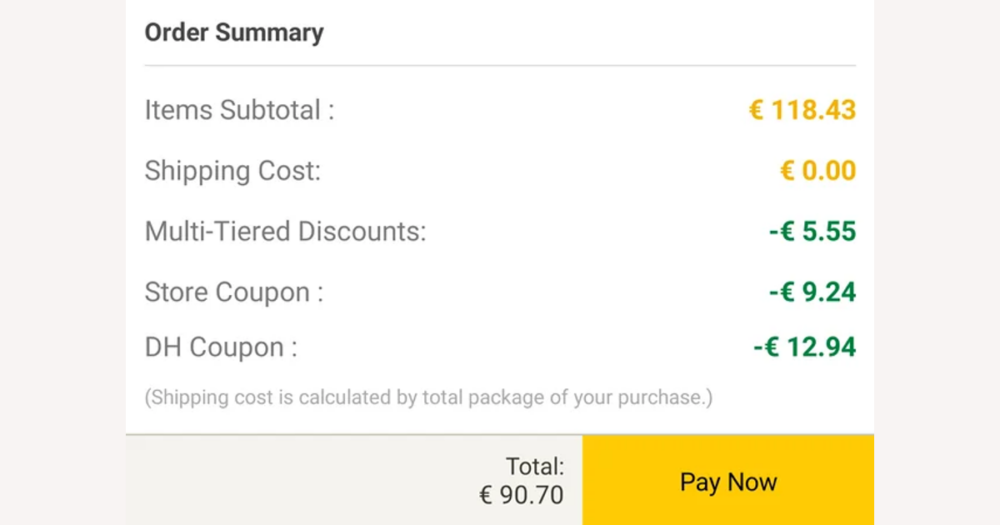
If you’re shopping on DHgate, you don’t need a separate budget app to find real savings. The discounts that affect your profit are the ones you can see and apply on DHgate’s listing, store and checkout screens. This guide focuses on those DHgate-native promotions and the full stack of related costs, so you can calculate a clear landed cost per unit and decide whether a deal is genuinely profitable instead of chasing every external coupon alert.
You don’t need a separate budget app to access DHgate discounts
On DHgate, every discount that actually changes what you pay is controlled inside DHgate itself, not by an external budget shopping app. Platform promotions and seller coupons can appear on product and store pages, in campaign banners, and again at checkout in the order summary or dedicated coupon and promotion fields. These DHgate screens are the authoritative places to confirm what is really being deducted from your order. External coupon or “deal” apps can remind you to look for sales, but they cannot change DHgate prices, make a seller honour a promotion, or guarantee that a code will appear at DHgate checkout. For profit decisions, I treat anything an app claims as marketing until I see the same saving reflected in DHgate’s order total: the base item price, any platform or seller discounts, and the final payable amount on DHgate are what matter. Once you’re focused on those verified numbers, the next step is to understand every cost component that feeds into that landed total so you can judge whether a DHgate deal is genuinely profitable, not just well advertised.
Know every component of your DHgate landed cost
Once you’re looking at DHgate’s own prices and promotions, the real budgeting work is to account for every component of landed cost on an order. Start with the base item price, then subtract any platform-level promotions, seller coupons or bulk-order discounts that DHgate shows as applied to your cart. Add back shipping charges for your chosen method, and include any optional shipping insurance you accept at checkout. Then consider payment-related costs: DHgate may show you a converted total using its currency conversion tool, but your bank or card provider can still add foreign transaction or conversion fees, which effectively raise the price you pay. Finally, factor in potential import or customs charges, which DHgate explains are usually the buyer’s responsibility and may be collected by the carrier on delivery; exact amounts depend on your country’s rules, so they’re a point to check with local customs or official guidance rather than guessing from an app. Profit depends on the combined total of all these elements, not just a headline coupon, and small changes in shipping option, insurance choice or payment method can move the overall order cost even when the item price and discount look identical. A practical way to judge margins is to calculate per-unit landed cost: take the full DHgate-visible order total plus any expected customs or payment fees, divide by the number of units, and compare that figure with your planned resale price or use value. With that per-unit number in hand, you can then look more closely at DHgate’s specific discount types to see which pieces of the cost stack you can realistically reduce and which will stay relatively fixed.
Understand DHgate discount types and how they stack
On DHgate, discounts generally fall into a few broad categories that each affect landed cost in a different way. Platform-wide campaigns—such as site events or limited-time deals—usually run within a fixed time window and apply to selected products, categories or regions. They often require you to meet a minimum spend or use the promotion during the stated event period, and the actual deduction is only confirmed once you see it reflected in the cart or checkout summary.
Seller or store-specific coupons are tied to a single seller’s store. They may appear on the product page, store page or in a coupon centre, and they typically come with minimum order values, expiry dates and per-customer usage limits. Even if a coupon is advertised, it only reduces your cost when DHgate shows it as applied to your order total for that seller.
Bulk discounts can appear as per-item price breaks or cart-level savings when you buy above certain quantity thresholds. These discounts change your unit price and may apply differently for single-unit versus multi-unit orders, so landed cost depends not just on the presence of a discount but on how many items you buy and how DHgate recalculates the total in the cart.
Shipping or logistics promotions work on the shipping component rather than the base item price. Examples include free shipping above a threshold, discounted methods for specific routes, or campaign rates for certain carriers. These offers change what you pay to move the goods, which can be decisive for profit on heavy or low-margin items, but they do not alter the underlying item price DHgate shows.
In practice, some of these promotions may stack—such as a platform event plus a seller coupon—while others exclude each other or apply only to part of the order. Marketing banners and coupon descriptions give a rough idea, but they are not the final authority on combinations. The binding figure is the amount DHgate shows in the checkout summary after all selected promotions, coupons and shipping options are applied.
When profit matters, I would rather rely on a simple, clearly understood discount combination than chase a complicated stack that makes fees, limits or expiry conditions hard to read. If the order total is difficult to interpret, I would usually skip the extra promotion instead of guessing how it affects my margin. The most practical way to handle DHgate’s discount types is to apply them directly while you walk through the listing, cart and checkout screens in sequence, which is where the next step-by-step routine comes in.
Step-by-step: evaluating a DHgate deal from listing to payment
- Start on the DHgate product listing and review the base item price, any options or variants, and any visible promotions or coupons shown on the page or store banner.
- Check the seller’s information and policies, including ratings, feedback, stated shipping times, and return or refund terms, and filter out offers where the risk looks too high for the price.
- Add the item to your cart and test which DHgate coupons, platform campaigns and bulk quantity discounts actually apply, watching how the cart total changes as you add or remove each promotion.
- Choose your shipping method, insurance options and any extras, paying attention to how each choice alters the order total and the expected delivery conditions.
- Review the order summary carefully for currency, any payment or conversion fees shown, and the overall total. Use that figure and the item count to calculate a per-unit landed cost for the order.
- Compare the per-unit landed cost with your planned resale price or personal value for the goods, and judge whether the margin or savings meets your minimum acceptable target.
- Proceed to payment only when the DHgate order summary matches your expectations and the profit margin looks acceptable, regardless of which external notification, reminder or budgeting app first drew your attention to the deal. External tools can be helpful prompts, but they do not replace this DHgate-centred evaluation routine.
Where external budget apps fit—and where they don’t
External budget or coupon apps sit entirely outside DHgate’s transaction system. At best, they can help you track general spending, set reminders to check DHgate around sales periods, or store notes on what you consider a good target price for a product. Used this way, they are simply organisational tools that prompt you to look at DHgate, not instruments that participate in the order itself.
Those tools cannot change DHgate prices, make a seller honour a promotion, or force a coupon to apply at checkout. Seller terms, shipping commitments, refund rules and the actual discount you receive are determined by DHgate and its sellers, and they only become real when you see them reflected in DHgate’s cart and order summary. If a third‑party app suggests paying through a different page, offers an alternative checkout path, or encourages off‑platform payment methods, it effectively moves the transaction away from DHgate’s protections and should be treated very cautiously or avoided altogether.
I treat external apps as passive trackers or reminders: they can tell me when to look, but DHgate’s own order summary, seller information and payment flow remain my final authority on costs, discounts and protections. Whether a deal is trustworthy depends on those DHgate numbers and terms plus the seller’s reliability, not on how optimistic an external coupon app looks, which is why the next step is to factor seller reputation and platform protections into your definition of a genuinely “good” deal.
- Coupons or promotions surfaced by third‑party apps may be expired, limited to certain regions, or restricted to specific products, so they can disappear or change value once you reach DHgate checkout.
- Currency displayed in an app can differ from DHgate’s billing currency, and bank or card conversion fees may apply, turning apparent savings into much smaller real discounts when you pay.
- Links in external apps or coupon sites can lead to lookalike pages or non‑DHgate payment flows; completing an order there weakens or removes DHgate’s dispute and refund protections and should be avoided.
- Follow a simple rule: only discounts and totals that you see applied in DHgate’s official cart and order summary are binding for your purchase and for any profit calculations you make.
Factor seller reputation and protections into your budget
Trusting a discounted offer on DHgate starts with the seller’s reputation. Look at overall ratings, how many transactions and feedback entries the store has, how long it has been active, and what recent comments say about shipping speed, packaging quality and how closely the goods match their descriptions. A long‑standing store with consistent, detailed positive feedback is a very different risk profile from a new seller with few reviews and mixed comments, even if the headline coupon looks attractive.
Before committing to a bulk order or relying on a very low price, use DHgate’s on‑platform messaging to clarify practical details: expected shipping times, how items will be packaged, whether there are minimum quantities or special terms for large orders, and how the seller handles issues like defects or missing units. Clear, responsive answers make it easier to judge whether an aggressive discount is simply a genuine promotion or a sign that corners might be cut on service or quality.
DHgate’s buyer protection, dispute and refund mechanisms are designed around orders that are placed and paid through DHgate, with communication kept inside the platform. If you accept alternative payment requests or move the conversation off DHgate, those protections may no longer apply, which can turn a small apparent saving into a large loss if something goes wrong.
Personally, I would rather pay a bit more to a seller with solid ratings, transparent policies and good recent feedback than chase the lowest possible coupon from an unproven store. Protecting profit means avoiding avoidable disputes, delays and quality problems, not just minimising the item price. When you combine these trust checks with the cost and discount information you’ve already gathered, you get a much stronger definition of what really counts as a good DHgate deal.
Checklist: numbers to confirm before calling any DHgate deal “good”
- Write down the base item price on DHgate, including any chosen options or variants, as shown on the listing and in your cart.
- Note each DHgate promotion or seller coupon that actually applies at checkout and how much it reduces the order total, not just the headline percentage.
- Confirm the shipping cost and method, including estimated delivery time and whether you’ve added insurance or other paid extras.
- Estimate payment or currency conversion fees from your bank or payment provider and add them to your assumed total cost.
- Add a separate line for any expected customs or import charges for your destination, based on local rules or guidance.
- Calculate per-unit landed cost by taking the DHgate order total plus expected fees and charges, then dividing by the number of units in the order.
- Compare that per-unit cost with your target resale price or personal value and check that it meets your minimum acceptable profit margin or savings threshold.
- Track these numbers in a simple spreadsheet or note app so you can compare DHgate deals consistently over time without relying on third-party discount apps to decide for you.
- If questions remain about missing coupons or mismatched charges after using this checklist, refer to DHgate’s help centre or the FAQ section for guidance on specific edge cases.
FAQ: DHgate budgeting, coupons and external tools
Can I use browser extensions or external price trackers with DHgate?
You can use passive tools that track prices or remind you to check DHgate, as long as they do not interfere with DHgate’s checkout or move payment off the platform. Always open DHgate directly, place the order through DHgate’s official pages, and pay only through DHgate’s own payment flow. If an extension tries to inject its own checkout, change the payment route, or open a non‑DHgate payment page, disable it for DHgate and complete the order using DHgate’s native interface instead.
Why does a coupon or promotion I saw not appear in DHgate checkout?
DHgate coupons and promotions usually have strict conditions. Common reasons they fail to appear include: the promotion has expired; the minimum spend or quantity threshold is not met; the offer is limited to certain regions or shipping destinations; the coupon applies only to specific products or categories; or you’ve already used it up under a per‑account or per‑order limit. Treat any third‑party reminder or screenshot as marketing until you see the discount applied in DHgate’s cart or order summary—only those DHgate figures affect your real cost and profit.
What should I do if the final charged amount is higher than the advertised or expected DHgate price?
First, capture evidence: take screenshots of the listing, any promotions shown, your cart, and the checkout summary before payment. Then compare your payment receipt with the DHgate order details to see whether currency, shipping method, insurance, or quantities changed between screens. If the discrepancy comes from a seller‑side issue, message the seller through DHgate to ask for clarification or correction. If that doesn’t resolve it, or if you suspect an error or misrepresentation, open a ticket with DHgate support or use the dispute process, attaching your screenshots and explaining exactly how the charged amount differs from the promotion or price you saw.
In a dispute, which information is the final authority on what I bought and paid?
DHgate’s own records—the order details, checkout summary, payment confirmation and on‑platform messages—are the final authority for what was ordered, what was promised, and what you paid. External apps, emails or screenshots from coupon sites can support your explanation but do not replace DHgate’s transaction data. Before confirming payment, rely on DHgate’s cart and order summary, not on an app’s estimate, and if you raise a dispute, base your case on the prices, discounts and terms shown inside DHgate.