
WordPress dropshipping means running a WooCommerce store that lists products you don’t stock. When a customer orders, you buy the item from a third‑party supplier and that supplier ships directly to the customer. WordPress handles your storefront, WooCommerce manages the cart and orders, and plugins or manual workflows connect you to suppliers who may be overseas.
This model can cut overhead for a US merchant because you don’t pay for inventory upfront or maintain a warehouse. Industry guides like WP Engine’s WordPress dropshipping overview point out that it also adds operational risk: you depend on outside suppliers for product quality, stock accuracy, and shipping performance. The decision you’re really making is not “WordPress vs something else” but “which suppliers and sourcing routes can I trust to plug into my WordPress stack?”
How WordPress Dropshipping Works in the Real Supply Chain
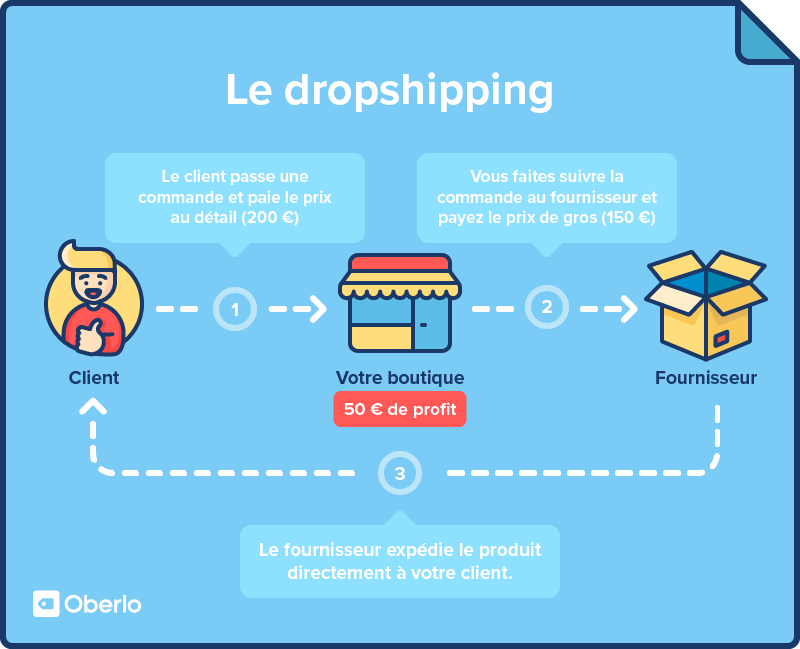
In WordPress dropshipping, you’re running an online store without holding physical inventory. As summarized by tools like DSers’ WordPress plugin description, the basic flow looks like this:
- A customer places an order on your WordPress site (usually powered by WooCommerce).
- You purchase the item from a third‑party supplier only after that order exists.
- The supplier ships the product directly from its warehouse to the customer.
From a supply‑chain perspective, your store becomes the front‑end retailer while the supplier is effectively your outsourced warehouse and fulfillment center.
On WordPress, WooCommerce is the commerce engine: it tracks products, prices, and orders. Around it, there’s a mature plugin ecosystem that connects stores to outside suppliers and automates much of this flow. Research from Cloudways on WordPress dropshipping plugins shows common capabilities:
- Importing product data from a supplier into WooCommerce (titles, descriptions, images, variants).
- Mapping your retail prices and margins onto that supplier catalog.
- Routing each paid order to the right supplier, sometimes via API, sometimes via semi‑automatic workflows.
Behind the scenes, cross‑border suppliers are often concentrated in manufacturing hubs (for consumer goods, that can mean China and other Asian countries). Their constraints become your constraints: if they batch‑ship only twice a week or have long handling times, your customers feel it.
For a US store, that means you need to think about WordPress as part of a larger system:
- WordPress/WooCommerce: brand, marketing, customer service.
- Dropshipping plugin or manual workflow: data sync and order routing.
- Supplier: product quality, packing, and international shipment.
Choosing and Vetting Dropshipping Suppliers for a WordPress Store
Most tutorials focus on themes and plugins. Your real risk sits in supplier choice. Expert sourcing guides like Uniqbe’s dropshipping supplier checklist recommend scoring suppliers on a few concrete dimensions: product quality, shipping speed, pricing, support responsiveness, and verification signals.
A practical way to apply that to a WordPress store is to build a simple evaluation sheet and rate each supplier from 1-10 in key areas. That keeps your decisions grounded instead of going by vibes or one Reddit comment.
What to actually check
Here’s how those criteria translate into specific checks for WordPress dropshipping:
- Product quality: Order samples of your top products before listing them. Compare the actual item to the supplier’s photos and specs. If you plan to import products via a plugin like Importify or Syncee, choose only suppliers whose catalog you’ve sampled.
- Shipping speed and reliability: Rather than chasing specific day counts, look for patterns. Does the supplier provide realistic lead‑time ranges to your region? Do sample orders arrive roughly within those windows and in good condition? If you’re using an integrated network plugin (Syncee, Importify, or similar), check if the supplier offers different warehouses or shipping methods that you can reflect in your storefront messaging.
- Pricing and margins: Dropshipping margins are often thin. Compare the supplier’s wholesale prices against what you believe is a defensible retail price for US shoppers, including your marketing and support costs. If you can’t reach a sustainable margin after shipping and fees, skip that supplier even if the integration is convenient.
- Support responsiveness: Test communication before committing. Send detailed questions about one product’s materials, variants, and packaging. Track how long it takes to get a clear, specific answer. A supplier that replies in hours with useful detail scores higher than one that sends canned replies.
- Verification signals: Look for business details such as years in operation, documented address, and a consistent product range that matches their claimed specialization. On plugin‑based networks like Syncee, you may see curated suppliers; still, treat each one individually and verify contact information and product documentation.
Red flags in a WordPress context
Because your store is decoupled from inventory, some supplier behaviors are especially risky:
- Unwillingness to allow samples of the products you want to feature.
- No clear contact channel beyond anonymous chat handles.
- Catalog mismatch: product titles and descriptions that don’t line up with photos or that copy brand names in ways that look inconsistent or unofficial.
- Refusal to acknowledge defects: if sample items arrive damaged or mis‑described and the supplier doesn’t engage constructively, assume the same stance will apply when it’s your customer on the receiving end.
If you source through more open marketplaces or off‑platform wholesalers, these checks matter even more. You don’t have a platform guarantee to lean on; your due diligence is the main protection.
Pricing, MOQs, and Channel Choices for Cross‑Border WordPress Dropshipping
On the money side, WordPress dropshipping is appealing because you usually don’t face large minimum order quantities (MOQs) to start listing products. But MOQs, pricing tiers, and logistics details vary a lot by channel.
How different sourcing routes behave
You can connect a WordPress/WooCommerce store to cross‑border suppliers in three broad ways:
- Integrated dropshipping apps and networks (for example, Importify or Syncee linking WooCommerce to external suppliers).
- Direct relationships with wholesalers or manufacturers (you negotiate terms and then integrate via CSV imports or custom workflows).
- General marketplaces (multi‑seller platforms offering wholesale or dropship‑friendly listings).
The table below compares these channels on factors that matter to a WordPress store. These are editorial generalizations, not hard rules; individual suppliers can differ.
| Sourcing channel | MOQ, WooCommerce fit, strengths, and limitations |
|---|---|
| Integrated dropshipping apps or networks (Importify, Syncee, and similar) | Often low or no MOQ per SKU, with pre-curated catalogs available through plugins. Product import and order routing can be automated, so setup and scaling are faster. Trade-offs include less supplier-negotiation control, potentially thinner margins, and changing network rules. |
| Direct wholesalers or manufacturers | Terms range from single-unit dropship agreements to bulk case packs. You manage catalog imports and custom order workflows, creating more overhead, but growing volume may unlock better pricing, packaging, and variant options. Supplier relationships and logistics become harder to manage as the network grows. |
| General marketplaces | MOQ and dropship terms depend on the listing. Generic tools may automate some imports, but orders often need manual handling. The broad catalog helps test ideas, while quality, compliance, and reliability remain seller-specific and require listing-level verification. |
Where DHgate and similar marketplaces actually fit
A marketplace like DHgate sits in the third category: it’s a broad catalog of global sellers, some of whom advertise dropshipping or cross‑border wholesale supply. For a WordPress merchant, that can be useful in one specific scenario: you want to test a small range of niche products from multiple overseas sellers before deciding whether to scale via a more integrated route.
If you explore DHgate or comparable marketplaces for this, treat them as sourcing directories rather than turnkey dropshipping systems. Check each seller and listing individually, ask about their willingness to ship single units directly to your customers, verify product details, and consider running trial orders. For deeper guidance on vetting marketplace sellers, you can use retailer‑focused resources such as this overview of finding wholesale suppliers on DHgate and then adapt those checks to your dropshipping needs.
Making the channel choice for your WordPress store
For a small US WooCommerce store, a practical path often looks like this:
- Start with a plugin‑integrated supplier network for your first catalog; it reduces technical overhead and lets you focus on marketing and customer service.
- As certain products prove themselves, negotiate more direct relationships with specific wholesalers or manufacturers to improve margins and control.
- Use marketplaces as a controlled experiment space for new products or styles, always backed by samples and careful supplier vetting.
WordPress dropshipping is less about finding the one perfect supplier and more about building a small, reliable roster of partners whose behavior you understand. If you treat your sourcing choices with the same seriousness you bring to your brand and customer support, WordPress plus WooCommerce can be a workable backbone for cross‑border dropshipping rather than just a quick experiment.