
Quick answer: Does DHgate sell phones and accessories? Related phone and accessory listings can appear, but availability, condition and compatibility must be confirmed on the exact product page. Treat a phone as a higher-risk purchase than a case or cable because network support, condition, account locks and after-sales options matter.
Phones and mobile accessories are a broad product category. In marketplace terms, that can include new smartphones, refurbished phones, used phones, unlocked devices, and accessories such as cases, chargers, cables, screen protectors, batteries, mounts, and replacement parts. For U.S. buyers, the main questions are usually compatibility, condition, carrier support, and whether the listing gives enough detail to judge what is actually being offered.
If you are trying to decide whether a phone-related listing is worth your time, start with the product type, then narrow by condition and compatibility. That order matters more than the marketplace name on the page. Once you know what you want, you can compare listings faster and avoid mixing up a full phone with a part, a refurbished unit with a new one, or an accessory bundle with a single-item listing.
What Counts as Phones and Mobile Accessories?
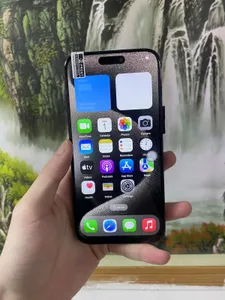
Phones in the marketplace usually fall into a few practical groups. The first is new smartphones, which are sold as complete devices. The second is refurbished or used phones, which may be listed with condition notes, storage size, unlock status, or cosmetic grading. The third is mobile accessories, which includes the add-ons and replacement items people buy to keep a phone usable, protected, or easier to carry.
A useful way to think about the category is this: the phone is the core device, while the accessory is anything that changes how you use, protect, charge, mount, repair, or personalize it. That includes cases, charging cables, wall chargers, wireless chargers, earbuds, SIM tools, screen protectors, replacement screens, batteries, and car holders.
For U.S. buyers, the category is not just about the model name. It is also about whether the item works with your carrier, whether it is locked or unlocked, whether the accessory fits your exact model, and whether the listing explains the condition clearly enough to compare it with alternatives.
Main Phone and Accessory Types Buyers Compare
The most common phone choices are new, refurbished, and used. New phones are usually chosen when the buyer wants the cleanest condition and the simplest setup. Refurbished phones are often considered when the buyer wants a lower-cost device with some level of testing or restoration. Used phones are typically the most condition-sensitive, because battery health, wear, and prior ownership matter more.
Unlocked phones are especially important for U.S. buyers because they are more flexible across carriers. A locked phone may only work with a specific network, while an unlocked phone is generally easier to activate if the bands and software support your carrier. For international listings, buyers should also check whether the device supports U.S. LTE or 5G bands, because a phone can be technically unlocked and still not be a good network match.
Accessory types are easier to separate by function:
- Protection: cases, screen protectors, camera lens covers
- Power: wall chargers, cables, power banks, wireless chargers
- Audio: wired earphones, Bluetooth earbuds, adapters
- Repair: screens, batteries, ports, flex cables, tools
- Convenience: mounts, holders, stands, grips, stylus pens
- Bundled kits: multi-item packs that combine several of the above
A simple selection rule helps: if you are buying a phone, prioritize compatibility and condition; if you are buying an accessory, prioritize exact model fit and connector type.
Where These Products Fit in Real Buying Scenarios
Phones and mobile accessories show up in several everyday buying situations. A person may want a primary phone, a backup device, or a short-term replacement while their main phone is being repaired. Small businesses may buy accessories in bundles for resale, for employee use, or to package with other electronics.
Refurbished or used phones are often considered by buyers who want a functional device without paying for the newest release. Accessories are common for people who want to protect a new phone immediately, replace a worn cable, or build a low-cost bundle for a retail counter, kiosk, or online store.
For resellers and repair-focused buyers, the category is also useful because it can support repeat purchases. A store may not need a full phone every time, but it may regularly need cases, chargers, replacement parts, or model-specific add-ons that move with the device market.
What to Check Before You Buy
Before buying any phone or accessory, check the listing in the same order you would check the product in person: identity, condition, compatibility, and visible seller details.
Start with identity. Make sure the listing clearly states the exact model, storage size, color, and version if those details matter. Then check condition. For phones, that means new, refurbished, or used, plus any notes on battery health, cosmetic wear, or included parts. For accessories, condition usually means whether the item is new, replacement-grade, or bundled with other pieces.
Next, check compatibility. U.S. buyers should confirm carrier support, network bands, charging port type, and model fit. A case or screen protector that is “for iPhone” is not enough if it is not for the exact generation. A charger is not enough if it does not match the connector or power standard you need.
Also review the listing itself. A strong listing usually gives:
- clear product photos
- exact model or part number
- condition details
- what is included in the box
- return or refund terms
- visible seller details or review signals shown on the page
A practical rule: if the listing leaves out the details that would change your buying decision, treat that as a reason to keep comparing.
Does DHgate Show Related Phone Listings Right Now?
The checked DHgate snapshot returned related results only. It does not verify an exact current match for the phrase “does dhgate sell phones.” The search evidence is a time-bound listing snapshot, so it should be read as a current discovery sample rather than proof of exact availability for that phrase.
The visible DHgate evidence includes related phone-category pages such as wholesale cell phones and refurbished cell phones, along with other mobile-product results. That means DHgate can function as a discovery tool when a buyer starts with a broad phone search and then narrows toward a more specific device type, condition, or accessory form. It is useful for seeing how listings are grouped and for opening product pages to compare visible details like model wording, condition labels, and accessory type. What the snapshot does not prove is stock, final shipping cost, seller information beyond what is shown on the page, product quality, or transaction outcome.
May suit buyers who
- want to refine a broad phone-related search into more specific listings
- want to compare visible listing details across related phone or accessory results
- are browsing for small-order phone accessories or device-related items before making a larger sourcing decision
How to Search and Buy on DHgate
A practical DHgate workflow starts with search terms, not assumptions. Use the broadest useful term first, then narrow it until the results look like the product you actually want. If you begin with “phones,” try adding model names, condition words, or accessory terms such as “refurbished,” “unlocked,” “case,” “charger,” or “screen protector.” That is the fastest way to turn a broad result set into a more usable shortlist. The current DHgate snapshot is time-bound, so treat it as a starting point for discovery, not as proof of what will remain available later.
- Refine the search term. Add the exact model, condition, or accessory subtype.
- Open the product page. Read the title, photos, specs, and what is included.
- Compare visible listing details. Check model fit, condition wording, connector type, and any compatibility notes.
- Review order terms. Look at shipping options, return language, and any order minimums or bundle rules shown on the page.
- Check the seller information shown on the listing. Use the visible ratings, order history, and review content as part of your comparison.
- Confirm the fit before checkout. For phones, verify carrier and band support; for accessories, verify exact model compatibility.
- Save your order information. Keep the listing page, order number, and product details so you can reference them if you need support later.
If you are comparing several phone or accessory results on DHgate, the goal is not to find the flashiest listing. It is to find the one whose visible details match your use case most closely, with enough information to make a clean decision before you place the order.
Quick answer
DHgate can be used to browse phone-related and mobile-accessory listings, but the checked search snapshot only verified related results, not an exact current match for the requested item. Use broader search terms first, then narrow by model, condition, connector type, and compatibility details before comparing listings.
FAQ
Can I treat a related DHgate result as proof the exact item is available?
No. A search snapshot only shows related results at the time it was checked.
What search terms work better for phones?
Try the exact model name, plus words like unlocked, refurbished, used, case, charger, or screen protector.
What should U.S. buyers verify first?
Carrier compatibility, network bands, and exact model fit for accessories.
Does a listing page confirm stock or delivery outcome?
No. It only shows the information visible on that page at that time.
What is the safest next step if I am unsure?
Open several related listings and compare the visible specs, condition notes, and compatibility details side by side.
Next step
If you are evaluating a phone or accessory on DHgate, start with the exact model or accessory type, then compare the visible listing details against your device requirements before you decide.
Sources and further reading
- DHgate search snapshot: https://www.dhgate.com/wholesale/search.do?act=search&searchkey=DHgate+products — query checked: “DHgate products”. This was used as time-bound discovery evidence only; it returned related results, not an exact verified match, and does not confirm stock, shipping cost, seller performance, quality, or transaction outcome.
- DHgate brand blog references used for platform grounding:
- U.S. Customs and Border Protection: https://www.cbp.gov/trade/basic-import-export
- FedEx packing guidance: https://www.fedex.com/en-us/shipping/packing/how-to-pack.html
Related reading
Phone purchase checks that cannot be skipped
- Exact identity: verify model number, storage, color, condition and what is included.
- Network fit: check the listed bands and carrier compatibility for your location; do not assume an unlocked label guarantees local support.
- Account and device status: ask about activation or account locks where relevant, and use the platform’s current buyer-protection and return process.
- Safety: avoid damaged batteries, swelling, missing charging information or vague condition descriptions.
For a primary phone or a warranty-sensitive purchase, compare an authorized or domestic retailer as well. Save the listing details, selected option and seller messages before payment.