
DHgate Shipping to USA: Check the Real Cost
DHgate shipping to USA can vary with package size, weight, delivery method and destination. Compare the selected variation and final cart total before deciding whether the offer is good value.
Why can DHgate shipping to the USA look higher than expected?
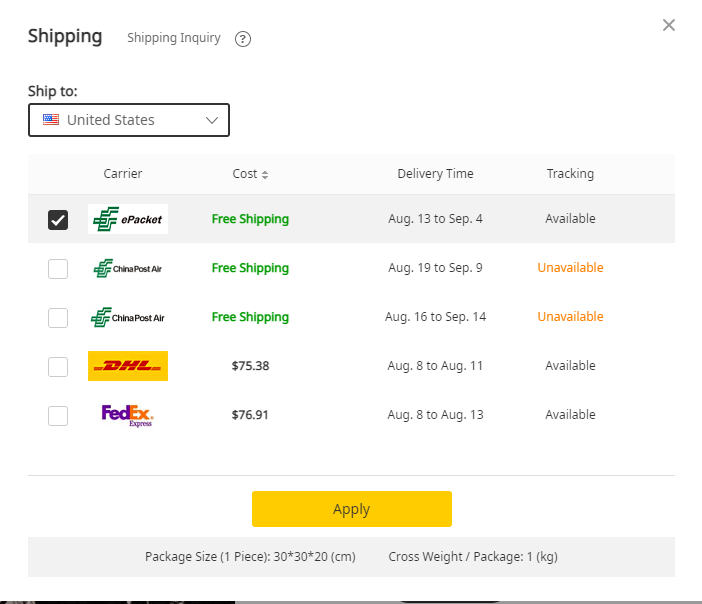
DHgate shipping to the USA can look higher because the final shipping charge is shaped by a few documented variables: shipment size, shipment weight, transport mode, and destination distance. DHgate’s own guidance also notes that air freight is more expensive than ocean freight, while express options are generally faster. For U.S. buyers, that means the quote you see can change a lot depending on how the seller ships the item and how far the package has to travel.
It is also important to separate shipping from other import-related costs and timing effects. Customs clearance, import documents, duties, taxes, and seasonal delays can affect the total experience or the delivery timeline. Those are not the same thing as the shipping charge itself, so the right move is to check the full order details before you decide.
What does DHgate say drives the shipping price?
DHgate’s documented shipping guidance points to a few core cost drivers:
- Package size and weight: smaller and lighter shipments are generally cheaper than larger and heavier ones.
- Transport mode: air freight costs more than ocean freight, but it moves faster.
- Destination distance: shipping time varies based on how far the destination is from China’s major ports and airports.
- Courier and service level: DHgate’s shipping calculator can show the courier used, and different couriers or service levels can come with different estimates.
DHgate also notes that shipping times vary by mode, and that delays can happen because of customs or port congestion. For documents, the brand guidance says shipments may require commercial invoices, and U.S.-side import steps can include an importer security filing. If you are buying for a small business, that is a reminder to treat shipping as part of the full order process, not just a line item.
Where should you check the exact courier and estimate before paying?
Before checkout, check the shipping details on the product page and the seller’s shop page. DHgate’s guidance says to go to the shipping section, open the seller’s name, then review the seller shop page and shipping details. That is where you can confirm whether the listing shows free shipping, a specific shipping method, or another shipping setup.
DHgate also provides a shipping calculator. According to the brand guidance, it can show the exact shipping cost and the courier used, which makes it the most direct place to verify the estimate for your own order. Because the final quote depends on the item and destination, do not rely on a general assumption about U.S. shipping. Check the current product, seller, and calculator results for the order you are considering.
How do you judge whether the quote makes sense?
A shipping quote makes sense only when you compare the full order details, not just the shipping line by itself. Start with these checks:
- Item size and weight: if the product is bulky or heavy, the quote may be higher.
- Shipping method: express options are usually faster, but DHgate’s guidance says they are also more expensive than slower methods.
- Courier shown in the estimate: the courier can affect both price and delivery expectations.
- Customs and import steps: duties, taxes, documents, and clearance timing may affect the total experience.
- Seasonal timing: DHgate notes that holidays and congestion can delay shipments.
The practical question is not whether shipping is “high” in the abstract. It is whether the shipping method, courier, and timing fit the order value and your deadline. If you need the item by a specific date, check the current estimate on the product page and seller page before you commit.
What is the simplest DHgate checkout check before you order?
Use this quick on-platform workflow before you pay:
- Open the product listing on DHgate.
- Go to the shipping section.
- Open the seller’s name and review the seller shop page.
- Check the seller’s shipping details.
- Use DHgate’s shipping calculator to confirm the estimate and courier.
- Review whether the method is express, standard, or economy.
- Check whether the order may need documents or could face customs-related delays.
- Decide only after you have the current shipping estimate for your own order.
If the shipping quote feels high, the safest operational response is to verify the exact method and courier on the current listing rather than assume the number is fixed. DHgate’s own tools are the right place to confirm the estimate before checkout.
Quick answer
DHgate shipping to the USA can look higher because the quote depends on package weight, size, transport mode, destination distance, and the courier or service level shown at checkout. Before paying, check the product page, seller shop page, and DHgate shipping calculator so you can review the current estimate for your own order.
FAQ
Why can the same item show different shipping quotes?
Because the estimate can change with the seller, courier, service level, and destination details.
Does faster shipping always cost more?
DHgate’s guidance says air freight is more expensive than ocean freight, and express options are generally faster.
Should I rely only on the product page shipping line?
No. Check the seller shop page and DHgate shipping calculator for the current estimate.
Can customs affect what I pay?
Customs duties, taxes, and import documents can affect the overall order experience, even though they are separate from the shipping charge.
What is the safest next step if the quote looks high?
Compare the current shipping method and courier on the listing, then decide based on the full order details.
Next step
Review the shipping section on the product page, open the seller shop page, and confirm the current estimate in DHgate’s shipping calculator before checkout.
Sources and further reading
- DHgate brand blog: https://www.dhgate.com/blog/?p=12586
- DHgate brand blog: https://www.dhgate.com/blog/?p=7972
- DHgate brand blog: https://www.dhgate.com/blog/?p=14705
- DHgate brand blog: https://www.dhgate.com/blog/?p=13012
- DHgate brand blog: https://www.dhgate.com/blog/?p=8748
- DHgate brand blog: https://www.dhgate.com/blog/?p=28511
- U.S. Customs and Border Protection, Basic Importing and Exporting: https://www.cbp.gov/trade/basic-import-export
- FedEx packing guidance: https://www.fedex.com/en-us/shipping/packing/how-to-pack.html
Note: The DHgate blog sources above were used as first-party brand grounding and are time-bound editorial references. They support general shipping factors, calculator use, and import-document context, but they do not provide a live quote for any specific order.
Related reading
- How does DHgate compare to other wholesale platforms for dropshipping?
- Snap and marketplace platforms
Before you buy: use this DHgate shipping to USA guide with the current listing and checkout details. Availability, price and delivery terms can change, so verify them before payment.