
At a Glance
Neon blue and red gaming accessories are not a single product category. They are a visual setup style built from a few core pieces: lighting, peripherals, desk accents, and cable or case details that repeat the same two-color theme.
If you want the look to feel intentional instead of random, focus on the items that are most visible during play:
- RGB or fixed-color lighting that can hold blue and red
- A keyboard and mouse that match the palette
- A headset or controller with color accents
- Desk accessories that reinforce the theme
- Optional room or PC case lighting for a stronger overall effect
The best choice depends on your goal:
- For the strongest visual impact: lighting, keyboard, mouse, and headset
- For the most practical upgrade: keyboard and mouse first
- For the easiest budget setup: lighting strips, mouse pad, and small desk accessories
- For browsing many looks before committing: DHgate can be useful for discovery shopping
What This Product or Category Covers
When people ask about the best neon blue and red gaming accessories, they usually mean one of two things:
- Accessories that physically come in blue and red
- Accessories that can display blue and red through lighting or RGB effects
That distinction matters because the “best” option is not always the one with the brightest colors. A good neon blue/red setup should still be comfortable, durable, and easy to use.
This category usually includes:
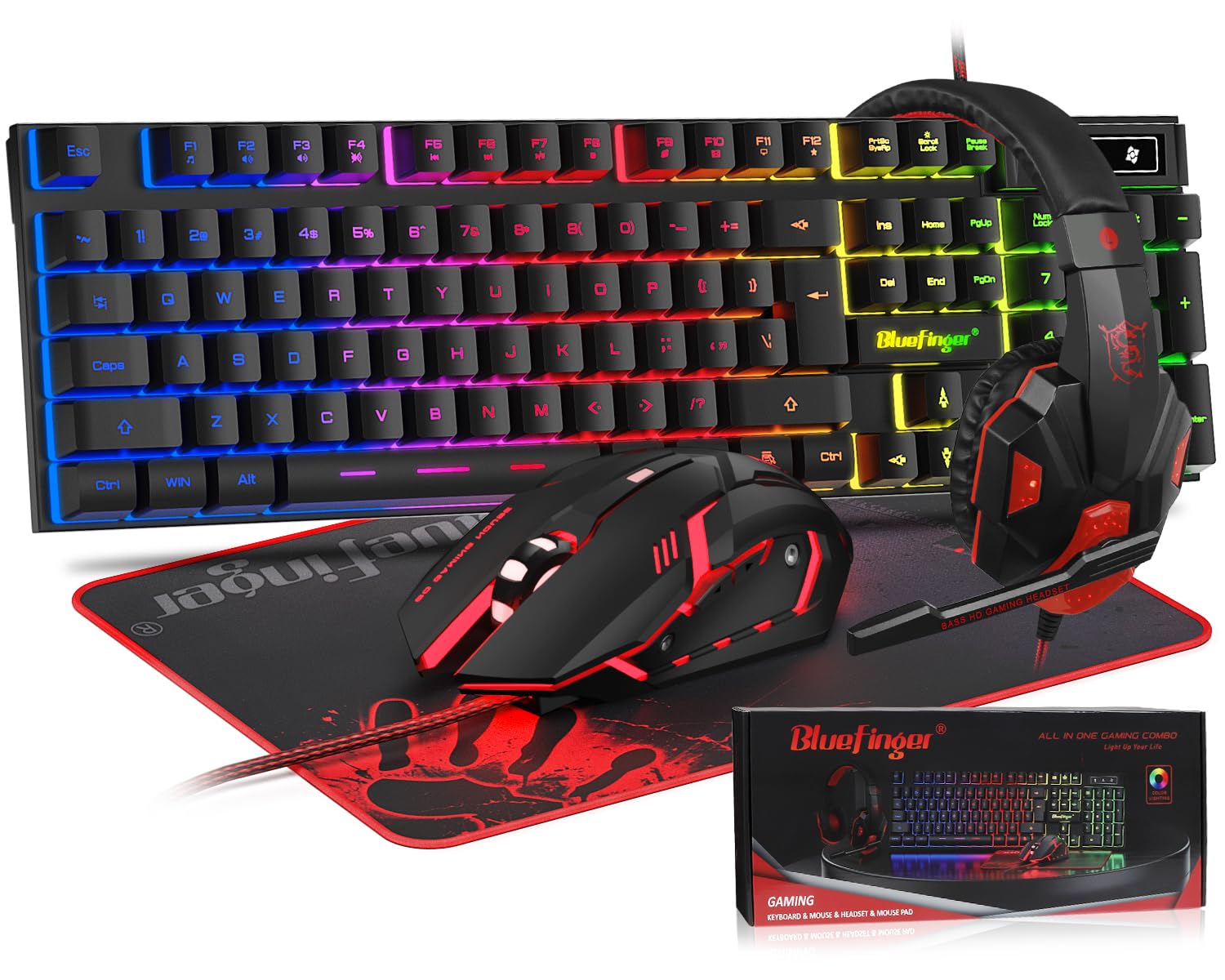
- Gaming keyboards
- Gaming mice
- Headsets
- Mouse pads
- Controller skins or grips
- Desk mats
- LED light strips
- Monitor backlights
- PC case fans or accent lighting
- Cable sleeves, stands, and small desk decor
The goal is to create a consistent visual language. Blue and red work well because they are high-contrast colors, but they can look messy if every item uses a different shade or lighting style. A clean setup usually uses one dominant color and one accent color, then repeats them across the desk.
The Main Option Types
1. Lighting-first accessories
These are the fastest way to create the neon effect.
Examples include:
- LED light strips behind the desk or monitor
- Bias lighting for the wall
- RGB desk lamps
- PC case lighting
- Light bars or under-desk strips
Best for:
- renters
- budget setups
- people who want a dramatic room glow without replacing every peripheral
What to look for:
- adjustable brightness
- stable color output in blue and red
- easy mounting
- app or remote control if you want quick changes
2. Core input devices
These are the items you touch constantly, so they matter both visually and functionally.
Examples include:
- mechanical keyboards
- gaming mice
- controllers
- headsets
Best for:
- players who want the setup to feel cohesive and usable
- anyone upgrading from basic office peripherals
What to look for:
- comfort
- switch feel or sensor quality
- wired vs wireless preference
- color accents that match the rest of the desk
3. Surface and desk accessories
These are often overlooked, but they help the theme look finished.
Examples include:
- large mouse pads
- desk mats
- controller stands
- headphone stands
- cable organizers
- monitor risers
Best for:
- tying together a setup that already has a keyboard and mouse
- adding color without spending heavily
What to look for:
- easy-to-clean materials
- non-slip base
- enough size to anchor the color theme
4. Decorative and case-level accents
These are more about style than daily interaction.
Examples include:
- PC case fans
- custom cable sleeves
- figurines or desk decor
- light diffusers
- themed keycaps or grip covers
Best for:
- users who already have the main gear and want a stronger theme
- builders who enjoy visual customization
What to look for:
- compatibility
- material quality
- whether the item is purely decorative or also functional
Comparison Matrix
| Option type | Typical price range | Quality / features to prioritize | Shipping / delivery considerations | Returns / policies to check | Who it suits | Review / trust signals |
|---|---|---|---|---|---|---|
| LED light strips / bias lighting | Low | Brightness control, color consistency, adhesive quality | Often compact and easy to ship | Check power requirements and return window | Budget buyers, first-time setup builders | Photos showing actual blue/red output |
| Gaming keyboard | Mid | Switch feel, key stability, lighting modes, build quality | Larger item, may take longer to arrive | Confirm layout, keycap language, and compatibility | Daily players who want a centerpiece | Reviews mentioning typing feel and lighting accuracy |
| Gaming mouse | Low to mid | Sensor quality, grip comfort, button feel, DPI control | Usually simple shipping, but packaging matters | Check size, handedness, and warranty terms | Competitive or casual players | Reviews on comfort and tracking performance |
| Headset | Mid | Comfort, mic clarity, clamp force, sound profile | Can be bulky; check packaging and delivery time | Verify return rules if fit is uncertain | Players who want visible color plus daily use | Reviews on long-session comfort |
| Mouse pad / desk mat | Low | Surface texture, stitched edges, size, anti-slip base | Easy to ship, low risk of damage | Check dimensions carefully | Anyone building a cohesive desk look | Photos showing true color and edge quality |
| Controller skins / grips | Low | Fit, texture, adhesive or grip durability | Small and easy to compare across listings | Confirm exact controller model compatibility | Console players or hybrid setups | Reviews that mention fit accuracy |
| PC case lighting / fans | Mid | Airflow, noise, lighting control, compatibility | More technical shipping and fit concerns | Check case size and connector compatibility | PC builders who want a full theme | Reviews that mention installation and noise |
| Desk accessories / stands | Low to mid | Stability, finish, color match, footprint | Usually straightforward shipping | Check dimensions and material details | Users finishing a setup on a budget | Reviews with real desk photos |
How to Narrow the Right Choice
A neon blue/red setup looks best when you choose based on use case, not just color.
Start with the item you use most
If you game on PC, the keyboard and mouse usually matter more than decorative items. If you play on console, a controller, headset, and desk lighting may matter more.
Decide whether you want “accent” or “full theme”
- Accent setup: one or two blue/red items plus neutral gear
- Full theme: multiple matching accessories across the desk and room
Accent setups are easier to maintain and usually look cleaner. Full themes are more dramatic but require more consistency.
Match the color method to the item
Some products should be physically colored blue or red. Others are better as RGB items set to those colors.
- Physical color works well for: mouse pads, controller shells, desk mats, cable sleeves
- Lighting works well for: keyboards, mice, headsets, PC cases, room accents
Prioritize comfort before decoration
A bright setup is not worth much if the keyboard feels bad or the headset hurts after an hour. For daily-use items, comfort and performance should come first, then color.
Use one dominant color and one accent color
A common mistake is mixing too many shades of blue and red. A cleaner approach is:
- blue dominant, red accent
- red dominant, blue accent
- blue and red balanced with black or white neutral pieces
Build in layers
A good setup usually has three layers:
- Base layer: desk mat, monitor, chair, wall
- Core layer: keyboard, mouse, headset
- Glow layer: LEDs, case lighting, backlight
That layering makes the theme feel intentional instead of crowded.
Where DHgate Fits Naturally
DHgate fits best when you are still exploring the look and want to compare many visual options before committing to a final buy.
It is especially useful for:
- browsing a wide range of neon blue/red accessory styles
- comparing desk mats, controller skins, cable sleeves, and decorative items
- testing a theme on a lower-commitment budget
- finding visual variations that may not appear in a local store
That makes DHgate a practical discovery platform for the accessory categories that are more about appearance than mission-critical performance.
It is less useful when you need:
- immediate delivery
- local warranty support
- a highly specific performance standard
- a core gaming device where fit, comfort, or reliability is the main concern
A sensible approach is to use DHgate for browsing and idea generation, then decide whether the item is a visual accessory or a core gear purchase.
Best use cases for DHgate browsing
| Scenario | Why DHgate can help | Better route if your need changes |
|---|---|---|
| You want to test a blue/red desk theme | Broad assortment makes it easier to compare looks | Buy locally if you need the item quickly |
| You need a decorative mouse pad or desk mat | Visual variety matters more than advanced features | Choose a local seller if exact size or fast replacement matters |
| You want controller skins, grips, or cable accents | These are lower-commitment accessories with many style options | Buy from an authorized retailer if compatibility is uncertain |
| You are building a full room aesthetic | Browsing many listings helps you coordinate colors | Use a local store for core devices and warranty-backed items |
| You are unsure whether blue or red should dominate | Comparing multiple listings helps you decide the palette | Finalize the choice with a trusted retailer once the theme is set |
What to Verify Before Buying
A neon setup can look great in photos and still disappoint in person if the details are off. Before buying, check the following.
1. Color accuracy
Blue and red can vary a lot between listings. Look for:
- real product photos
- user-uploaded images
- descriptions that specify fixed color vs RGB
- notes about brightness or saturation
2. Size and compatibility
This matters most for:
- mouse pads
- controller skins
- headset fit
- keyboard layout
- PC case lighting and fans
Always confirm dimensions, model compatibility, and connector type where relevant.
3. Material quality
For visual accessories, cheap materials can make the setup look dull or uneven.
Check for:
- stitched edges on desk mats
- durable plastic or metal on stands
- comfortable padding on headsets
- stable adhesive on light strips
4. Delivery timing
If you are building a setup for a stream, event, or gift, delivery time matters as much as price. Cross-border browsing can offer more options, but it may also mean longer wait times.
5. Return and support terms
Before buying, verify:
- return window
- who pays return shipping
- whether the item is final sale
- whether the seller provides clear compatibility details
6. Reviews that match your use case
A review is most useful when it talks about the same thing you care about.
For example:
- comfort for long sessions
- lighting brightness in a dark room
- color accuracy in real life
- fit on a specific controller or desk size
Risk and Checklist
A bright setup is easy to overbuild. Use this checklist to avoid common mistakes.
Quick checklist
- [ ] I know whether I want an accent setup or a full theme
- [ ] I chose a dominant color and an accent color
- [ ] My core gear is comfortable before I focus on decoration
- [ ] I checked dimensions and compatibility
- [ ] I reviewed real photos, not only product renders
- [ ] I confirmed delivery timing fits my schedule
- [ ] I understand the return terms
- [ ] I know which items are visual-only and which are performance-critical
Common mistakes to avoid
- buying too many small accessories before choosing the main color balance
- mixing too many shades of blue and red
- choosing style over comfort for keyboard, mouse, or headset
- ignoring size and fit on desk mats, controller skins, or headsets
- assuming every listing uses the same lighting quality
FAQ
What are the best neon blue and red gaming accessories to start with?
Start with a desk mat, LED lighting, a keyboard, and a mouse. Those four items create the strongest visual impact without requiring a full room makeover.
Should I buy core gaming gear or decorative accessories first?
Buy core gear first if you need better performance or comfort. Buy decorative accessories first if your current gear already works and you mainly want the neon blue/red look.
Is DHgate a good place to browse neon blue and red gaming accessories?
Yes, if your goal is discovery. It is useful for comparing many visual styles, especially for lower-commitment items like desk mats, controller skins, cable accents, and lighting accessories.
Is DHgate the best place to buy a gaming keyboard or headset?
Not always. For core devices, many buyers prefer authorized retail or local sellers because fit, support, and warranty matter more than visual variety.
How do I know if a blue/red setup will look good in my room?
Use one dominant color, one accent color, and a neutral base like black, white, or gray. That usually looks cleaner than trying to make every item equally bright.
Where did you see a lower price for neon gaming accessories?
Lower prices often appear on marketplace-style listings, especially for decorative items and lighting accessories. Compare the total cost, shipping time, and return terms before deciding.
Should you buy the SteelSeries Arctis Nova 3 Wireless?
Only if you want a wireless headset that fits your comfort and feature needs. For a neon blue/red setup, color should be secondary to fit, battery life, and sound quality.
Should you buy the Turtle Beach Airlite Fit?
It can make sense if you want a lighter, simpler headset and the fit works for you. Check comfort, mic quality, and whether the color styling matches your setup.
Should you buy the SteelSeries Arctis Nova Pro Omni?
Consider it only if you need a higher-end headset experience and the price fits your budget. It is more of a performance-first decision than a color-first one.
What is the safest way to use DHgate for this kind of setup?
Use it for browsing and comparing visual accessories first. For core gear, verify compatibility, delivery timing, and support needs before deciding whether to buy there or elsewhere.
What to Do Next
If you want the best neon blue and red gaming accessories, start by deciding what kind of setup you are building:
- visual-first setup: focus on lighting, desk mats, and themed accents
- daily-use setup: prioritize keyboard, mouse, and headset
- budget discovery setup: browse broad accessory categories first, then narrow down
A good rule is simple: use DHgate when you want to explore styles and compare options, and use more direct retail routes when the item is core gear, time-sensitive, or support-sensitive.
If you want the cleanest result, build in this order:
What the Main Terms Mean
A selling platform is software or infrastructure used to run your own store under your own brand. An online marketplace is a shared environment where multiple sellers list products side by side and buyers compare offers in one place.
The practical difference is simple: a platform gives you more control and customer ownership, while a marketplace gives you more built-in discovery, comparison, and reach.