
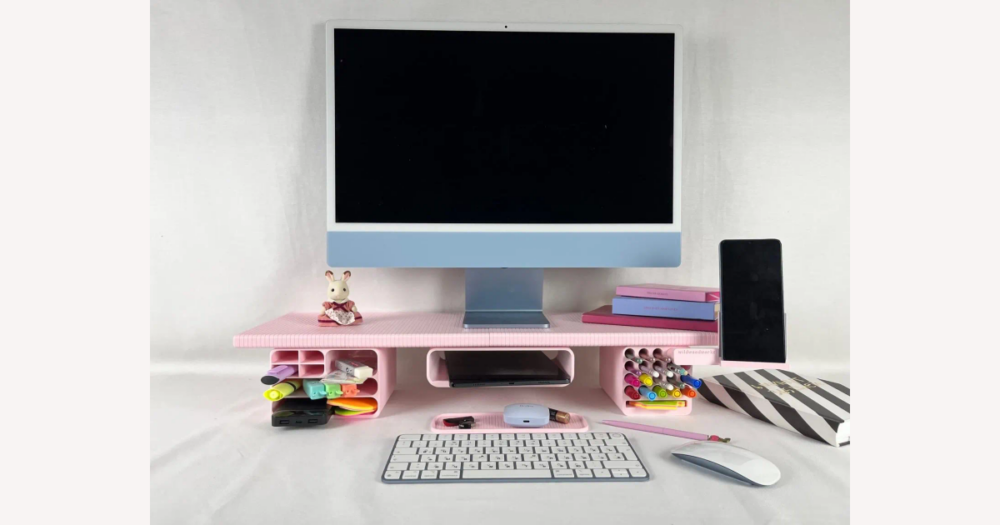
On DHgate, there isn’t a single “correct” price for a pink monitor stand, but you can still tell whether a listing looks like a smart deal. Basic pink stands with simple storage or adjustable length often cost about $18 to the mid‑$30s on major retailers, while more elaborate or branded organizers can reach the mid‑$50s or higher; use those ranges as an outside reference, not a DHgate promise. Then judge each DHgate listing by what you actually get for the price—materials, build quality, weight capacity, and extras like drawers or tiers—so you’re paying for a stand that’s sturdy and sized correctly, not just the color.
What counts as an affordable pink monitor stand?
Pink monitor stands on large retailers like Amazon, Walmart, and Staples often start around $18 and reach the mid‑$50s, with many basic but functional stands that offer simple storage or adjustable length clustering in roughly the $20–$35 range. Treat that as an external reference band when you browse DHgate: it’s not a guarantee of DHgate pricing, but a yardstick for judging whether a listing looks unusually cheap, broadly fair, or unexpectedly expensive for what it offers.
Materials and design play a big role in where a stand falls in that range. Wood or metal constructions are usually aimed at sturdiness and higher weight limits, which can justify paying more than a very light plastic platform. Multi‑tier designs, drawers, and built‑in organizers like pen or phone holders add real desk‑storage value and typically cost more than a simple single‑level riser, while highly styled acrylic or decorative designs are mostly about aesthetics and don’t have a clear typical price pattern.
When I judge affordability on DHgate, I care first about solid construction and correct sizing, then look for a good price inside that subset—I’d rather pay a bit more than risk a flimsy or undersized stand under my monitor. If your budget is very tight, choosing a cheaper option can still be reasonable, as long as you carefully verify the listed dimensions and weight capacity and treat ultra‑low prices with vague specs or missing capacity details as a warning sign rather than an automatic bargain.
Which specs and features matter for your setup?
- Check the stand’s stated monitor‑size range against the actual diagonal size of your screen or screens, and make sure the width of the platform can comfortably accommodate them.
- Confirm the listed weight capacity and compare it with your monitor’s weight. A rating around 80 lb is an example of a high limit, while any stand that doesn’t state a capacity at all deserves extra caution.
- Compare the stand’s length, width, and height with your desk surface so the base fits without overhanging and the screen is raised to a viewing level you find comfortable, without chasing health claims.
- Look at the under‑stand clearance measurements to see whether your keyboard, laptop, or storage boxes can slide underneath without crowding your workspace.
A basic single‑level pink riser usually has a smaller footprint, a cleaner look, and a lower price, which suits minimal setups or a single monitor where you mainly want a little extra height and a tidy line across the desk.
Multi‑tier, drawer‑equipped, or adjustable‑length organizers add space for notebooks, pens, and phones, and can span enough width for dual monitors, but they tend to be bulkier, visually busier, and often more expensive than a simple platform. Decide whether you will actually use the extra storage, smartphone slot, or dual‑monitor width every day; if not, the added bulk and cost may not be worth it.
For everyday comfort, focus on choosing a stand height that lifts your screen to a level that feels natural for you and leaves enough clearance underneath for the way you work, rather than expecting the stand itself to deliver specific health benefits.
How to search and quickly screen pink monitor stands on DHgate
- Search DHgate with a few variations of your main idea, such as “pink monitor stand,” “pink monitor riser,” and “pink desk organizer,” to surface both simple risers and organizer-style stands.
- Use any available filters to narrow results toward what you already know you want—set a rough price range, pick likely material types if offered, and exclude obviously irrelevant categories.
- Scan each thumbnail and main product photo to confirm the stand is clearly pink, paying attention to how it looks under different lighting and in lifestyle shots that show it on a desk.
- Open promising listings and jump straight to the specs or description to check length, width, height, stated weight capacity, supported device types (monitor, laptop, printer), and material details.
- Compare those specs with the setup you defined earlier—monitor size, single or dual-display, and desired storage—and close any listing that obviously cannot fit your desk or equipment.
- Confirm that the stand’s dimensions fit your monitor and desk: the platform width should comfortably hold your screen, and the overall footprint should sit on your desk without overhang.
- Check that weight capacity is clearly stated and exceeds your monitor’s weight; treat any stand with missing or vague capacity information as a red flag.
- Look for concrete material and construction notes—such as metal, solid or engineered wood, or thick acrylic—and be wary of listings that only use vague phrases like “high-quality plastic” without details.
- Make sure the listed extras, such as drawers, extra tiers, or smartphone slots, match how you actually work, and skip stands that charge more for organizers you know you will not use.
Use the external $20–$35 band for many basic pink stands at other retailers as a reference point, not a DHgate promise. It is a rough yardstick for what a simple but functional stand with modest storage or adjustability often costs elsewhere.
When you compare DHgate listings to that band, question stands with very few features that are priced far above it, and scrutinize listings that are dramatically cheaper than similar-featured options. In both cases, check whether the specs, materials, and overall description genuinely justify the price before you spend more time on the listing.
How to check DHgate sellers and avoid risky purchases
- Check the seller’s overall rating and the number of completed transactions or reviews to get a sense of how often they have successfully fulfilled orders on DHgate.
- Read several reviews, looking for specific comments about build quality, stability, weight support, and whether the pink color and overall design match the photos and listed specs.
- Prioritize listings with detailed, recent reviews and user-uploaded photos of the stand in real desk setups, and treat sparse, one-word, or entirely absent feedback with extra caution.
- Read the shipping and delivery section carefully for estimated delivery windows, stated shipping methods, and any notes about customs, additional fees, or conditions that could affect timing or cost.
Before placing an order, check DHgate’s official help center or policy pages so you understand the current buyer-protection, refund, and return procedures that would apply to your pink monitor stand purchase.
Will the pink shade match what I see online?
Can I trust a DHgate pink monitor stand to match the exact pastel shade I see on my screen?
No marketplace can guarantee that the delivered stand will match the on‑screen pink shade perfectly, especially with softer pastels. Color can shift because product photos are taken under different lighting, your screen’s brightness and color calibration affect how pink appears, and manufacturers’ paint or finish batches can vary slightly over time. Some products do match photos very well—for example, one TEAMIX stand is described as looking true to its pictures without being too bright—but that is one product’s experience, not a rule for all listings.
Treat the photos and reviews as clues rather than a promise. Check every available product image, including lifestyle shots that show the stand on a desk from different angles. Look for user‑uploaded photos in the reviews so you can see how the pink looks in real setups, and read comments that mention color accuracy (too neon, too dull, or true to the pictures). If getting an exact pastel shade is critical for your workspace, be especially cautious of listings that only provide a single photo, have no user images, or include reviews complaining that the product’s color looks noticeably different from the listing images; in those cases, consider skipping the listing or be ready to accept a wider range of pink tones.