
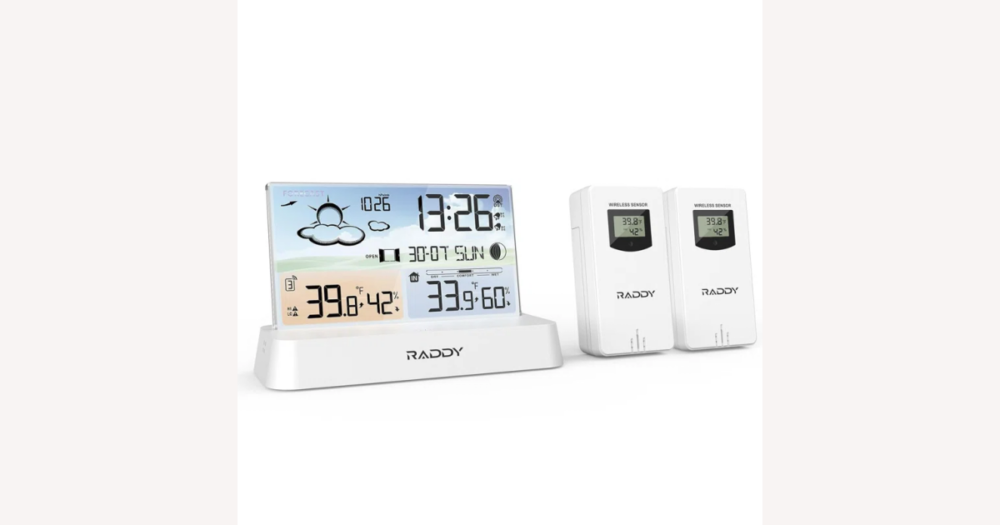
If you’re browsing atomic weather station clocks on DHgate, the real decision isn’t which single model is “best” but whether this hybrid type fits how you live: a clock that keeps time automatically and adds indoor and outdoor readings on one screen. This guide explains how those hybrid clocks differ from simple atomic clocks and full home weather stations, what their timekeeping and sensor specs usually look like, and which DHgate‑specific checks—seller history, descriptions, and protections—you should rely on before paying for an advanced‑looking display that might not match your expectations.
Atomic weather station clocks versus simple atomic clocks and full weather stations
On DHgate, an “atomic weather station clock” is usually a digital desk or wall clock that keeps its time automatically and adds basic indoor and outdoor weather readings on the same display. Instead of relying only on a manual setting, it either listens for a standardized time signal or uses internet time through a connected gateway, then shows indoor temperature and often humidity alongside data from a small wireless outdoor sensor and simple forecast icons.
You’ll most often see three broad variants in listings. At the simpler end are basic atomic clocks that still market themselves as “atomic” but only show time and maybe indoor temperature; they don’t always include an outdoor sensor, so they’re closer to a conventional radio‑controlled clock. In the middle are atomic clocks with indoor and outdoor sensors that add wireless temperature (and sometimes humidity) from a sensor you mount outside, giving you a clearer picture of conditions around your home. At the feature‑heavy end are compact forecast stations that combine automatic timekeeping with indoor/outdoor readings, trend arrows, and weather icons; these feel more like mini weather stations but still use consumer‑grade sensors and straightforward displays.
Compared with simple atomic clocks, these hybrid weather station clocks give you more environmental information but also more layout and configuration decisions: extra numbers and icons can make the screen busier, so I would choose a design where time and key readings stay clear even if that means fewer decorative graphics. In contrast, enthusiast‑level home weather stations sit above all of these in complexity and price; they may support multiple outdoor sensors, barometric pressure, wind and rain instruments, data logging, and app integration. Those systems suit buyers who want detailed, long‑term data and are willing to pay more and spend time on setup. If you mostly want reliable automatic time plus a quick glance at indoor and outdoor conditions from a single DHgate listing, an atomic weather station clock in this middle tier is usually the better fit; if style, animations, or advanced app features matter more to you, you may reasonably favor more design‑focused or fully connected weather stations instead.
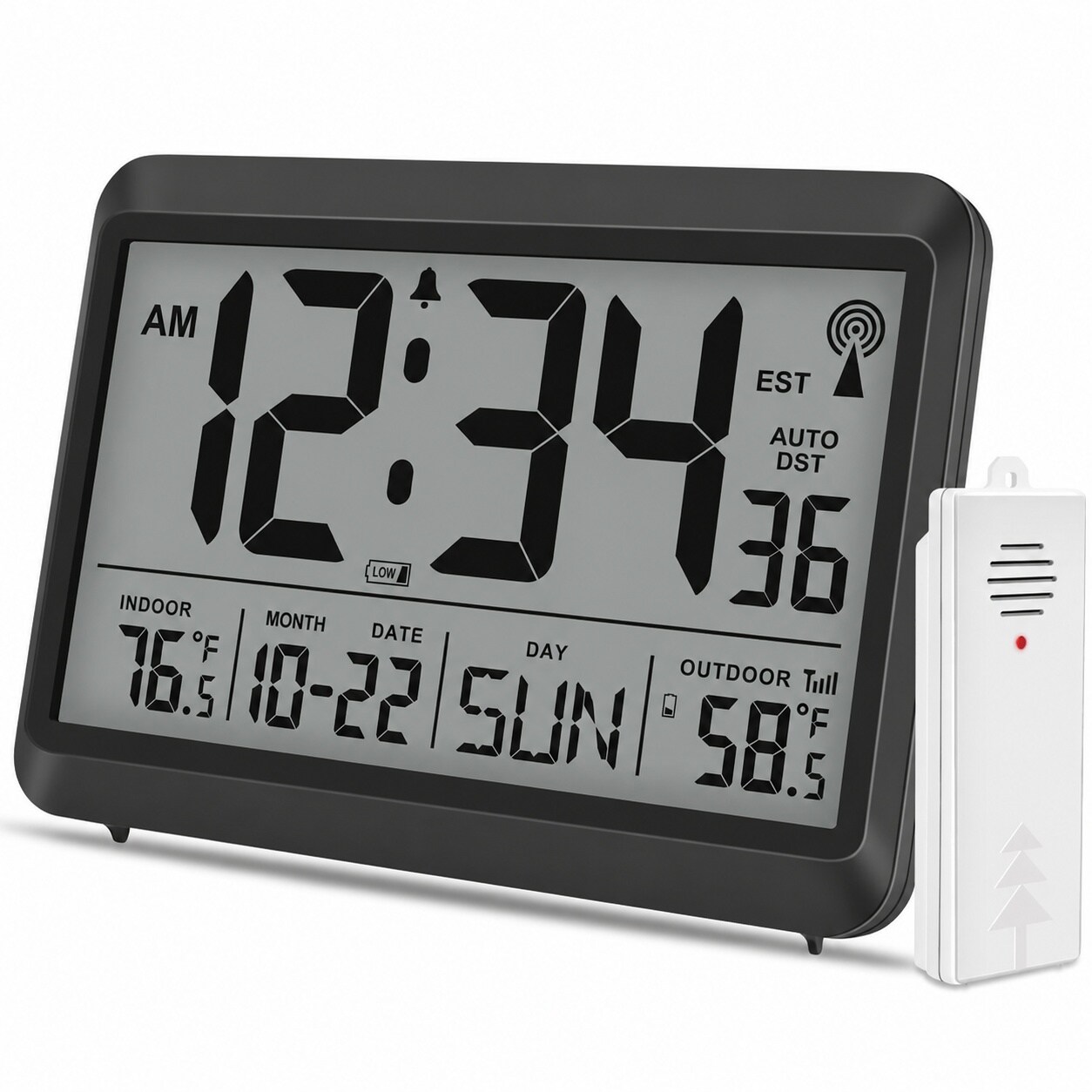
A typical atomic weather station clock combines large digital time with indoor temperature, outdoor readings from a wireless sensor, and simple forecast icons on one screen, which is the hybrid layout you’ll often see in DHgate listings.
How atomic time synchronization really works
Most consumer “atomic” clocks, including atomic weather station designs you might see on DHgate, stay accurate by synchronizing with an external time source rather than keeping perfect time on their own. Traditional radio‑controlled models periodically listen for long‑range national time signals, such as WWVB in the US or similar transmitters in other regions, and use those broadcasts to correct their internal quartz clock. Newer devices may instead rely on internet time via NTP servers, updating through a gateway, router, or companion app when they have a stable connection.
Because “atomic” is attractive marketing language, some DHgate listings use the term loosely. A clock might advertise atomic accuracy but only offer manual setting with a standard quartz movement, or it may use internet sync without any dedicated radio receiver. That’s why it’s important to read the specification or description carefully and look for a clear statement of the sync method—mentions of radio time signals and their frequency, or references to internet time, Wi‑Fi, or a specific app—rather than assuming every “atomic” label means true radio control everywhere you live.
Even genuine radio‑controlled or internet‑synced clocks have practical limits. Long‑wave time signals can be weaker or less reliable in some regions, and building construction can block reception, so a clock placed deep inside a house, near heavy wiring, or in a basement may struggle to catch updates. Many models need you to set the correct time zone at first startup, and if signals are weak they may go for long stretches simply running on their internal quartz clock, which can drift and occasionally need manual correction. Internet‑based designs depend on your home network and the server they use, so outages or configuration changes can interrupt sync. For DHgate buyers who prioritize dependable timekeeping, it’s safer to choose listings that clearly describe how and how often they synchronize, which regions the method is designed for, and what fallback behavior they have when updates fail, instead of relying on vague promises like “always accurate anywhere.”
Weather features and their realistic capabilities
The weather information matters just as much as the clock’s timekeeping. Most atomic weather station clocks on DHgate combine indoor temperature, indoor humidity, and data from a small wireless outdoor sensor with simple trend arrows or forecast icons. The outdoor sensor almost always measures temperature and may also track humidity; the main unit then uses these readings, plus basic pressure trends in some designs, to show icons such as sun, clouds, or rain and simple up/down arrows for temperature or humidity changes.
These features are designed for everyday comfort decisions, not scientific projects. Indoor temperature and humidity help you judge whether a room feels too warm, too cold, or too dry, and can hint when to adjust heating, cooling, or a humidifier. Outdoor readings let you quickly check how it feels outside before going out, or see whether conditions are warming or cooling without opening a window. Update intervals vary by model: many consumer clocks refresh sensor data every few seconds to a few minutes, which is fast enough for routine use but slower than professional instruments.
Because the sensors and forecast logic are consumer‑grade, their accuracy and reliability have limits. Forecast icons usually infer conditions from pressure and temperature trends rather than real‑time meteorological data, so they can feel approximate or “wrong” compared with what you see out the window. Humidity readings in low‑cost sensors may drift over time or disagree slightly between units, and advertised wireless ranges assume an ideal line‑of‑sight path; walls, metal structures, and interference can reduce the realistic distance at which the outdoor sensor stays connected.
If, like me, you care about clearly documented sensor performance more than flashy graphics, it’s worth favoring DHgate listings that spell out measurement ranges (for example, indoor and outdoor temperature spans), any stated accuracy margin (such as ±1–2 °C or ±5% RH), and realistic refresh intervals. Those details give you a better sense of what the clock can reliably do than broad marketing phrases like “professional‑grade” or “laboratory accurate,” which are often promotional wording rather than evidence of calibrated, research‑quality sensors.
Display, readability, and everyday usability trade-offs
How clearly the readings appear on screen is just as important as which readings the clock offers. Atomic weather station clocks typically use a digital LCD display, with differences in overall screen size, brightness and backlighting, whether the panel is monochrome or filled with color graphics, how large the time digits are, and how indoor and outdoor data are arranged. Some designs give the time a dominant central position with smaller temperature and humidity fields around it; others split the screen into zones for forecasts, calendars, and multiple sensors.
Usability depends just as much on controls and layout as on screen style. Everyday comfort comes from being able to see current time, indoor temperature, and outdoor temperature at a glance, without hunting through menus. Intuitive button placement on the front or side, clear labels, and a menu language you can read all matter when you’re setting time zones, daylight‑saving rules, alarms, or switching units between °C and °F. A design that lets you navigate these settings with a few straightforward button presses will feel more usable than one that buries essential options inside complex sequences.
There are real trade‑offs between a simple display and a more decorative one. Large‑digit monochrome screens often look plain, but they usually make the time and key readings much easier to read from across a room or in mixed lighting. Busy multi‑color forecast graphics, animated icons, and extra panels for moon phase, calendar, or timers can be visually appealing, yet they may crowd the screen and make it harder to scan quickly—especially in strong sunlight or at an angle. Extra functions like multiple alarms and countdown timers can be genuinely useful for some people, but they also add menu complexity that not everyone will enjoy.
Personally, I would usually choose a sturdier clock with a clear, well‑spaced display over a feature‑heavy model whose screen feels cluttered. If you care more about style or decorative impact, you might reasonably lean toward a more visually elaborate design, as long as you’re comfortable with slightly busier menus. On DHgate, use product photos to judge legibility—can you easily read the time and main temperatures from the provided images?—and check descriptions for display size, mentions of viewing angles, and backlight behavior (for example, always‑on at low brightness versus tap‑to‑light). Those clues help you match the screen to where and how you plan to use the clock day to day.
Build quality, materials, and sensor durability
On DHgate, the most reliable clues to build quality are the materials and construction you can see in photos and descriptions. A main unit with thicker, rigid plastic, clean seams, and a solid-looking back or side panel usually suggests better resistance to flexing and creaking than very thin, glossy shells. Check whether the clock has a wide, stable stand or secure wall-mounting points; a narrow foot or awkward angle can make it easy to tip over when you press buttons or accidentally bump the surface.
Outdoor sensors are rarely fully waterproof, so it’s safer to assume they are splash-resistant at best and meant for sheltered installation, such as under an eave or on a covered porch. Listing photos should show an enclosure that shields vents and openings from direct rain and dust, and a battery door with a visible gasket or tight-fitting seal rather than a loose flap. If the sensor looks like a bare plastic box with gaps around the door or obvious holes facing upward, it’s a hint that you’ll need to protect it more carefully from the elements.
Battery compartment design is another durability signal. Secure doors that latch firmly, metal contacts that look corrosion-resistant, and clear labels for battery type and polarity all make long-term maintenance easier. By contrast, very thin plastic doors, clips that seem easy to snap, exposed contacts inside shallow trays, or vague power information (for example, “uses batteries” with no type given) can point to a shorter lifespan or more hassle if something breaks. Personally, I would rather choose a sturdier, slightly less sleek housing and sensor with well-designed battery access than a prettier unit with flimsy doors.
Because DHgateWiki doesn’t involve hands-on testing of specific listings, all of these durability judgments are reasonable inferences from materials and design, not promises about how long any one product will last. Treat housing thickness, seam quality, stand stability, sensor enclosure design, and battery compartments as the best available signals across unknown brands, and weigh them more heavily than purely decorative styling when you’re deciding which atomic weather station clock feels trustworthy enough for everyday use.
Reliability risks to watch for in listings and reviews
- Atomic time sync that rarely or never works in some locations: look for a clear mention of which time-signal standard the clock uses (such as a named radio station or “internet/NTP time”) and any stated reception range or region. If the listing is vague about how it syncs or only promises “always accurate” without explaining the method, treat that as a risk, especially if you live far from major transmitters.
- Outdoor sensors that lose connection or show erratic readings: check the wireless frequency band (often 433 MHz or 915 MHz) and the maximum claimed sensor distance, plus any note about how often data is refreshed. Listings that specify a modest, realistic range and an update interval (for example, every 30–60 seconds) are usually more trustworthy than ones that advertise huge distances with no detail. Where available, scan reviews or Q&A for repeated complaints about sensors dropping out or readings jumping unexpectedly.
- Forecast graphics that imply more capability than the sensors provide: many consumer clocks use simple icons based on temperature, humidity, and sometimes basic pressure trends. If a listing shows very elaborate forecast scenes but barely describes the underlying sensors, assume the visuals are marketing rather than professional forecasting. Give more weight to clear descriptions of what the sensors actually measure and how often they update than to promises of “precise local forecasts.”
- Confusing or high-maintenance power setups: some products rely on different battery types for the main unit and outdoor sensor, or mention adapters in photos without stating whether they are included. Check the spec text for explicit battery sizes, voltage, and whether any AC adapter is actually part of the package. Vague power information or a mix of many battery types can mean more ongoing cost and a greater chance of failure if you choose the wrong combination.
- Reading user feedback cautiously: when reviews or Q&A are available, look for patterns rather than one-off complaints—multiple people mentioning lost sensor links, unreadable displays at certain angles, or constant low-battery warnings are stronger signals than a single frustrated comment. At the same time, remember that individual experiences are illustrative, not definitive proof that every unit behaves the same.
- Weighing specs over grand promises: treat dramatic claims such as “perfect accuracy,” “never loses signal,” or “professional-grade forecasting” with skepticism on a marketplace platform. For atomic weather station clocks, modest, clearly explained specifications—defined reception standards, realistic sensor ranges, stated operating temperature for outdoor units, and straightforward power details—are usually better indicators of reliability than bold marketing slogans. If accuracy and stability matter most to you, prioritize those concrete specs and recurring review patterns over flashy features when choosing among DHgate listings.
DHgate-specific buyer checklist for atomic weather station clocks
- Start by checking the seller’s profile on DHgate: look for solid ratings, a meaningful number of completed orders, and reviews that mention clocks, electronics, or similar products. For technical devices, avoid brand‑new or poorly rated sellers even if their prices look attractive.
- Read the product description closely for how the clock keeps time—radio signal, manual setting, or internet sync—plus any mention of supported regions or time zones and sensor specs such as indoor and outdoor measurements, claimed range, and update interval.
- Confirm what is included in the package by cross‑checking text and photos: number and type of outdoor sensors, power adapters, battery sizes, and any mounting hardware, so you are not surprised by missing components after delivery.
- Review shipping terms and estimated delivery times, checking for tracking availability and any notes about handling fragile electronics. Decide whether you are comfortable choosing slower but more reliable shipping if it comes from a seller with better communication and packaging.
- Before you place an order, familiarize yourself with DHgate’s buyer protection, dispute, and refund rules, including time limits and documentation requirements, so you know how to respond if the clock arrives damaged or differs noticeably from its description.
- Throughout your search, prioritize clear specifications and a proven, responsive seller over the lowest possible price; paying a bit more or waiting longer for delivery is often worth it if it means more reliable timekeeping, better sensor performance, and stronger support if something goes wrong.
When an atomic weather station clock is the right choice
An atomic weather station clock is typically the right choice if you want a single wall or desk unit that shows automatically updated time alongside basic indoor and outdoor readings, simple forecast icons, and alarms, without needing detailed logs or app connectivity. In that middle ground, the hybrid design keeps everyday information in one glance and stays practical as long as the sensor specs and display are clearly documented.
Plain atomic clocks fit buyers whose top priority is reliable, easy‑to‑read automatic time with minimal extra information; if you rarely check outdoor conditions or don’t care about humidity and forecasts, a straightforward atomic clock is simpler and often cheaper. At the other end, full home weather stations make more sense for hobbyists and data‑focused users who want multiple sensors, finer measurements, and integration with apps or web services, and who are willing to accept higher cost and setup complexity.
Personally, I tend to favor solid atomic weather station clocks with clear displays, well‑documented sensor capabilities, and durable construction when I want both time and basic weather at a glance. If I don’t need weather data at all, I would still choose a simple atomic clock for its clarity and reliability, and if detailed tracking and app integration become a priority, I would step up to a fuller home weather station instead of trying to push a hybrid clock beyond what it’s designed to do.
Practical FAQs about atomic weather station clocks
Will an atomic weather station clock still work if it can’t receive atomic time signals?
Yes. In typical designs, the clock keeps running as a regular quartz clock even when it can’t receive an atomic or internet time signal. It usually continues from the last successful sync, so time can slowly drift over weeks or months. Because behavior varies, treat this as typical rather than guaranteed and check each DHgate listing for a clear description of how the clock behaves when signals are unavailable.
How far can I place the outdoor sensor from the main unit?
Manufacturers often quote maximum ranges that assume a clear, unobstructed path between the sensor and the clock. In everyday use, walls, metal structures, and other sources of interference can noticeably reduce that distance. Many consumer systems work best with the sensor in a sheltered outdoor spot within a moderate range and with as few solid barriers as possible. On DHgate, look for realistic range descriptions and plan to mount the sensor where it is protected from weather but not heavily blocked by walls or metal surfaces.
What happens if I move to another country or region with different time signals?
If you move, you may need to change the time zone and other settings manually, and some radio‑controlled clocks may not receive local time signals if they were designed for a different region’s transmitters. Internet‑synced models may need network or app setup in the new location. Before buying on DHgate, check which regions or signal standards the clock supports and be prepared to use manual time settings if atomic or network updates are unreliable where you live.
Are batteries and power adapters usually included with atomic weather station clocks?
In many consumer listings, required batteries and power adapters are not automatically included, or only some components come in the box. To avoid surprises, never assume everything is supplied by default. Instead, check DHgate product descriptions and package contents carefully for battery types, whether an AC adapter is included, and any notes about separate purchase of power accessories.