
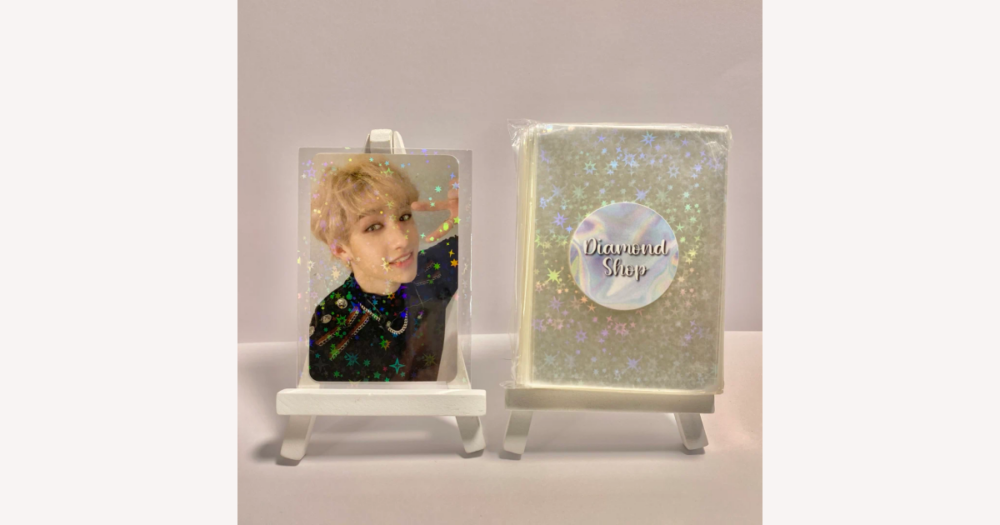
You can absolutely find custom and themed K‑pop photocard sleeves on DHgate, but the best results come when you treat them as decorative versions of standard trading‑card sleeves and check the details closely. Start by confirming that the design you like is a mass‑produced themed sleeve (not a promise of one‑by‑one custom printing), then look at measurements, material descriptions, and buyer photos. On DHgate, those listing details and the seller’s feedback are your main tools for deciding whether a cute sleeve will actually fit, protect your cards, and match the aesthetic you have in mind.
What kinds of custom and themed K‑pop photocard sleeves can you actually find on DHgate?
Yes—on DHgate you’ll find plenty of custom and themed sleeves that work for K‑pop photocards. They’re usually listed as K‑pop, anime, or trading‑card sleeves, and most are built on standard card‑sleeve shapes rather than as one‑off, made‑to‑order designs for a single bias or era.
Common decorative styles include printed character art and group‑inspired borders, holographic or glitter finishes that give a foil effect, repeating patterns like hearts or stars, and pastel or solid‑colored backs that change how your binder pages or top loaders look. These designs are typically mass‑produced themes sized for common trading‑card or photocard dimensions, not individually personalised sleeves with your own artwork, so a specific concept or member may not always exist on DHgate even if DIY tutorials elsewhere show how to make one.
Compared with plain clear polypropylene sleeves, which focus on transparency and simple protection, themed sleeves add visual elements that deliberately change how the card looks in the pocket. The protective role is still there, but you’re choosing a decorative layer first and a basic sleeve second, which is why later sections focus on checking fit and material details before you commit to a design.
How do decorative sleeves differ from plain protective sleeves in use?
Once you move from plain clear sleeves to decorative ones, the main change you’ll notice is how the card looks and reads at different angles. Holographic foils, glitter layers, or iridescent coatings can catch light in a way that makes parts of the photocard harder to see straight on, even if they look stunning when you tilt the page. That’s a big contrast with basic clear polypropylene sleeves, which aim for maximum transparency so you can see every detail at a glance.
Printed borders, frames, logos, and character art literally take up space around the card, slightly reducing the visible area—especially near edges, album text, or signatures—while pastel or colored backs shift the overall vibe of a binder page or top loader from neutral to themed. Many decorative sleeves also feel a bit different in hand: some are a touch thicker or stiffer, others have a matte or textured surface instead of the very smooth, glossy feel of simple clear sleeves, which changes how easily cards slide in and how smoothly pages flip.
Because of those trade‑offs, I tend to prioritise sleeves that clearly state their fit and material and use moderate decoration, ideally keeping heavy printing away from the inner card surface. I’d only choose very design‑heavy sleeves when I’m comfortable accepting slightly less clarity or perfectly uniform printing in exchange for a stronger aesthetic theme.
How can you make sure themed sleeves will fit your K‑pop photocards?
- Measure several actual K‑pop photocards with a ruler, noting both width and height. Many official cards fall around the mid‑50 mm × high‑80 mm range, but there are variations by group and release, so use your own cards as the real reference.
- Check each DHgate listing for inner sleeve dimensions rather than overall outer size. Compare directly: the inner width should be a few millimetres wider than your card’s width, and the inner height a few millimetres taller than its height so the card can slide in smoothly.
- Avoid sleeves that look extremely tight or much larger than your measurements. Very snug decorative sleeves can pinch corners or make insertion awkward, while oversized sleeves can feel floppy, let cards shift around, or work better as an outer layer over a snug inner clear sleeve.
- Before ordering multiple packs, read buyer reviews and look closely at user photos that mention fit with photocards. When dimensions or compatibility seem vague, I’d only test a small quantity first and save bulk orders for listings where measurements and reviews clearly match K‑pop card sizes.
What material and printing details should you check for themed sleeves?
- Scan the description for material terms such as polypropylene, PET, and phrases like PVC‑free, acid‑free, or archival. For everyday photocard storage, I generally prefer sleeves that specify polypropylene or clearly state they’re PVC‑free over listings that just say “plastic” with no detail.
- Look at how the listing describes the design and foil placement. Artwork, holographic foil, or glitter applied mainly on the outer surface or on a separate outer layer is less likely to touch the card directly, whereas heavy printing all over the inner surface can pose more risk of rubbing, sticking, or ink transfer if the quality is low.
- Use buyer photos and reviews as an additional check on material and print quality. Comments about sharp, clear designs, no flaking, and minimal chemical odor are reassuring; repeated reports of blurry printing, flakes on hands or cards, strong plastic smells, or sleeves sticking together suggest lower‑quality materials or inks.
- Favor themed sleeves that clearly name their material and keep dense printing away from the inner card area, ideally showing real photos of the actual product. I’d skip listings that offer only polished mockups, vague material wording, or no close‑up images, because they make it harder to judge how safe and sturdy the sleeve will be in everyday use.
A simple process for choosing themed sleeves on DHgate
- Confirm your photocards’ measurements with a ruler so you know the width and height you need to match in any DHgate sleeve listing.
- Search DHgate for K-pop or photocard sleeves using group names, themes like holographic or pastel, or size keywords, then shortlist only a few designs you genuinely like.
- Open each listing and check the stated inner dimensions, material terms, and where the design sits on the sleeve, skipping options that don’t clearly describe size, materials, or design placement.
- Review listing photos and buyer images for print clarity, color accuracy, and how the sleeves fit real photocards, then scan seller ratings, feedback comments, and typical shipping times for overall reliability.
- Decide quantity last: I’d start with a small pack when reviews or details are limited and choose a simpler design from a well-documented, well-rated DHgate seller over a highly decorative sleeve from an unknown seller, because clear listings make buyer protection and disputes easier to navigate.
Common pitfalls when buying decorative sleeves on DHgate
- Listings that rely on edited mockups or stock art can arrive with different colors, border thickness, or print alignment, so sleeves may look duller or less precise than the images suggested.
- Heavy frames and border designs often hide parts of the photocard, especially edges or text, which can make pages feel crowded and obscure details you wanted visible.
- Sleeves sized only for generic trading cards or unusual photocards can be too tight and bend corners, or too loose so cards slide around, forcing you to retire or repurpose them for other uses.
- Print quality can vary between batches from low-volume sellers, leading to streaks, smudging, or uneven foil; you can reduce this risk by checking buyer photos, measurements, and written reviews and favoring well-documented listings over dramatic but poorly described designs.
DIY and layering ideas for a custom sleeve look
- Use high‑quality clear sleeves as snug inner protection, then add outer decorative sleeves for color, holographic effects, or themed borders. The inner sleeve handles fit and basic preservation; the outer one is where you can experiment with styles.
- Keep adhesives away from the card and inner sleeve by decorating around binder pockets or page margins instead. Apply washi tape, stickers, or labels on the plastic page edges or dividers so the layout feels themed without touching the photocards themselves.
- Create printable paper or thin cardstock inserts that sit behind the card inside a slightly larger sleeve. Simple patterns, colors, or text can frame the photocard while the insert stays physically separate from the card surface and can be swapped out whenever you change concepts.
- Treat standard clear sleeves as your default protective layer and think of decorative sleeves, tape, and inserts as styling pieces you can replace. I’d rather keep important cards in reliable clear inners and update only the outer layers when I want a new look or theme.
Do you need an inner clear sleeve under decorative ones?
Do you really need an inner clear sleeve under decorative K‑pop photocard sleeves?
Decorative sleeves on their own can give basic everyday protection against fingerprints, light scratches, and casual handling, but their material and printing quality vary more than plain clear sleeves. Heavy borders, textures, or dense foil may not be ideal as the only layer for tight, long‑term storage—especially for rare or sentimental cards—because they add friction, can hide corners, and may age differently over time.
Double‑sleeving is a common compromise many collectors use. You put each photocard in a snug inner clear sleeve made from materials you prefer (often polypropylene or clearly PVC‑free), then slide that into a slightly larger outer decorative sleeve. The inner sleeve does most of the protective work and handles fit; the outer sleeve adds the themed look and an extra layer against surface wear when you handle binders or top loaders.
The main pros of double‑sleeving are stronger physical protection, more control over what materials actually touch the card, and the flexibility to change outer designs without re‑sleeving the card itself. The trade‑offs are added bulk, occasional tightness in very snug binder pockets or top loaders, and slightly higher cost and effort because you’re buying and using two sleeves per card.
Personally, I would double‑sleeve for rare, signed, or highly sentimental photocards and use single decorative sleeves only for less critical cards, temporary displays, or concepts I might change soon. This isn’t a guarantee of archival preservation, but it’s a practical everyday setup that balances aesthetics with reasonable protection for most collections.